AI Product Authentication: Streamlined Controls
Learn how to integrate AI product authentication, billing, and usage limits effectively in your applications to enhance security and user experience.

How To Add AI Product Authentication, Billing, And Usage Limits
Most teams build the model call first, then bolt on auth, billing, and limits after users start hitting the API. That shortcut usually gets expensive. Pricing leaks show up. Abuse slips through. Then the team has to untangle identity, plans, and usage logic after real customers already depend on the system.
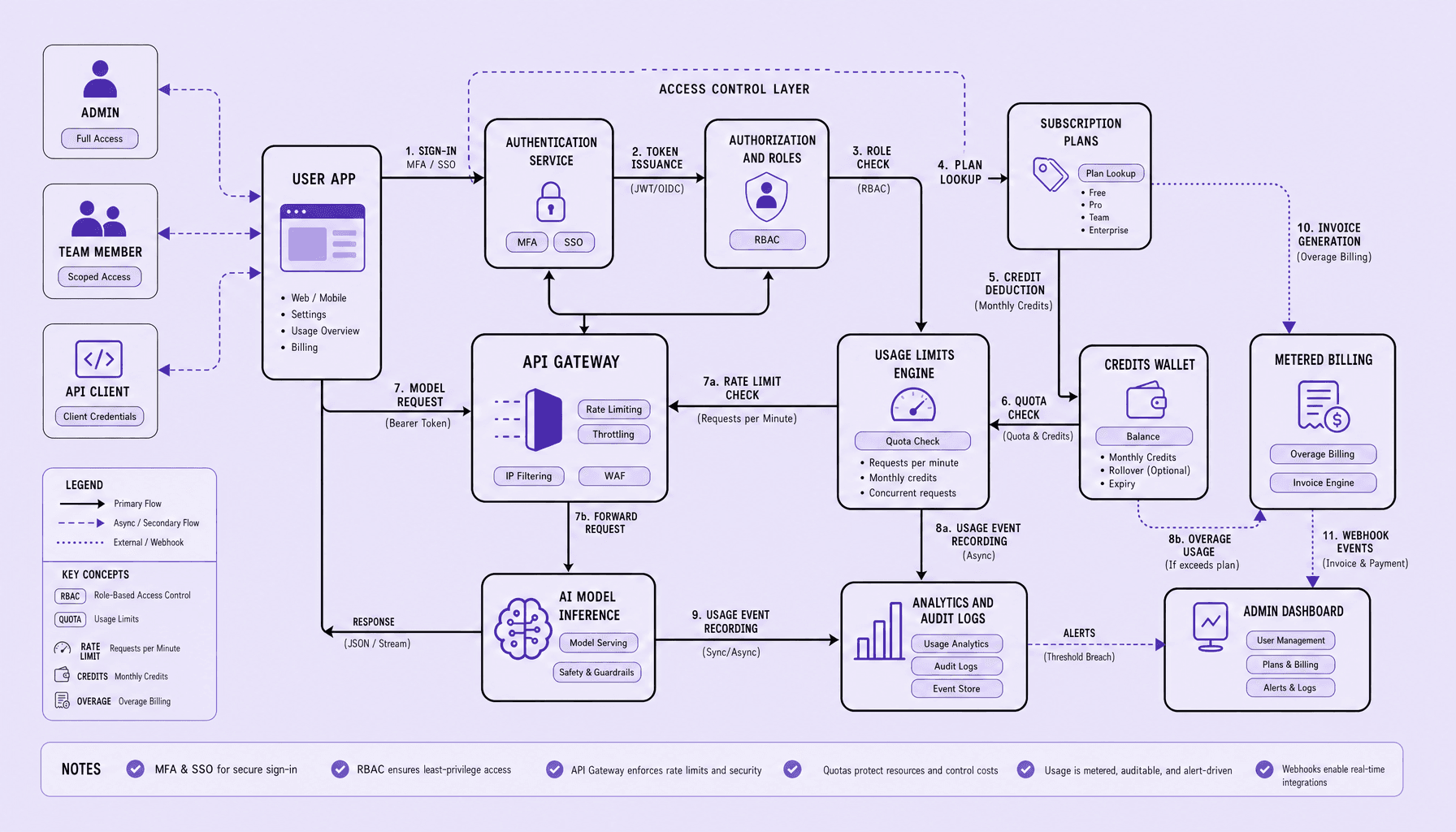
A better approach is to treat AI product authentication, SaaS billing, and AI usage limits as one connected control layer from the start, not three separate features. The setup is not complicated: use OAuth 2.0, SAML, or API keys for access, map users to workspaces with RBAC, attach plans and credits, meter requests or tokens, then enforce quotas and rate limits at the API layer.
Clarity is better than complexity.
In practice, that means keeping one source of truth for who the user is, what plan they are on, and what they have consumed. Teams building serious AI product development stacks -- including the kind of operational systems valued at Imversion Technologies Pvt Ltd -- should treat Stripe usage records, monthly credit balances, per-workspace quotas, JWT claims, and requests-per-minute limits as parts of the same operating system. Start narrow. But design for team plans and metered growth.
Key Takeaways
-
Build AI product authentication, SaaS billing, and AI usage limits as one control system from day one. Identity should map to workspace, role, plan, and entitlements -- so a JWT, session, or API key is not just login state, but a billing and enforcement context.
-
Start simple, but not disconnected. Use RBAC for admin, member, and viewer access; support OAuth 2.0, SAML, or API keys based on the product surface; and keep user identity separate from workspace membership if team plans are on the roadmap.
-
Meter first, charge second. Track requests, tokens, images, or minutes before pricing them, then connect those usage records to subscription rules, monthly credits, overages, and per-workspace quotas. Decisions should be backed by data, not guesswork.
-
Enforce limits in layers. Quotas handle plan boundaries, credits control spend, and rate limits protect reliability -- for example, requests per minute plus tokens per day. Avoid hard blocks without clear user messaging, upgrade paths, and admin visibility.
-
In AI product development, teams often overbuild pricing pages and underbuild audit logs, entitlement checks, and usage reconciliation. That is backwards. Reliable systems matter more than flashy packaging.
What Should You Design First In AI Product Authentication And Access Control?
If the identity model is wrong, everything that follows becomes patchwork. Billing feels inconsistent, quotas attach to the wrong entity, and support teams end up manually fixing usage disputes that should never have existed.
So design the identity and access model first. Before pricing tables. Before Stripe usage records. Before monthly credits.
Start with three separate concepts: user, workspace or organization, and membership. Authentication proves who the person or system is -- via email login, OAuth 2.0, SSO, API keys, or a JWT-backed session. Authorization decides what that identity can do. Then workspace access decides whose plan, quota, and bill that action should hit. For most AI product development, that last part is where teams get burned.
The reason is simple: AI costs are often shared. A prompt run, image generation job, or token-heavy workflow usually belongs to a team budget, not just one login.
Identity model
Keep identity simple and portable. One user record should represent the person across the whole product, even if they belong to multiple organizations. Then attach access through memberships, not by stuffing everything into the user table.
A practical model includes:
- users
- organizations or workspaces
- memberships
- roles
- plans
- API keys or service credentials
Use RBAC from day one. Admin, member, viewer or auditor is enough to start. But define permissions cleanly under those roles -- billing management, model access, workspace settings, usage export, API access. Clarity is better than complexity here, especially early.
Workspace model
Make the workspace the billing and usage boundary.
That means subscriptions, credits, quotas, and rate limits attach to the workspace, while the user only acts inside it. This separation makes team plans much easier to support. It also reduces later schema changes when enterprise onboarding introduces SAML, multiple admins, procurement-owned billing, or cross-functional access reviews.
Grounded recommendation: start with users, organizations, memberships, roles, and plans as separate entities, even for a single-tenant MVP.
The tradeoff is real. A user-centric model is faster to ship. A workspace-centric model takes a bit more discipline early, but it supports shared AI usage limits, team billing, and enterprise controls without painful rewrites. That is why each action should map to both a person and a paying workspace if you expect the product to grow.
Which Authentication Flows And Roles Work Best For AI SaaS Products?
Teams often spend too much time polishing signup and too little time thinking about how access will be controlled and metered once real usage starts. That imbalance shows up fast. A consumer AI app needs low-friction entry. An enterprise workspace needs tighter identity controls. An API product needs machine access that can be rotated, scoped, and billed without ambiguity.
Use the flow that matches the product motion. The right choice depends on who signs in, how they buy, and what has to be metered or controlled.
User Login Flows
For standard SaaS, start with email/password plus MFA. It supports account recovery, billing ownership, and team invites. Add social login — Google, GitHub, Microsoft — if fast activation matters more than strict identity control at signup.
For enterprise, use SSO with SAML or OpenID Connect, and plan for SCIM if admins need automated provisioning and deprovisioning. Enterprise buyers usually care about access governance before UI polish.
For developer products, use API keys for direct server-to-server access. Use OAuth 2.0 if a third-party app needs delegated access to a user or workspace.
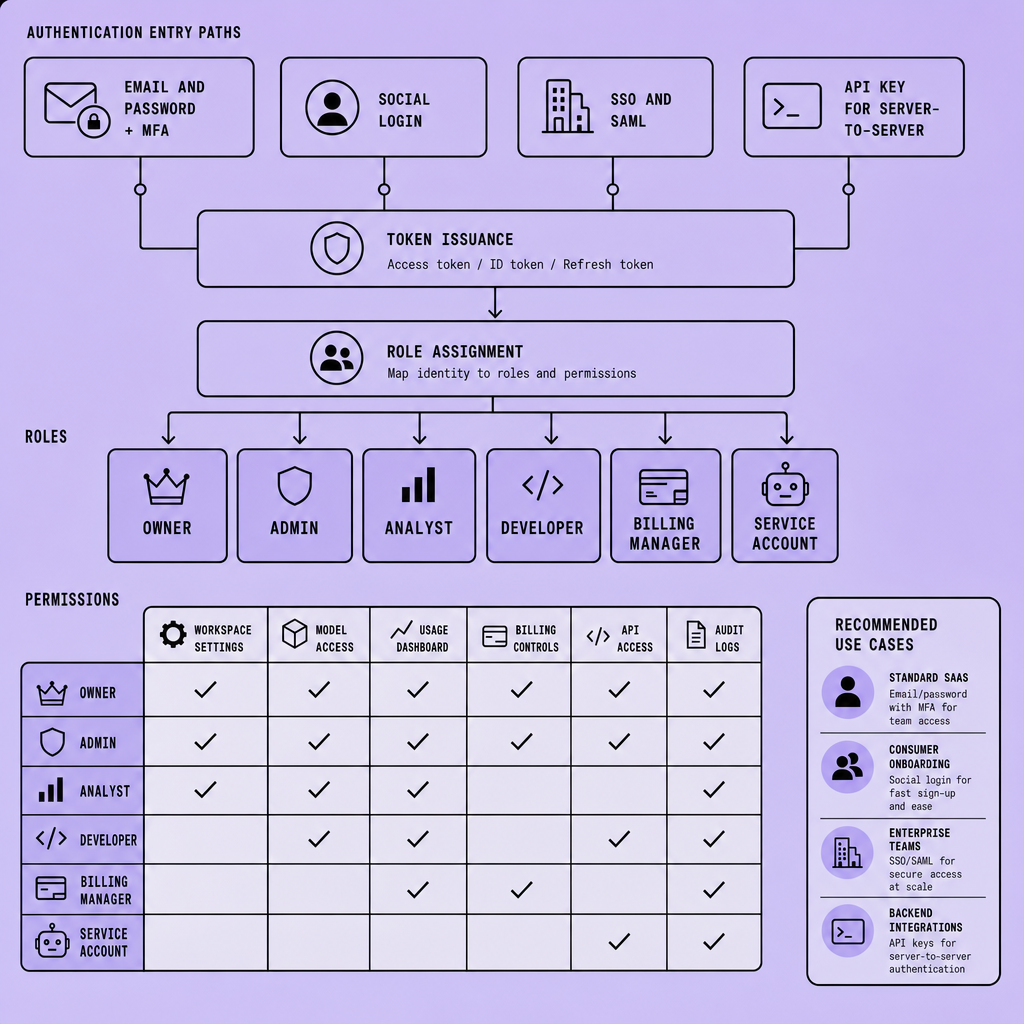
| Approach | Best fit | Main tradeoff |
|---|---|---|
| Email/password + MFA | Standard SaaS, team workspaces | More steps, stronger account security |
| Social login | Consumer or self-serve AI tools | Lower friction, weaker admin control |
| SSO/SAML + SCIM | Enterprise accounts | More setup, better lifecycle management |
| API keys / OAuth 2.0 | APIs, integrations, agent platforms | Key leakage or scope mistakes if poorly designed |
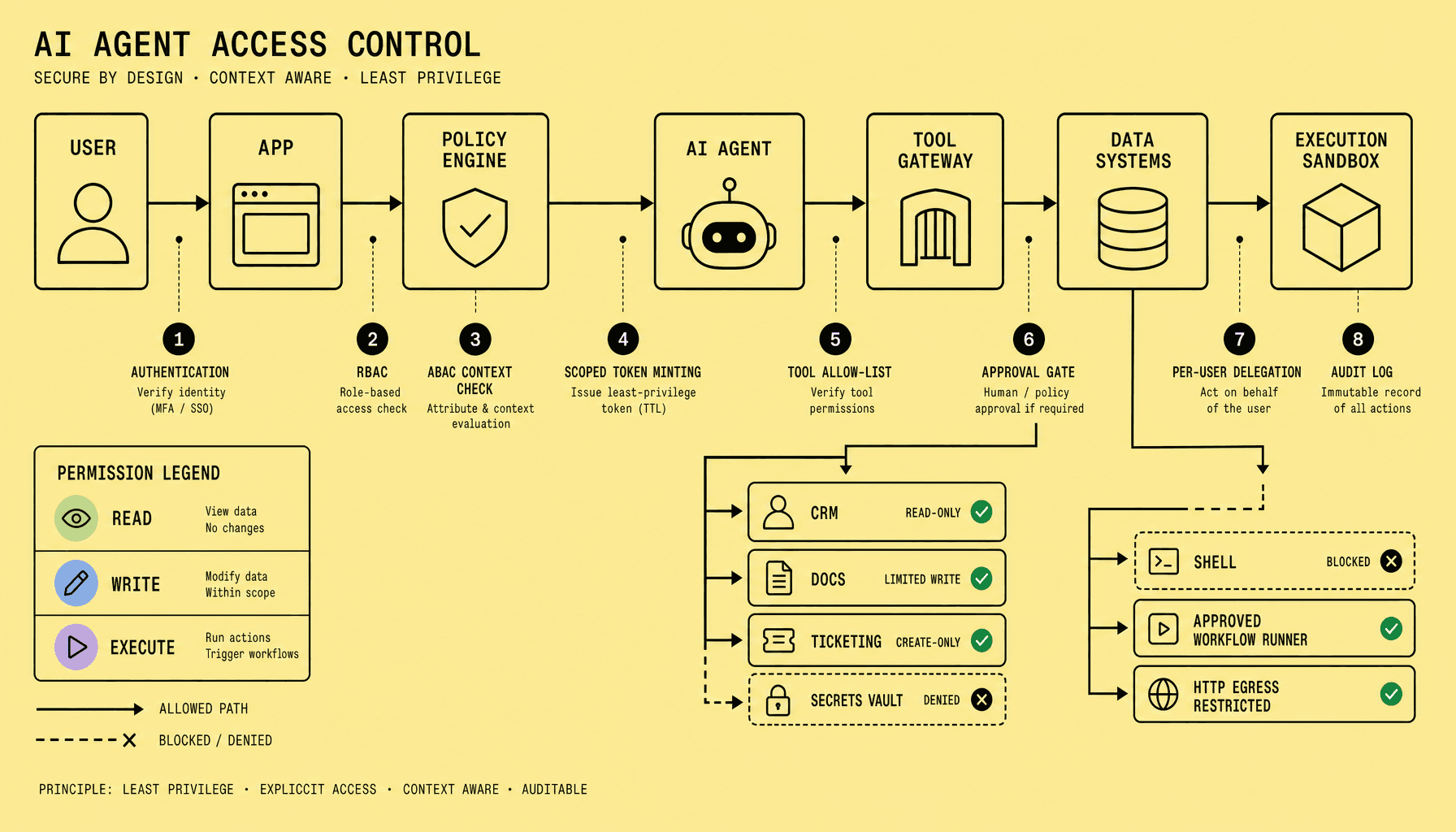
A practical rule: use JWTs or sessions for user access, API keys for backend usage, and explicit workspace membership checks on every billable action.
Role Design
Permissions get messy faster than most teams expect, especially once billing settings, model access, and usage exports all live in the same product. That is why the early role model should stay small.
Keep RBAC small at launch: Admin, Member, Viewer.
That is enough for most AI SaaS products.
Admin should manage subscription settings, payment methods, invoices, model allowlists, rate limits, and workspace quotas. Member should run prompts, consume credits, and view their own usage. Viewer or Auditor should see logs, reports, and usage visibility without changing plans or settings.
Avoid custom roles too early. Clarity is better than complexity, especially where permissions touch metered billing, monthly credits, token quotas, or model access. If one role can access advanced models, export data, and change plan limits, each permission check should be explicit and auditable. Otherwise billing leaks and quota enforcement errors become much harder to trace later.
How Do SaaS Billing, Metered Billing, And Credits Fit Together?
Pricing breaks down when the billing model ignores how AI costs actually behave. A flat subscription looks neat until heavy users consume far more than light users. Pure usage pricing is accurate, but it makes budgeting harder and weakens commitment from customers who want predictable spend.
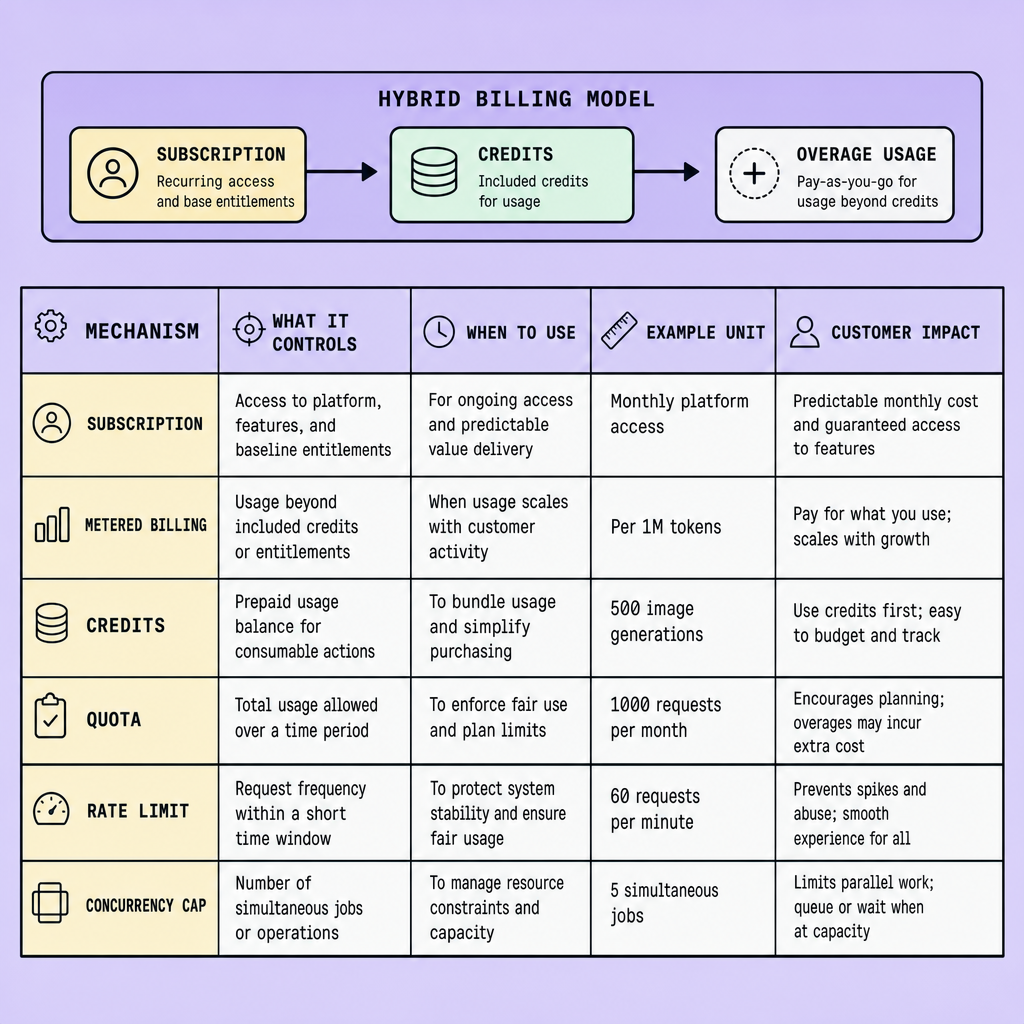
That is why most AI products should use hybrid pricing. One layer covers access. The other covers variable cost. In practice, that means recurring SaaS billing for the product itself, plus metered billing for usage that scales with model calls, image generation, audio minutes, or workflow runs.
Hybrid pricing gives teams both: predictable revenue and a cleaner path to enforce AI usage limits.
| Model | Best fit | Main risk | Operational need |
|---|---|---|---|
| Subscription-only | Simple tools with low variable cost | Heavy users become unprofitable | Strong plan packaging |
| Usage-only | APIs and developer utilities | Revenue volatility, harder budgeting | Accurate usage records |
| Hybrid | Most AI SaaS products | More billing logic to maintain | Subscription management + metering |
Pricing architecture
Pricing architecture is where products often become harder to operate than they need to be. The cleanest version is usually the least clever one.
A practical structure is simple: a free tier with limited monthly credits, a paid plan with included usage, then overages after the included amount. Enterprise plans often replace self-serve overages with contracted limits, negotiated pricing, and invoice terms.
The key is to bill on business-facing units, not raw model vendor cost. Use units customers can understand: API calls, documents processed, images generated, minutes transcribed, or workflows completed. Keep internal mapping flexible, since one workflow may use different models later. Customers buy outcomes, not token accounting internals.
Tools like Stripe can handle recurring plans, subscription management, and usage records for overage billing. The hard part is not checkout. It is deciding which events count, when to aggregate them, and which workspace owns them.
Credit design
Credits help when the raw cost unit is too technical to be useful in a buying decision. Tokens are fine for developer products, but they confuse many business users. So teams often convert underlying usage into monthly credits. A report run, image job, or assistant session can consume credits based on workload.
Use credits with guardrails:
- reset monthly for self-serve plans
- allow prepaid top-ups for predictable expansion
- expire carefully, or not at all, if sales friction matters
- pair credits with quotas and rate limits so one user cannot drain a whole workspace
Keep overage rules visible before launch. Surprise bills create churn faster than weak onboarding.
How Should You Set AI Usage Limits, Quotas, And Rate Limits?
One blunt cap rarely works. It either blocks legitimate usage too aggressively or leaves the system too exposed. AI products need different controls for different failure modes, and confusing those controls leads to pricing leaks, support issues, or unstable infrastructure.
Set multiple limit types, not one.
Credits, Quotas, Concurrency Caps, And Rate Limits
Credits are a billing unit. They map usage to price -- for example, monthly credits tied to tokens, image generations, or minutes. They work well with metered billing and hybrid SaaS billing because they give users a simple balance while preserving cost control.
Quotas are allowance rules over a period. Think tokens per day, requests per month, or seats per workspace. Quotas enforce plan entitlements and fairness across users or teams.
Concurrency caps control how many jobs can run at once. This matters for long-running generations, batch prompts, and streaming outputs. Without concurrency limits, one workspace can saturate workers even if its monthly quota looks fine.
Rate limits control request velocity -- requests per minute, tokens per minute, login attempts per IP. This is abuse control and infrastructure protection. Use token bucket or leaky bucket policies at the API gateway or edge.
The reason for separating them is operational, not academic. Credits protect gross margin. Quotas protect plan fairness. Concurrency protects worker capacity. Rate limiting protects the edge.
How To Enforce AI Usage Limits Accurately
Enforcement fails when teams only check usage after the fact, or only in the UI, or only in billing. Accurate control needs checks before, during, and after the request.
Before the request, check identity, plan, quota state, and current concurrency. Reject early if the workspace has no credits left, has hit a hard quota, or exceeds active-job caps. For APIs, pair this with idempotency keys so retries do not double-charge or double-count.
During the request, apply mid-stream stops for token-heavy or streaming responses. If usage crosses a hard ceiling, terminate cleanly and return a clear reason.
After the request, write final usage to a usage ledger and reconcile metering records. This is where post-usage adjustments belong -- not in the hot path.
Use hard limits for abuse and system protection, but consider soft overage policies for paid plans where brief overrun is less damaging than a broken workflow.
In practice, accurate AI usage limits depend on one thing: a durable usage ledger tied to workspace, user, model action, and billing period. Clarity beats complexity here.
What Security Gaps And Common Mistakes Break AI Product Authentication Launches?
A launch can look polished and still fail in the backend. The common breakpoints are not usually model quality. They are weak authorization, exposed secrets, missing enforcement, and poor auditability. Those gaps turn into unbilled usage, accidental data exposure, admin abuse, support disputes, and unstable margins.
Treat identity, billing, and usage enforcement as one backend security surface rather than separate product features.
Insecure keys and weak authorization
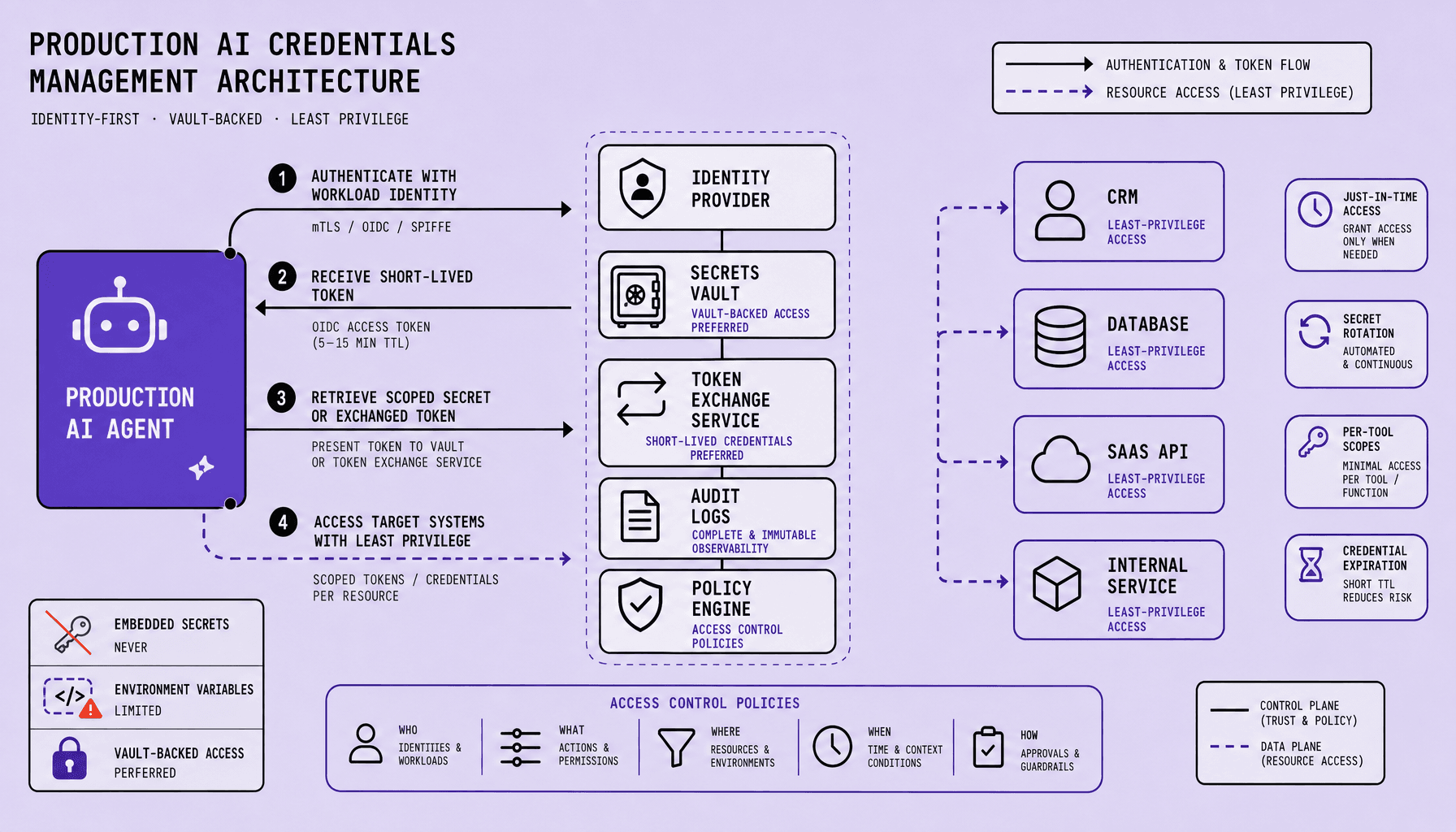
Store API keys and secrets in server-side secret management, never in frontend code, mobile bundles, or shared team accounts. Use short-lived JWTs, scoped API keys, MFA for admins, and RBAC checks on every sensitive route. Many teams verify login but skip authorization on billing, workspace, or admin actions. That is where access leaks and billing mistakes start.
Client-side counters and vague overages
Do not trust browser counters, hidden form fields, or local state for credits, quotas, or rate limits. Enforce usage on the backend. Record token-, request-, or job-based usage before returning results, then sync SaaS billing through verified webhooks.
Treat authorization and billing events as auditable backend decisions, not UI convenience logic.
Missing audit logs and abuse prevention
If there are no audit logs, there is no dispute trail. If there are no abuse controls, shared API keys, scripted signup abuse, quota evasion, and noisy-neighbor problems are all easier than they should be. Log plan changes, usage writes, admin actions, and webhook events. Add per-workspace quotas, rate limits, and anomaly review for unusual spikes.
There is a tradeoff here. Stricter controls can add friction for users and operators. That is usually acceptable for admin actions, billing changes, and high-cost model access, but lower-risk paths may need lighter checks to avoid hurting activation.
What Are The Best Practices To Launch AI Product Authentication And Billing Cleanly?
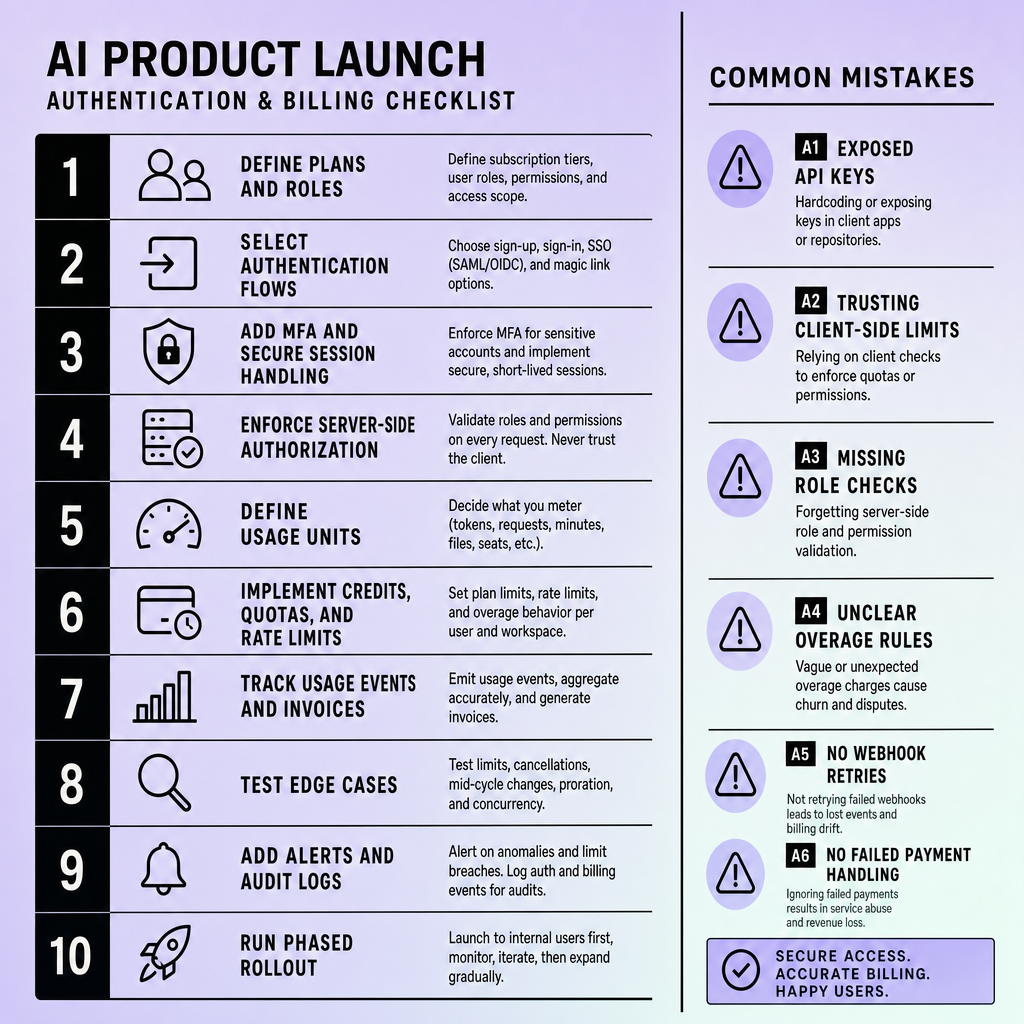
Rushed launches usually fail in boring places: duplicate billing events, stale API keys, unclear downgrade behavior, missing entitlement checks. Those are not glamorous problems, but they are the ones customers remember.
Launch in stages, but design the control system upfront. The cleanest rollout starts with a narrow plan model, a small RBAC setup, and explicit entitlements tied to workspace access. In practice, AI product authentication should connect identity, role, plan, and enforcement in one path, whether access comes through OAuth 2.0, SAML, sessions, or API keys.
Define usage units before you charge for them. Pick concrete meters such as requests, tokens, images, or minutes, then map each one to a billing rule and an enforcement rule. A good default is one subscription layer for access, one metered layer for variable cost, and one credit rule only if credits solve a real pricing need. The tradeoff is simplicity versus flexibility: fewer plans and fewer meters are easier to operate, but they may be less precise at launch.
Before launch, test failure cases, not just happy paths:
- failed webhooks and webhook retries
- plan downgrade behavior
- expired cards
- usage reconciliation when billing events lag or duplicate
- quota resets and overage handling
- revoked users who still hold active API keys or sessions
Add observability early. Track auth failures, rejected requests, billing event status, usage deltas, entitlement changes, and manual admin overrides.
Publish billing rules in plain language before customers hit them.
Finally, enforce permissions and usage checks on the backend, not only in the UI. Smaller initial pricing and role models reduce risk because billing mistakes, entitlement leaks, and access bugs are much harder to unwind after active customers depend on them.
Frequently Asked Questions
What is the difference between AI product authentication and authorization?
AI product authentication verifies who a user or system is, while authorization determines what that identity is allowed to do inside a workspace, API, or billing boundary. Keeping them separate prevents permission sprawl and makes billing, audit logging, and usage enforcement far easier to manage as the product grows.
How does AI product authentication affect billing accuracy?
AI product authentication affects billing accuracy because every billable action must be tied to a verified identity and the correct paying workspace. If requests are not reliably mapped to users, roles, and organizations, usage can be assigned to the wrong customer, overages can be disputed, and abuse becomes harder to contain.
Why should AI products use a usage ledger instead of only provider invoices?
AI products should use an internal usage ledger because provider invoices do not capture product-specific rules such as workspace ownership, included credits, soft overages, refunds, or entitlement checks. A ledger gives the product a canonical record for reconciliation, customer support, and enforcement decisions that external billing systems alone cannot provide.
What is the best way to set SaaS billing units for AI features?
The best way to set SaaS billing units for AI features is to choose units that customers can predict and understand, then map them internally to actual compute cost. Good billing units describe outcomes such as documents processed, images generated, or minutes transcribed rather than exposing raw infrastructure metrics that create confusion.
How should a team handle failed billing webhooks without breaking access?
A team should treat failed billing webhooks as a temporary sync problem, not as an immediate reason to revoke access. The correct pattern is to queue retries, mark account state as pending review, preserve audit logs, and apply clear grace-period rules so temporary billing failures do not create accidental lockouts or inconsistent entitlements.
Make Imversion a preferred source on Google
Like this kind of AI and software analysis? Add Imversion as a preferred source so Google can highlight our articles for you in Search, AI Overviews, and AI Mode.