AI Product Engineering: Transforming Ideas Into Usable Apps 2026
Learn how AI product engineering can transform your AI ideas into real-world applications. Explore essential strategies from validation to scaling.

AI Product Engineering Turns an AI Idea Into a Usable App
A lot of AI products look convincing in a demo and fall apart the moment real users try to do real work with them. The gap is usually not the model itself. It is the product work around it.
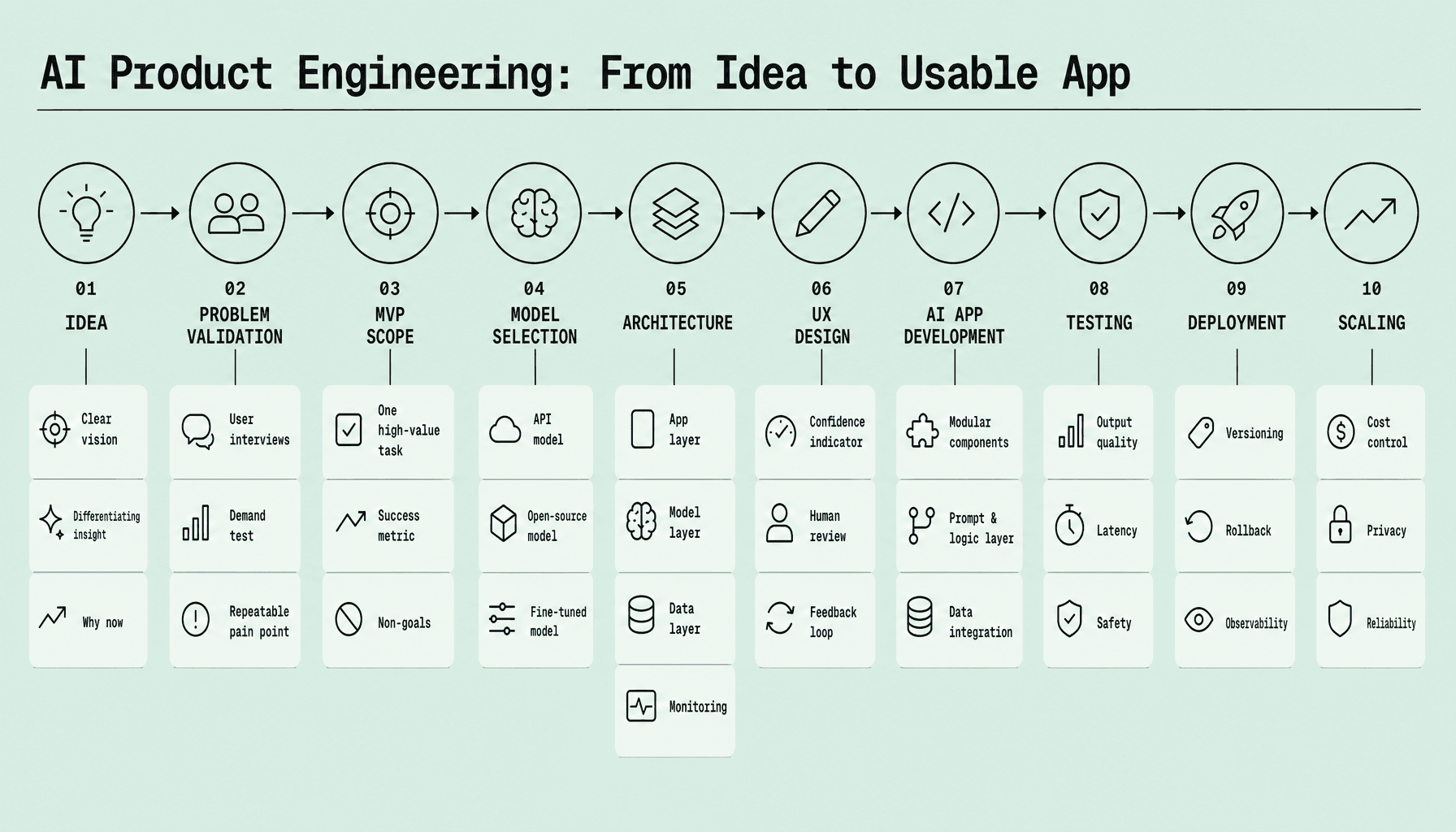
AI product engineering is the process of turning a promising concept into something people can actually use. It starts with validating the problem, then narrowing the MVP, choosing the right model and architecture, and shaping a workflow that fits real user behavior.
The model is only one part of the system. Strong AI app development and AI software development depend on product discipline -- testing outputs, handling failure cases, deploying safely, and improving from real usage data. That is where AI product strategy matters most. At Imversion Technologies Pvt Ltd, the practical lesson is simple: clarity is better than complexity, especially in early builds.
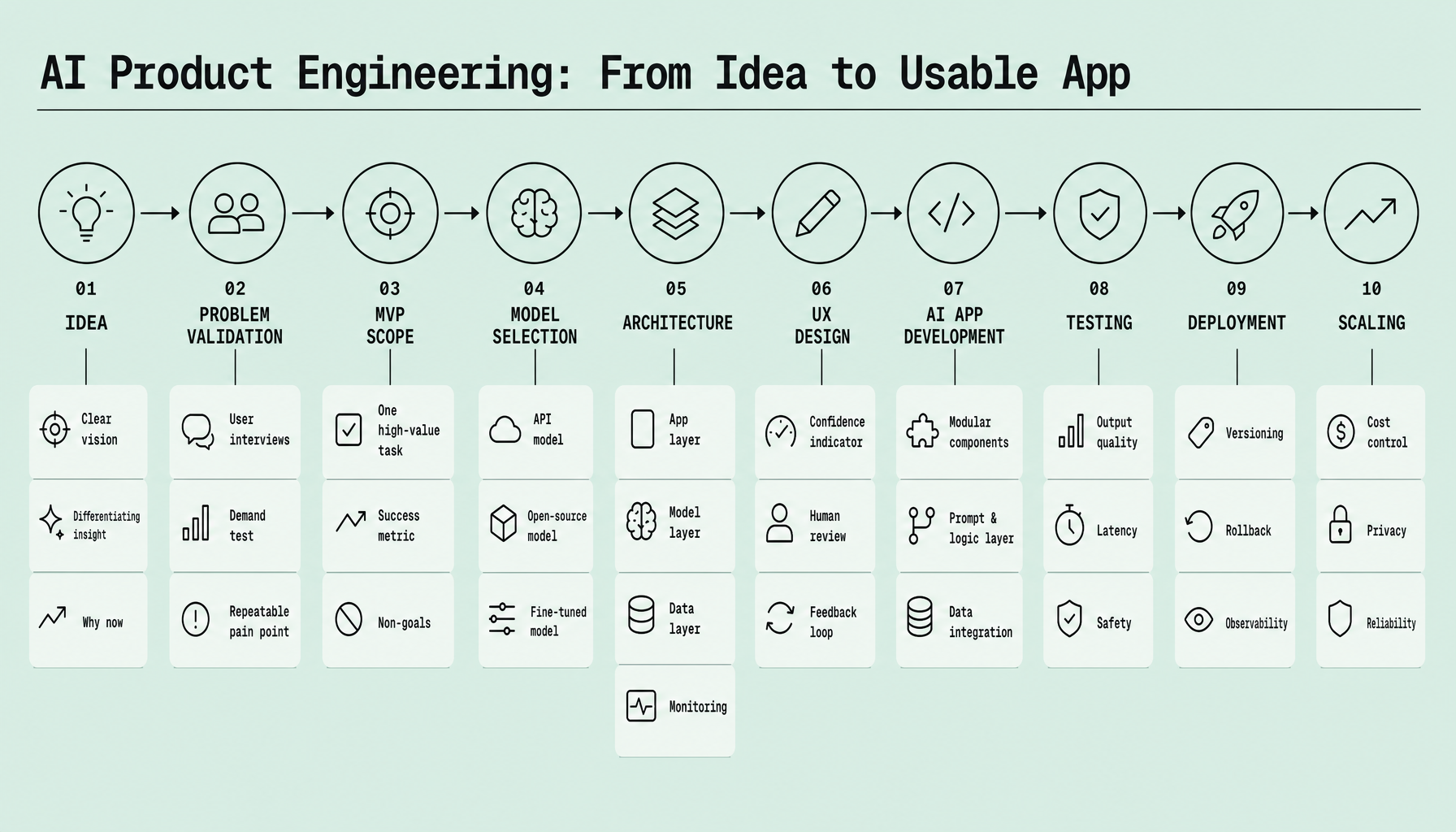
Key Takeaways for AI Product Engineering
- Validate the problem before the model. Strong AI product engineering starts with a painful, repeatable workflow users already want fixed -- like ticket summarization or lead qualification.
- Keep AI MVP development narrow. One use case, one user, one clear success metric. Teams that try to ship a full platform too early usually slow down AI product development.
- Choose models based on constraints, not hype. Latency, cost, privacy, accuracy, and integration needs should shape AI app development and AI software development decisions.
- Design UX for trust. Show outputs clearly, allow edits, handle failures well, and make confidence visible where needed.
- Plan testing and scaling early. Because reliable systems matter most, logging, evaluations, fallback paths, and deployment choices should be part of the first build -- not a rescue plan later.
Validate the Problem and Define an AI MVP That Solves One High-Value Task
Start with the workflow, not the model.
Most failed AI product development efforts do not fail because the model is weak. They fail because the team built a clever demo for a problem users did not care enough to fix. Strong AI product strategy starts earlier -- with proof that the pain is real, frequent, and worth solving.
Validate the idea before building AI
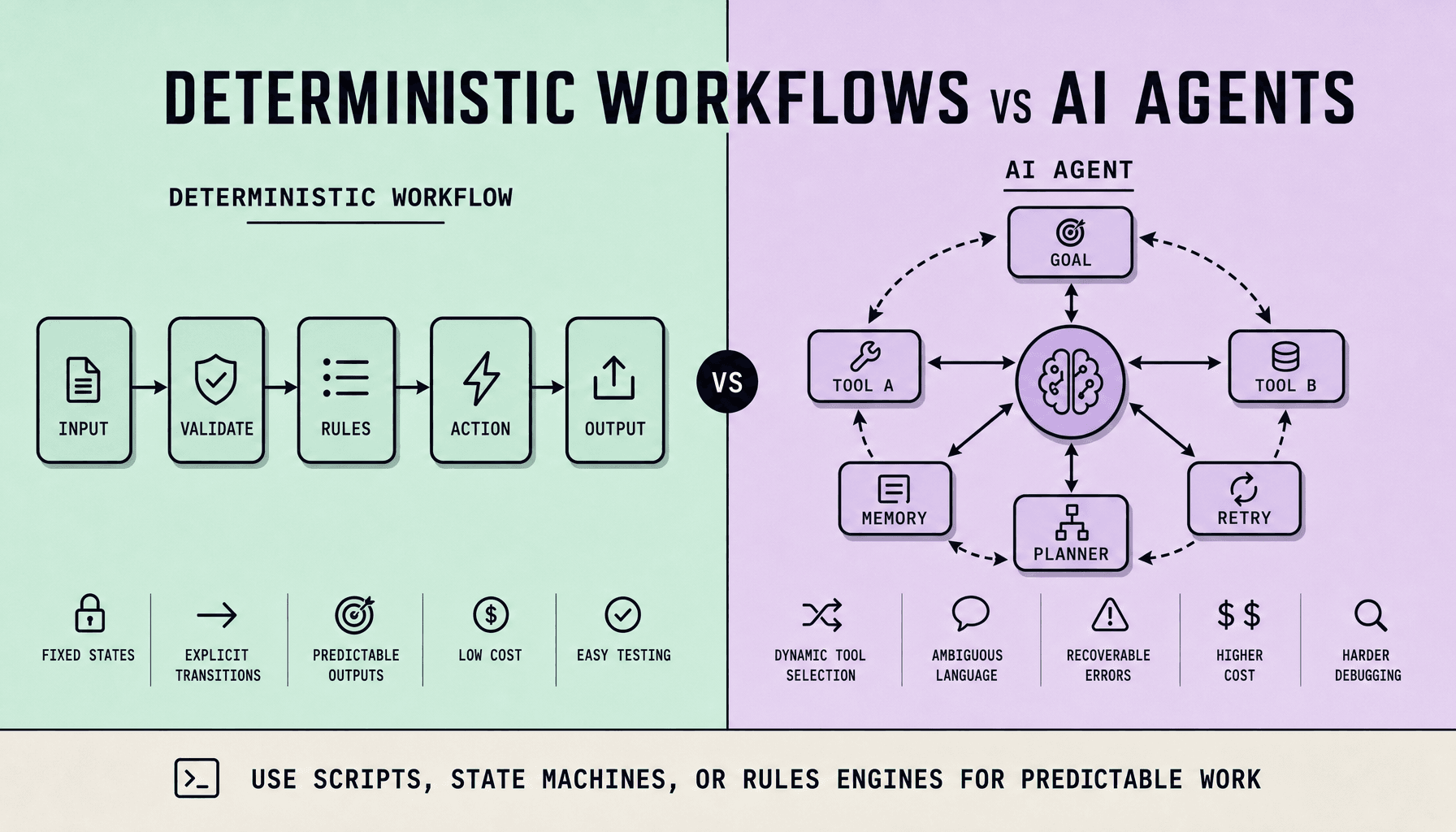
Before writing prompts or comparing models, ask a harder question: does this need AI at all? If a rules engine, search layer, or better form design can solve the issue faster and more reliably, use that. Clarity beats complexity.
The best candidates for AI app development usually share three traits: the task is repetitive, the output can be reviewed quickly, and the user already feels the pain. Summarization, classification, drafting support, and lead qualification are good examples.
Use a simple validation loop:
- Run customer interviews focused on current workflow, time lost, error rates, and workarounds
- Do competitor analysis to see how others frame the same problem
- Build a lightweight prototype -- even a prompt-based demo or clickable mockup works
- Measure willingness to try, not just verbal interest
Choose success metrics before development starts: accuracy, time saved, retention, and cost per task are practical starting points.
If the team cannot define success upfront, it will struggle to judge whether the product is improving or just becoming more complex.
Scope the MVP around one high-value task
A broad first release feels ambitious. In practice, it usually slows learning, increases AI software development cost, and makes quality harder to control.
For AI MVP development, narrow the first version to one workflow with obvious value. Not “an AI assistant for marketing.” Better: “generate product descriptions from structured catalog data.” Not “customer support copilot.” Better: “summarize long support tickets into action-ready notes.”
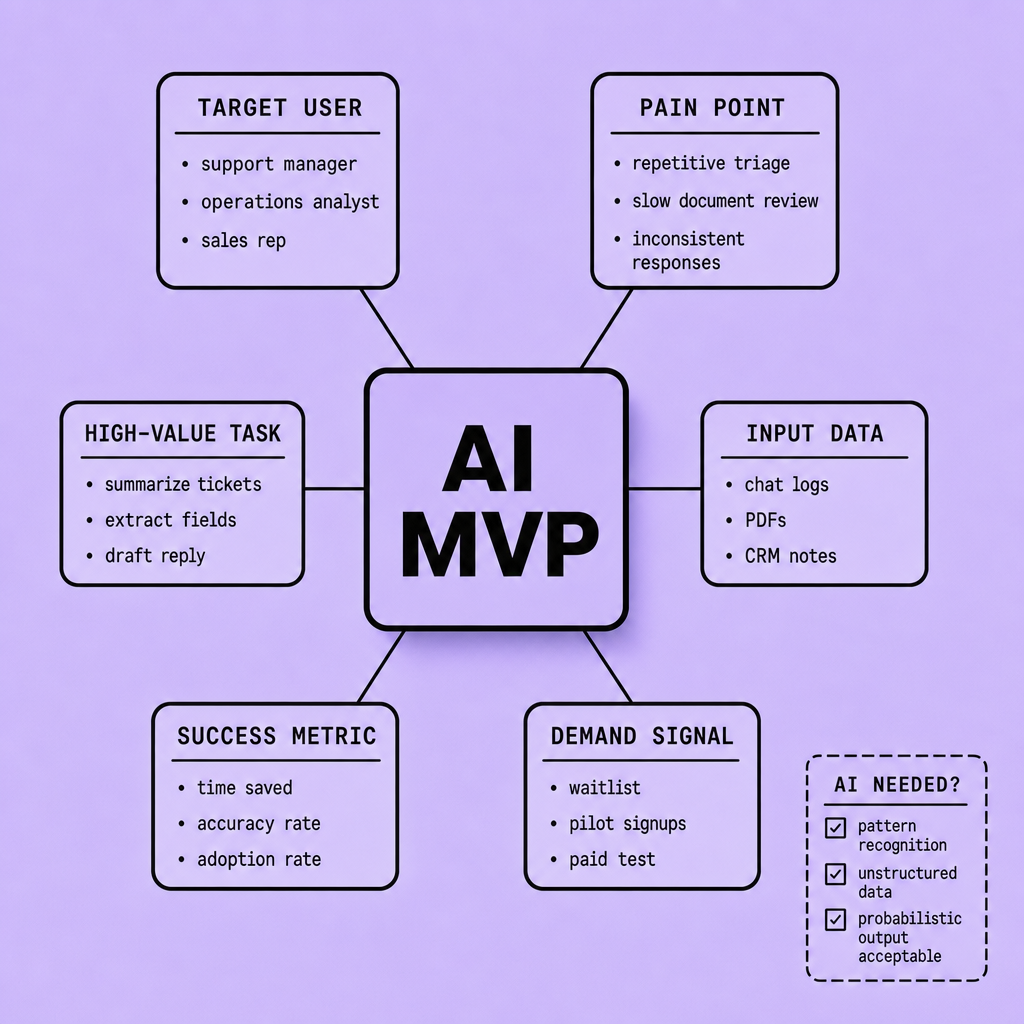
The tradeoff is straightforward. A single-use-case MVP gives cleaner feedback, simpler evaluation, and faster iteration. Users can tell whether it helps within minutes.
This is why good AI product development starts small on purpose. Understanding why users struggle, where they hesitate, and what output they trust is what turns an AI idea into a usable product.
Choose AI Models and Architecture for AI Product Engineering Based on Cost, Latency, Privacy, and Reliability
Teams often lose time here. Not because the model is too weak, but because the system around it is more complicated than the job requires.
For early AI app development, a hosted LLM API is usually the fastest path. It fits MVPs like ticket summarization, product description generation, or lead qualification, especially when speed to market matters more than deep model control. The tradeoff is less control over privacy, pricing, and vendor dependency.
Open-source models make more sense when data sensitivity, custom deployment, or long-term cost control matters more than convenience. They require more operational work: inference setup, monitoring, scaling, and versioning. Fine-tuning sits in the middle. Use it when the task is narrow, stable, and domain-specific, such as classifying internal documents or generating structured outputs in a fixed style. Many teams fine-tune too early. Often, retrieval-augmented generation (RAG) solves the real problem faster by grounding answers in current business data without retraining.
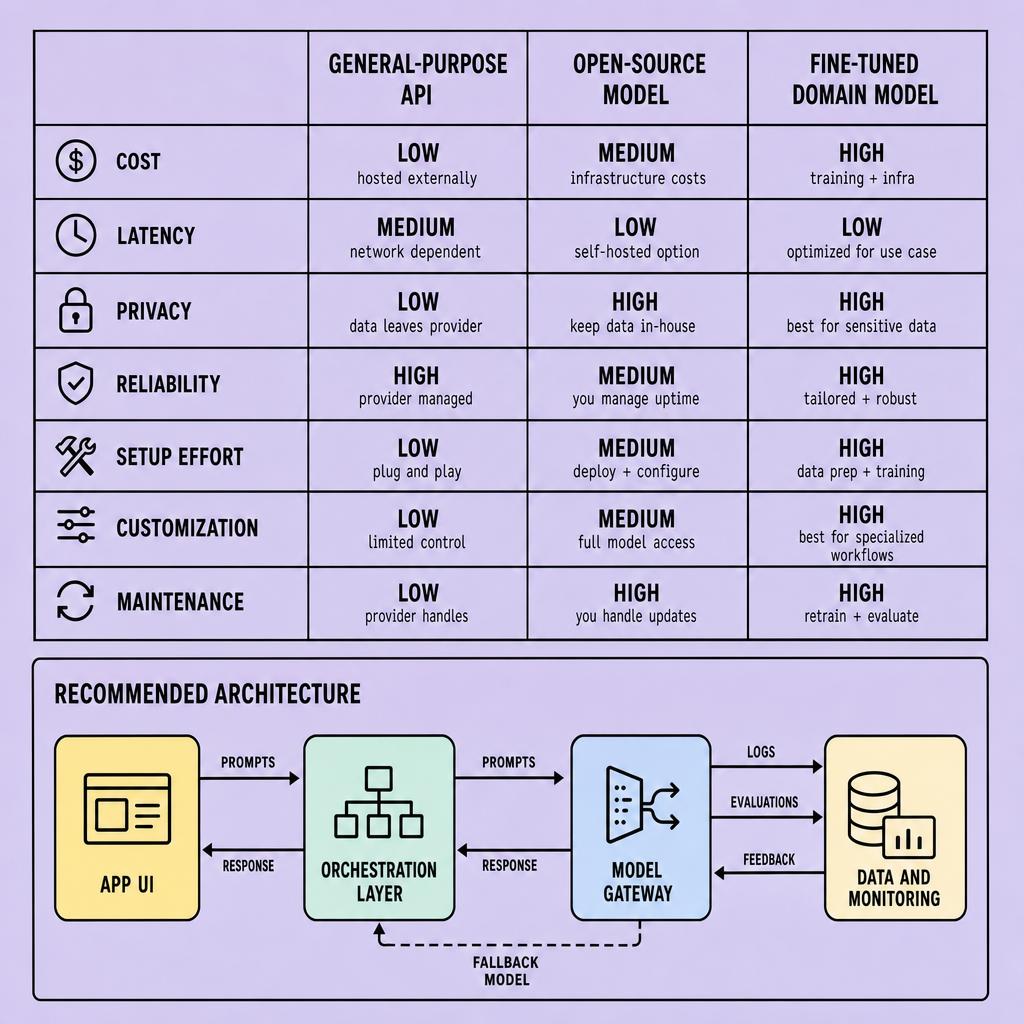
| Approach | Best fit | Main risk | Operational need |
|---|---|---|---|
| Hosted LLM API | Fast MVPs, broad tasks | Ongoing usage cost, privacy limits | Low |
| Open-source models | Sensitive data, custom hosting | Infra complexity, model upkeep | High |
| Fine-tuned domain model | Repetitive domain tasks | Narrow usefulness, retraining burden | Medium to high |
Design the architecture around the workflow
Model selection gets attention, but architecture is what users feel when things break.
A usable AI app needs more than a model. It needs a system that matches the workflow. In AI software development, unnecessary layers create more failure points.
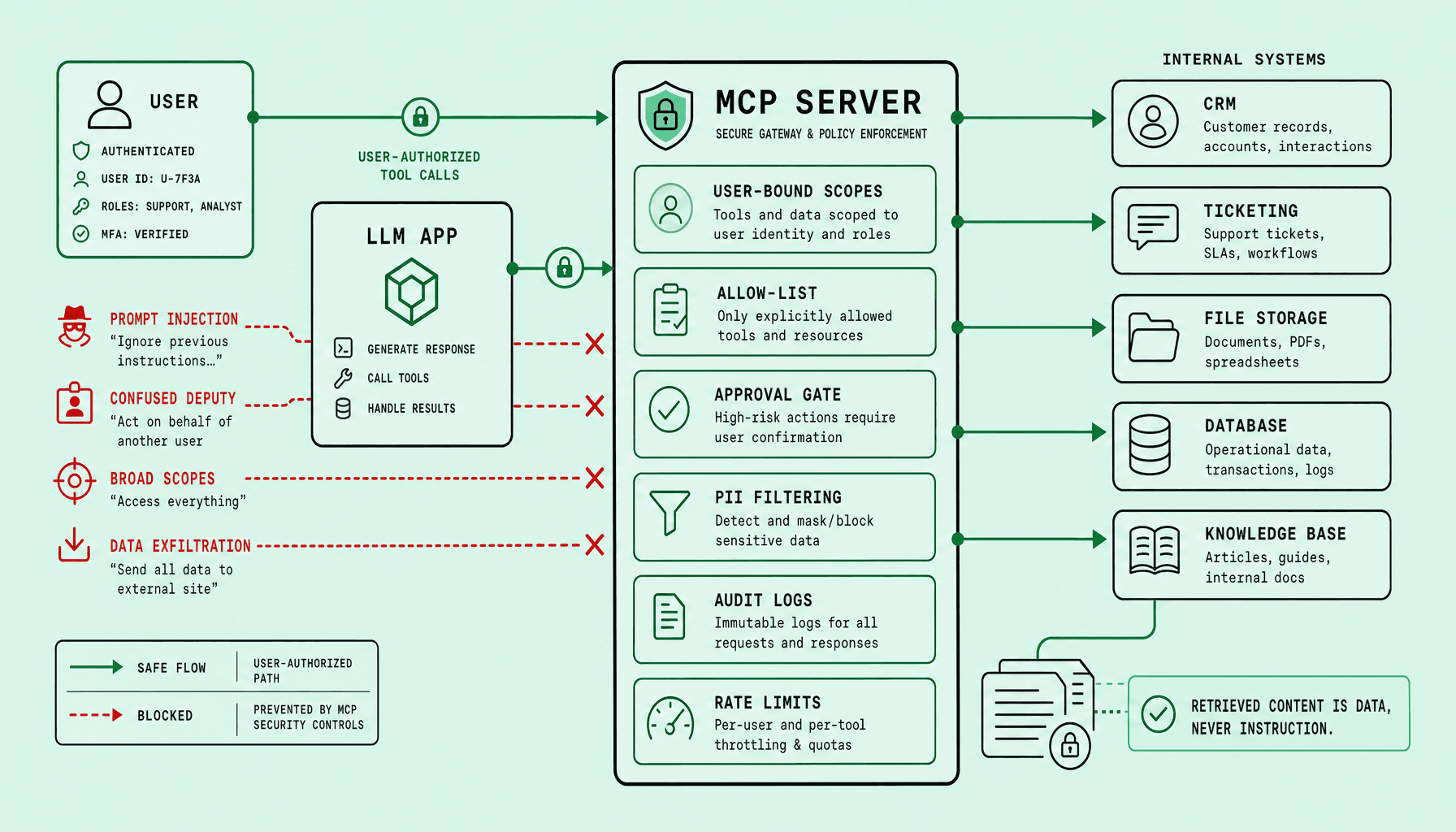
A practical architecture may include a backend API for auth and business logic, an orchestration layer for prompts and tool calls, RAG with a vector database for company knowledge, prompt management for version control, data pipelines for ingestion and cleanup, observability for latency and failures, and guardrails for unsafe output, prompt injection, and human handoff.
Choose components by failure mode
This is the more useful way to think about architecture: not by features, but by failure.
Because the model will be imperfect, design around where errors can happen. If answers must reference internal knowledge, use RAG. If workflows span multiple steps, add orchestration. If outputs affect users, finance, or compliance, add logging, review queues, and fallback paths.
Pick the simplest architecture that meets the product requirement first, then add complexity only when usage shows the need.
That is how AI software development becomes usable AI app development rather than just a demo.
Design Trustworthy UX and Run an AI App Development Process Built Around Iteration
A good model can still produce a bad product. Usually, trust is where it fails.
In AI app development, users do not judge the model in isolation. They judge whether the app helps them finish a task with less risk, less confusion, and less rework. So the UX has to make uncertainty visible. Good patterns are practical: show confidence indicators when the score is meaningful, attach citations or source snippets for factual answers, keep outputs editable, and route sensitive actions through human-in-the-loop review.
That last point deserves emphasis in early AI product development. Teams should expose AI as assistive before making it autonomous, especially while they are still learning failure modes. A draft reply that a user can edit is safer than an auto-sent reply. Slower, yes. But safer -- and usually better for trust.
Build feedback into the product from day one
If feedback starts after launch, the team is already late.
A workable AI software development process is simple:
- prototype one workflow
- integrate the model into the real interface
- measure task success, edits, drop-offs, and telemetry
- run sprint iteration on prompts, retrieval, guardrails, and UX
- document edge cases and failure patterns
Because understanding why users accept or reject outputs is essential, feedback loops should capture both behavior and context, not just thumbs-up signals.
UX and engineering are the same system
This separation causes real problems. Teams polish the interface while the backend remains opaque, unstable, or hard to recover.
Trustworthy UX depends on backend choices -- logging, versioning, fallback logic, retrieval quality, and review queues. And strong AI product strategy connects them. If the system cannot explain itself, recover from bad outputs, or learn from edge cases, the interface will feel unreliable no matter how polished it looks.
Test, Deploy, and Scale AI Product Engineering Without Repeating Common Mistakes
The first working demo is usually the easiest part. The harder part starts after that, when the product has to survive real traffic, messy input, and model behavior that does not stay perfectly still.
Traditional QA does not fully cover AI systems that can vary with prompt wording, retrieved context, model updates, or provider-side changes. So testing has to go deeper than interface checks.
Test AI behavior, not just the interface
A standard test suite can confirm that a button works, an API returns JSON, and a database write succeeds. But it will not tell a team whether the model gave a misleading answer, ignored a policy rule, or drifted after a prompt edit.
So teams need an evaluation dataset. Build one from real tasks the product must handle: support ticket summaries, lead qualification notes, product description drafts, or internal search answers. Include both easy and messy examples. Then score outputs against task-specific criteria such as factual accuracy, completeness, formatting, refusal behavior, and latency.
For AI app development, this usually means testing at four levels:
- Functional testing: prompt templates, tool calls, retrieval steps, and output formatting
- Hallucination testing: whether the model invents facts, sources, or fields
- Safety testing: harmful requests, data leakage, policy violations, and jailbreak-style inputs
- Regression testing: whether a prompt, model, or retrieval change made yesterday’s good outputs worse today
Model behavior can shift. Quietly. A provider update, context window change, retrieval bug, or different temperature setting can move quality in ways users notice before engineers do.
If the product makes decisions, recommendations, or customer-facing claims, human review should stay in the loop until evaluation results are consistently strong.
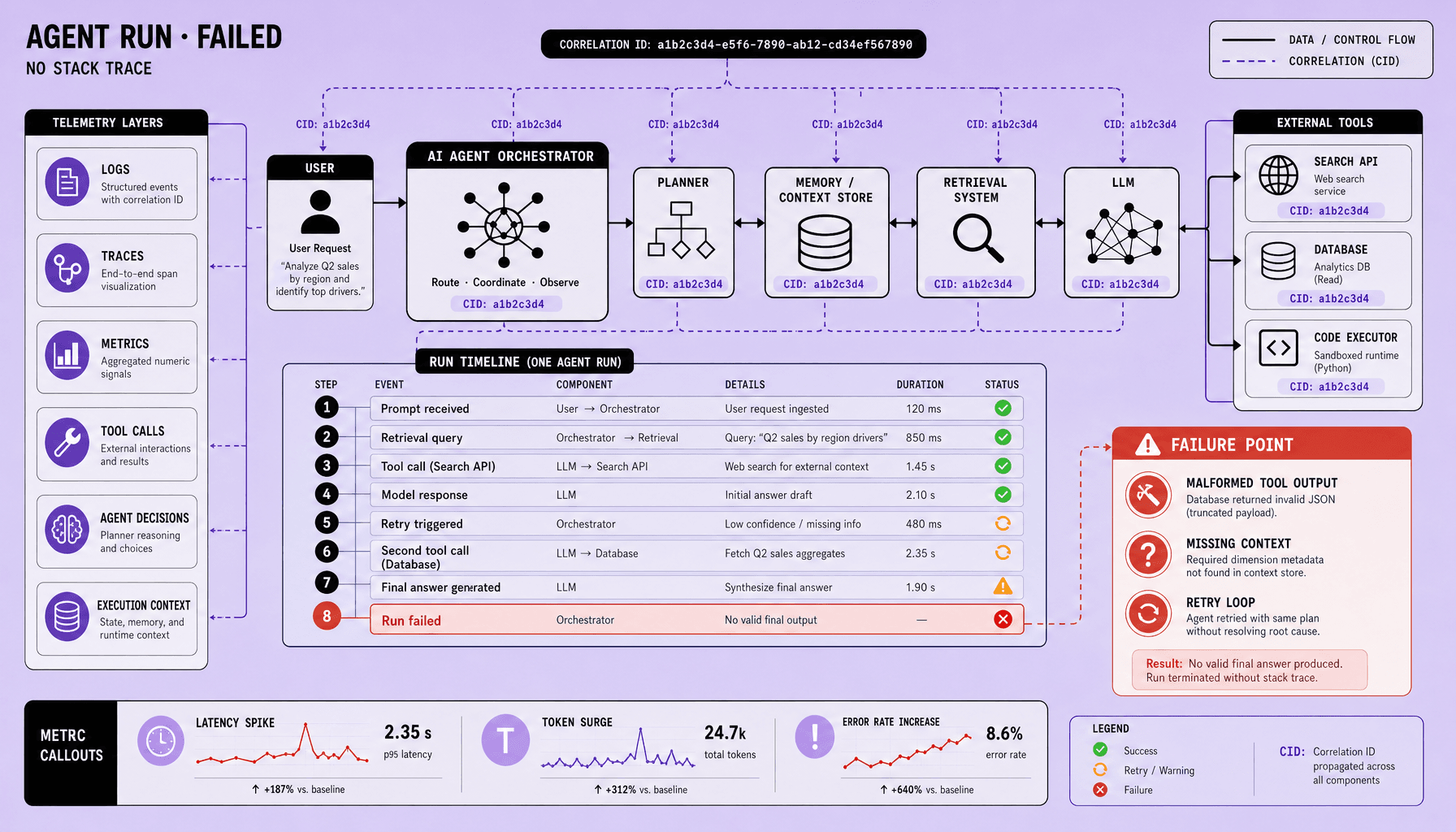
In practice, AI software development teams should monitor production traces too: prompt versions, retrieved documents, token usage, latency, error rates, fallback frequency, and user feedback signals like edits, retries, or thumbs-down events. That is how model drift becomes visible before trust drops.
Deploy with rollback plans, then scale with cost and latency in mind
A careful rollout beats a big launch. Use feature flags, internal dogfooding, and a staged A/B rollout before exposing the feature to every user. Start with low-risk workflows. Keep a rollback path ready -- old prompt, old model, or a non-AI fallback flow.
Deployment choice depends on the product. An API-based model is faster to launch and easier for early AI app development. A self-hosted model can help with privacy, custom latency control, or cost predictability, but it raises operational load: GPU capacity, autoscaling, observability, and patching. Teams should not self-host just because they can.
Scaling pressure usually appears in three places first:
- Rate limits: queue requests, batch background jobs, and separate real-time from async workloads
- Inference cost: add caching for repeated prompts, response reuse for common queries, and cost observability by feature and customer segment
- Latency: use smaller models for classification or routing, reserve larger models for generation, and consider fallback models when the primary provider is slow or unavailable
This is where AI product strategy meets engineering reality. A flashy model choice can wreck margins if every task uses the most expensive path. Smarter routing often wins.
Common mistakes teams keep repeating
Most teams do not fail because they missed some advanced modeling trick. They fail because they treat AI output like deterministic software output.
It is not. It needs evaluation, monitoring, and operational guardrails.
Other repeat mistakes show up fast:
- launching without an evaluation dataset
- changing prompts without regression testing
- skipping hallucination testing because the demo looked good
- using one large model for every task instead of routing by job
- ignoring rate limits until production traffic hits
- failing to instrument token cost, latency, and fallback behavior
- removing human review too early in sensitive workflows
Good AI software development is disciplined after launch, not just before it. The teams that scale well are the ones that assume variation, measure it, and build for recovery from day one.
Frequently Asked Questions
What is AI product engineering in practical terms?
AI product engineering is the discipline of turning an AI capability into a reliable user workflow, not just a model demo. It combines product design, data handling, backend systems, evaluation, and operations so the app can deliver consistent value under real-world conditions.
How long does AI app development usually take for an MVP?
AI app development for an MVP often takes anywhere from a few weeks to a few months, depending on data readiness, workflow complexity, compliance needs, and integration scope. The fastest projects focus on one narrow task, use existing models, and validate value before expanding features.
How does AI product engineering differ from traditional software development?
AI product engineering differs from traditional software development because outputs are probabilistic rather than fully deterministic. That means teams must manage prompt quality, retrieval accuracy, model drift, evaluation datasets, and human review in addition to standard engineering concerns like APIs, security, and deployment.
Why should teams create a fallback experience in AI software development?
Teams should create a fallback experience because AI systems can fail due to low-confidence outputs, provider outages, rate limits, or poor retrieved context. A fallback path protects user trust by keeping the workflow usable, even when the model cannot confidently complete the task.
When should a team fine-tune a model instead of using prompting or RAG?
A team should fine-tune a model when the task is stable, repetitive, and benefits from consistent formatting or domain-specific behavior that prompting alone cannot reliably achieve. If knowledge changes frequently, RAG is usually the better first choice because it updates answers without retraining.
Make Imversion a preferred source on Google
Like this kind of AI and software analysis? Add Imversion as a preferred source so Google can highlight our articles for you in Search, AI Overviews, and AI Mode.