LLM Integration: Streamlined Solutions for Business Software
Explore how LLM integration can revolutionize your business software, ensuring secure and efficient workflows. Learn key strategies and best practices.

How LLM integration works with existing business software
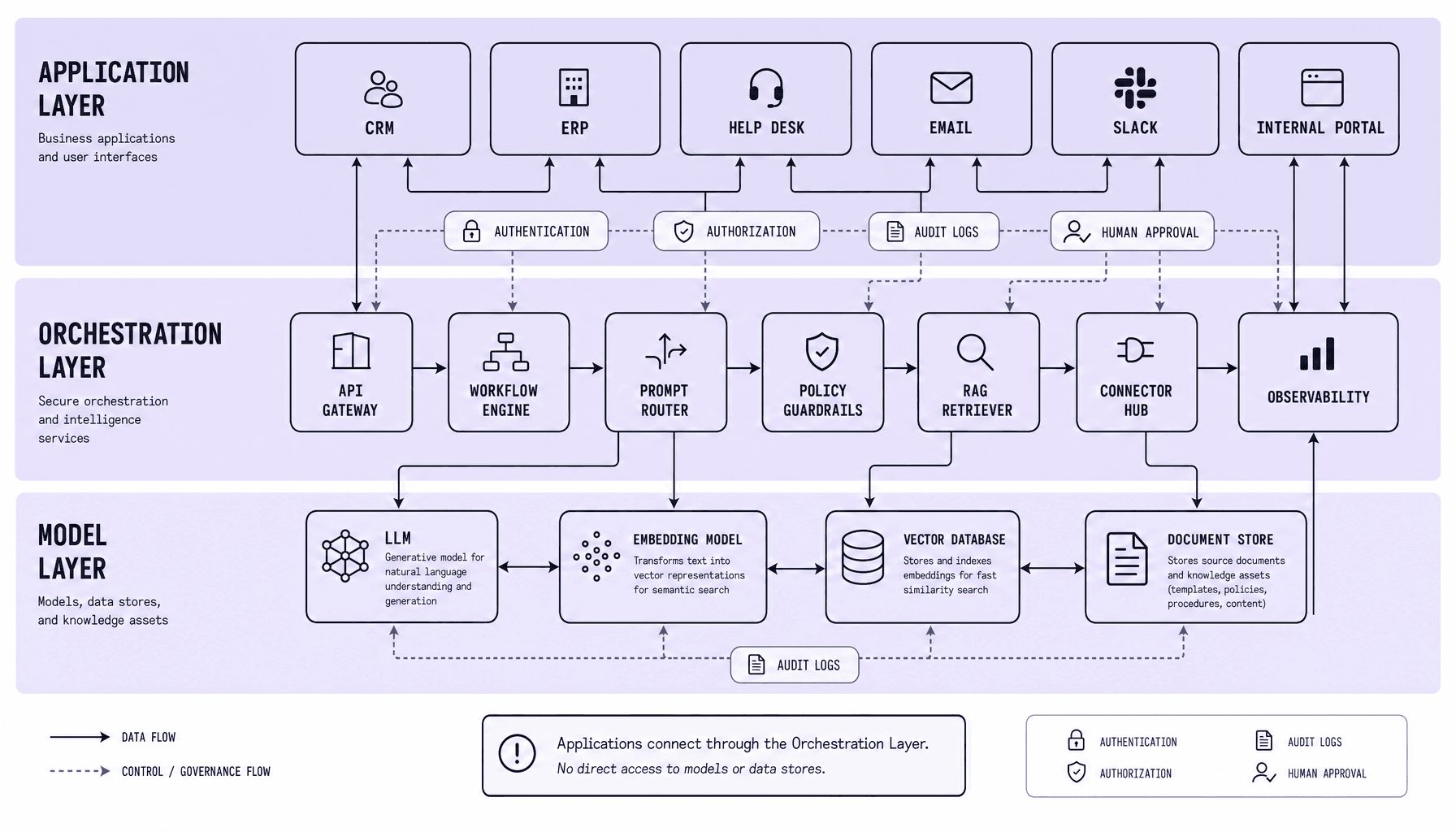
Most LLM integration problems do not start with the model. They start a few weeks later, when every app has its own prompt logic, its own permissions setup, and its own brittle connection to the model. That is why LLM integration works best when the model sits behind an orchestration layer, not inside every app. That layer handles APIs, data connectors, retrieval, and governance so business software integration stays maintainable, secure, and ready for enterprise AI use.
LLM Integration Key Takeaways
-
Put an orchestration layer between the model and core systems like Salesforce, SAP, ServiceNow, or SharePoint. Direct model-to-app links look fast in a demo. But they create brittle AI system integration, weak policy control, and harder model swaps later.
-
Use RAG for enterprise AI tasks that depend on internal documents, tickets, or knowledge bases. APIs handle structured records well; connectors plus embeddings and a vector database handle unstructured content. Reliable systems matter most -- retrieval should be scoped, versioned, and monitored.
-
Treat security as part of the architecture, not a patch. Use OAuth 2.0, SSO, RBAC, audit logs, and API gateways so LLM integration follows the same access rules as existing business software integration.
-
Design workflows with clear handoffs: trigger, retrieve, generate, validate, act. And keep humans in approval paths for sensitive actions.
-
Deploy with discipline -- staging, canary rollouts, latency targets, token-cost tracking, and observability dashboards. That is what keeps AI system integration maintainable in production.
Build LLM integration around an orchestration layer, not direct app connections
The shortcut is tempting: let each app call the model directly and move on. It works for a proof of concept. It does not age well.
Teams should use a three-layer architecture. Not direct model links from every app.
That prototype shortcut becomes painful in production -- especially once Salesforce, SAP, ServiceNow, Slack, or Microsoft 365 all need different permissions, prompts, audit rules, and fallback behavior. For maintainable LLM integration, the model should sit behind middleware, an API gateway, or a workflow engine.
The three-layer architecture
The clean pattern for AI system integration is simple:
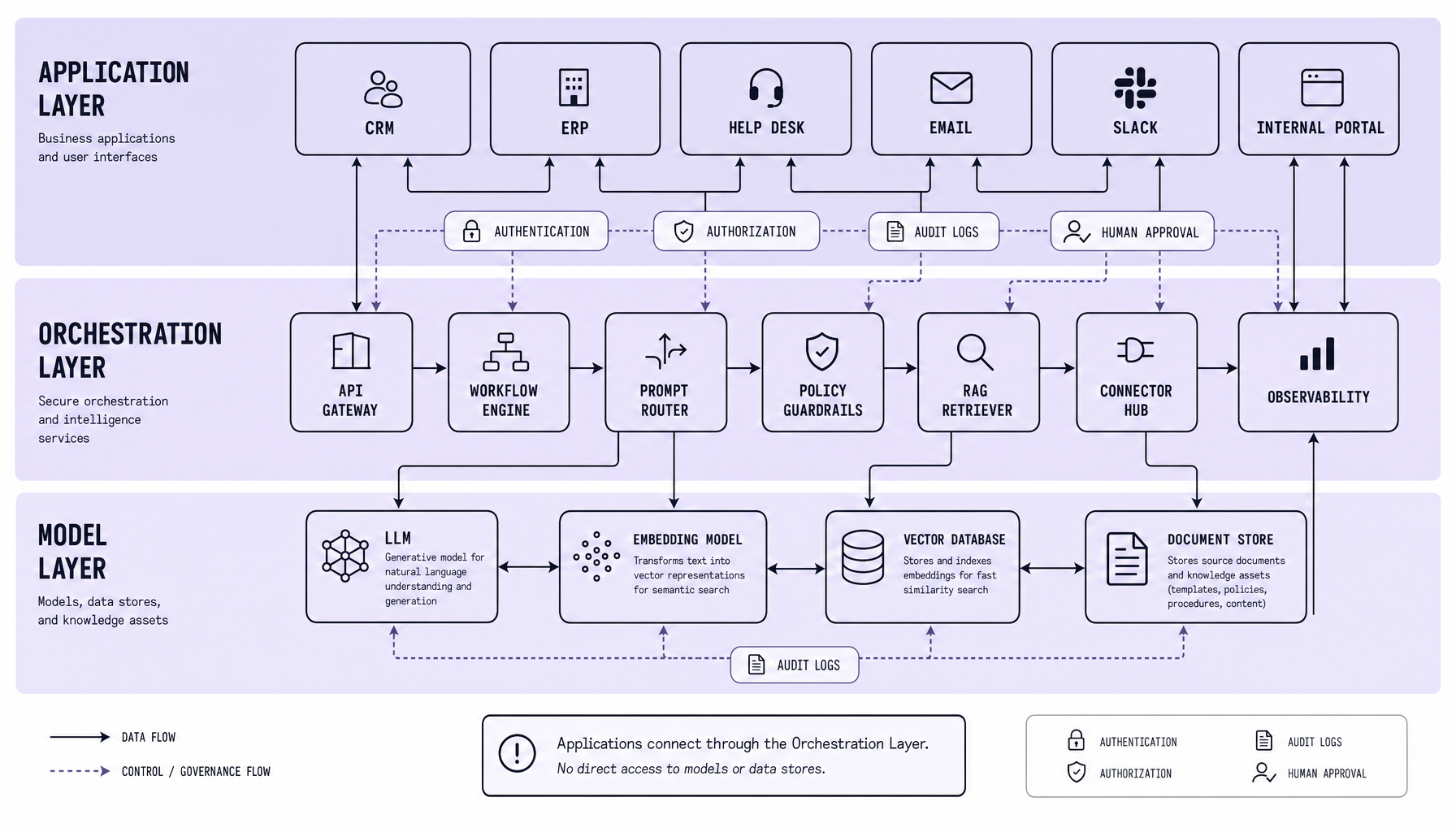
- Application layer: business systems such as Salesforce, SAP, ServiceNow, Slack, and Microsoft 365
- Orchestration layer: API gateway, middleware, workflow engine, prompt templates, RAG pipelines, authentication, logging
- Model layer: the LLM, embeddings, vector database, safety filters, output checks
The application layer should ask for a task, not manage model behavior itself. The orchestration layer then decides what data to fetch, which prompt to use, whether RAG is needed, what model to call, and how to return a usable response. That separation keeps business software integration easier to change without rewriting every app connection.
Why the orchestration layer matters
Production issues rarely stay isolated. One app uses raw CRM text. Another sends SharePoint documents. A third needs human approval before updating a ticket. Now debugging spans five systems, and nobody has one place to inspect the full path.
An orchestration layer fixes that. It centralizes OAuth 2.0, SSO, RBAC, rate limits, prompt versioning, observability dashboards, and human handoff rules. So teams can swap models, tune retrieval, or add guardrails in one place.
The easiest prototype pattern is often the hardest production pattern to maintain.
If responses touch customer records, contracts, or support workflows, governance cannot live inside scattered app code.
| Dimension | Direct integration | Orchestrated integration |
|---|---|---|
| Approach | Each app calls the model | Apps call middleware or API gateway |
| Best fit | Fast proof of concept | Production enterprise AI |
| Risk | Weak policy control, brittle debugging | Centralized governance and tracing |
| Human handoff | Custom per app | Managed in one workflow layer |
A practical caveat: orchestration adds one more component to operate. True. But that tradeoff is worth it once enterprise AI moves beyond a single use case, because scattered complexity is the worst kind.
Connect APIs, data connectors, and RAG architecture for accurate answers
Bad answers often get blamed on the LLM. In production, the real problem is usually weaker and less glamorous: stale data, messy permissions, broken sync jobs, or poor indexing. Answer quality depends more on data access than model size.
Poor enterprise AI results usually come from weak data plumbing -- stale records, loose permissions, broken sync jobs, or inconsistent indexing. If the source is unreliable, prompt tuning will not save the output.
Structured data through APIs
For structured systems, use APIs first. CRM and ERP platforms such as Salesforce, SAP, and ServiceNow already expose customer records, orders, tickets, pricing, and status fields through controlled endpoints. That makes them the right foundation for LLM API integration.
The pattern is simple: the orchestration layer calls approved APIs, normalizes fields, applies RBAC, and sends only the minimum context to the model. Not the whole record dump. For example, a support assistant may need account tier, recent cases, and contract status -- not every object in the CRM.
Use API gateways, OAuth 2.0, SSO, and audit logging from the start. Business software integration fails fast when access control is treated as cleanup work. Rate limits matter too. So do retries, caching rules, and timeout handling.
Unstructured data through connectors
Documents are where many enterprise workflows get difficult. SharePoint, Microsoft 365, Slack exports, PDFs, cloud drives, internal wikis, and knowledge base articles hold useful context, but the content is rarely clean or consistent.
A practical pipeline extracts text and metadata, chunks documents, creates embeddings, and stores them in a vector database alongside source references and permission tags. Then re-index on change events or scheduled syncs. If the index lags behind the repository, answers drift out of date.
A smaller, clean index with strong metadata usually beats an oversized corpus filled with duplicates, stale files, and unclear ownership.
When RAG architecture is the right choice
RAG becomes necessary when answers have to reflect current business state, not static instructions. A fixed prompt can handle formatting rules or stable guidance. It breaks when users ask about the latest invoice status, an updated SOP in SharePoint, or a contract clause inside a PDF.
RAG retrieves relevant passages at runtime, then gives the model bounded context. That reduces unsupported answers and improves freshness without retraining. The tradeoff is straightforward: more moving parts -- embeddings, retrieval logic, ranking, permissions, and monitoring. So teams should use RAG for high-accuracy workflows, not every prompt in an LLM integration stack.
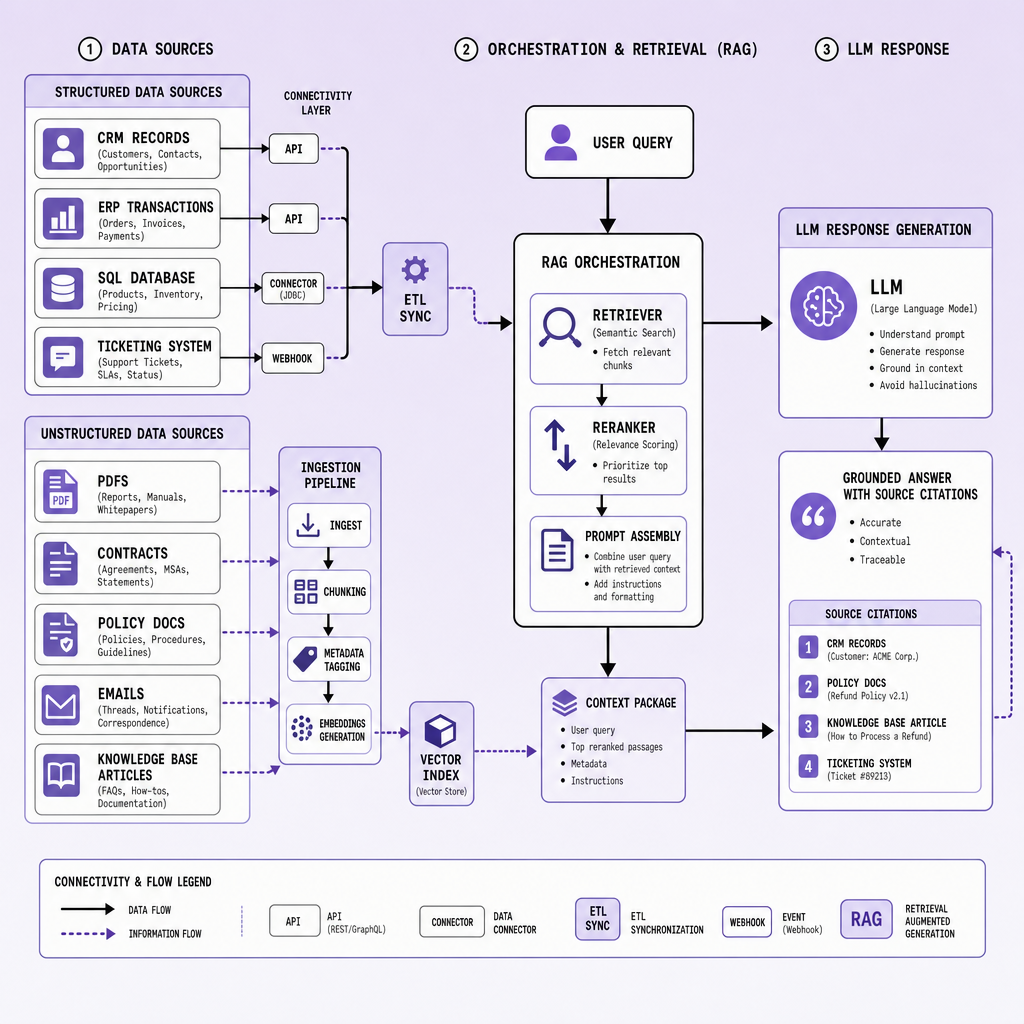
If a response must reflect live CRM, ERP, or document data, retrieval should be designed as a product feature, not an afterthought.
Secure LLM integration with authentication, authorization, and workflow guardrails
A working demo can hide dangerous assumptions. The system answers nicely, tools are connected, and everyone focuses on speed. Then the harder questions show up: who approved access, which records are exposed, and what exactly the model is allowed to change?
Enterprise-grade LLM integration needs a hard boundary between what the model can read, what it can recommend, and what it can change. Teams often get a demo running fast. Then they discover the real problem: unsafe access to CRM records, document stores, tickets, and internal actions. For enterprise AI, the model is not the security boundary. The orchestration layer is.
Authentication and identity
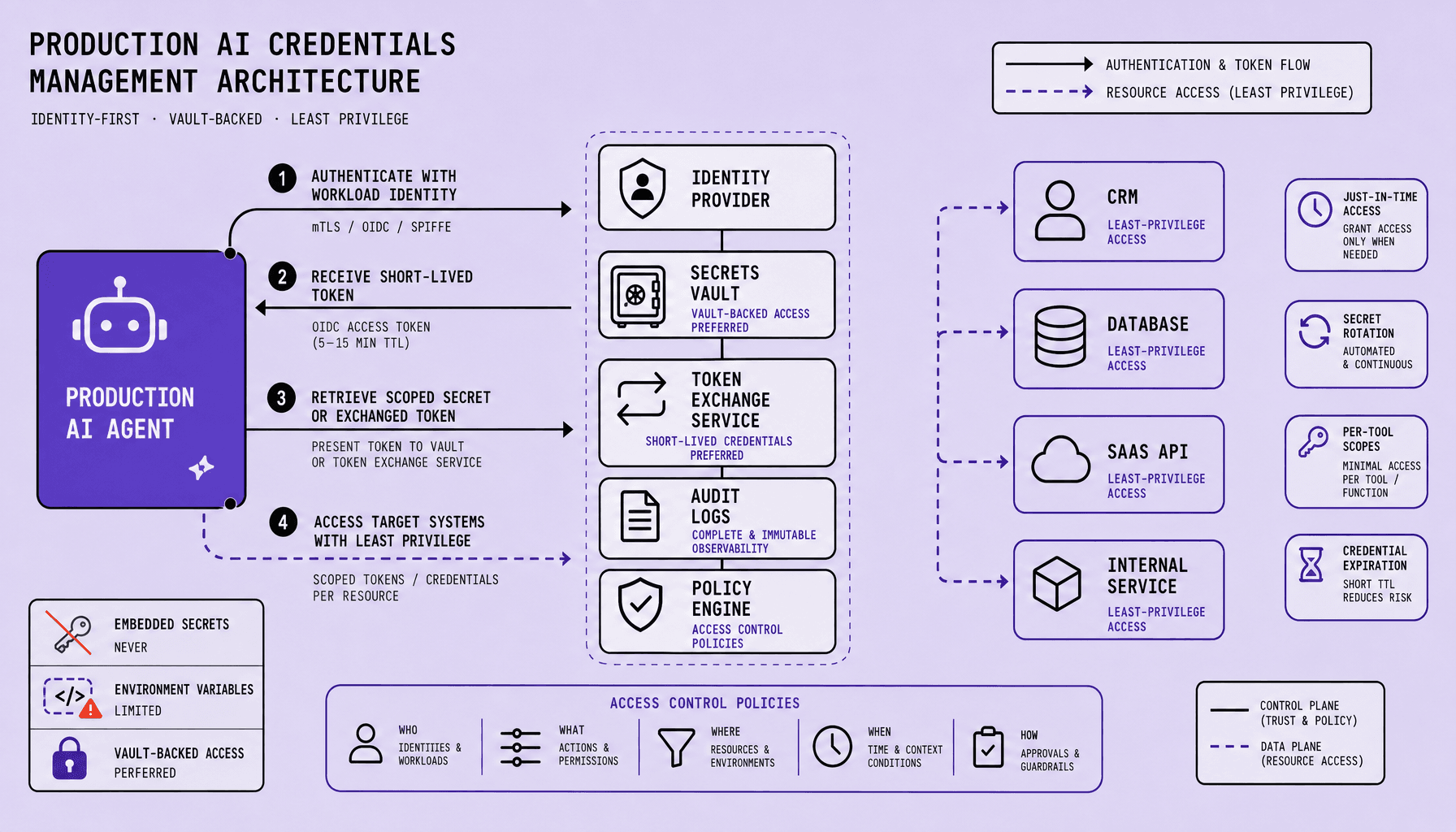
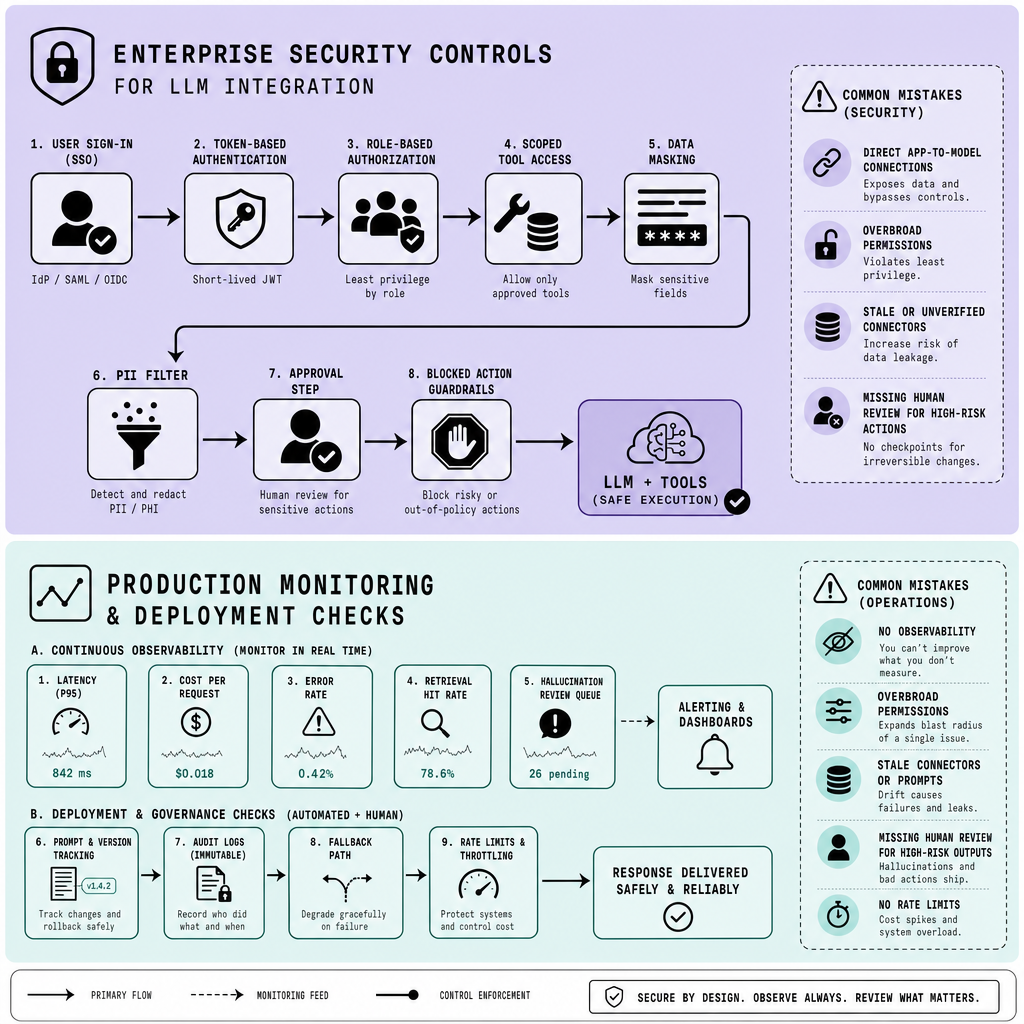
Every request should run through a verified identity path -- not a shared service account passed around in scripts. Use OAuth 2.0, SSO, and short-lived tokens so the LLM workflow acts on behalf of a known user, service, or approved system process.
This matters for business software integration because the model may touch Salesforce, ServiceNow, Microsoft 365, SharePoint, Slack, or internal APIs in one flow. Identity must survive that hop-by-hop chain. If a user cannot access a contract folder or customer record in the source system, the LLM should not see it through a connector or RAG pipeline either.
Store API keys, database credentials, and model provider secrets in a secret management system. Not in prompts. Not in code. And not in workflow configs exported to logs.
Authorization and least privilege
Authentication proves who is calling. Authorization decides what they can do.
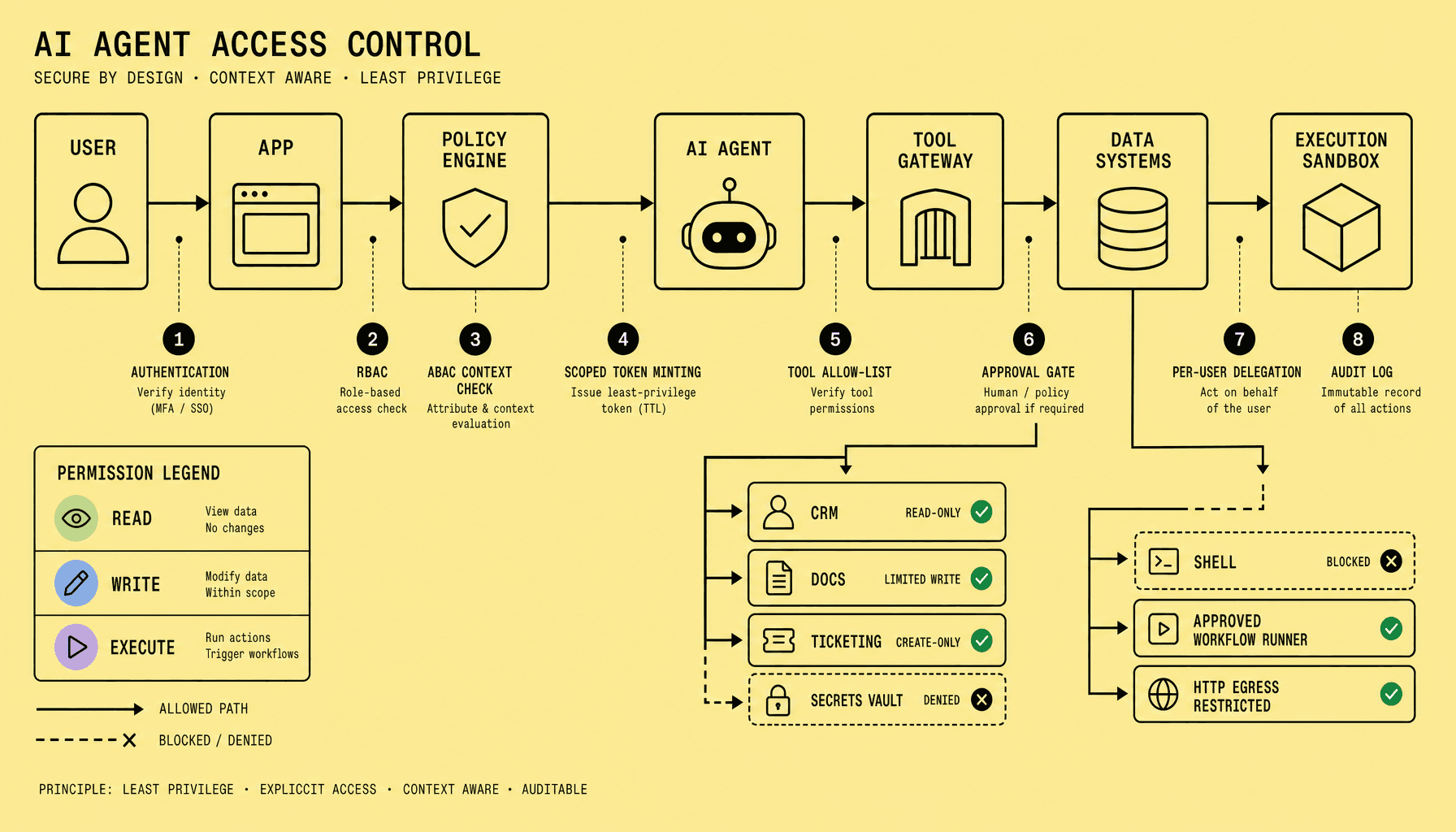
Use RBAC and scoped tokens with least privilege. Give the LLM one permission set for retrieval, another for drafting output, and a tighter one -- if any -- for writes. That separation keeps AI system integration governable.
A practical pattern:
- Read: search documents, fetch CRM context, retrieve ticket history
- Suggest: draft an email, classify a case, recommend a field update
- Act: create a ticket, update Salesforce, trigger an SAP workflow
But never collapse those into one broad permission.
Teams should make access rules explicit in policy code and audit logs. Log prompts, retrieved sources, tool calls, approvals, and final actions with sensitive data masked where needed.
Human-in-the-loop workflow automation
The fastest path is not always the safest one. Start with assistive workflow automation before autonomous execution. Let the model draft, summarize, route, or recommend first. Then require approval for high-impact actions like CRM updates, document sharing, payment-related workflows, or closing incidents.
Add prompt and data filtering before model calls and before outbound actions. Strip secrets, block disallowed fields, and reject prompts that try to bypass policy. Human-in-the-loop checkpoints slow some flows. True. But they reduce operational risk while teams learn where the model is reliable -- and where it is not.
Monitor LLM integration in production and avoid common deployment mistakes
Production is where polished demos get exposed. Uptime can look fine while users still get slow responses, weak retrieval, or answers that quietly ignore permissions. That is why production-ready LLM integration is an operations problem first.
Teams usually monitor uptime, CPU, and API errors. But they miss answer quality, retrieval drift, and permission leaks -- the issues that actually break business software integration after launch.
What to monitor
Track both system health and output quality. If a support workflow in ServiceNow or a sales workflow in Salesforce slows down, fails, or starts returning weak answers, users feel it immediately.
A practical monitoring stack should cover:
- Latency: end-to-end response time, model time, retrieval time, and downstream API time
- Token usage: prompt tokens, completion tokens, and spikes by workflow
- Cost monitoring: cost per request, cost per user action, and cost by model version
- Failure rates: timeout rates, rate-limit hits, connector failures, parse errors, and fallback frequency
- Retrieval quality: document hit rate, irrelevant context rate, citation success, and empty-result frequency
- User feedback: thumbs up/down, correction rate, human override rate, and task completion outcomes
Teams often have observability dashboards for infrastructure, but no evaluation pipeline for answer quality. That is a mistake. Decisions should be backed by data, and LLM monitoring needs business metrics -- not just logs.
If users must frequently rewrite prompts, ignore generated answers, or escalate to humans, the system is already telling you it is underperforming.
Mistakes that break production systems
The most common failure pattern is direct coupling. The model calls ERP, CRM, and document systems without a governed orchestration layer, so one prompt change can create unstable behavior across multiple tools.
Other mistakes show up fast:
- No offline or staging evaluation before release
- Weak permissioning across OAuth 2.0, SSO, or RBAC boundaries
- No fallback path when retrieval fails or the model times out
- Poor prompt versioning and no record of model, embedding, or RAG changes
- Shipping one giant workflow instead of isolating actions, approvals, and tool calls
And yes, fast demos hide all of this.
Deployment best practices
Shipping too broadly, too early is expensive. Rollbacks get messy, debugging gets slower, and trust drops fast once users hit unreliable behavior.
Use staged releases. Start in a test environment with masked production-like data, then move to canary deployment for a small user group or one workflow. Monitor quality and cost before broad rollout.
Keep a rollback plan for prompts, model versions, connectors, and retrieval settings. Abstract the model behind an internal service so the rest of the AI system integration does not break when providers, models, or rate limits change.
Speed matters. But controlled release patterns win in production.
Frequently Asked Questions
What is the fastest safe way to start LLM integration in an enterprise?
The fastest safe starting point is a narrow read-only use case with one orchestration service, one approved data source, and human review on outputs. This approach limits blast radius, exposes security gaps early, and gives teams measurable results before they add write actions, more connectors, or broader workflow automation.
How does LLM integration differ from a traditional chatbot deployment?
LLM integration is a system design problem, not just a conversation interface. A traditional chatbot can operate on fixed intents and scripts, while an integrated LLM must manage live data access, identity propagation, retrieval quality, tool permissions, logging, and downstream actions across business software.
Why should business software integration for LLMs avoid vendor lock-in?
Vendor lock-in makes model changes expensive because prompts, tool schemas, safety logic, and monitoring often become tied to one provider. A thin internal abstraction layer preserves flexibility, improves negotiating leverage, and lets teams change models for cost, latency, compliance, or quality without redesigning every application workflow.
When should LLM integration use fine-tuning instead of RAG?
Fine-tuning is best for stable behaviors such as output format, classification style, or domain-specific phrasing, while RAG is best for changing facts and internal knowledge. If the answer must reflect current documents, records, or policies, retrieval should remain the primary pattern and fine-tuning should play a supporting role.
How do you measure whether enterprise AI is actually improving business outcomes?
Enterprise AI should be measured against workflow results, not model fluency alone. The strongest indicators are reduced handling time, fewer manual lookups, faster resolution, higher first-pass accuracy, lower escalation rates, and controlled cost per completed task. If those metrics do not improve, the integration is not delivering real business value.
Make Imversion a preferred source on Google
Like this kind of AI and software analysis? Add Imversion as a preferred source so Google can highlight our articles for you in Search, AI Overviews, and AI Mode.