Production AI Checklist: Best Practices for Reliable Deployment 2026
Prepare your AI for success with our comprehensive production AI checklist, covering reliability, latency, security, and more!

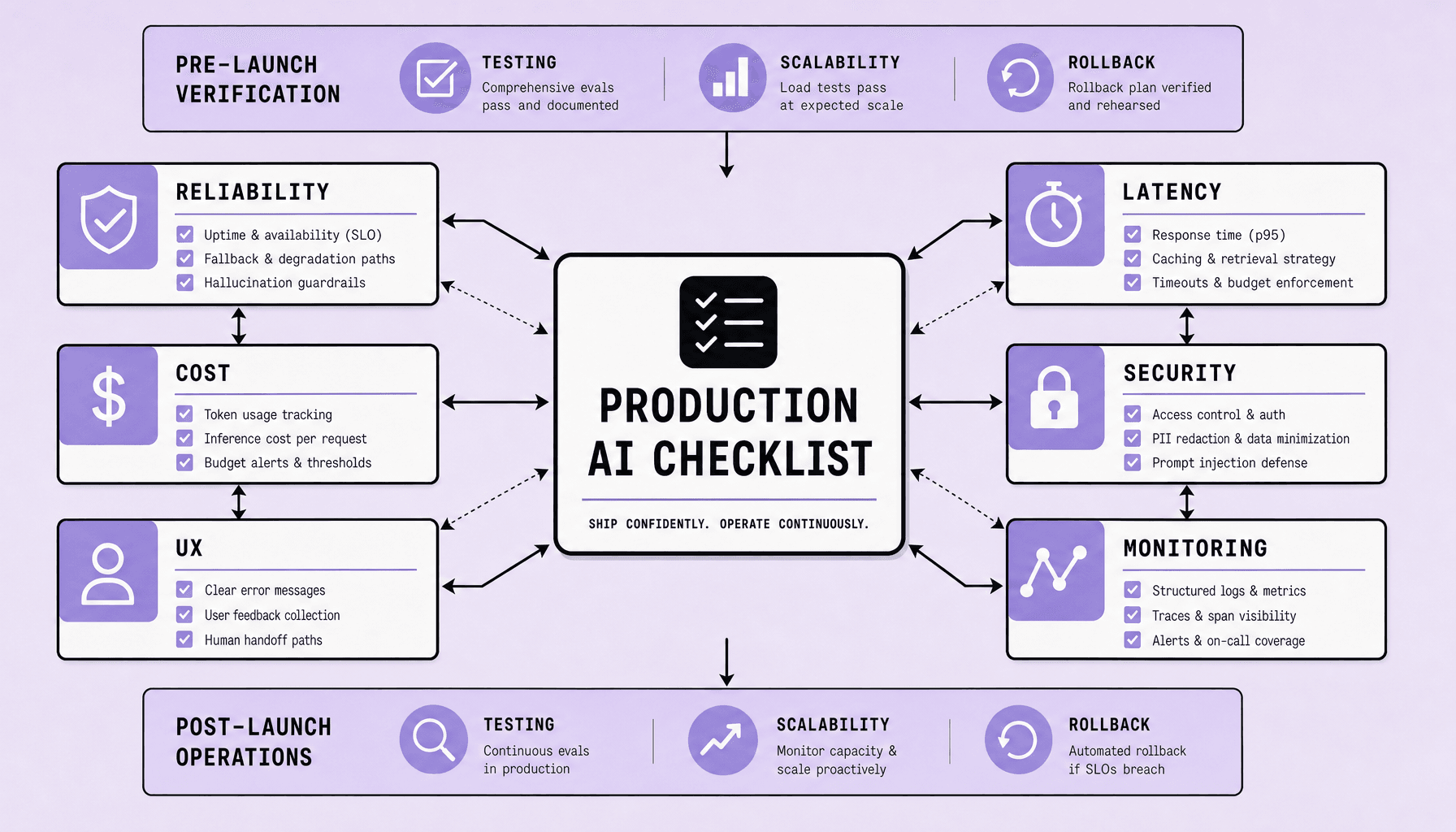
The production AI checklist every team should verify before launch
Your AI feature looked solid in the demo. Then real traffic hit: strange inputs, slow dependencies, token spikes, and users who do not behave like your test set. That is where most teams find out the hard part was never getting the model to answer. It was getting the system to hold up in production.
Production AI checklist: Key Takeaways
- Treat your production AI checklist as a launch gate, not a doc you skim once. Verify AI reliability with real inputs, fallback paths, human escalation, and clear SLOs before exposing the system to live traffic.
- Measure AI latency end to end -- model time, retrieval time, network overhead, and time to first token. Fast enough in staging can still feel slow in production.
- Control spend early. Track token usage, cache repeat queries with tools like Redis, set usage limits, and review model choice regularly for AI cost optimization.
- Build AI security in from day one. Redact sensitive data, lock down secrets, validate prompts and outputs, and log access for audits.
- Monitor after launch. Deployment is only half the job; real users will expose gaps your tests missed.
What production AI means and how to build a production AI checklist
If your model only works in a demo, you do not have production AI. You have a prototype with good lighting.
Production AI is an operational standard. The model must stay available under real traffic, meet quality thresholds on messy inputs, protect data, control spend, and fail safely when it cannot answer well. A benchmark score helps. But benchmark accuracy alone is not enough, because users bring ambiguity, edge cases, retries, abuse, and volume spikes that a tidy eval set will never fully capture.
That difference drives the checklist. You are not validating intelligence in the abstract. You are validating whether the system can survive contact with production.
What changes in production
In a prototype, teams ask, “Can this work?” In production, the question becomes, “Can this keep working -- reliably, securely, and at an acceptable cost?”
That shift changes everything. You need SLOs and SLAs, not just eval screenshots. You need ownership for prompts, models, guardrails, observability, and incident response. You also need release controls such as feature flags, a canary release, and a tested rollback path.
If you cannot see latency spikes, prompt regressions, token cost jumps, or fallback rates in OpenTelemetry, Grafana, or Datadog, you are launching blind.
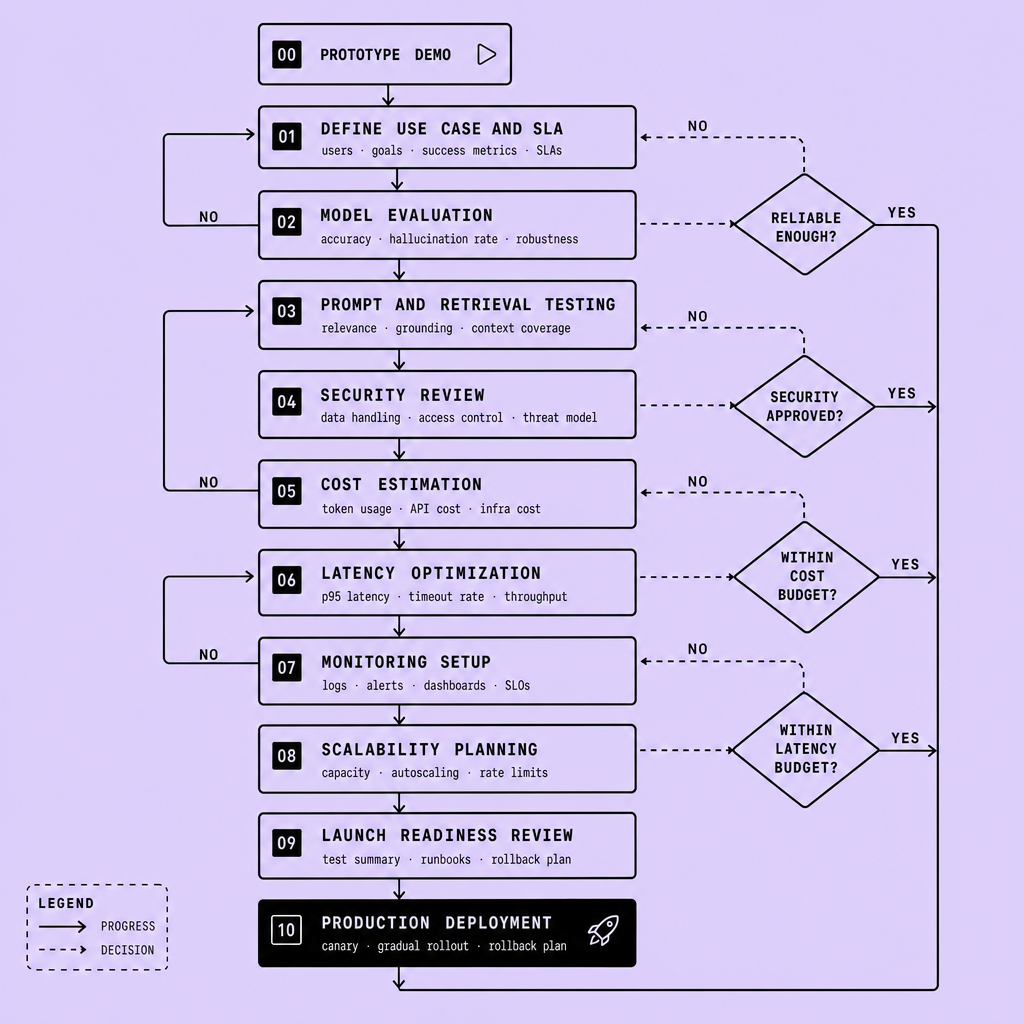
Core production readiness checks
A practical AI deployment checklist should confirm these items before launch:
- Reliability targets: define SLOs for uptime, error rate, response quality, and fallback coverage
- Quality gates: validate on production-like inputs, adversarial prompts, and known failure cases
- Fallback paths: route low-confidence answers to retrieval, a rules-based flow, or human review
- Approval workflow: require sign-off for prompt changes, model swaps, guardrail edits, and data access changes
- Clear ownership: assign one responsible owner each for model behavior, prompt/version control, monitoring, and incident response
- Release criteria: deploy through CI/CD in Docker, promote carefully on Kubernetes, and use feature flags plus rollback plans
- Security checks: verify redaction, secret handling, access control, audit logs, and data retention rules
- Cost controls: set token budgets, rate limits, caching rules, and alerts for unusual spend
- UX checks: test streaming, timeout messaging, citations, and graceful recovery when the model is unsure
A solid production AI checklist treats launch as an operational commitment, not a model demo.
One thing teams miss often is enforceability. If release criteria are not tied to owners and approval gates, the AI deployment checklist becomes aspirational instead of real.
How the production AI checklist improves AI reliability, AI latency, and UX
Users do not grade model quality, speed, and trust separately. They experience one system. That is why a strong production AI checklist has to improve reliability, latency, and UX together.
The tradeoffs show up fast. If the answer is fast but wrong, confidence drops. If it is accurate but slow and opaque, patience runs out.
Reliability
AI reliability improves when you stop treating the model as a single black box and start defining failure behavior. Measure output error rate, hallucination rate, and fallback success rate on real prompts -- not just curated test cases. For retrieval-augmented generation, check whether the answer is grounded in retrieved context, whether retrieval fails silently, and whether the system can refuse cleanly when evidence is weak.
Use a confidence threshold. Below that line, trigger a fallback response, ask a clarifying question, or route to a human-in-the-loop path. This is where prompt versioning and A/B testing help: you can compare answer quality and refusal behavior before a bad prompt change reaches all users.
A common mistake is forcing the model to answer every question.
Latency
Latency feels simple until you try to debug it. AI latency is not one number. Track time to first token, end-to-end response time, model inference time, and retrieval delays from your vector database or search layer. In practice, retrieval-augmented generation often feels slow because the user waits on both retrieval and generation.
Streaming responses helps. So does caching common queries, trimming prompt size, and using a smaller model for simpler tasks. But there is a tradeoff: larger models may improve answer quality, while smaller models usually reduce latency and cost. Pick by task, not by hype.
Monitor the full path. Latency spikes can come from Redis, embedding calls, API gateways, or overloaded model-serving pods.
UX
Speed and accuracy are not enough if the interface leaves users guessing. Good UX protects trust when the system is uncertain or slow. Show progress during retrieval. Stream partial output. Indicate provenance when answers rely on documents. Give users a clear escalation path if the model is unsure or blocked.
Treat UX as an operational control, not decoration.
Users tolerate delay and uncertainty better when the interface explains what is happening. Your production AI checklist should verify these patterns before launch, or AI reliability and AI latency gains will not translate into a usable product.
Production AI checklist: AI cost optimization and AI security controls to verify before launch
A launch can look clean in testing and still fail the first week in production. Token spend spikes. Retrieval calls multiply. Logs capture sensitive data. Prompt injection reaches tools or data. That is why cost and security belong in the launch checklist, not in a cleanup sprint after release.
Cost optimization checks
Review the main cost drivers in your AI deployment checklist: model choice, input and output tokens, retrieval overhead, retries, tool calls, and concurrency. Common leaks include long system prompts, oversized context windows, unbounded chat history, and sending every request to a premium model.
Use layered controls before launch:
- cache repeat prompts or retrieval results
- route simple tasks to smaller models and escalate only when needed
- add rate limits in front of inference APIs
- set budget alerts by feature, tenant, workspace, or user segment, not just account-wide
Track unit economics early: cost per request, cost per successful task, average tokens per session, cache hit rate, and waste from failed calls.
A practical caveat: the cheapest path is not always the best one. Aggressive truncation, smaller models, or strict caps can lower spend but also hurt answer quality or completion rates. Verify the savings against task success, latency, and user experience.
Treat logging, retention, and third-party API access as design decisions from day one. Retrofitting AI cost optimization and governance after launch is usually more expensive.
AI security controls to verify
Security failures in AI systems rarely stay contained. Check how prompts, uploaded files, retrieved documents, and model outputs move through your system. If you handle sensitive data, verify encryption in transit, encryption at rest, retention rules, redaction paths, and who can access raw conversations.
Use RBAC for admin tools, a secret manager for API keys, and short-lived credentials where possible. Do not leave tokens in client code or shared host config files.
Then test the model layer itself:
- prompt injection against tools and retrieval
- data exfiltration paths
- unsafe tool execution
- over-permissive document access
- logs that may store secrets or sensitive prompts
If your launch target requires SOC 2 or similar controls, confirm that your vendors and deployment choices support that path.
Stronger controls can add friction. Tighter permissions and heavier filtering may reduce flexibility, so aim for controls that block obvious failure modes without making the product unusable.
Monitoring, scalability, testing, common mistakes, and launch tips for production AI
The launch button is not the finish line. It is the moment your assumptions meet real users, real load, and failure modes your demo never had to survive.
That is why the last part of the checklist matters so much: you need to see problems quickly, scale without guessing, test beyond the happy path, and know exactly how to back out of a bad release.
Monitoring and scalability
Production AI needs observability for both system health and model behavior. Infrastructure metrics alone will not tell you when answers degrade, and quality review alone will not explain latency or outages.
Track system metrics such as p95 latency, timeout rate, queue depth, token throughput, cache hit rate, and dependency failures. Pair them with behavior metrics such as fallback frequency, refusal rate, human escalation rate, abuse attempts, and signs of drift from changing prompts or retrieval results. Use tracing across model calls, retrieval, APIs, and background jobs so incidents can be isolated quickly.
Scalability also needs planning for concurrency, not just average traffic. A workflow that works for a small internal group can fail under live demand, especially when requests include long contexts, retrieval steps, or slow downstream services. Use autoscaling where possible, queue-based buffering when needed, response streaming for long waits, and rate limits for bursty or abusive traffic. If your stack depends on multiple services, test each bottleneck separately. One slow dependency can degrade the whole experience.
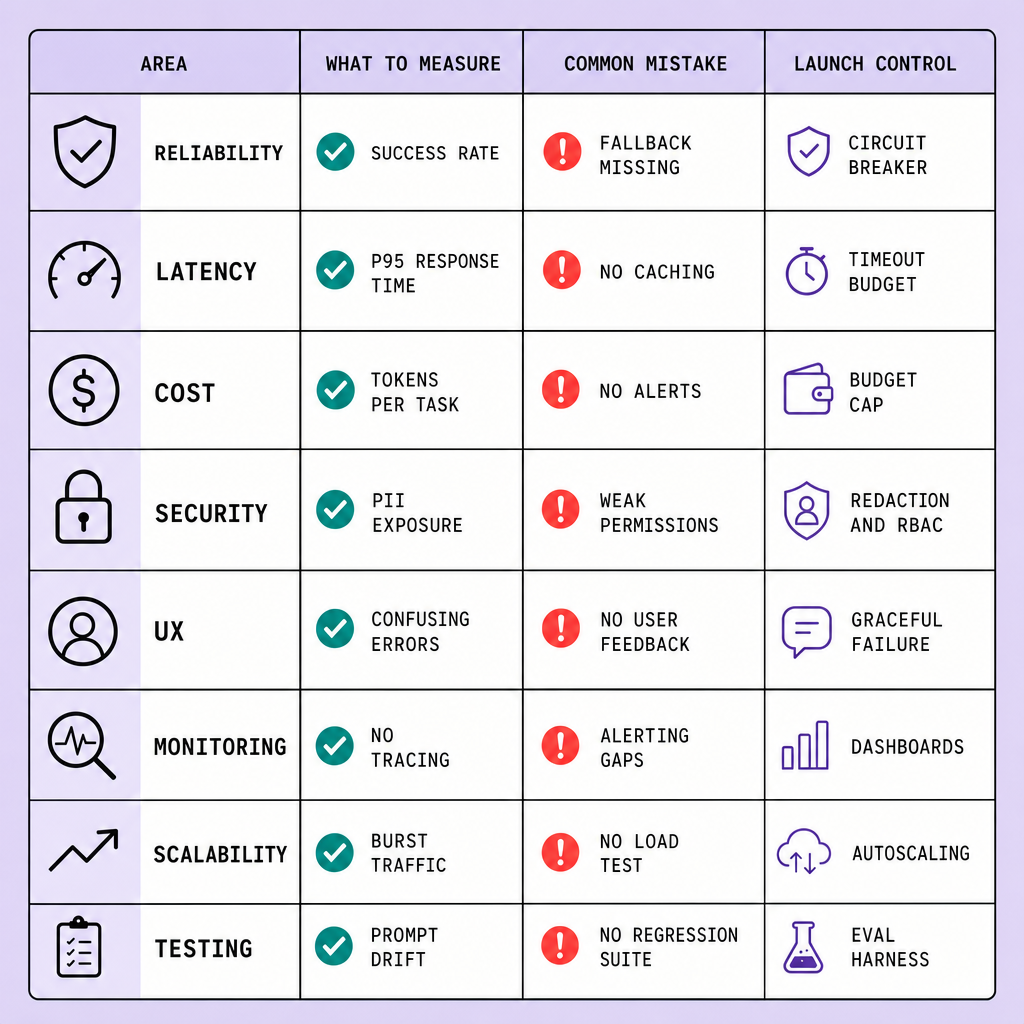
Testing checklist
Functional tests catch the obvious parts. Production failures usually come from the parts around them.
Before launch, go beyond functional tests:
- Run regression tests for prompts, retrieval behavior, safety rules, and structured outputs
- Red-team prompt injection, jailbreaks, data leakage, and abusive inputs
- Load-test realistic concurrency, long prompts, and mixed request sizes
- Validate fallback paths, retries, circuit breakers, and human handoff flows
- Compare staging with a production-like environment
Synthetic tests are useful, but they will not cover every weird input users invent.
Common mistakes
The most common failure pattern is simple: a strong demo creates false confidence, and the team ships without the operational controls that production needs. Watch for these gaps:
- No monitoring for quality drift or rising failure rates
- No token-cost alerts or budget guardrails
- Weak handling of logs, secrets, or sensitive inputs
- No owner for prompt, model, or retrieval changes
- No rollback plan when an update breaks downstream behavior
Another mistake is treating every issue as a model problem. Sometimes the real cause is caching, retrieval quality, queueing, or a slow dependency.
Launch tips
A risky launch usually starts with rushing exposure. Use a staged rollout: internal users first, then a small cohort, then broader exposure with feature flags or canary releases. Define rollback triggers before launch, such as latency spikes, cost increases, quality regressions, or abuse thresholds. Then document the runbook so the team knows exactly who acts, what gets disabled, and how traffic is routed if things go wrong.
The goal is not a perfect launch. It is a controlled, observable, reversible one. That tradeoff may slow release a little, but it reduces blast radius and gives you a safer path to improve reliability, latency, and security after go-live.
FAQs
What should teams monitor in production AI?
Monitor latency, errors, throughput, dependency health, and behavior metrics such as drift, fallback rate, refusal rate, and escalation rate.
How do you test production AI before launch?
Use regression testing, red teaming, load testing, and fallback validation with production-like inputs and traffic patterns.
Why does staged rollout matter for production AI?
Because real traffic reveals failures that demos and synthetic tests miss, and staged release limits impact.
How do you improve AI reliability after release?
Set alerts, review drift, version prompts and models carefully, and keep rollback options ready.
What belongs in an AI deployment checklist for launch?
Monitoring, scalability planning, testing coverage, rollback runbooks, alerting, feature flags, cost controls, and security checks.
Frequently Asked Questions
What is a production AI checklist, and who should own it?
A production AI checklist is a release standard that confirms an AI system meets operational, security, cost, and user-experience requirements before launch. It should be jointly owned by engineering, product, security, and operations, with named approvers for model changes, prompt updates, data access, and rollback decisions.
How often should a production AI checklist be reviewed after launch?
A production AI checklist should be reviewed on a recurring schedule and after every meaningful change to models, prompts, retrieval logic, tools, or traffic volume. In practice, teams should revisit it during incident reviews, pre-release approvals, and monthly reliability checks so controls stay aligned with real production behavior.
How does AI cost optimization affect model quality in production AI?
AI cost optimization affects quality because cheaper models, shorter prompts, and stricter token limits can reduce answer depth, accuracy, or completion rates. The right approach is to optimize by task tier, measure success rates against spend, and only keep savings that do not damage user outcomes or operational stability.
Why should teams include UX in an AI deployment checklist?
UX belongs in an AI deployment checklist because user trust depends on how the system behaves during uncertainty, delay, and failure. Clear status indicators, streamed responses, editable input, source visibility, and graceful error states can make the same model feel more reliable and usable without changing the underlying model.
What are the most overlooked launch checks in a production AI checklist?
The most overlooked checks in a production AI checklist are tenant-level budget alerts, fallback testing under partial outages, permission scoping for retrieved data, runbooks for disabling tools quickly, and post-launch sampling for response quality. These checks matter because many production failures come from surrounding systems, not the model alone.
Make Imversion a preferred source on Google
Like this kind of AI and software analysis? Add Imversion as a preferred source so Google can highlight our articles for you in Search, AI Overviews, and AI Mode.