React vs Next.js: Migration Strategies for 2026
Explore the 2026 landscape of React vs Next.js. Learn about migration strategies, architectures, and how AI integration shapes development.
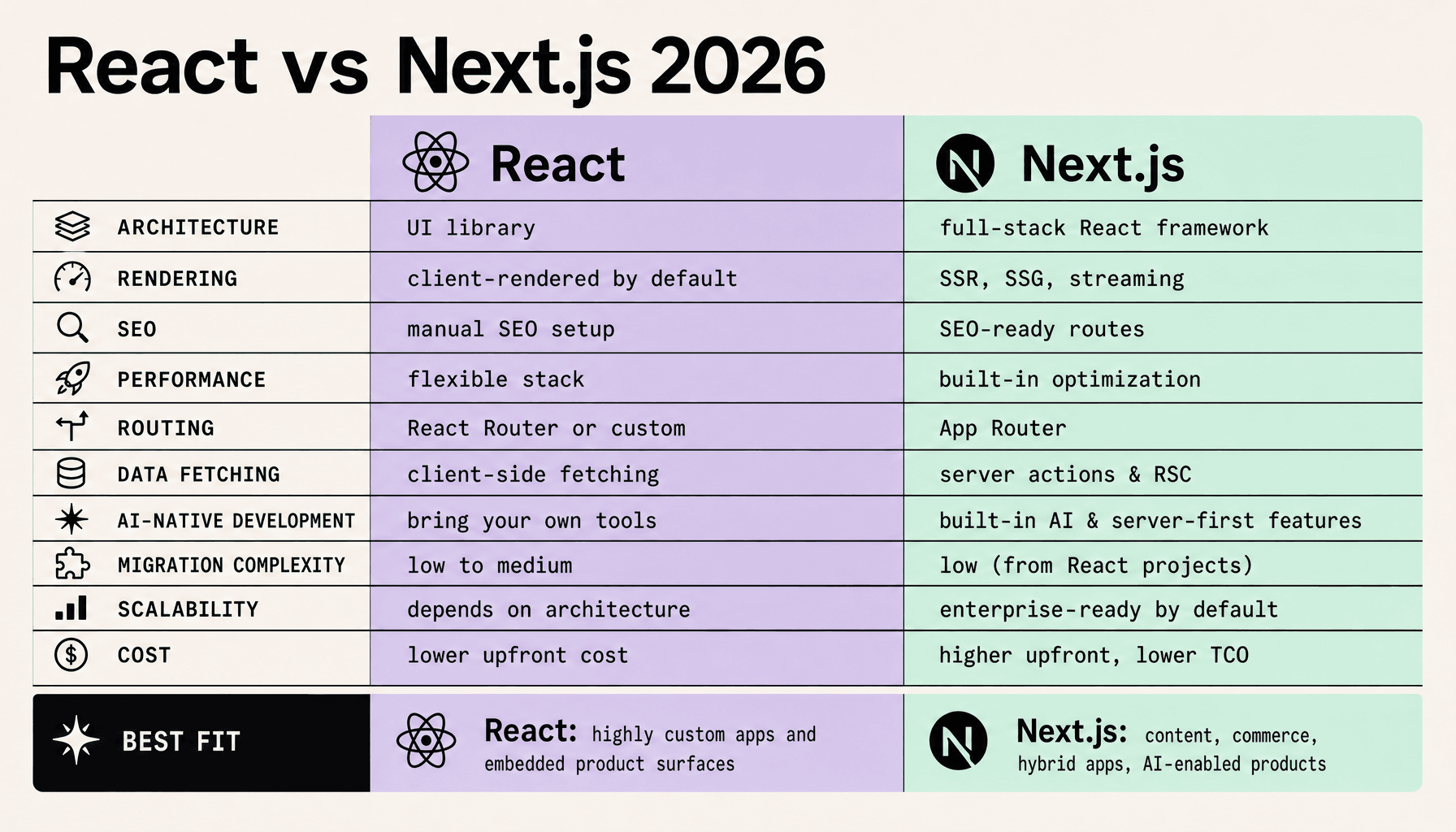
On this page
React vs Next.js 2026: Which One Should You Choose?
If your team is stuck choosing between shipping faster and keeping full architectural control, this is the real React vs Next.js decision in 2026. Choose React if you want maximum control. Choose Next.js if you want built-in routing, rendering options, SEO support, and faster delivery. For legacy products, an extraction-first path is usually safer than a full rewrite.
React vs Next.js Key Takeaways
- Choose based on delivery model, not hype: in React vs Next.js, React gives you architectural freedom, while Next.js 2026 gives you built-in routing, hybrid rendering, metadata, and server-first conventions.
- Next.js wins on public surfaces -- marketing pages, content hubs, search, and commerce routes -- where SEO, Core Web Vitals, and fast first load directly affect results.
- React still fits internal dashboards, complex client-heavy apps, and products with mature frontend infrastructure where a full framework shift adds cost without enough upside.
- For legacy teams, Next.js migration should start with extraction rescue, not a rewrite. Pull high-value routes out first, keep the old SPA where it still works, then phase React migration by route, layout, and data boundary.
- AI-native development changes the decision. If you need server actions, streaming UI, edge execution, and controlled backend integration, Next.js usually gives you the cleaner path. At Imversion Technologies Pvt Ltd, I’d still keep one rule: consistency in environments is critical.
React vs Next.js: Key Differences in Architecture, Rendering, and Delivery
Most teams are not really arguing about React syntax or Next.js features. They are arguing about ownership, speed, and how much infrastructure work they want to carry for the next few years. In React vs Next.js, you either assemble the architecture yourself with React, or you accept more built-in conventions with Next.js and move faster.
React is a UI library. You choose routing, data fetching, cache strategy, metadata handling, image delivery, and deployment shape. That freedom is powerful. Over a 2-3 year horizon, though, it also pushes more architectural work onto your team, and uneven standards can slow delivery faster than people expect.
Next.js 2026 packages those decisions into a full-stack React framework. You get the App Router, Server Components, SSR, SSG, ISR, the metadata API, image optimization, and support for Node and Edge Runtime out of the box. Public pages, content hubs, search surfaces, and AI-assisted workflows can reach production with fewer custom layers.
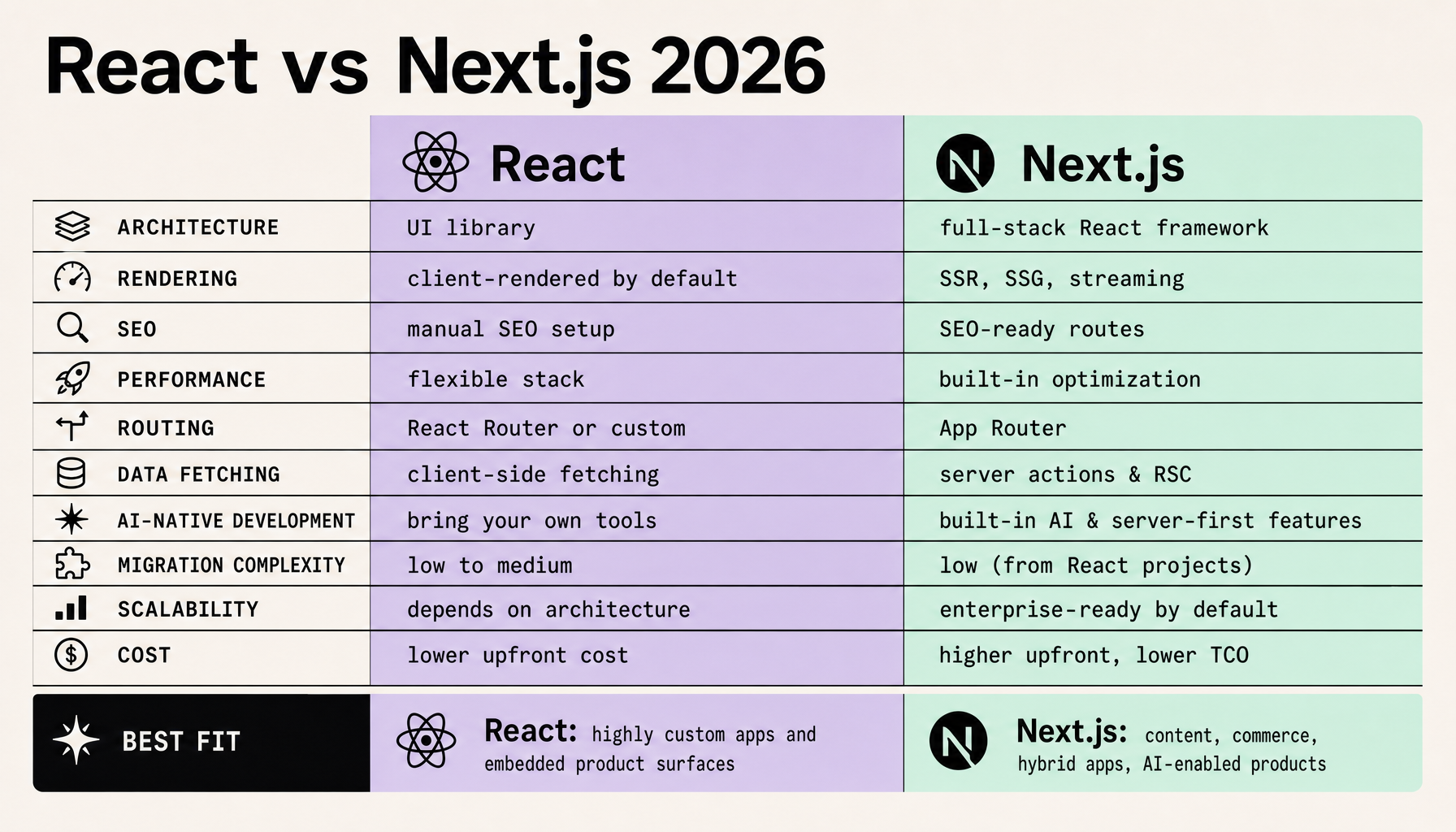
| Dimension | React | Next.js |
|---|---|---|
| Architecture | UI library; assemble your own stack | Full-stack React framework with conventions |
| Rendering | Client-first unless you add SSR/SSG tooling | Built-in SSR, SSG, ISR, Server Components |
| SEO & metadata | Manual setup via libraries and custom patterns | Native metadata API and server-rendered routes |
| Media & assets | Bring your own image pipeline | Built-in image optimization |
| Delivery model | Flexible, but more operational decisions | Opinionated defaults, faster production handoff |
The tradeoff is straightforward. React gives you maximum flexibility for internal dashboards, embedded apps, or products with unusual runtime constraints. Next.js gives you a faster path to SEO-ready delivery, hybrid rendering, and cleaner server-client boundaries.
That flexibility is not free.
With plain React, your team has to standardize route structure, caching rules, head tags, asset optimization, and deployment conventions. Consistency in environments is critical -- otherwise local, CI, and production behavior drift apart, and migration work gets messy fast.
This becomes most obvious in legacy SPAs. If the pain is weak SEO, slow first render, or poor content indexing, a Next.js migration usually works better when you extract public routes first instead of rewriting the whole product. Keep the dashboard where it is. Move the revenue-facing surfaces first. That is usually the safer call.
React vs Next.js 2026 and AI-Native Development: Why the Stack Conversation Changed
AI features changed this choice because they drag frontend architecture into server orchestration, streaming, caching, and security. Add chat, semantic search, RAG pipelines, AI-assisted content generation, or agent workflows, and the stack decision stops being just about components or routing.
This is where Next.js 2026 often becomes the safer default. Its application model keeps routing, server execution, API handling, and streaming UI closer together, which makes AI features easier to ship without stitching together as many separate layers. That matters when you need to render an initial shell quickly, stream partial results, call retrieval systems on the server, and keep provider keys out of the browser.
A common example is a support assistant with retrieval. The browser sends a question, the server handles authentication, fetches context, calls the model, applies response rules, and streams the answer back to the interface. Next.js fits that flow well because rendering and server-side delivery can live in the same implementation model.
React can still support this architecture. But you usually assemble more of it yourself: routing, API boundaries, streaming transport, cache strategy, and deployment shape. For highly customized products or teams with an established backend platform, that flexibility can be useful. Under delivery pressure, it often creates more integration work.
The broader shift is simple: AI-native development favors hybrid, server-first patterns more than purely client-heavy rendering.
AI alone is not a reason for a Next.js migration. But AI features often expose weaknesses in aging React SPAs faster than almost any other requirement.
My recommendation is practical. If your roadmap includes AI search, chat, content generation, or workflow automation on public or SEO-sensitive surfaces, Next.js 2026 is usually the safer default. If your product is mostly authenticated, highly interactive, and already backed by a mature server platform, React may still be the cleaner path.
FAQs
What changed in React vs Next.js for AI features?
AI-native development pushes framework choice toward server-first patterns, streaming, secure model access, and caching strategy.
Is Next.js better for RAG applications?
Often yes, because API routes, server actions, and streaming UI reduce assembly work for retrieval and response delivery.
Can React still support AI-native development?
Yes. But you will usually need more custom architecture around APIs, streaming, auth, and cache control.
Does AI justify a full React migration to Next.js?
No. Start with extraction on high-value surfaces before committing to a full Next.js migration.
Which stack is better for secure model access?
Next.js usually makes it easier to keep secrets server-side and centralize LLM security controls.
Legacy App Extraction Rescue: Modernize High-Value React Surfaces First
A full rewrite feels clean on paper. In production, it is usually where timelines slip and risk multiplies. If you are dealing with a legacy SPA, extract the pages that affect discoverability, conversion, and perceived speed first, then leave the hardest stateful modules in place until the new boundary is stable.
That is the practical middle path in React vs Next.js for 2026.
A strong React migration starts with routes that benefit immediately from server rendering, metadata control, and tighter caching. In practice, the first extraction wave is usually:
- marketing pages
- blog or content hubs
- product or category pages
- the auth shell and shared layout
- AI-assisted search flows
These surfaces are public, SEO-sensitive, and easier to isolate. They also create visible wins fast. Better indexing. Faster first paint. Cleaner route ownership. You get those gains without freezing roadmap work inside the legacy React app.
Teams often make the opposite move and pull dashboards, reporting screens, or deeply stateful admin modules too early. Bad idea. Those areas usually depend on tangled client state, older data-fetching patterns, browser-only libraries, and implicit routing assumptions. Keep them in the legacy SPA at first. Use incremental migration where it pays off most.
Once that boundary is clear, coexistence is straightforward. Put Next.js 2026 in front for extracted routes, keep the legacy SPA for protected app sections, and join them with a reverse proxy or edge routing layer. One domain. Two runtimes. Shared navigation if needed.
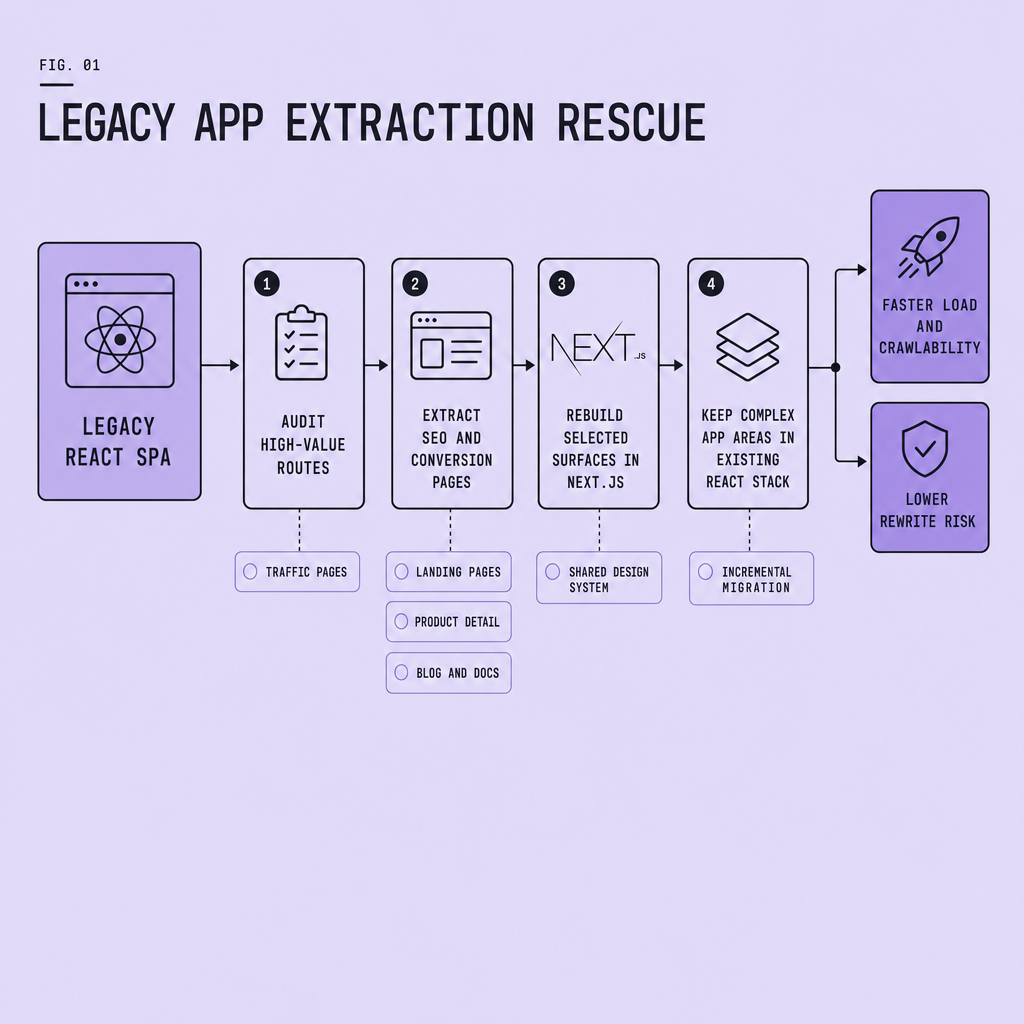
How the hybrid setup works
Use a shared layout and design system across both apps -- often from a monorepo package -- so the user does not feel the seam. Centralize authentication with a shared session or token strategy. Keep routing boundaries explicit, such as /blog, /products, and /search in Next.js, while /app or /dashboard still resolves to the legacy SPA.
Consistency in environments is critical -- especially during Next.js migration -- because auth, cookies, caching, and asset paths tend to fail at the boundaries, not inside the apps themselves.
The tradeoff is operational complexity. You will run two delivery paths for a while. But the risk is lower than a full rewrite, and the wins are measurable before you touch the most fragile parts of the system.
React to Next.js Migration Strategy: Audit, Extract, Rebuild, and Scale
The safest React migration is phased, reversible, and measured. Prove that a narrow Next.js migration improves a real business surface before you expand it. Do not start with a full rewrite.
Audit routes, bundles, and rendering needs
Start with a route audit. Map every URL, data dependency, auth boundary, SEO requirement, and third-party script. Then run bundle analysis to find heavy client code, duplicate libraries, and hydration hotspots. Aging React SPAs often hide expensive patterns behind screens that look “good enough.”
Next, classify each route by rendering mode: static, SSR migration candidate, hybrid, or client-only. Marketing pages, content hubs, search entry points, and public product surfaces usually move first. Dense internal dashboards often stay on React longer.
This is your first go/no-go checkpoint: if you cannot describe route ownership, cache strategy, and rendering intent, you are not ready to migrate.
Extract high-value surfaces first
Do not migrate everything at once. Extract the pages that benefit most from server rendering, metadata control, and improved Core Web Vitals. Put Next.js behind a reverse proxy or edge router, keep the legacy app serving protected areas, and share identity at the boundary.
Use feature flags for route-level cutover. Then ship a canary release to a small percentage of traffic before broader rollout. Small blast radius. Fast learning.
Rebuild shared primitives before scaling
Once the first slice proves out, rebuild the shared layer: design tokens, navigation, auth shell, API clients, error boundaries, analytics hooks, and form patterns. This is where many teams lose time. They migrate pages before stabilizing primitives, then duplicate logic across stacks.
Set architecture checkpoints for caching, server/client component boundaries, image strategy, and AI-native development paths such as streaming responses or server-side orchestration.
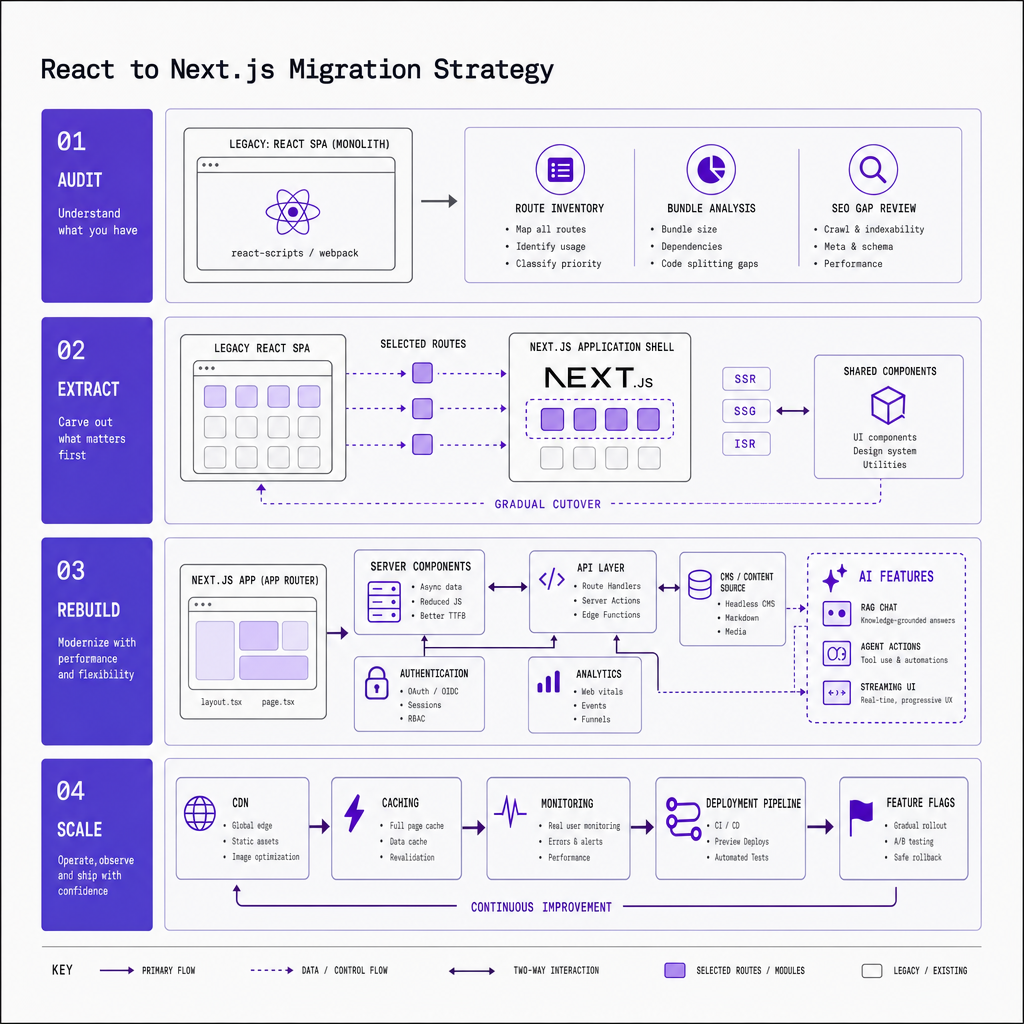
Operational controls: test, observe, and roll back
Your CI/CD pipeline should validate route contracts, visual regressions, auth flows, and Docker build parity across environments. Consistency in environments is critical, because migration bugs often come from config drift, not framework code.
Monitor from day one. Observability should cover logs, traces, frontend errors, Core Web Vitals, and release markers. Define rollback paths before launch -- DNS switchback, proxy reversal, or flag disablement. In Next.js 2026, the teams that do this well are not the fastest rewriters. They are the teams that standardize only after the first extraction slice works in production.
Performance, SEO, Scalability, and Cost Tradeoffs in React vs Next.js
This choice has less to do with preference than with operating model. Plain React can stay lean for dashboards, authenticated apps, and tightly controlled client-side experiences. Next.js usually ships faster on public, crawl-sensitive surfaces because SSR, SSG, metadata, image handling, routing, and streaming reduce implementation burden and make SEO-friendly delivery easier. But Next.js is not automatically faster. Performance still depends on bundle size, caching, data-fetching patterns, hydration boundaries, and how much JavaScript reaches the client.
That leads to the real tradeoff: where do you want complexity to live? With React, you keep more architectural freedom, but you often assemble more of the rendering, routing, and SEO stack yourself. With Next.js, more is built in, but cost can shift into hosting, caching strategy, edge versus node runtime decisions, and platform conventions. This gets sharper once AI features add server orchestration, streaming responses, and stricter security boundaries.
Scalability follows the same pattern. React scales well when your team wants custom control. Next.js scales well when your team benefits from shared conventions and faster delivery across many public routes. The cheapest migration on paper can become expensive if it creates custom SSR, SEO, or orchestration work your team has to maintain long term. The safer choice is the one your team can operate consistently, measure clearly, and extend without rebuilding core delivery assumptions.
Frequently Asked Questions
What is the biggest practical difference in React vs Next.js for teams in 2026?
The biggest practical difference is where complexity lives. React gives teams freedom to assemble their own routing, rendering, and deployment stack, while Next.js centralizes those decisions with framework conventions. That usually means React offers more control, and Next.js offers faster delivery with fewer infrastructure choices to maintain.
How should I estimate React migration or Next.js migration cost before starting?
Estimate migration cost by route, not by application size alone. Audit public pages, shared layouts, auth boundaries, and data dependencies separately, then price the operational overlap of running two systems during transition. The most accurate forecast comes from migrating one high-value route first and measuring build effort, defects, and performance gains.
Is React vs Next.js mainly an SEO decision?
No. SEO is often the visible trigger, but the deeper decision is about rendering strategy, operational ownership, and delivery speed. Teams that choose only for SEO can miss important tradeoffs around caching, backend integration, observability, and long-term maintenance, especially when AI-native development introduces more server-side responsibilities.
Why should I avoid a full Next.js migration for a legacy React app?
A full rewrite increases delivery risk because it forces teams to replace stable and unstable areas at the same time. An extraction-first Next.js migration isolates high-impact routes, preserves working app sections, and gives teams measurable production feedback before expanding scope. That usually lowers rewrite risk, limits regressions, and protects roadmap velocity.
When does React still win over Next.js in 2026?
React still wins when the product is heavily authenticated, highly interactive, and already supported by a mature internal platform for routing, APIs, and deployment. In those cases, switching to Next.js may add framework overhead without enough business return, especially if SEO and public discoverability are not primary growth drivers.
Make Imversion a preferred source on Google
Like this kind of AI and software analysis? Add Imversion as a preferred source so Google can highlight our articles for you in Search, AI Overviews, and AI Mode.