UI Agents vs API Agents: Choosing the Best for AI Automation
Dive into the comparison of UI agents and API agents for AI automation, exploring trade-offs, use cases, and choosing the best interface for your needs.

UI Agents vs API Agents: Which Interface Is Better for AI Automation?
If an automation breaks every time a page layout shifts or a token expires, the argument about “smart agents” stops being interesting fast. The real question in the UI agents vs API agents decision is simpler: which interface will keep working in production without creating cleanup work for your team?
For most AI automation, API agents are the better default. They are faster, more reliable, easier to secure, and much easier to observe in production. UI agents still matter, especially for legacy systems, internal portals, desktop apps, and software with no usable integration. In practice, hybrid agentic workflows often win.
Use API agents for core business logic: creating records, moving data, triggering workflows, and calling webhooks or function-based AI tools. Use UI agents where APIs do not exist or cannot reach the needed step, such as a browser-only approval flow or an old ERP screen. The trade-off is simple. UI agents offer reach, but they break on DOM changes, pop-ups, slow rendering, and MFA prompts. API agents need structured access -- OAuth 2.0, RBAC, tokens, rate limits -- and that consistency is exactly what production systems need. At Imversion Technologies Pvt Ltd, I would treat UI agents as coverage layers, not the primary control plane.
Key Takeaways: UI Agents vs API Agents
- Default to API agents for production AI automation. They give you structured inputs and outputs, lower latency, clearer retries, and better control over auth, rate limits, and schema changes.
- Use UI agents where APIs do not exist or do not reach far enough -- legacy desktop apps, internal portals, brittle ERP screens, and mainframe front ends. Coverage matters.
- In the UI agents vs API agents choice, failure modes are different. UI agents break on DOM changes, pop-ups, timing issues, and CAPTCHA; API agents fail on expired tokens, permission gaps, payload validation, or upstream outages.
- Security and observability should drive the decision, not just build speed. API agents usually fit OAuth 2.0, RBAC, logs, and traces better. Monitoring is as important as deployment.
- Hybrid designs often win. Use API agents for core writes and system-to-system steps, then add UI agents as a last-mile layer for software your stack cannot integrate with directly.
UI Agents vs API Agents: How They Work Differently in Agentic Workflows
Two agents can target the same business outcome and still behave completely differently under pressure. The deciding factor is usually not model quality. It is the interface the agent depends on.
What UI agents do
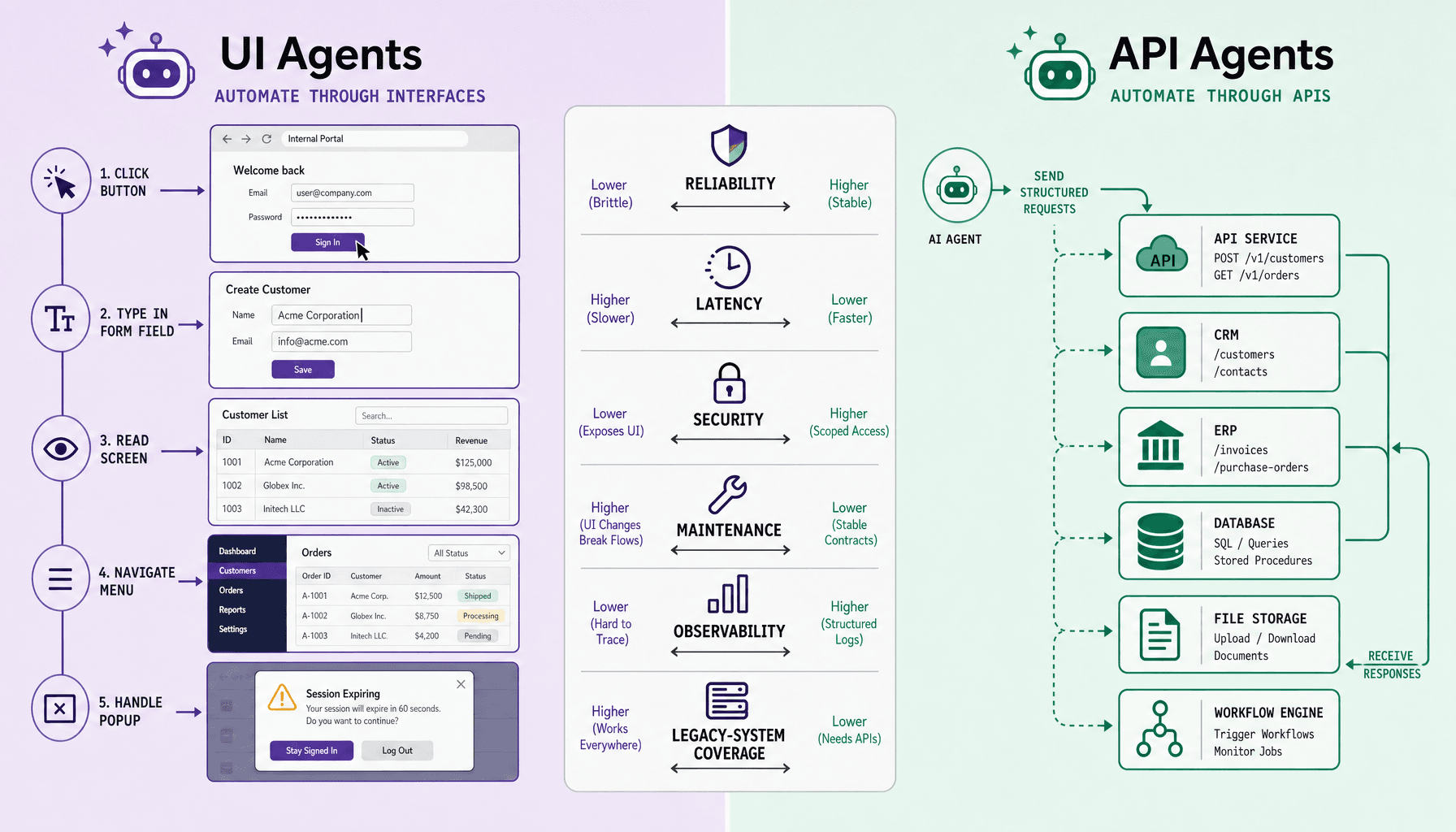
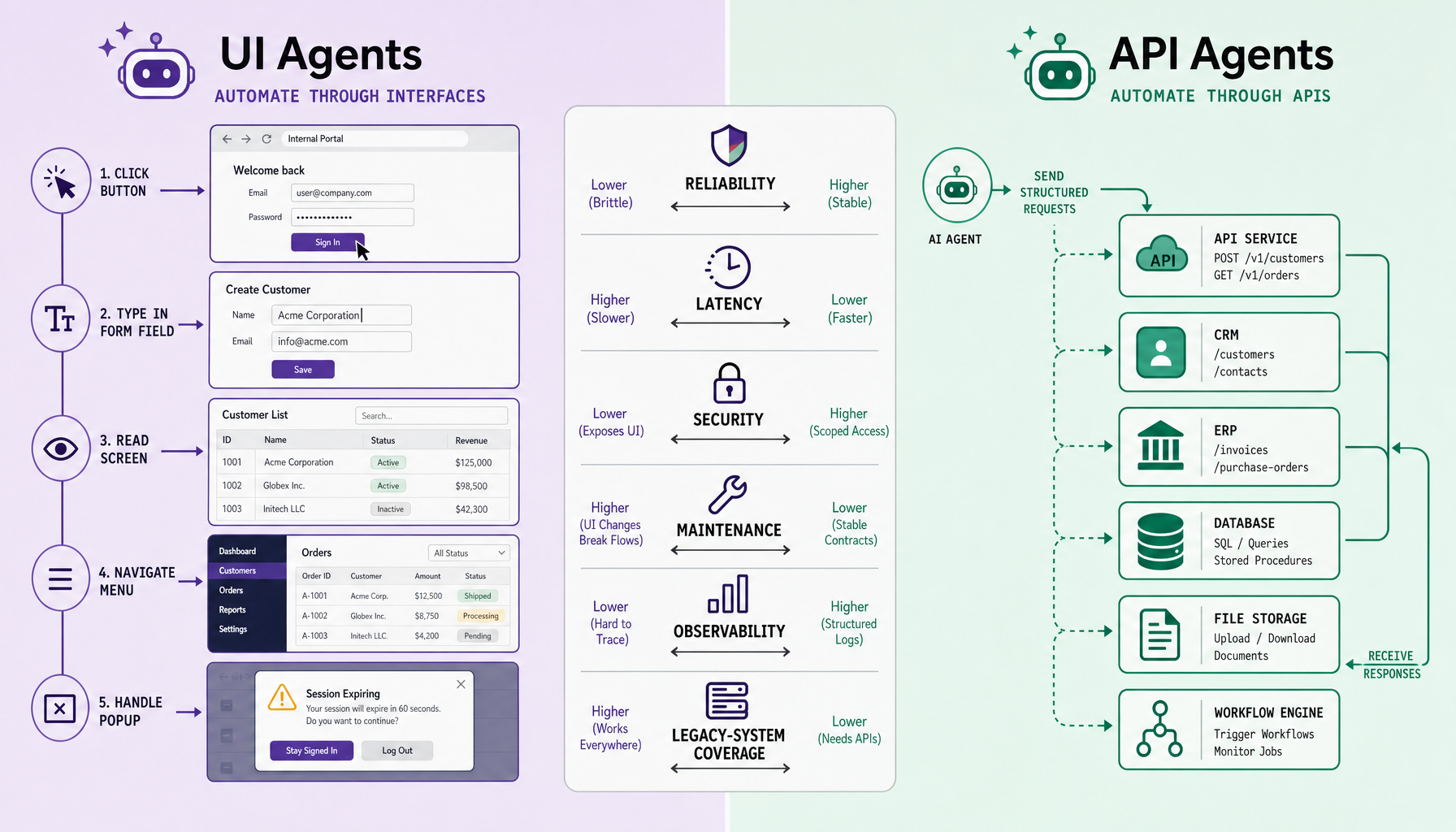
UI agents act through visible surfaces. They use browser automation or RPA-style actions to click buttons, type into forms, read labels, and move through desktop applications or internal portals. A common example is entering lead data into a browser form because no CRM API is available. That gives UI agents broad reach, especially for legacy software, partner portals, and internal tools that were never designed for programmatic access.
That reach comes with fragility. A UI agent operates against pixels, DOM elements, timing, permissions, and layout state. If a modal appears, a selector changes, the page renders slowly, or a login step shifts, the workflow can fail even though the underlying business task has not changed.
What API agents do
API agents work through structured contracts such as function calling, webhooks, and a CRM API. Instead of “find the Create button,” the instruction is “create lead with these fields.” That usually means clearer inputs, predictable outputs, and simpler error handling.
Teams often overestimate what “agentic” means. The more useful distinction is interface layer, not intelligence level. In practice, API agents should be the default for core AI automation because structured systems are easier to validate, retry, log, version, and secure. UI agents fit best as coverage layers for systems APIs cannot reach, or as temporary bridges while a more reliable integration is built.
UI Agents vs API Agents Across Reliability, Latency, Security, and Maintenance
Once the workflow is expected to run repeatedly and survive production noise, the interface choice starts driving most of the operational cost. That is why API agents should usually come first, with UI agents added only where APIs cannot reach.
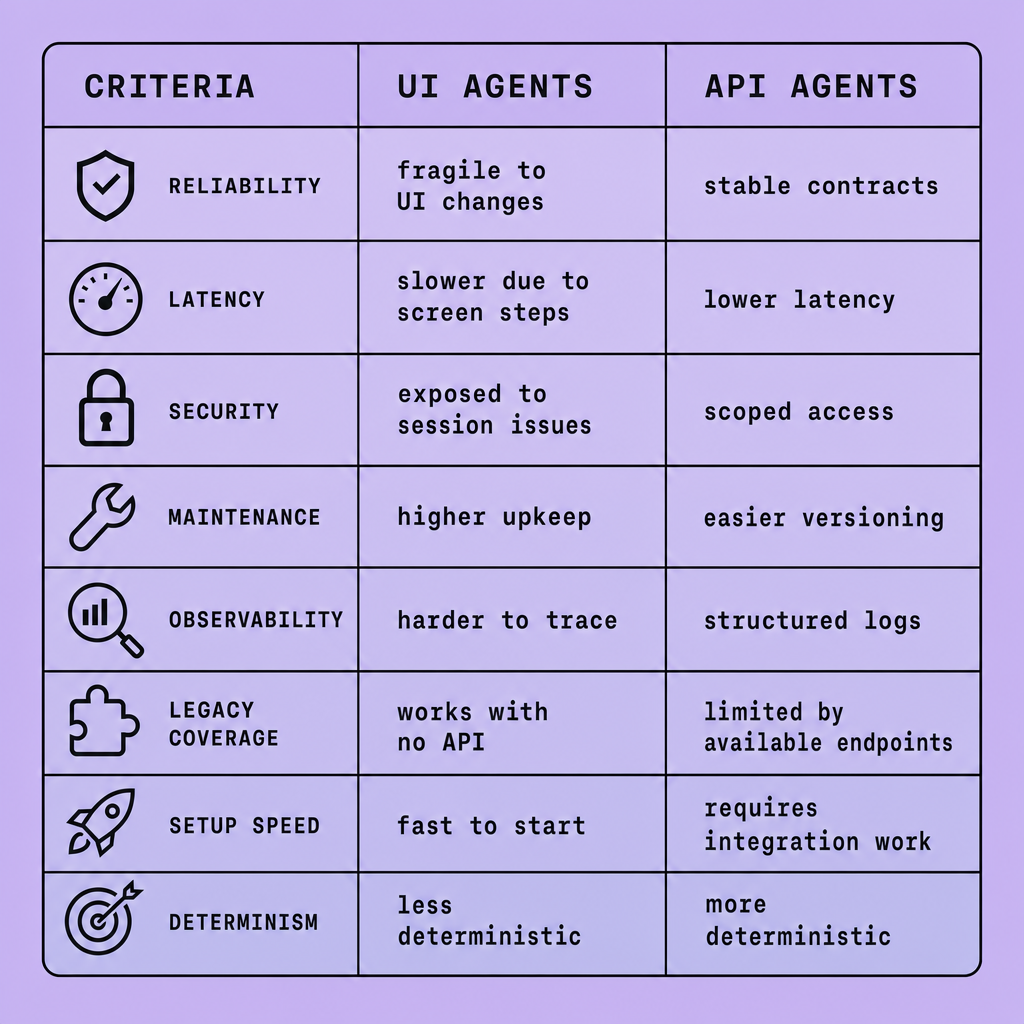
| Criterion | UI agents | API agents | Practical implication |
|---|---|---|---|
| Reliability | Sensitive to rendering, DOM selectors, timing, pop-ups, and visual state | Deterministic requests and structured outputs; explicit success/error responses | Use APIs for core workflows with retries and idempotency; use UI only where no stable integration exists |
| Latency | Slower -- must load pages, wait for scripts, scroll, and validate screens | Faster -- direct request/response or webhook flow | High-volume agentic workflows usually favor APIs |
| Security | Often depends on stored browser sessions or user-level credentials | Cleaner control with OAuth 2.0, RBAC, scoped tokens, and audit logs | APIs are generally easier to harden and review |
| Maintenance | Breaks on layout changes, renamed fields, new modals, and selector drift | Usually affected by version or schema changes, which are easier to test | UI automations need more frequent upkeep |
| Observability | Harder to trace root cause beyond screenshots, browser logs, and step replay | Better logs, tracing, request IDs, and structured errors | Monitoring matters as much as deployment in long-running AI tools |
| Legacy-system coverage | Strong for internal portals, desktop apps, ERPs, and systems with no API | Limited to systems with usable endpoints or tool interfaces | UI wins on reach; APIs win on control |
The main difference in UI agents vs API agents is interface stability. APIs usually provide structured inputs and outputs. UI automation depends on rendering, selectors, timing, and page state, so small interface changes can break a browser-driven flow.
Still, reach can outweigh elegance.
If you need to automate a mainframe front end, a locked-down vendor portal, or a desktop finance app, UI agents may be the only viable option. In that role, they work best as coverage layers rather than primary control planes.
A hybrid design is often the safest choice. Use API agents for system-of-record actions such as creating orders, updating CRM records, or triggering workflows. Then use UI agents for the gaps: downloading a report, pulling data from an internal portal, or completing a task in software with no integration path.
That split limits the blast radius of failures, improves tracing, and makes human handoff clearer when selectors break or tokens expire.
Where UI Agents Fail, Where API Agents Fail, and What Those Failures Cost
What breaks is only half the story. The bigger issue is what the failure leaves behind.
UI agents usually fail at the presentation layer. A changed layout, brittle selector, slow page load, modal interruption, CAPTCHA, session timeout, or anti-bot check can break a step that worked yesterday. The more dangerous pattern is partial completion: the agent may click through half a process, then stall after submitting one form but before confirming the next screen. That creates retries, duplicate entries, inconsistent records, and human cleanup. Browser automation and RPA can extend legacy-system coverage, but they also inherit the instability, timing issues, and edge cases of the interface they drive.
API agents fail differently. Schema changes alter payload shape. Token expiration kills long-running jobs. Rate limits, permission errors, idempotency mistakes, or validation mismatches block otherwise valid requests. Some failures are silent: the endpoint accepts the call, but a business-rule mismatch writes the wrong status, owner, amount, or date. Those are costly because they appear successful until reporting, billing, fulfillment, or audit processes break downstream.
The cost profile differs too. UI failures more often create operational drag: reruns, exception queues, and manual reconciliation. API failures more often create control problems: bad writes at scale, broken integrations, or downstream systems acting on incorrect structured data.
One reason API-first designs age better is visibility. API failures are usually easier to observe with logs, traces, typed responses, and explicit retry logic. UI failures are still sometimes necessary for internal portals, ERPs, or mainframe front ends with no usable integration surface.
Practical rule: default to API agents for core production paths, then use UI agents as a controlled fallback layer where coverage matters more than elegance.
Best-Fit Use Cases for UI Agents, API Agents, and AI Tools in the Real World
A broad interface feels flexible at the start. It often becomes expensive later. The safer approach is to use the narrowest interface that can finish the job reliably.
Best for UI agents
UI agents fit legacy internal portals, desktop tools, ERP screens, web dashboards without APIs, and back-office data entry. They can work well when the only available workflow is the same one a human already performs through a browser or desktop client. But they are best treated as a coverage layer, not a primary control plane, because layout changes, pop-ups, MFA prompts, and slow rendering can interrupt runs.
Best for API agents
API agents fit CRM updates, ticket routing, document workflows, order sync, notifications, data enrichment, and backend orchestration. They are usually a better fit when a system provides structured inputs, explicit errors, and machine-friendly authentication. That gives you clearer retries, logging, access control, and easier monitoring.
A hybrid model is often the practical middle ground. Use a UI agent to extract or submit data in a legacy portal, then hand off to API agents for validation, enrichment, approvals, or downstream writes. This works best when both UI steps and API calls are monitored together.
FAQs
What are UI agents best used for?
Legacy portals, desktop apps, dashboards without APIs, and human-style data entry.
What are API agents best used for?
Structured, repeatable automation such as CRM writes, ticket routing, notifications, and backend actions.
Are UI agents less reliable than API agents?
Usually yes. UI flows are more exposed to layout, timing, and session issues.
When should I use a hybrid AI automation approach?
When one system only supports UI access but the rest of the workflow can run through APIs.
Which is better for long-term agentic workflows?
API agents, unless a critical system has no usable integration path.
Why a Hybrid Approach Often Beats a Pure UI Agents vs API Agents Decision
Choosing one side too early can create unnecessary constraints. In production, the better design is often the one that keeps fragile steps small and keeps critical writes inside structured systems.
A hybrid model is often the best answer. Not because it splits the difference, but because it assigns each interface to the part of the workflow it can handle with the least fragility.
In practice, the strongest agentic workflows stay API-first for deterministic steps, then use UI agents only where no practical integration exists. A common pattern is API orchestration for reads, validation, business rules, and writes, with a single browser automation step for a legacy portal, desktop app, or mainframe front end. Another pattern runs the opposite direction: a UI agent collects information from hard-to-parse screens, then an API agent performs the state-changing action in the system of record, where retries, idempotency, and auditability are easier to enforce.
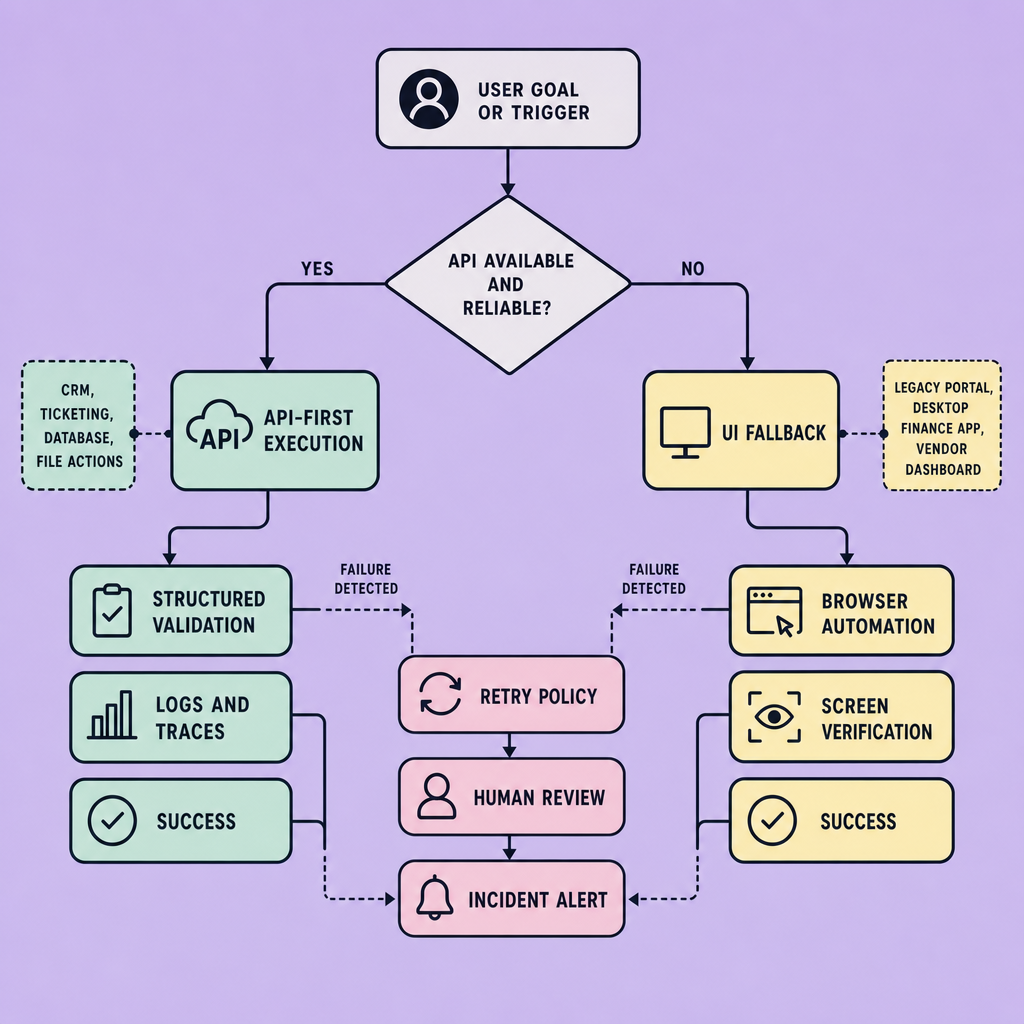
That split lowers operational risk. Reads can often tolerate some ambiguity or delay. Writes usually cannot. If a selector breaks during data collection, you may lose coverage for one run. If a brittle UI action submits the wrong value, the recovery path is much harder.
Treat the UI as a coverage layer, not your primary control plane.
For the UI agents vs API agents decision, hybrid design also improves guardrails. You can require approvals before sensitive actions, route exceptions to human review, and define fallbacks for common failures such as expired tokens, changed page layouts, or unavailable services. The key is discipline: one orchestration layer, clear handoffs, shared logs and traces, RBAC, and explicit rules for when the workflow should retry, pause, or escalate. In that form, hybrid architecture is not a compromise. It is usually the most practical way to balance reach, reliability, and control in production AI automation.
Implementation Best Practices for Reliable AI Automation Regardless of Interface
The difference between a demo and an operational system usually shows up after the first failure. If the workflow cannot be traced, retried safely, or handed off cleanly, the problem is not the model. It is the engineering.
Treat production readiness as an engineering discipline, not a model feature. Reliable AI automation comes more from controls, recovery, and visibility than from giving an agent more autonomy.
Start with interface selection. Use API agents where systems offer stable endpoints, clear schemas, predictable authentication, and event hooks such as webhooks. Use UI agents for internal portals, desktop apps, ERPs, or legacy workflows with no practical integration path. In hybrid designs, keep the UI step as narrow as possible so the most brittle part of the workflow is isolated.
Next, define a minimum observability baseline. Capture structured logs, run IDs, traces across dependent systems, screenshots or session recordings for UI failures, and audit trails for tool calls, auth events, and write operations. Monitoring matters as much as deployment because silent failures are often more damaging than visible ones.
Then lock down execution with explicit safeguards:
- Enforce least privilege with RBAC, scoped secrets, and short-lived credentials.
- Validate inputs and outputs with schema checks before any write or side effect.
- Make mutating actions idempotent, with retries, backoff, and duplicate protection.
- Test in a staging environment that mirrors production data shape and permissions.
- Harden UI selectors with stable attributes, fallback locators, and explicit waits.
- Version prompts, tools, selectors, and rollback plans together.
- Add human review for low-confidence decisions, auth challenges, and irreversible steps.
Finally, design for graceful degradation. If an agent cannot complete a task, it should stop safely, preserve context, and hand off cleanly rather than guess. That discipline is what turns automation from a demo into an operational system.
Frequently Asked Questions
What is the main difference in UI agents vs API agents for compliance-heavy workflows?
API agents are usually the better fit for compliance-heavy workflows because they support scoped credentials, structured audit logs, explicit permissions, and easier evidence collection. UI agents can still be used in regulated environments, but proving who did what, when, and with which data is typically harder when actions happen through a browser session.
How does latency affect UI agents vs API agents in real production systems?
Latency matters because it compounds across every step in an automated workflow. UI agents must wait for pages, scripts, rendering, and visual confirmation, so delays grow quickly in multi-step jobs. API agents usually complete faster because they exchange structured requests directly with systems, which makes them better for high-volume or time-sensitive AI automation.
Why should teams choose a hybrid approach instead of only UI agents or only API agents?
A hybrid approach is best when no single interface covers the full workflow reliably. Teams can use API agents for validated reads, writes, and orchestration, then reserve UI agents for narrow legacy steps that lack integrations. This reduces fragility, keeps system-of-record actions controlled, and avoids rebuilding entire processes around one difficult application.
What are the biggest hidden costs of UI agents vs API agents?
The hidden cost of UI agents is operational upkeep: selector fixes, replay analysis, failed runs, and manual cleanup after partial completion. The hidden cost of API agents is governance: managing schemas, permissions, versioning, and error handling across multiple services. The cheaper option depends on whether your environment is constrained more by interface access or by integration complexity.
Can AI tools use both UI agents and API agents in the same workflow?
Yes, AI tools can combine both interfaces in one workflow, and that is often the most practical design. A workflow might use a UI agent to collect data from a vendor portal, then pass that data to API agents for validation, enrichment, approvals, and final writes. This pattern improves reliability without sacrificing coverage.
Make Imversion a preferred source on Google
Like this kind of AI and software analysis? Add Imversion as a preferred source so Google can highlight our articles for you in Search, AI Overviews, and AI Mode.