AI Agent Reliability: Measuring Success with SLIs and SLOs
Discover the essential metrics for AI agent reliability, including SLIs, SLOs, and error budgets, to ensure effective performance.

On this page
AI agent reliability means measuring whether agents complete useful work safely, quickly, and cost-effectively
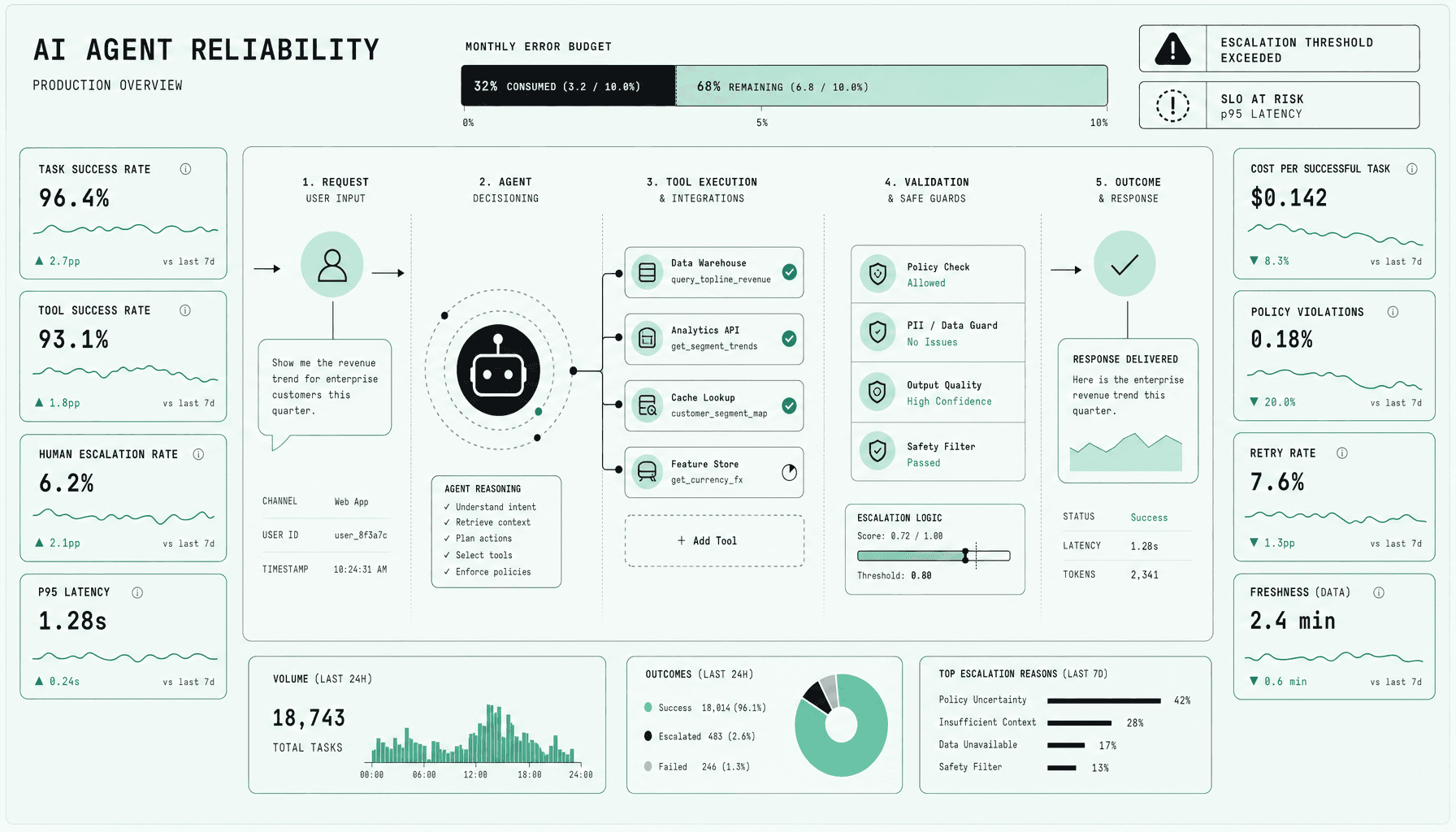
A green status page does not help much if your agent is slow, unsafe, expensive, or keeps handing work back to humans. That is where teams get misled. AI agent reliability is not uptime with a new label. You measure it by whether the agent finishes real tasks safely, fast enough, and at a sane cost -- then enforce that with each SLI, the matching SLO, and error budgets. Core signals include task-success rate, tool success, human escalation, p95 latency, cost per successful task, policy violations, retry rate, and freshness.
This shift matters because an agent can be “up” while still failing users -- slow tool calls, stale retrieval, expensive retries, unsafe outputs, or constant handoffs. In practice, agent observability should start with end-to-end outcomes, not CPU graphs. Monitoring is as important as deployment, because without it you cannot set escalation thresholds, spend error budgets intentionally, or alert on the failures users actually feel.
Key Takeaways for AI agent reliability
-
Track outcome-based SLIs, not just uptime. For AI agent reliability, start with task-success rate, tool success, human escalation, p95 latency, cost per successful task, policy violations, retry rate, and freshness. That is the core of agent observability and useful AI agent monitoring.
-
Set practical SLOs around user outcomes. A good SLO says the agent must finish the task correctly, within an acceptable latency window, without unsafe behavior -- not merely return a response.
-
Use SLI SLO error budgets to control release risk. If policy violations rise, retries spike, or task success drops, slow feature rollout, tighten prompts, or gate risky tool changes.
-
Define escalation thresholds and alert on breach patterns, not noise. Example: alert if human escalation climbs for one workflow, or if p95 latency and tool failure degrade together.
-
Balance reliability with speed and cost. A slower agent that completes safely may beat a fast agent that retries, escalates, or burns tokens without finishing.
Why AI agent reliability needs more than uptime and basic agent observability
If you only watch uptime, you will miss the failures users actually care about. The system can respond and still do the wrong thing.
That gap is the core problem in AI reliability engineering. A model endpoint can stay available, your queue can stay healthy, and every container can pass readiness checks -- while the agent still picks the wrong tool, retrieves stale documents, loops through retries, breaches policy, or hands off work a human never needed to touch. The service is up. The outcome failed.
A simple example: an agent handling account updates can successfully call the model, complete retrieval, and return a response in seconds. But if it selects search instead of the CRM write tool, or writes based on stale retrieval, the user still gets a bad result. Traditional uptime sees green dashboards. Users see failure.
Outcome reliability is the unit that matters
For AI agent reliability, the right question is not “Was the service available?” It is “Did this run complete the task within latency, safety, and cost limits?” Treat each agent run as a service transaction with outcome, latency, safety, and cost attributes. That gives you SLIs and SLOs that map to real trust.
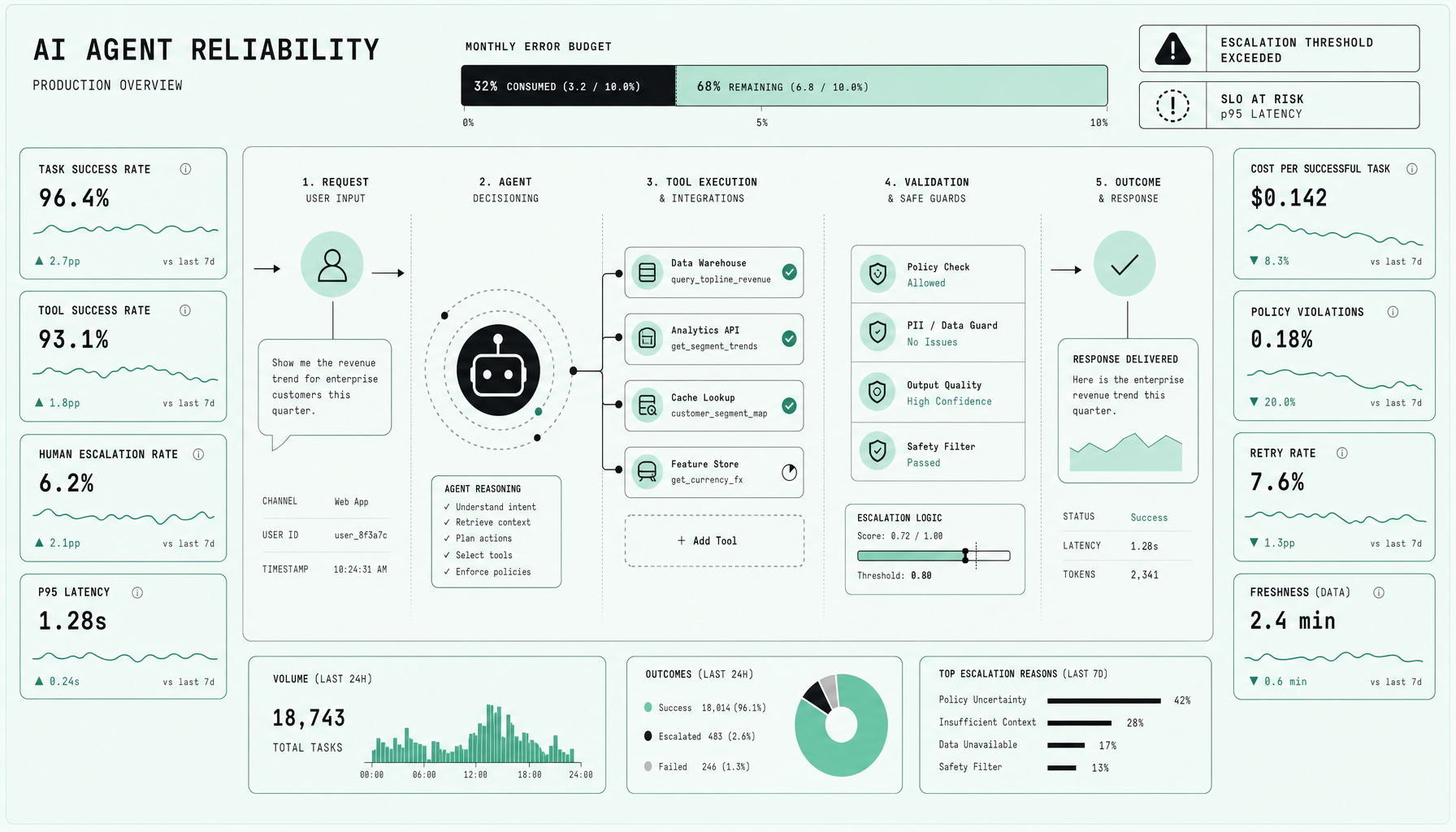
You need to measure task-success rate, tool success, human escalation, retry rate, policy violations, freshness, cost per successful task, and p95 latency. p95 latency matters because tail behavior is what users feel when an agent stalls on retrieval, waits on tool calling, or bounces across multiple model calls. Average latency hides that pain.
Basic agent observability is not enough
Plenty of teams stop at logs, prompt traces, and model response times. Useful. Still incomplete.
You need agent observability that follows the full path: request intake, prompt assembly, retrieval, model calls, tool calling, policy checks, memory access, final action, and final outcome. In practice, that means distributed tracing for the whole run, not isolated component dashboards.
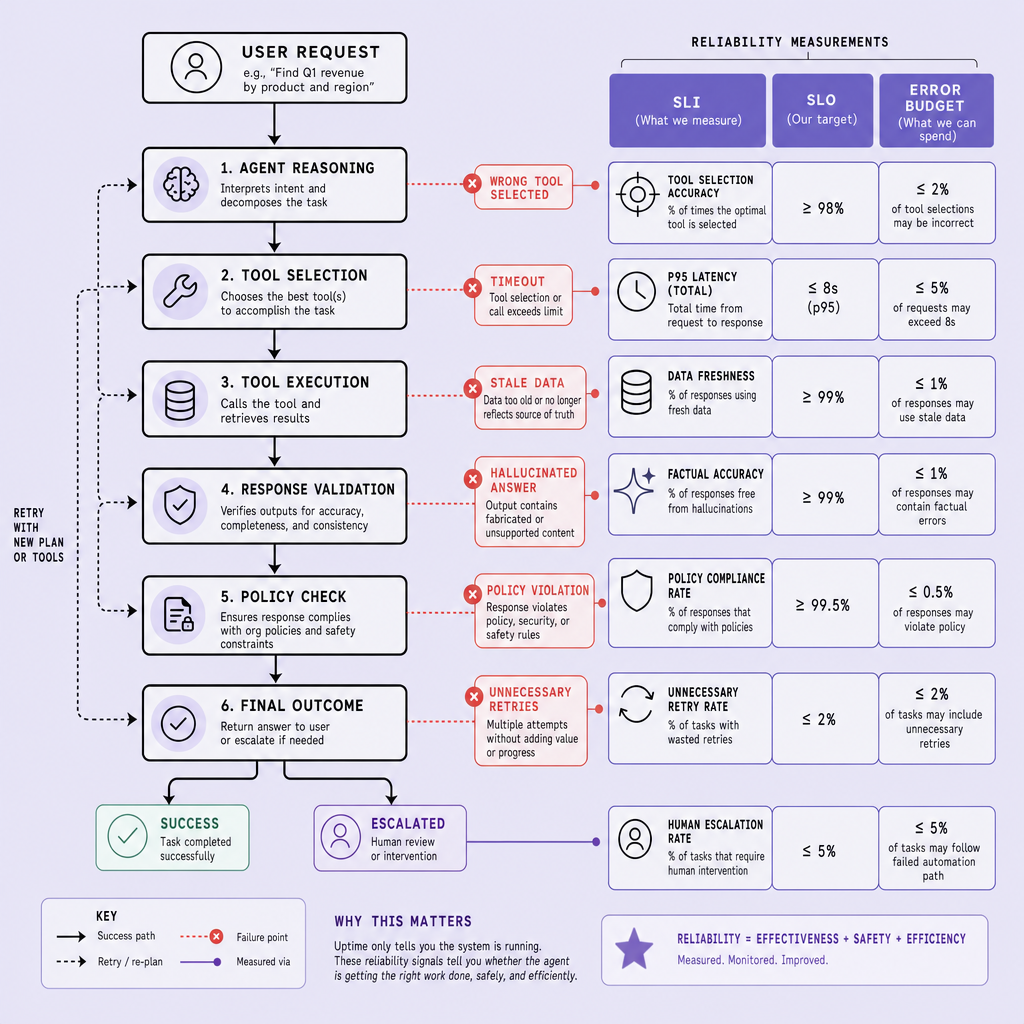
If you cannot connect a failed outcome to the exact retrieval step, tool call, or policy check that caused it, you do not have usable observability.
At Imversion Technologies Pvt Ltd, I’d treat monitoring as equal to deployment for agent systems because blind automation fails quietly. And quiet failures are the expensive ones.
Core SLIs for AI agent reliability: the metrics that matter in production
Production issues usually show up first in outcomes, latency, or spend. Not in neat infrastructure charts. If you want a practical SLI set, start with metrics that reflect user outcomes and operational risk -- not just whether the agent answered.
The operational SLI set to use first
For most production agents, these eight AI agent performance metrics give you the clearest view of AI agent reliability, agent observability, and AI agent monitoring:
-
Task-success rate = successful end-to-end task completions / total task attempts.
Example: 920 successful resolutions out of 1,000 requests = 92%. A low value usually means the agent is failing on reasoning, tool use, workflow orchestration, or handoff design. -
Tool success = successful tool calls with valid outputs / total tool calls.
Measure this per tool -- CRM lookup, search, ticket write, database update. Low tool success often signals brittle integrations, auth failures, schema drift, or bad input formatting. -
Human escalation = sessions handed to a human / total sessions.
A high value can mean the agent is underpowered or overly cautious. But low is not automatically good. If escalation drops while policy violations rise, you made the agent riskier, not better. -
p95 latency = the completion time under which 95% of tasks finish.
Use end-to-end task latency, not only model response time. High p95 latency usually points to slow tools, long context windows, retries, or queueing under load. -
Cost per successful task = total model + tool + compute cost / successful tasks.
Example: if a workflow costs $240 to run and completes 800 tasks successfully, cost per successful task is $0.30. Rising cost can mean too many retries, expensive model selection, or poor prompt and tool efficiency. -
Policy violations = policy-breaking outputs or actions / total sessions or actions.
Track unsafe content, unauthorized actions, data exposure, or compliance misses. Security should not be optional -- this metric belongs in AI agent monitoring from day one. -
Retry rate = retries triggered / total tasks or tool calls.
A high retry rate often hides deeper failure modes. The agent may still “complete” tasks, but with worse latency and cost. -
Freshness = percentage of responses or actions using data within the required freshness window.
For retrieval or operational data, define the window explicitly -- minutes, hours, or by last successful sync. Low freshness points to stale indexes, delayed pipelines, or cache issues.
Start small: define top-level SLIs first, then break them down by workflow, model, tool, or customer tier after the baseline stabilizes.
Here is the tradeoff teams miss. You cannot optimize one metric in isolation. Lower escalation, fewer retries, or cheaper model usage can all look good -- until task-success rate, freshness, or policy safety degrades.
How to define SLOs and error budgets for AI agents without overpromising
This is where teams often overstate reliability and box themselves in later. Set SLOs from observed behavior, not ambition. If your agent is “up” but still slow, unsafe, or wrong, your target is fiction. Good AI reliability engineering starts with a baseline, then turns each SLI into a promise you can actually operate.
Do not use one global SLO for every workflow.
Customer support, internal ops, and research assistants have different failure costs. A support agent that writes to a CRM or triggers refunds needs tighter targets than a low-risk research assistant that drafts notes from a retrieval pipeline. Separate high-risk actions, write operations, and policy-sensitive tasks from low-risk summarization or brainstorming.
A practical pattern:
- Start with a rolling window -- usually 7 days for fast-moving systems, 30 days for steadier workloads.
- Use your baseline first. If task-success rate is 88%, do not publish a 99% SLO next week.
- Tie each SLO to one clear SLI and one workflow.
Example SLO statements:
- Customer support agent: over a rolling 30-day window, maintain task-success rate of at least 90% for password reset and order-status flows, with policy violations below 0.5%.
- Internal ops agent: over a rolling 7-day window, keep tool success for ticketing and CRM updates at or above 98%, with p95 latency under 12 seconds.
- Research assistant: over a rolling 30-day window, keep freshness within the last indexed update for 95% of answers, while human escalation stays below 20% for low-risk queries.
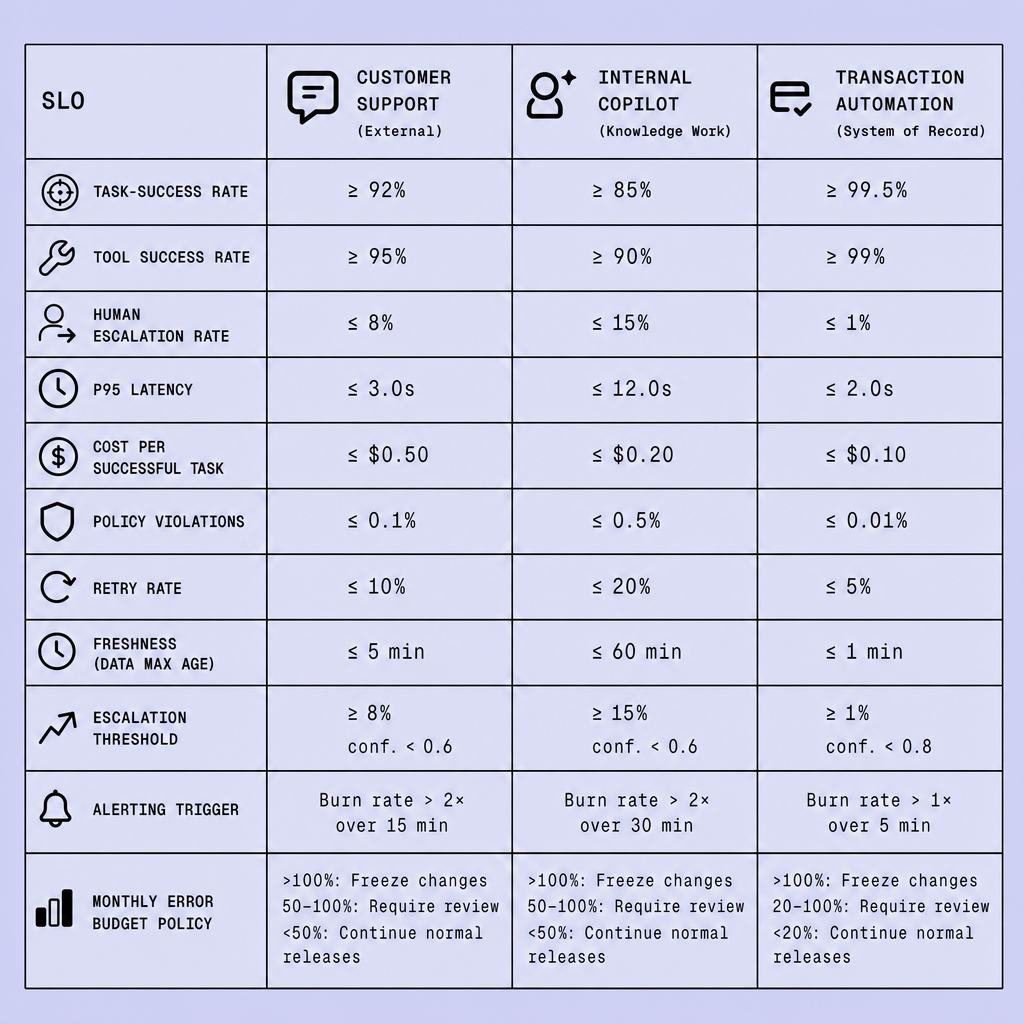
Error budgets make these targets enforceable. If your SLO is 95% task success over 30 days, your error budget is 5% failed tasks in that window. Every bad completion, policy breach, timeout, or retry storm consumes that budget, depending on how you define failure.
Aggressive SLOs protect users, but they can also slow iteration, raise cost per successful task, and force earlier human handoff.
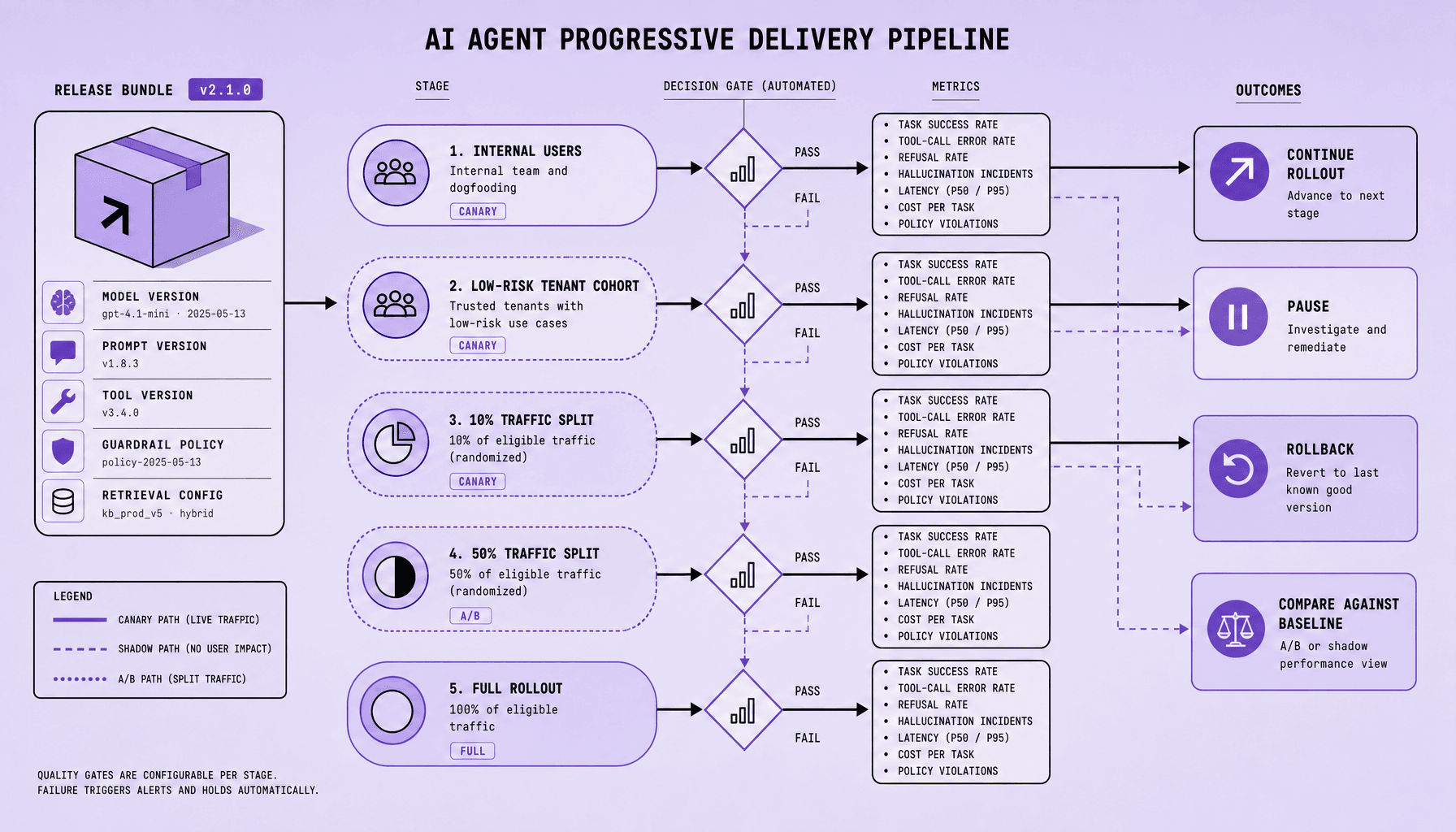
Use error budgets for release gating and autonomy limits. If the budget burn rate spikes after a prompt change or model swap, pause rollout. If retries rise, tighten escalation thresholds. Monitoring is as important as deployment -- because SLI SLO error budgets only work if agent observability shows budget burn before users feel it.
Escalation thresholds and alerting rules for AI agent reliability monitoring
Bad alerting makes an already noisy system worse. Teams get paged for symptoms, miss the real failure, and lose trust in the signals. Set alerts on user impact and budget burn, not on every raw event. Good AI agent monitoring ties alerting to the same SLI SLO error budgets you use to define reliability.
Alert on sustained degradation, not isolated blips
A practical rule: page only when a threshold is breached long enough to threaten safety, user experience, or error budgets. For example:
- Task-success rate: page if it drops below your SLO target for two consecutive windows, or if the short-term burn rate suggests you will exhaust the monthly budget fast. Open a ticket if the drop is small and confined to one workflow.
- p95 latency: page if p95 doubles from normal and blocks user-facing tasks. Route to a non-paging notification if latency rises but task completion stays healthy.
- Policy violations: page immediately on any meaningful spike. Security should not be optional -- a low-volume safety breach can matter more than a high-volume latency blip.
- Tool success: trigger automated fallback first if a single dependency, like CRM lookup or search, starts failing in bursts. Page if fallback also degrades task-success or causes unsafe behavior.
- Retry rate: alert when retries surge alongside lower task success or higher cost per successful task. Retries alone can be noisy.
- Freshness: open a ticket for stale retrieval data in low-risk flows; page if stale data can drive wrong actions, quotes, or decisions.
Map each alert to a response
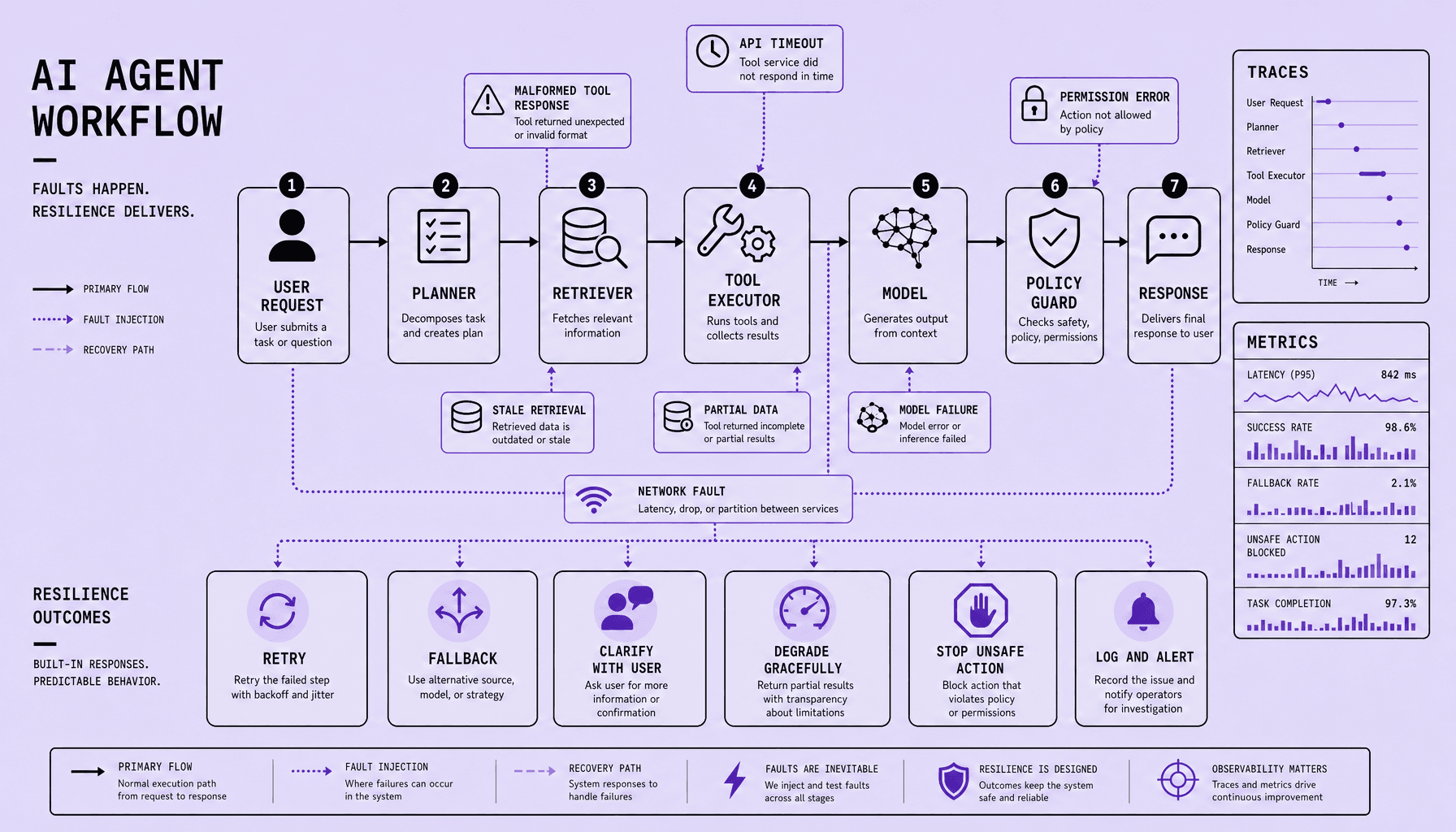
An alert without a response plan is just background noise. Your incident response should be explicit. Immediate page for policy violations, broken writes, or severe task-success collapse. Ticket for slower trends, such as freshness drift or rising human escalation. Automated fallback for partial failures -- switch models, disable a flaky tool, serve read-only mode, or hand off to a human-in-the-loop queue.
Human escalation should be a safety valve, not a hidden failure sink.
If human escalation rises above its expected band, treat it as reliability degradation in agent observability, not proof that the system is coping. Monitoring is as important as deployment. If you cannot see budget burn, fallback rates, and operator load together, your alerting is incomplete.
Frequently Asked Questions
What is a good starting point for AI agent reliability if my team has no SRE process yet?
Start with one workflow, one owner, and a small SLI set tied to user outcomes. Track task-success rate, p95 latency, human escalation, and policy violations first. Then define one realistic SLO per workflow and review failures weekly. This creates a usable AI agent reliability process without forcing a full platform overhaul.
How does AI agent reliability differ from model accuracy?
AI agent reliability measures whether the full system completes useful tasks safely, quickly, and within cost limits. Model accuracy measures how often a model prediction or response is correct in isolation. An accurate model can still power an unreliable agent if retrieval is stale, tools fail, or workflows loop through retries.
Why should error budgets matter for AI agents that already have human fallback?
Human fallback reduces risk, but it does not erase reliability problems. If agents consume too much operator time, the system is still failing economically and operationally. Error budgets make that visible by limiting acceptable failure, escalation, and unsafe behavior before teams slow releases, tighten autonomy, or improve safeguards.
How often should teams review SLOs for agent observability and performance?
Teams should review SLOs on a fixed cadence and after major workflow changes. Weekly reviews work well for fast-moving agents, while monthly reviews fit steadier systems. The goal is to confirm that targets still match user expectations, operational cost, and current failure modes rather than becoming stale reporting artifacts.
What is the most common mistake in AI agent reliability alerting?
The most common mistake is alerting on component noise instead of outcome risk. Teams often page on model latency, isolated tool errors, or token spikes without checking whether users are actually impacted. Better alerting ties signals to budget burn, failed task outcomes, unsafe actions, or sustained escalation pressure.
Make Imversion a preferred source on Google
Like this kind of AI and software analysis? Add Imversion as a preferred source so Google can highlight our articles for you in Search, AI Overviews, and AI Mode.