AI CRM Automation: Streamlining Workflows for 2026
Explore the balance of AI CRM automation and human intervention in sales processes. Discover best practices and tips for implementation.

AI CRM automation works best when it automates tasks, not trust
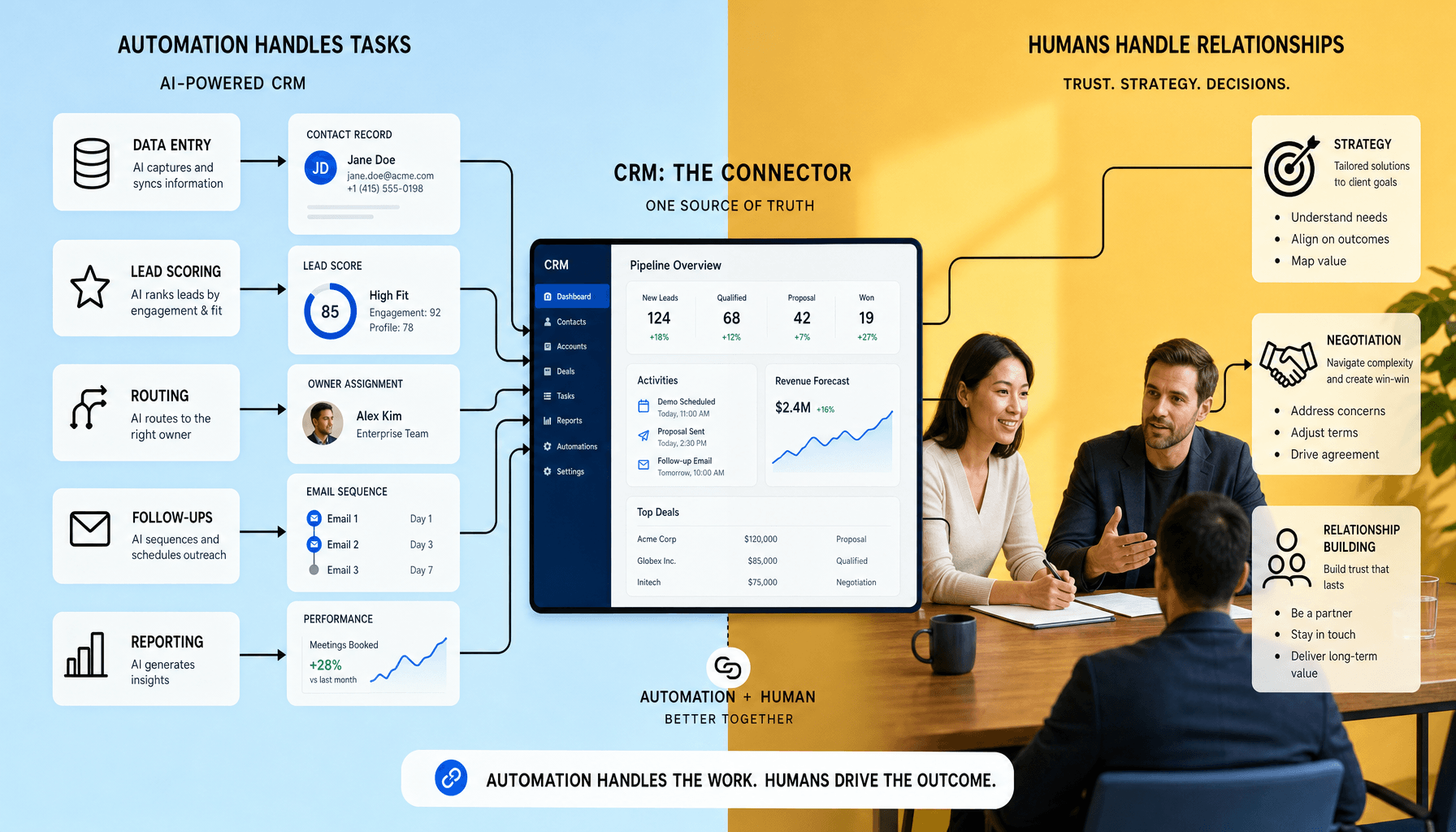
When CRM automation starts writing, routing, and deciding too much on its own, teams feel the damage quickly. Replies get colder. Lead quality gets noisier. Reps spend more time fixing the system than benefiting from it. AI CRM automation works best on repetitive, data-heavy work -- not the moments where buyers judge credibility, intent, and fit. We use AI CRM and CRM workflow automation to speed up data entry, lead scoring, routing, follow-ups, and reporting, while humans keep ownership of strategy, negotiations, and relationship-building.
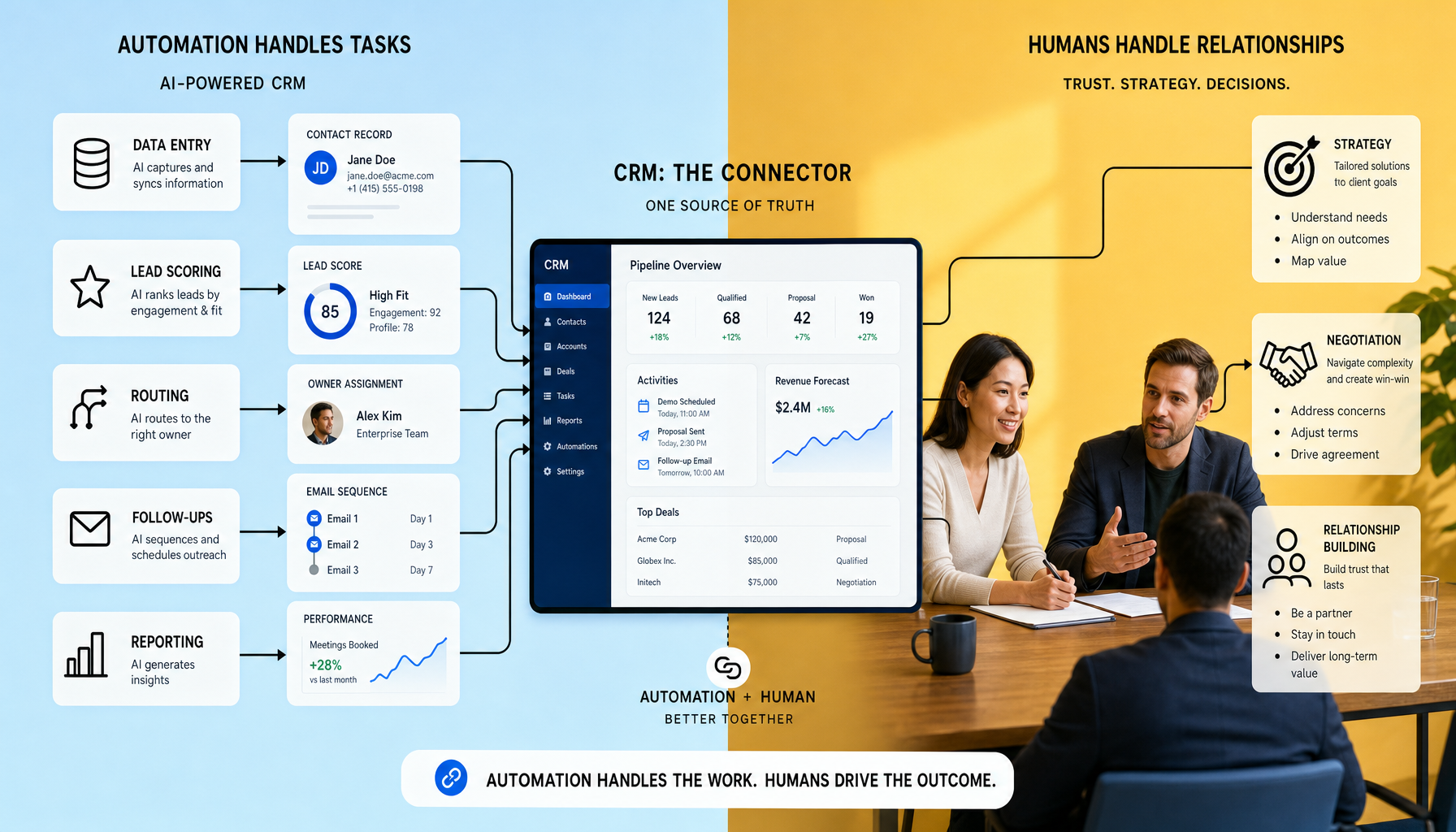
That line is easy to blur. Teams often over-automate outreach in Salesforce, HubSpot, Zoho CRM, Pipedrive, or Microsoft Dynamics, then wonder why replies feel colder and deal quality drops. Our view is simple: user experience is as important as functionality, so AI sales automation should remove admin friction and improve timing, not fake trust. At Imversion Technologies Pvt Ltd, we treat CRM AI as decision support first -- automate the repeatable, escalate the consequential.
Key Takeaways for AI CRM automation
- Automate the repeatable first: use AI CRM automation for data entry, lead scoring, lead routing, follow-up sequences, and reporting inside Salesforce, HubSpot, Zoho CRM, or Dynamics. Fast wins live there.
- Keep humans on consequential work: strategy, pricing discussions, negotiations, exception handling, and relationship-building should not be handed to CRM AI or AI sales automation. Trust is earned, not auto-generated.
- Build CRM workflow automation around clear handoff points -- for example, route by territory or score threshold, then require rep review before proposal-stage actions.
- Start small, measure hard. A 30/60/90-day rollout with field audits, response-time KPIs, and sequence reviews is safer than automating everything at once.
- User experience is as important as functionality, so avoid generic outreach, bad scoring logic, and noisy dashboards that create more friction than value.
What AI CRM automation actually means in day-to-day sales and marketing
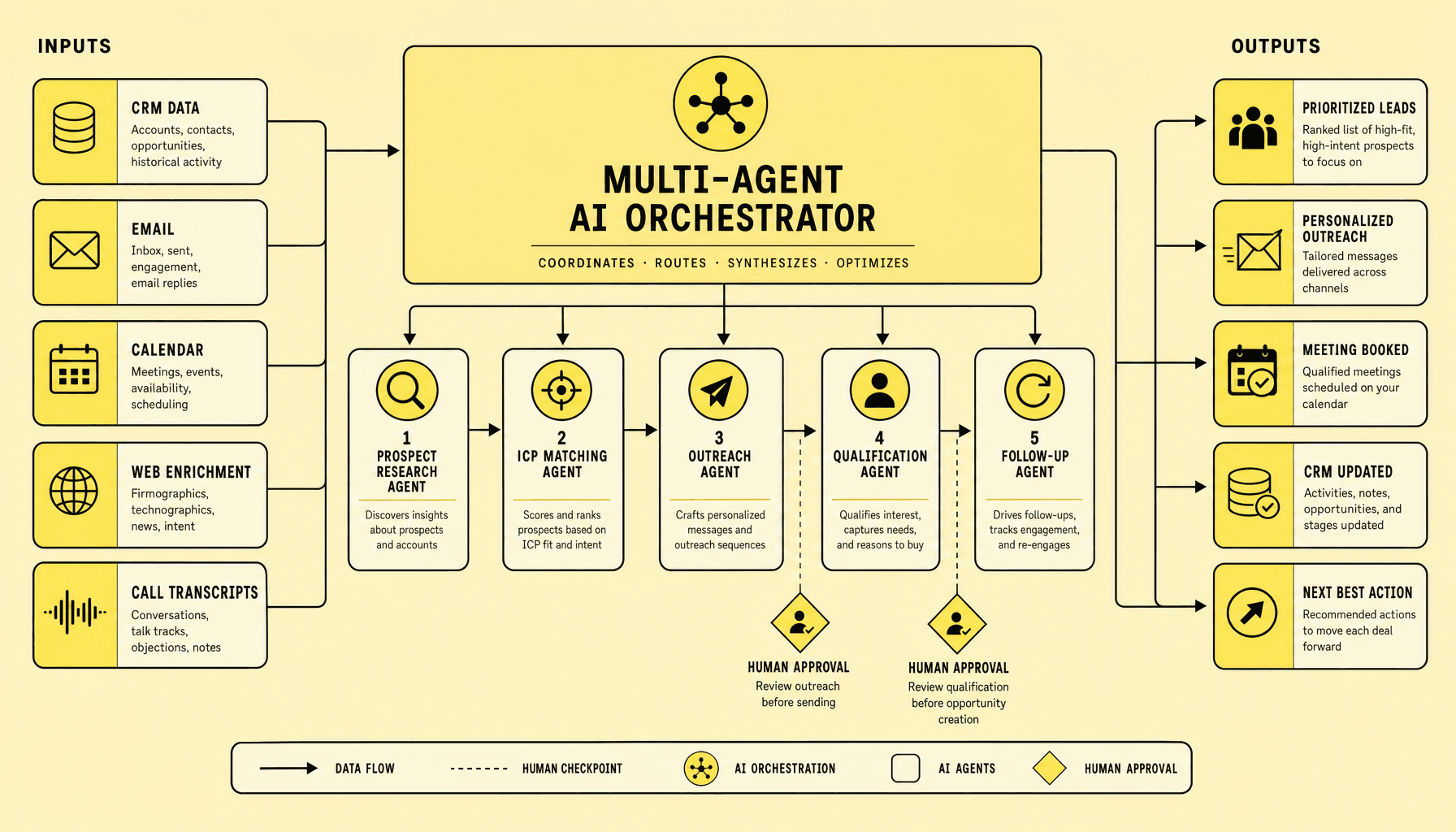
Most teams do not struggle to understand what AI is. They struggle to see where it actually helps inside daily sales and marketing work without creating new mess. In practice, AI CRM automation changes how the CRM prioritizes records, recommends actions, drafts outreach, and helps teams decide where human attention should go next.
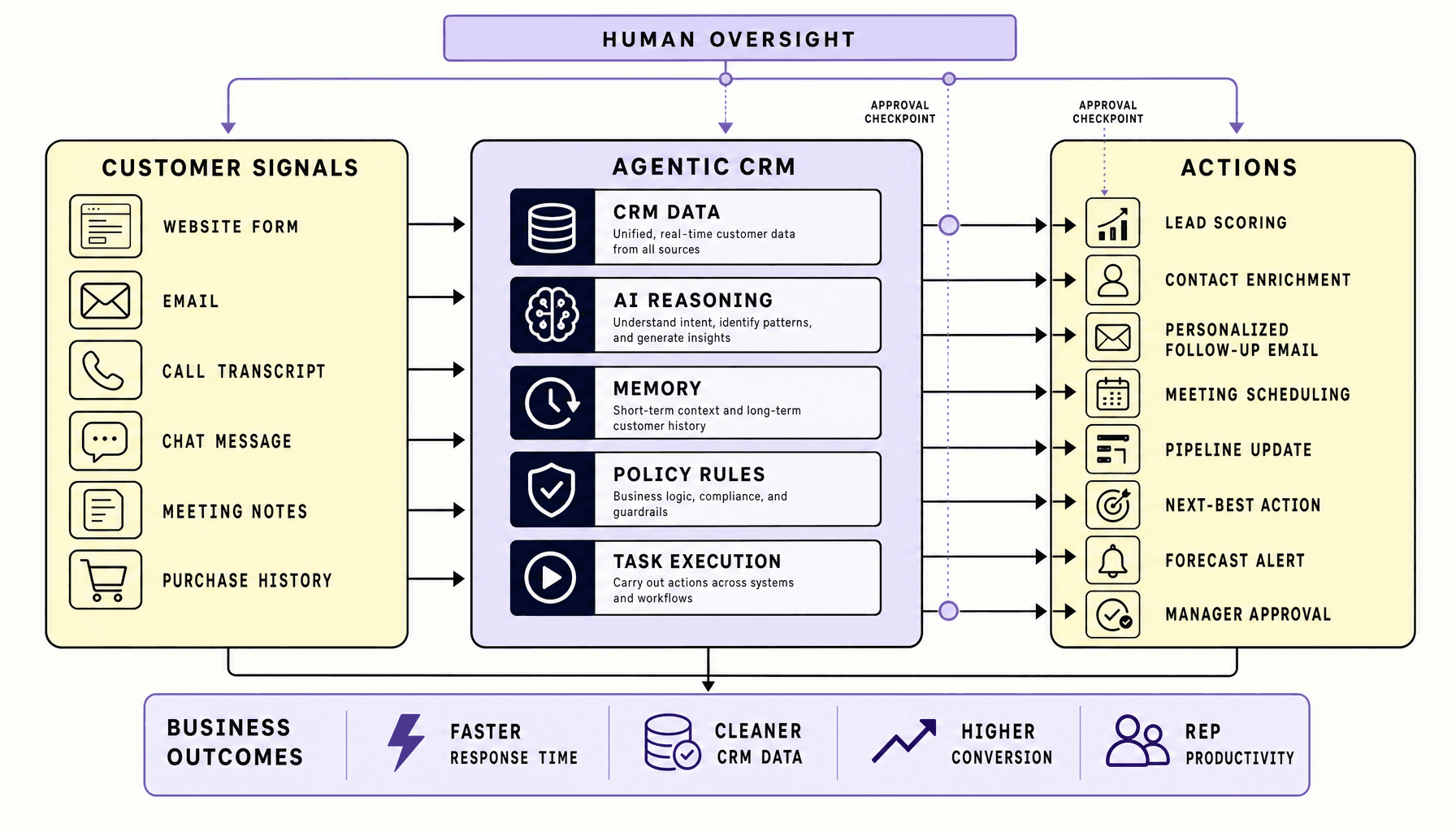
Traditional CRM workflow automation follows fixed rules: if a form is submitted, assign the lead; if a deal sits for seven days, trigger a reminder. Useful, but limited. AI CRM systems add pattern recognition, predictive scoring, summarization, and content assistance on top of those triggers. Instead of only moving records through a process, they can score leads from behavior, suggest a next best action, flag deal risk, summarize call notes, or draft a follow-up inside tools like Salesforce Einstein or HubSpot AI.
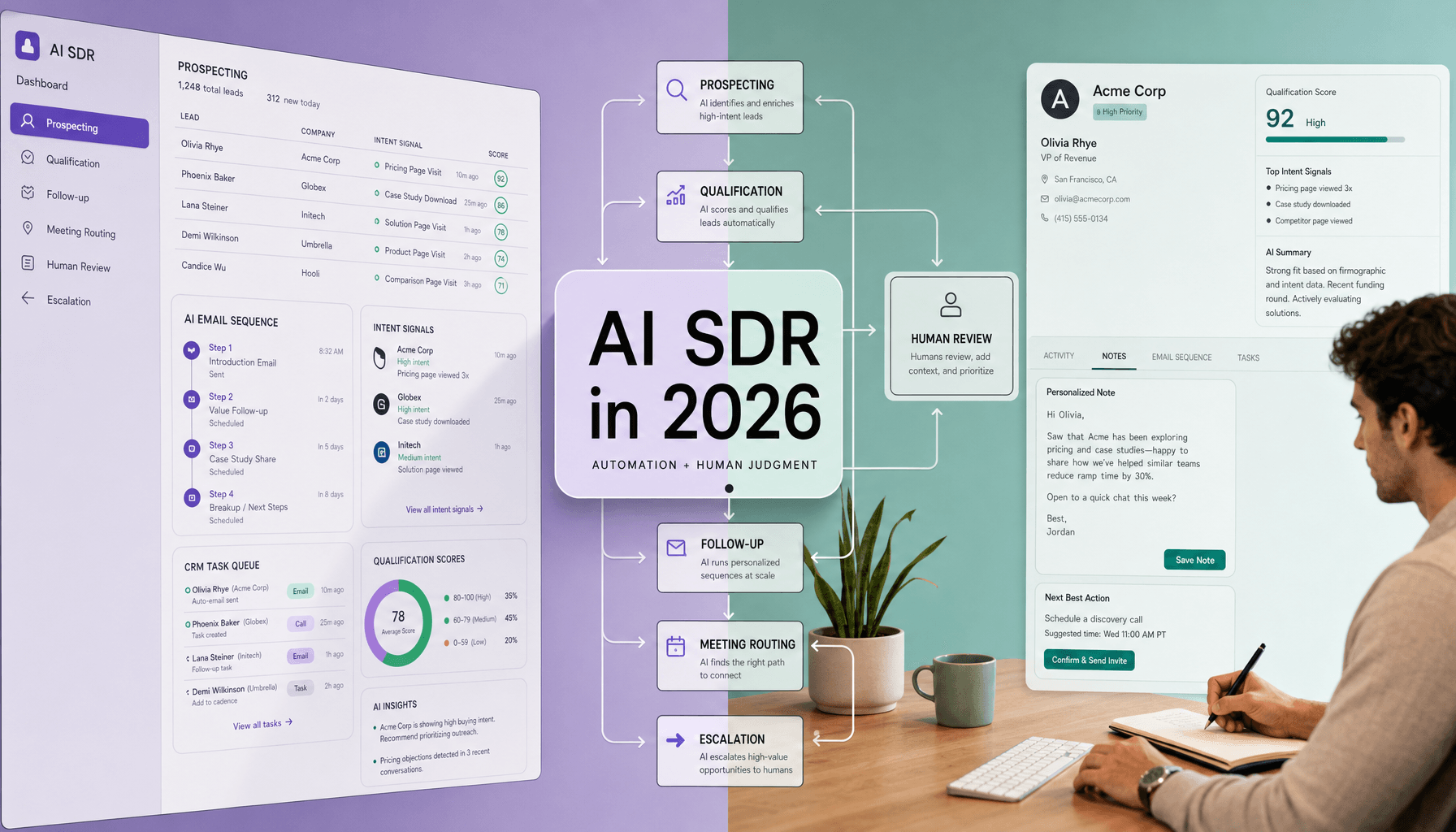
That shift changes the texture of daily work. A standard workflow sends the same sequence to every demo request. AI sales automation can adjust timing, route by likely fit, highlight accounts that need human review, and help reps focus on the few opportunities most likely to move.
The grounded recommendation is to start with repeatable decisions that use clear inputs: lead routing, follow-up timing, data cleanup, note summaries, and basic prioritization. The tradeoff is real. AI can improve efficiency while also introducing bad guesses, awkward messaging, or false confidence if teams automate too far. Keep humans on strategy, negotiation, exception handling, and relationship moments where tone, context, and trust matter most.
What AI CRM automation should automate in CRM first
The fastest way to get value from CRM AI is not to automate everything. It is to pick the work nobody wants to do manually, the work that happens at volume, and the work you can audit without debate. Start there. The goal is not full autonomy. It is to remove admin drag while keeping human judgment on customer-facing decisions.
Data entry and data enrichment
This is usually the best first use case. An AI CRM can log emails, calls, meeting notes, field changes, and contact updates across Salesforce, HubSpot, Zoho CRM, Pipedrive, or Microsoft Dynamics. It can also fill standard firmographic fields and flag missing values.
Why AI fits: the task is structured and repeatable. Human review still matters for sensitive notes, duplicate merges, and custom fields tied to segmentation or compliance.
Lead scoring
Lead scoring is another strong starting point because it combines rules with behavior patterns. Page visits, form submissions, email engagement, company size, and product interest are all machine-readable signals.
Why AI fits: it can rank records quickly and consistently across large volumes. The caveat is simple: bad inputs create false confidence. Review the model regularly, and do not let scores replace rep judgment on strategic accounts.
Lead routing
Round-robin routing, territory assignment, language matching, and product-line ownership should not depend on manual queue checks.
Why AI fits: routing logic is operational, time-sensitive, and measurable. Human overrides are still needed for named accounts, conflict rules, and edge cases.
Follow-ups and email sequences
Speed helps. Generic speed does not. AI sales automation is useful for instant acknowledgments, reminder tasks, and post-form-fill or post-demo email sequences.
Why AI fits: these workflows are trigger-based and easy to monitor. Keep humans in the loop for pricing questions, objections, and multi-stakeholder deals. A practical tradeoff: faster follow-up helps coverage, but overly generic messages can reduce trust.
Reporting, dashboards, and pipeline forecasting
Reporting usually sounds safe until a team starts trusting flawed dashboards too early. AI can assemble dashboards, flag stalled deals, summarize pipeline movement, and support forecasting from CRM activity and stage history.
Why AI fits: reporting is data-heavy and pattern-based. Human review is still required for forecast calls, deal risk interpretation, and board-level commitments.
| Task | Why AI fits | Expected benefit | Human review needed |
|---|---|---|---|
| Data entry | Repetitive, structured inputs | Less admin, cleaner records | Sensitive notes, deduping |
| Lead scoring/routing | Rules plus behavior patterns | Faster response, better prioritization | Model tuning, exceptions |
| Follow-ups/reporting | Trigger-based and data-heavy | Quicker outreach, clearer dashboards | Complex replies, forecast judgment |
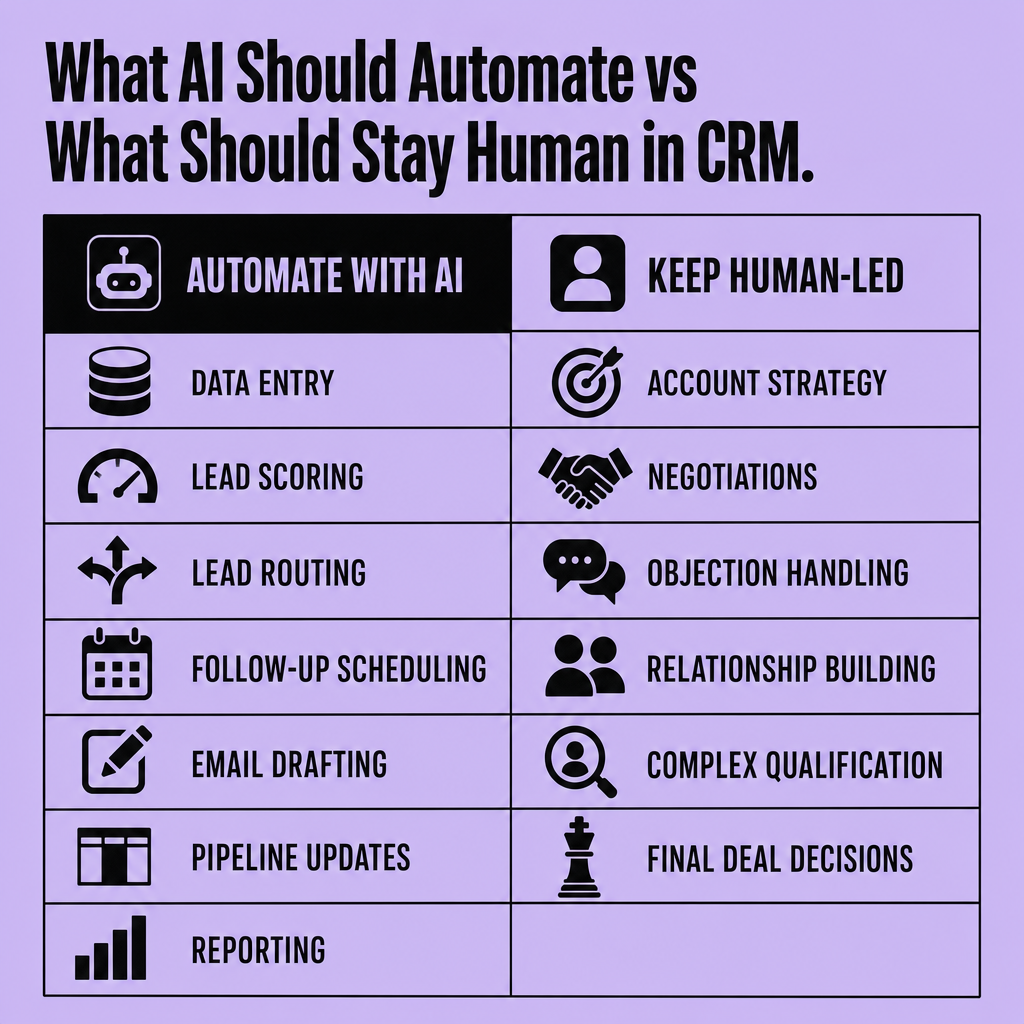
Start with low-risk, high-volume workflows where errors are measurable, then expand once handoff rules, audit logs, and KPIs are stable.
What should stay human even with AI CRM automation
Efficiency is useful. Trust is harder to win back once automation damages it. Keep people in charge of high-trust, high-context, high-stakes work. AI CRM automation and CRM workflow automation should inform these moments, not own them.
Strategy
Account strategy, stakeholder mapping, and market positioning stay human-led because they depend on judgment across messy inputs -- budget reality, internal politics, timing, and competitive risk. CRM AI can surface patterns from Salesforce or HubSpot data, flag expansion signals, and summarize account activity. But it cannot reliably choose the right tradeoff between short-term pipeline and long-term customer experience. Our view is simple: user experience is as important as functionality, and strategy shapes both.
Negotiation
This is where overconfidence causes real problems. Negotiation should not be handed to AI sales automation. Price, scope, legal terms, and concession timing all carry context that models can summarize but not own. A tool can draft responses, compare redlines, or suggest next steps in Microsoft Dynamics or Zoho CRM. But the final call belongs to the person accountable for revenue, margin, and relationship risk.
Use a human-in-the-loop rule for discounts, contract changes, and renewal exceptions.
Relationship building
Relationships are where CRM AI helps most -- and replaces least. It can draft follow-ups, prep meeting briefs, and detect sentiment shifts. But trust is built through listening, empathy, and consistent judgment across sensitive moments. Teams often over-automate outreach and create personalization fatigue. So use AI sales automation for prep and timing, then let humans handle the conversation.
CRM automation best practices and common AI mistakes to avoid
A lot of CRM automation problems are not model problems. They are workflow problems wearing an AI label. Good AI CRM automation depends less on the feature list and more on workflow design, data hygiene, and governance. Teams get better results when they define automation boundaries early -- what the system can do alone, what needs review, and what must always escalate to a rep. Clear ownership matters too: someone should be responsible for rules, model behavior, exception handling, and periodic cleanup.
Best practices
Start with clean fields, consistent lifecycle stages, and deduplicated records in Salesforce, HubSpot, Zoho CRM, or Microsoft Dynamics. If the CRM is messy, CRM workflow automation will scale the mess. Build clear routing logic, fallback rules, and escalation paths -- for example, route by territory first, then product line, then send exceptions to a queue for human review. Use a small pilot before rolling changes out broadly so teams can catch bad scoring, broken triggers, or awkward messaging early. Monitor outputs weekly. Check scoring drift, response quality, misroutes, and forecast anomalies as part of quality assurance. We treat user experience as equal to functionality, so automated follow-ups should feel timely and relevant, not machine-made.
Automate the repeatable; review the consequential.
Common mistakes
The biggest failure is over-automation. Teams let AI sales automation send generic follow-ups, misroute high-intent leads, or push biased scoring based on bad historical patterns. Another mistake is automating around unclear process. If reps do not agree on stages, handoffs, or qualification criteria, the system will only make inconsistency faster. Poor personalization hurts trust fast. So do risky decisions made without human review. Strong CRM automation best practices keep humans in the loop for exceptions, tune rules on a set review cadence, document overrides, and override the model when context beats prediction.
How to measure ROI and implement AI CRM automation without disrupting the team
A bad rollout can poison a good tool. If implementation is chaotic, teams stop trusting the automation before it has a fair chance to prove itself. Roll out AI CRM automation like an operations change, not a feature launch. Teams get better results when they prove value in one narrow workflow first, then expand once the data, handoffs, and user behavior are stable.
Measure ROI with workflow-level KPIs
Start with metrics tied to work your team already does in Salesforce, HubSpot, Zoho CRM, Pipedrive, or Microsoft Dynamics. Track time saved on data entry, first-response SLA performance, lead-to-opportunity conversion, rep productivity, forecast accuracy, and the number of stalled records needing manual cleanup.
A simple example works well: if CRM workflow automation logs activities, routes inbound leads by territory, and triggers follow-ups within a defined SLA, compare baseline vs post-launch on response time, meetings booked, and admin hours removed. Then run A/B testing where possible -- one team uses the automated routing or sequence, another follows the old process. Because user experience is as important as functionality, include adoption signals too: override rate, rep trust, and how often managers correct AI outputs.
Measure outcomes, not feature usage.
Implement with minimal risk
Start narrow. Good candidates are lead routing, follow-up timing, or activity capture -- repeatable work, clear handoff points, easy auditing.
Then move in sequence:
- Audit core fields: owner, source, lifecycle stage, territory, close reason
- Define KPIs before launch
- Set human-review rules for edge cases
- Train users on exceptions, not just clicks
- Review results at 30, 60, and 90 days
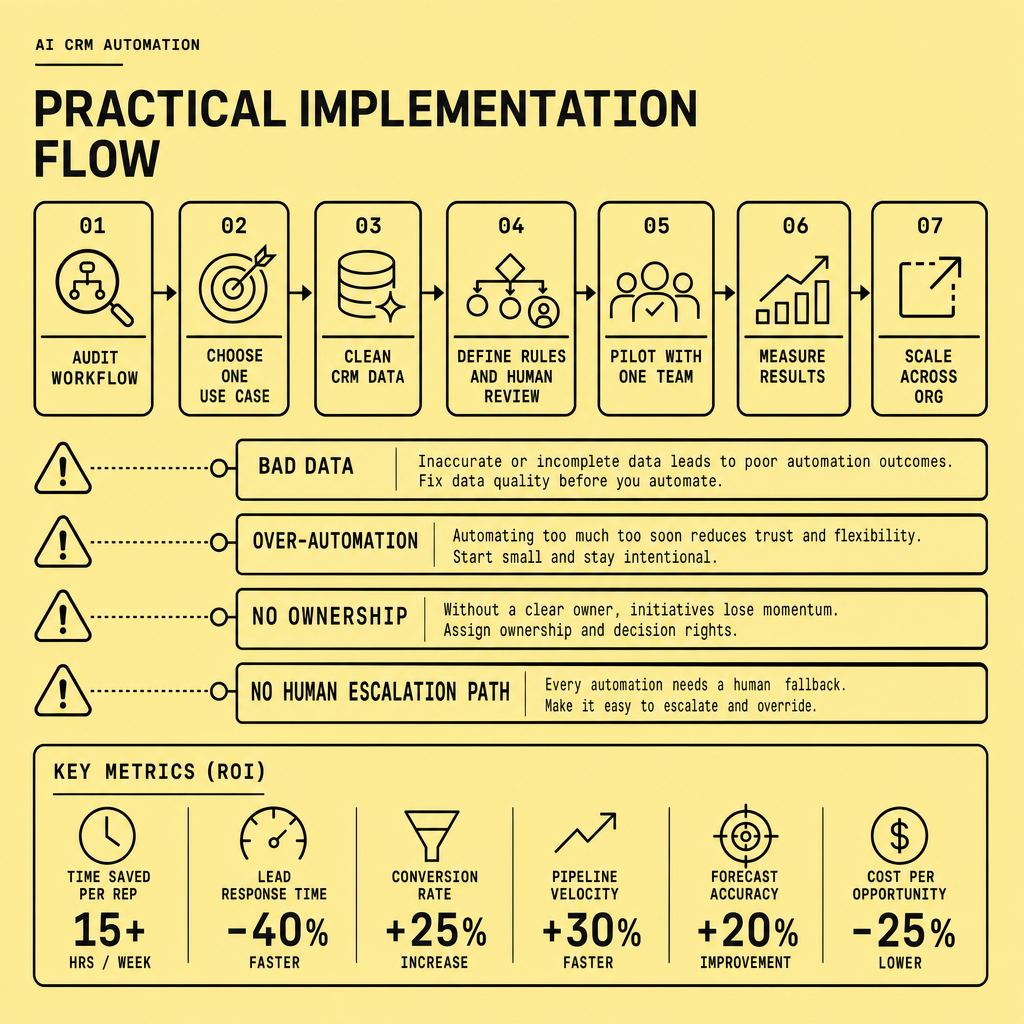
There is a tradeoff here. Faster deployment gets quick wins, but less control can spread bad scoring logic or weak data across the CRM AI stack. So keep the first release narrow, review results regularly, and expand only after the workflow is reliable.
Frequently Asked Questions
What is AI CRM automation in simple terms?
AI CRM automation is the use of machine learning and predictive logic inside a CRM to handle repetitive work, recommend actions, and prioritize records based on patterns in customer data. It goes beyond rule-based workflows by helping teams decide what needs attention first, while still requiring human oversight for sensitive decisions.
How does AI CRM automation differ from standard CRM workflow automation?
Standard CRM workflow automation follows predefined rules such as assigning a lead after a form submission or sending a reminder after inactivity. AI CRM automation adds scoring, summarization, prediction, and pattern recognition, which means it can adapt recommendations based on behavior instead of only executing fixed if-then triggers.
Can AI sales automation improve response times without hurting personalization?
AI sales automation can improve response times without harming personalization when teams automate timing, task creation, and first-draft messaging but require human editing for nuanced outreach. The safest approach is to let AI accelerate the process while sales reps control tone, context, and final communication for higher-value conversations.
What data do you need before implementing CRM AI successfully?
CRM AI works best when core data is standardized, complete, and actively maintained. At minimum, teams should have reliable ownership fields, lifecycle stages, lead sources, activity history, and outcome data. Without consistent inputs, AI models produce weak scoring, poor routing, and unreliable reporting that undermines trust in the system.
Why should companies audit AI CRM automation regularly?
Companies should audit AI CRM automation regularly because model outputs drift as customer behavior, channel performance, and sales processes change over time. Regular audits catch misrouted leads, weak scoring logic, broken triggers, and inaccurate forecasts early, which protects user trust and keeps automation aligned with business goals.
Make Imversion a preferred source on Google
Like this kind of AI and software analysis? Add Imversion as a preferred source so Google can highlight our articles for you in Search, AI Overviews, and AI Mode.