AI Lead Scoring: Streamlining Sales Automation for 2026
Explore how AI lead scoring, routing, and follow-up can automate your sales process, maximizing efficiency and improving ROI.

How AI Lead Scoring Automates Lead Prioritization, Routing, and Follow-Up
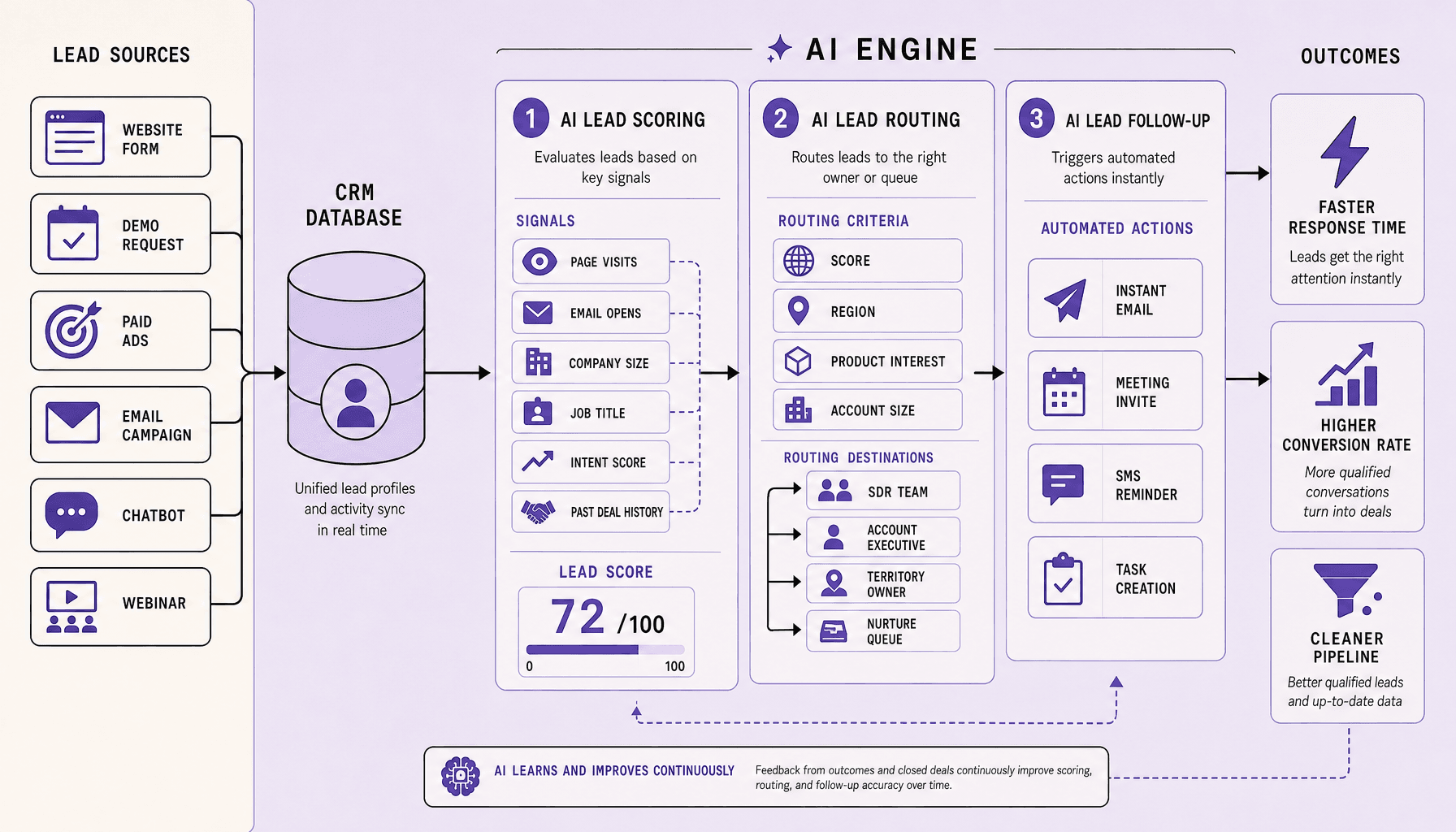
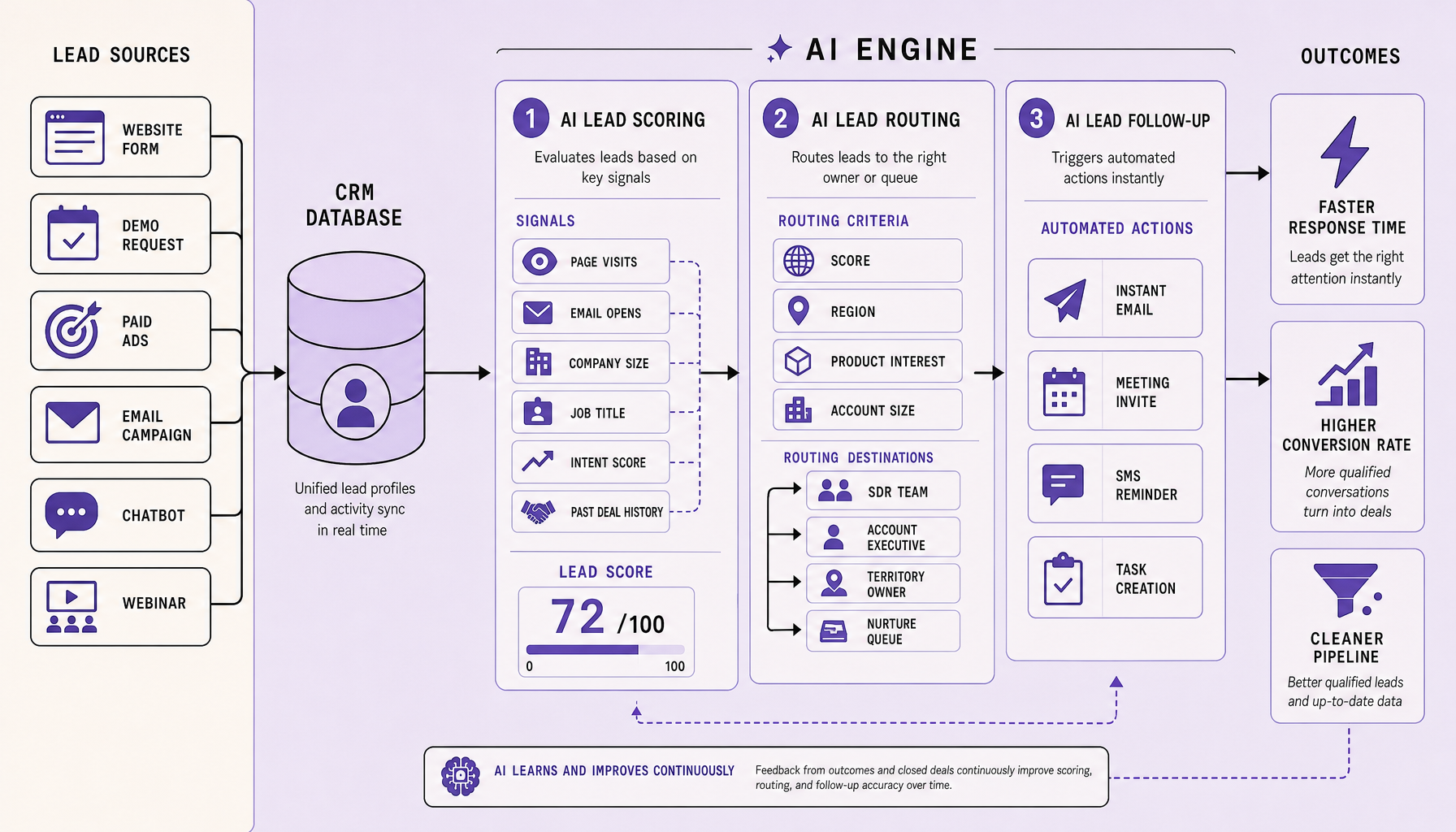
When inbound volume picks up, lead management usually breaks in familiar ways: good prospects wait too long, low-fit leads eat rep time, and follow-up depends more on who noticed a notification than on any reliable process. AI lead scoring helps fix that by predicting which leads are most likely to convert, then pushing the highest-value prospects into the right next step fast. Paired with AI lead routing and AI lead follow-up, it turns lead management into one connected sales automation workflow instead of three manual tasks.
In practice, AI lead scoring reads CRM and behavioral signals -- page visits, form fills, reply history, firmographics, and past win/loss patterns -- to rank intent and fit. AI lead routing then assigns ownership by rules like geography, product line, account owner, or SLA urgency inside Salesforce, HubSpot, or Zoho CRM. AI lead follow-up triggers the next action through AI CRM automation: an email sequence, SDR task, demo handoff, or nurture path in Marketo. At Imversion Technologies Pvt Ltd, we see the best results when teams connect all three stages because user experience is as important as functionality -- speed helps, but relevance protects conversion quality.
Key Takeaways for AI Lead Scoring and Sales Automation
- AI lead scoring, AI lead routing, and AI lead follow-up work best as one system -- not three disconnected automations inside your CRM.
- Speed improves first. Then consistency. But only if your data fields, scoring inputs, routing rules, and SLA logic are clean enough to trust.
- Good sales automation does more than assign leads in Salesforce, HubSpot, or Zoho CRM; it prioritizes high-intent buyers, routes by ownership or geography, and triggers the right next step fast.
- Bad setup creates expensive noise. A weak model, vague routing logic, or over-automated follow-up can send the wrong lead to the wrong rep and hurt conversion quality.
- Our view: user experience is as important as functionality, so AI CRM automation should feel timely, relevant, and human -- not robotic.
How AI Lead Scoring, AI Lead Routing, and AI Lead Follow-Up Work Together
If scoring lives in one system, routing in another, and follow-up depends on rep memory, leads slip through even when each tool looks fine on its own. That is why the best results come from treating these as one workflow inside the CRM, not three separate automations. AI CRM automation turns lead data into a sequence: prioritize, assign, act.
Scoring signals
Everything starts with signal quality. AI lead scoring combines behavioral signals with firmographic data and CRM history. Typical inputs include pricing-page visits, repeat sessions, form fills, webinar attendance, email clicks, replies, job title, industry, company size, territory, lifecycle stage, and past opportunity outcomes from similar accounts. In Salesforce, HubSpot, or Zoho CRM, the model usually updates as new activity arrives from marketing automation or website tracking.
But scores should guide priority, not dictate truth.
A lead with strong engagement but weak fit may still need nurture, while a strong-fit account with light activity may deserve quick human review. That is why AI lead scoring works best as a prediction layer validated with CRM context. Bad scoring creates a poor buying experience fast.
Routing logic
A high score alone does not tell you who should act next. Once the score is calculated, AI lead routing applies business rules and constraints. Score matters, but geography, product line, named-account ownership, language, rep capacity, and service level agreement targets matter too.
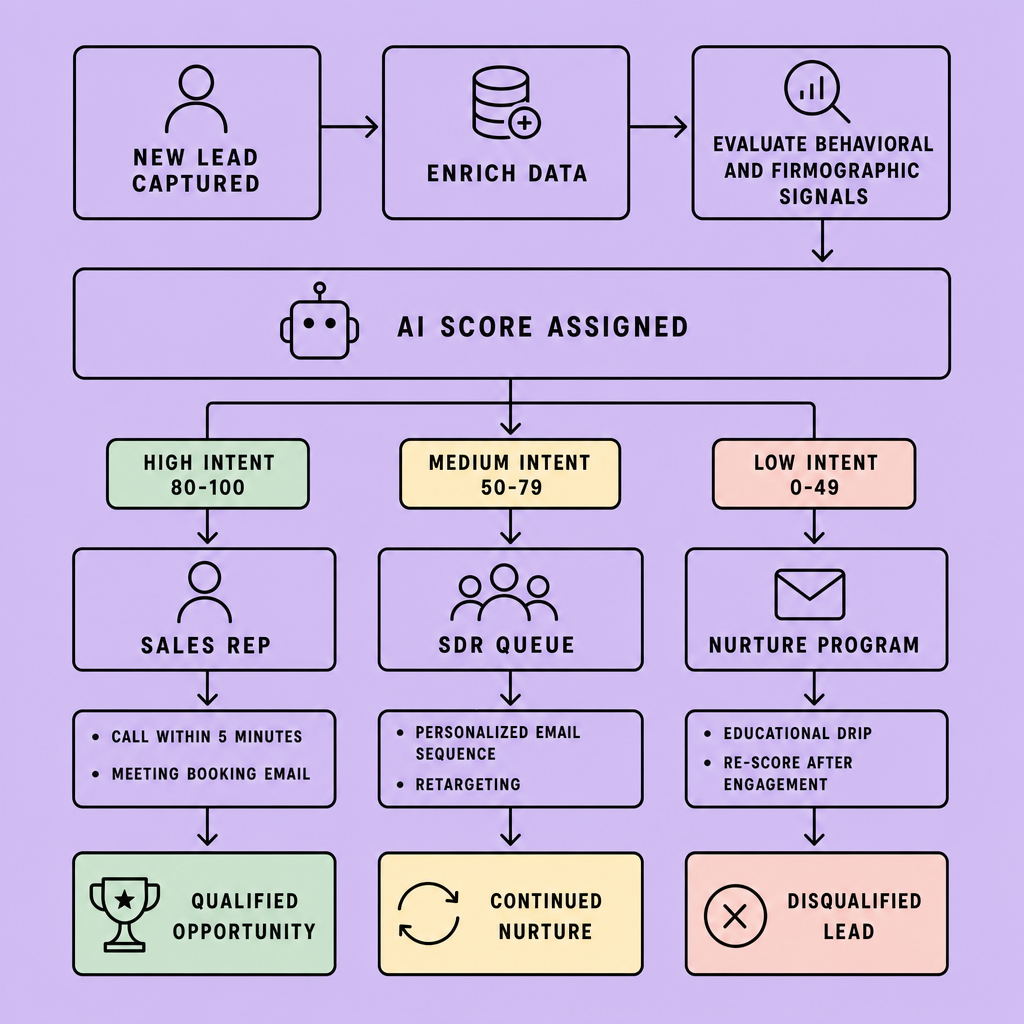
A common workflow looks like this: high-score enterprise leads go to an AE queue, mid-score leads go to SDRs, partner leads go to channel managers, and low-score leads stay in nurture automation. Some teams route by round-robin inside each segment. Others prioritize existing account ownership to avoid duplicate outreach.
Model output is not enough on its own, so routing rules need human oversight and regular review.
Follow-up triggers
Once ownership is clear, timing becomes the next risk. AI lead follow-up handles the next best action after assignment. That may mean sending a personalized email, creating a call task, pushing the lead into an SDR queue, enrolling it in a nurture sequence, or escalating a hot lead for same-day outreach. In HubSpot or Salesforce, these triggers often depend on score thresholds, inactivity windows, reply status, or SLA timers.
The payoff is speed and consistency. Sales automation reduces lag between intent and response, while AI lead follow-up keeps leads moving when reps are busy. The tradeoff is monitoring: if scores drift or routing rules get stale, quality drops before teams notice.
AI Lead Scoring Workflow Steps From Capture to Conversion
Trying to automate everything at once is usually where confidence drops. Start narrow, measure quickly, then expand. If teams automate every lead source at once, AI lead scoring and routing often become hard to trust.
1. Capture and normalize lead data
Before scoring works, the record itself has to make sense. Pull data from forms, chat, email, ads, and product sign-up flows into one CRM record in Salesforce, HubSpot, or Zoho CRM. Standardize core fields first: source, industry, company size, role, country, product interest, and campaign.
Then add behavioral signals such as page views, pricing visits, repeat sessions, webinar attendance, email clicks, and chatbot replies. If fields are inconsistent, the workflow will amplify bad inputs instead of fixing them.
2. Choose scoring signals and define the target outcome
This step decides whether the model reflects buying intent or just activity noise. Pick signals tied to a real business outcome, not vanity activity. Useful targets include “books a demo,” “accepts an SDR meeting,” or “becomes an opportunity.” Combine firmographic data with behavioral signals so the model reflects both fit and intent.
3. Train a model or start with rules
Teams with enough historical CRM data can train a model on won, lost, and stalled leads. Teams without that history should not force it. Start with weighted rules instead. For example, assign higher scores to demo requests, repeat pricing-page visits, and target-account matches. Then set thresholds so high-scoring leads go to sales while lower-scoring leads stay in nurture.
4. Define routing logic before activation
A model can rank leads well and still create chaos if routing is vague. AI lead routing should match how your team sells. Route by geography, product line, account ownership, territory, language, or segment. Use round-robin only within the right pool. For example, enterprise leads above a threshold may go to named AEs, while mid-market leads go to SDRs with a first-touch SLA.
5. Orchestrate AI lead follow-up
Assignment is not the finish line. Build the next action into the workflow: confirmation email, calendar link, rep alert, SMS, or nurture sequence. Start with a high-intent path like demo requests before expanding. Follow-up should feel timely and relevant, not robotic.
Automate the first response, but keep clear handoff points for human conversation.
6. Set handoff and exception conditions
Automation needs an exit plan. Define when automation stops. Hand off on reply, meeting booked, negative intent, duplicate ownership, or missing required fields. Create exception queues for bad data, spam, and routing conflicts.
7. Close the loop and retrain
Without outcome feedback, the workflow gets stale. Sync outcomes back into the CRM, including reply rates, meetings booked, opportunity creation, conversion rate, and time-to-first-touch. That feedback helps improve model quality and reveal weak routing rules.
Benefits and Ideal Use Cases for AI Lead Scoring in Sales Automation
Most teams do not need more lead activity. They need better decisions after capture. The biggest win is operational: AI lead scoring, AI lead routing, and lead nurturing automation shorten the gap between lead capture and meaningful action. Teams stop treating every inbound contact the same. High-intent leads get fast attention, low-fit leads enter the right nurture path, and reps spend less time triaging spreadsheets or reassigning records inside Salesforce, HubSpot, or Zoho CRM.
A practical benchmark: speed matters because slower first response usually means lower contact and meeting rates. So the value of sales automation shows up first in time-to-first-touch, queue hygiene, and rep focus -- before it shows up in revenue dashboards.
The clearest benefits usually stack up in four areas:
- faster response times through automatic routing by score, geography, account owner, or product line
- better SDR and AE efficiency because reps work prioritized queues instead of raw inbound volume
- more consistent follow-up through AI lead follow-up and lead nurturing automation across email, chat, and task creation
- improved conversion visibility because AI CRM automation can tie score thresholds, reply rates, and handoff outcomes to pipeline stages
AI usually pays off fastest where lead volume, routing complexity, or rep specialization already creates friction. Think high-volume inbound pipeline teams, B2B SaaS companies, a multi-product sales team, or organizations where follow-up discipline varies by rep.
There is a limit, though. Low-volume teams should be careful. If leads are few and routing logic is simple, rules-based workflows may be enough at first. We prefer that approach because user experience is as important as functionality -- and overbuilt automation can create more confusion than speed.
Implementation Best Practices and Common Mistakes in AI CRM Automation
Most AI CRM automation failures have less to do with model quality than with process design. The pattern we see is straightforward: teams get better results when they treat AI lead scoring, routing, and follow-up as an operational workflow inside the CRM. Clean inputs, explicit rules, clear exceptions, regular review. The goal is not full autonomy on day one. It is faster, more consistent next actions that sales can actually trust.
Best practices
- Keep CRM data clean: standardize lifecycle stages, lead sources, owner fields, account status, and activity timestamps in Salesforce, HubSpot, or Zoho before enabling AI lead routing or AI lead follow-up.
- Make routing logic explicit: define geography, product line, account ownership, score thresholds, and SLA response rules so revops and sales can audit outcomes.
- Start with one narrow use case, such as inbound demo requests or MQL handoff, before expanding to every channel and segment.
- Preserve human override: let managers reassign edge cases, paused accounts, strategic deals, or accounts with known relationship history.
- Review models and workflows regularly for drift after changes to campaigns, forms, territory design, or market focus.
Common mistakes
- Automating bad or incomplete data.
- Overfitting AI lead scoring to old wins without checking whether the buying motion has changed.
- Ignoring rep capacity, which creates “correct” routing on paper but slow follow-up in reality.
- Sending generic AI lead follow-up too early, such as pushing a demo email after a single pricing-page visit.
- Measuring only model accuracy instead of business outcomes like response time, lead acceptance, and progression to the next stage.
A practical tradeoff: tighter automation improves speed and consistency, but overly rigid rules can misroute valuable exceptions. When in doubt, automate the common path and make exceptions easy to inspect and override.
How to Measure ROI From AI Lead Scoring and Lead Management Automation
A dashboard full of scored leads does not tell you much if revenue motion stays the same. Measure ROI by comparing business outcomes before and after automation, not by counting scored leads or automated touches. Start with a 30- to 60-day baseline, then compare similar cohorts by channel, territory, segment, and lead source. Aggregate improvement can hide weak routing rules, poor follow-up timing, or uneven lead quality.
Use a compact KPI set that ties operational change to revenue impact:
- speed-to-lead and time-to-first-touch
- MQL-to-SQL rate
- meeting booked rate
- opportunity creation rate
- pipeline contribution and pipeline velocity
- rep workload per qualified lead
- closed-won conversion
Then read the metrics together, not one by one. If AI lead scoring raises response speed but MQL-to-SQL stays flat, prioritization may not be improving fit. If AI lead routing increases assignment speed but certain segments convert worse, queue logic or territory rules may need adjustment. If AI lead follow-up drives more touches but not more meetings, opportunities, or wins, the system is creating activity without enough sales value.
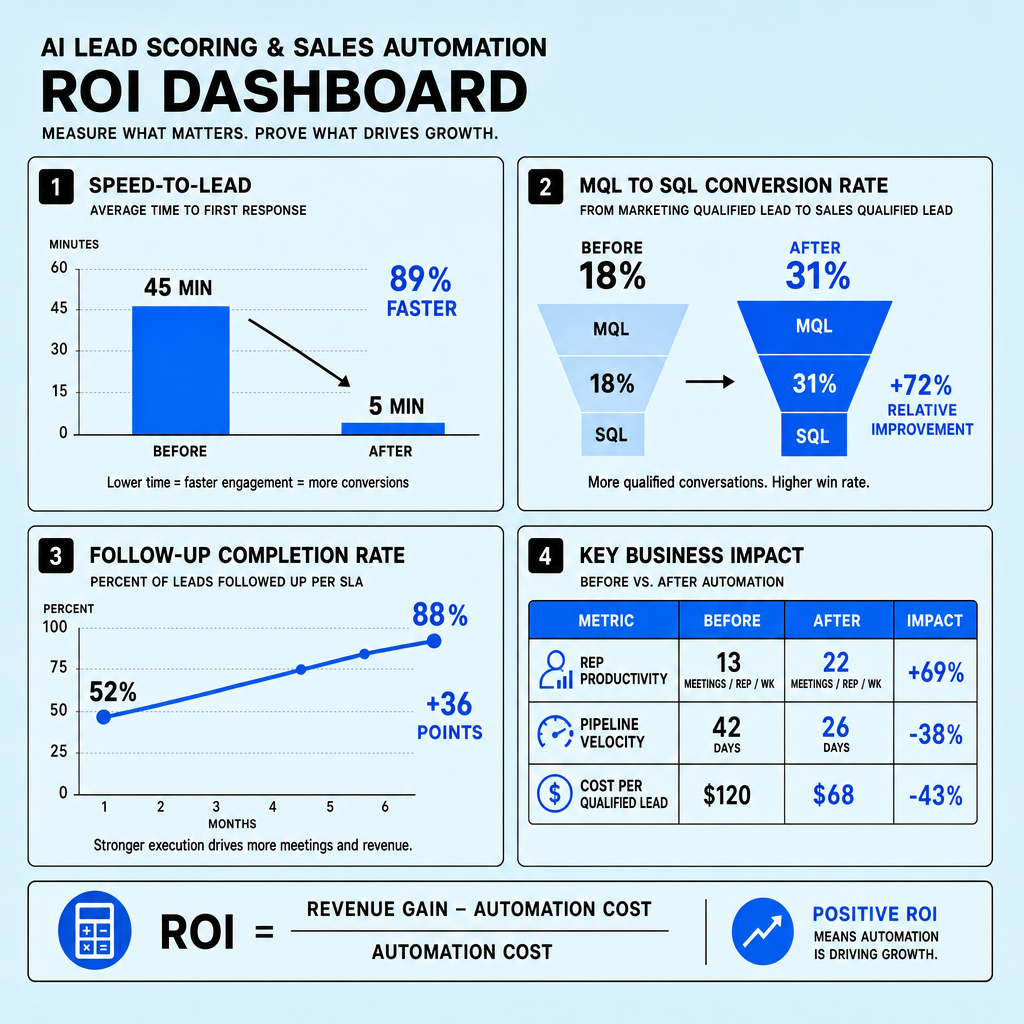
A practical ROI view combines efficiency and conversion: fewer manual triage hours, faster first action, better handoff consistency, and stronger downstream pipeline quality. Review results monthly inside Salesforce, HubSpot, Zoho CRM, or Marketo, and separate early indicators from lagging revenue metrics so you can correct workflow issues before they affect closed-won results.
Frequently Asked Questions
What is the difference between AI lead scoring and traditional lead scoring?
AI lead scoring adapts to real conversion patterns by learning from historical CRM, engagement, and outcome data, while traditional lead scoring usually relies on static point rules. The result is that AI can detect non-obvious combinations of fit and intent signals that manual scoring models often miss.
How accurate does AI lead scoring need to be before a sales team should trust it?
AI lead scoring does not need perfect accuracy to create value; it needs to outperform the current manual or rules-based process on business outcomes. Teams should trust it when it consistently improves response speed, lead acceptance, meeting rates, or pipeline progression across comparable lead cohorts.
How does AI lead routing handle leads when multiple reps could own the account?
AI lead routing should resolve ownership conflicts through a defined hierarchy such as existing account owner, territory rule, product specialization, and then round-robin as a final fallback. This prevents duplicate outreach, reduces internal reassignment, and keeps high-intent leads from sitting in unresolved queues.
Why should companies combine AI lead follow-up with human outreach instead of fully automating everything?
Companies should combine automation with human outreach because automated follow-up is best at speed and consistency, while reps are better at nuance, objection handling, and deal judgment. The strongest systems automate first response and task coordination, then hand control to people when intent becomes clear.
What ROI should teams expect from AI CRM automation in the first 90 days?
In the first 90 days, teams should expect operational gains before revenue gains, especially faster speed-to-lead, cleaner routing, and higher follow-up completion. Early ROI usually appears as reduced manual triage time and better sales responsiveness, while pipeline and closed-won impact typically takes longer to validate.
Make Imversion a preferred source on Google
Like this kind of AI and software analysis? Add Imversion as a preferred source so Google can highlight our articles for you in Search, AI Overviews, and AI Mode.