MCP vs function calling: Strategic Insights for 2026
Explore the strategic choices between MCP, function calling, and AI plugins. Understand architecture, trade-offs, and implementation efforts for your next project.

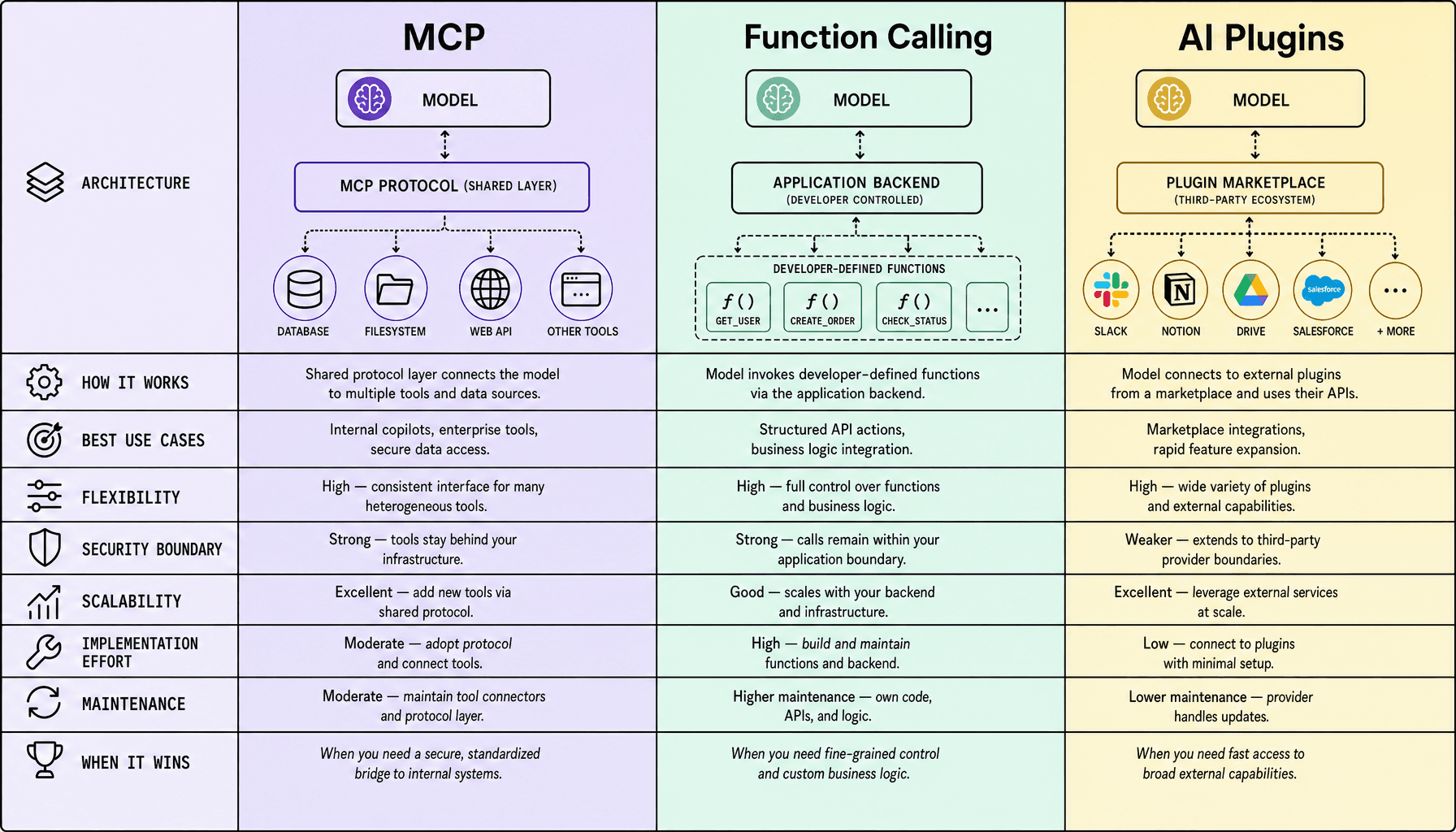
MCP vs function calling: which one should you choose?
Most teams do not get stuck on model quality here. They get stuck once the assistant has to do real work: call internal APIs, pass security review, survive retries, and stay maintainable after the third connector gets added. That is where the MCP vs function calling choice becomes practical, not theoretical.
For most teams comparing MCP vs function calling, the choice is straightforward: use function calling for app-controlled workflows, AI plugins for fast ecosystem access, and Model Context Protocol for portable, multi-tool integrations. Pick based on who controls the execution layer and how much reuse you need across models and tools.
If your app owns the logic -- say OpenAI function calling or Anthropic tool use triggering internal CRM or ticketing APIs -- function calling gives you the most control, simplest security review, and cleaner observability. But if you need broad third-party connectivity fast, AI plugins can cut setup time. Choose MCP when you want a standard client/server pattern, shared tool definitions, and less adapter sprawl across environments; consistency in environments is critical, especially once multiple teams, Docker deployments, and CI/CD pipelines enter the picture. At Imversion Technologies Pvt Ltd, this is usually the dividing line: control, speed, or portability.
Key Takeaways for MCP vs function calling
- Use function calling if your app owns the workflow, the tools are known, and you want tight control over schemas, execution, and guardrails. Think CRM updates, ticket creation, or internal microservice actions.
- Choose MCP -- Model Context Protocol -- if you need portable, reusable AI integrations across multiple tools or models. It costs more upfront, but it reduces connector sprawl later.
- Pick AI plugins when ecosystem speed matters most and the platform already supports them. Fast start. Less control.
- The biggest tradeoff in MCP vs function calling is simplicity versus portability. Function calling is easier to ship; MCP is better for long-term standardization. And consistency in environments is critical -- especially once tools move from local testing to Docker, CI/CD, and production auth flows.
- Simple rule: app-controlled workflow = function calling, platform marketplace = plugins, shared multi-tool interface = MCP.
What MCP vs function calling, and AI plugins actually are
A lot of confusion starts here. In demos, these terms can sound interchangeable. In production, they are not even solving the same layer of the problem. You are comparing three different layers of AI integrations: a protocol standard, a tool invocation pattern, and a packaging or distribution model.
MCP
Model Context Protocol is about standardizing how tools and context are exposed to a model. Think client-server, not one-off glue code. An MCP client connects to an MCP server, and that server presents resources, prompts, or actions through a consistent interface. The benefit is portability: you can expose internal docs, a ticketing API, or a database-backed service once, then reuse that interface across compatible model workflows.
That is why MCP often fits broader tool ecosystems and multi-model setups. But it also adds architecture. You are not just calling an endpoint; you are maintaining a protocol surface.
Function calling
Function calling is the mechanism a model uses to ask your application to run a known action. In OpenAI function calling or Anthropic tool use, you define functions with a JSON schema, the model returns structured arguments, and your app decides whether to execute them. That makes it ideal for app-owned flows like create_ticket, refund_order, or lookup_customer.
Simple. Controlled. Predictable.
But function calling is not a protocol for cross-tool interoperability. It is an invocation contract between the model and your application runtime.
AI plugins
AI plugins are packaged integrations exposed through a platform-specific ecosystem. They usually include a plugin manifest, authentication rules, and an API definition so a host platform can discover and use the capability. This is useful when you want quick access to external services like CRM, search, or support tools without building every connector yourself.
The trade-off is dependence on the host platform’s plugin model, review process, and limits.
Teams often compare these as substitutes, then design the wrong thing: using plugins where they need control, or using raw function calling where they really need a standard interface across tools.
That is the practical rule: choose by architecture role first. Then lock down security boundaries, because tools that can trigger backend actions need hard limits, not optimistic assumptions.
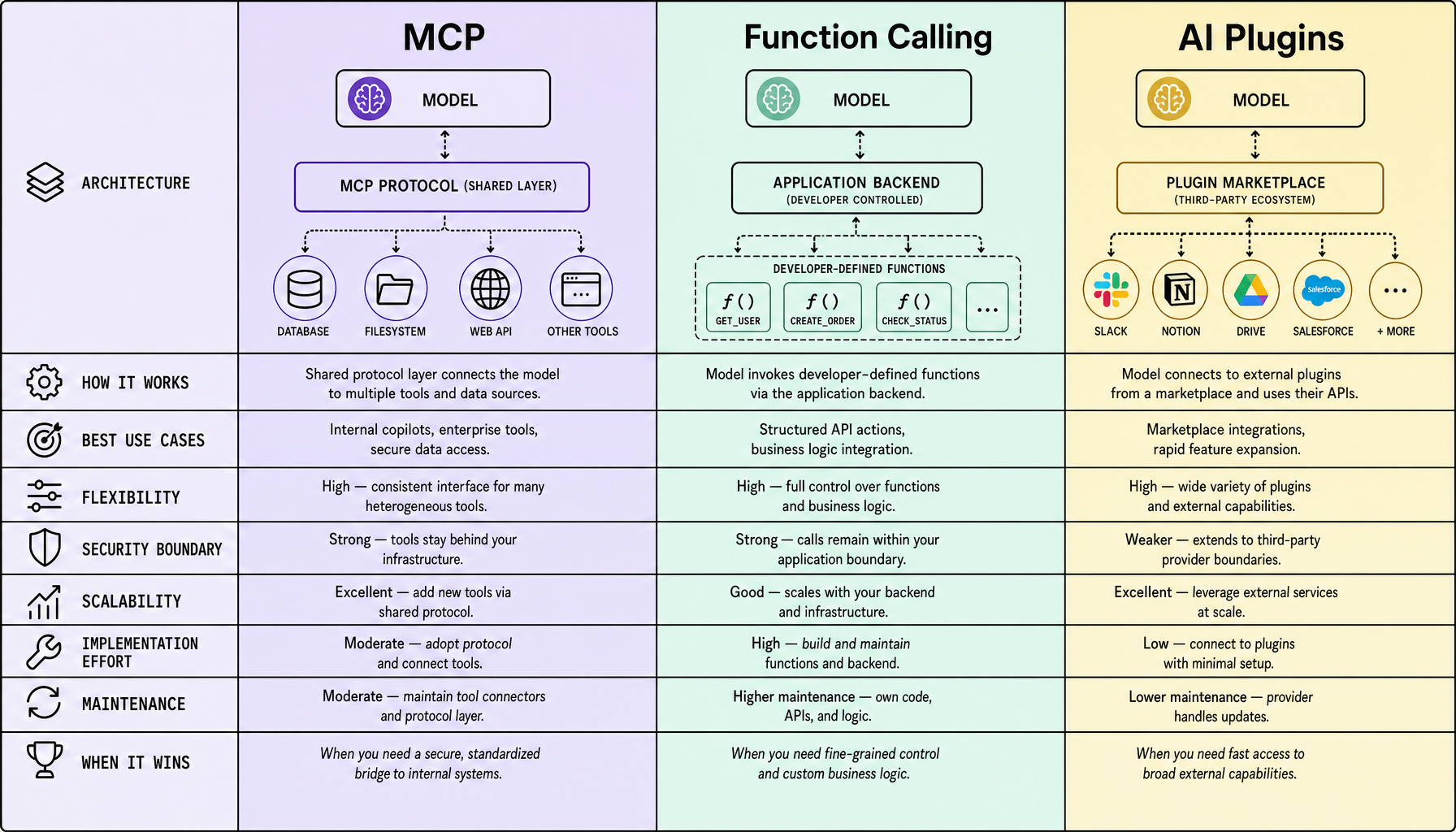
How MCP vs function calling works in production: architecture, control, and data flow
This is where the decision stops being abstract. The runtime winner is usually not about model quality. It is about who owns the interface, auth, retries, and failure handling.
Function calling: app-owned execution
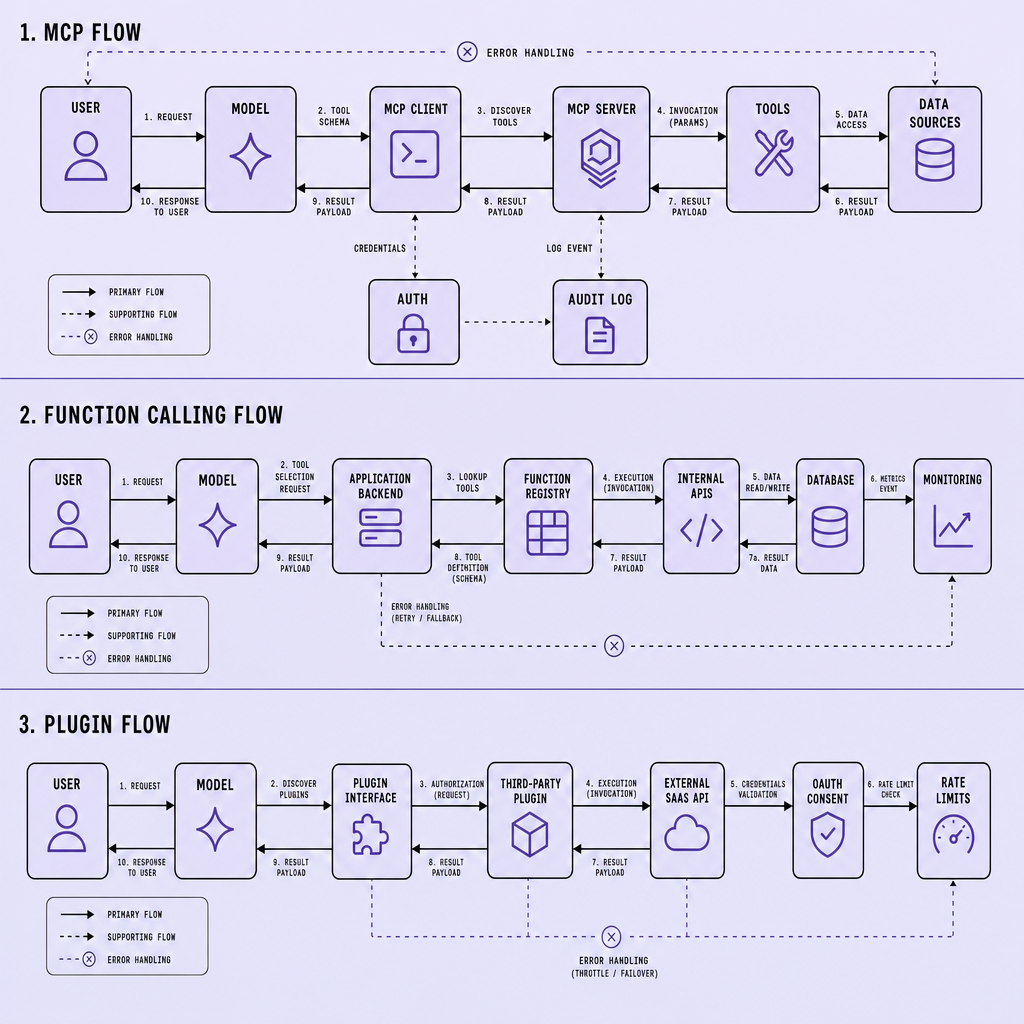
With function calling, the model does not talk to your systems directly. You define a tool schema, often for actions like create_ticket, get_customer, or refund_order, and the model selects a function plus arguments. Your application validates those arguments, applies policy, executes the API or internal service call, and returns structured results to the model.
Flow: model → tool schema → app executor → REST API / microservice → model
Control lives in your app. That is the main advantage. You decide validation, retries, rate limits, service accounts, and approval steps. The tradeoff is operational: you own every connector and edge case. In MCP vs function calling, that is why function calling fits tightly controlled workflows inside one product.
AI plugins: platform-owned integration surface
Plugins move the control boundary outward. The platform exposes a plugin interface, the plugin advertises capabilities through a manifest or API description, and the model uses that contract to call the external service. Auth often runs through OAuth, and async updates may use webhooks.
Flow: AI platform → plugin interface → third-party API → platform → model
Adoption can be fast. Control is not. If the platform changes plugin rules, your integration may need to change too.
MCP: client-server mediation for portable tools
Model Context Protocol adds a mediation layer. An MCP client connects to an MCP server, which exposes tools, resources, and prompts through a standard interface. The server then talks to databases, internal APIs, file systems, or external services.
Flow: model host / MCP client ↔ MCP server ↔ tools and data systems
That separation can improve portability across models and hosts. The tradeoff is that you now operate another layer. If MCP behavior differs across local, staging, and production environments, debugging gets painful fast.
| Approach | Interface model | Control owner | Portability | Coupling |
|---|---|---|---|---|
| Function calling | Tool schema in app | Application team | Low to medium | Tight to app logic |
| AI plugins | Platform plugin contract | Platform + plugin provider | Low | Tight to platform |
| MCP | MCP client/server protocol | Team running MCP server | Higher | Looser across models |
Practical rule: choose the layer you are willing to operate for the next year, not the one that looked best in a demo.
Best use cases and real-world examples for MCP, function calling, and plugins
Newer is not better here. The better fit is the one that matches workflow ownership and how often you expect to reuse connectors. That is usually the cleanest way to decide which pattern fits your AI integrations.
Function calling: best for app-owned actions
Use function calling when your application owns the business logic, the tool list is known, and you need strict control over inputs, execution, and auditability. A customer support bot that creates a Zendesk ticket, checks order status from an internal microservice, and updates a Salesforce case is a strong fit. The model returns structured arguments, and your backend decides what actually runs.
This works well for CRM and ticket automation because you can validate fields, enforce permissions, and add retries in one place. The tradeoff is portability: function-calling setups can be clean inside one app, but connector reuse across multiple assistants is limited unless you build your own abstraction layer.
AI plugins: best for marketplace-style extensions
AI plugins fit best when the host platform already has a plugin ecosystem and you want fast access to third-party services like Slack, GitHub, Jira, or Salesforce without building every connector from scratch. This is a good fit for marketplace-style products and broad external integrations.
But you give up control. Auth models, request limits, plugin quality, and long-term maintenance are partly shaped by the platform and plugin provider. So plugins win on speed, not on deep customization. In MCP vs plugins decisions, plugins are usually the better choice when distribution matters more than backend ownership.
MCP: best for cross-tool assistants and enterprise data access
Model Context Protocol fits cross-tool assistants that need a standard way to reach an internal knowledge base, GitHub, Jira, Slack, and other systems through a consistent client/server pattern. This is especially useful for internal copilots and enterprise assistants where multiple models or clients may need the same connectors.
A common example is an internal engineering assistant that reads docs from a knowledge base, opens Jira issues, inspects GitHub repositories, and fetches deployment status from internal services through MCP servers. The benefit is connector reuse and cleaner separation between model and tool layers. The tradeoff is implementation effort: you need to design, secure, and operate MCP servers well.
Security, scalability, implementation effort, and maintenance trade-offs
Most architecture choices look cheap in the first sprint. They get expensive later, once access control, observability, and connector maintenance start showing up in real environments. That is why this comparison matters.
If you care about production durability, function calling usually gives you the most control, AI plugins the fastest start, and Model Context Protocol the cleanest path to reusable multi-tool integrations. But the cheapest implementation up front often becomes the most expensive later -- once access control, observability, and connector maintenance show up.
| Approach | Best fit | Main risk | Operational requirement |
|---|---|---|---|
| Function calling | App-owned workflows | Tight coupling to app schemas | Strong schema versioning, retry policy |
| AI plugins | Fast third-party access | Auth sprawl, weak plugin governance | Vendor review, rate limiting, audit logs |
| MCP | Portable tool layer across models | More moving parts at runtime | RBAC, observability, server lifecycle management |
From a security standpoint, function calling is the easiest to fence in. You define the JSON schema, enforce least privilege in your backend, and keep permission boundaries inside your app. Audit logs are straightforward because every call passes through one execution path. Good.
Plugins are harder. OAuth scopes, third-party manifests, and shared platform trust models create more review surface. Weak plugin governance is a real failure mode -- teams approve broad scopes early, then spend months untangling who can access what.
MCP sits in the middle. It standardizes tool exposure well, but you still need clear RBAC between the MCP client, MCP server, and downstream systems. Consistency in environments is critical here, because environment drift between local, Docker, and CI/CD can break auth, tool discovery, or schema behavior in subtle ways.
On scalability, plugins offload connector work, MCP improves reuse across models, and function calling scales best for narrowly defined internal workflows. But monitoring is just as important as deployment. Without observability around latency, retries, schema drift, and failed tool calls, all three become expensive to maintain after launch.
When each wins: decision criteria and common mistakes to avoid
By this point, the pattern should be clear: start with workflow ownership, then check connector reuse, then decide how much control you are willing to operate yourself. That order avoids a lot of bad architecture decisions.
Start narrow and choose the pattern that matches workflow ownership, connector reuse, and how much control your team needs. In practice, function calling wins when your application orchestrates the flow end to end. AI plugins win when speed to external ecosystem access matters most. Model Context Protocol wins when you expect multiple models, shared connectors, or a need to reuse integrations across tools and teams.
A simple decision matrix helps:
- Control and governance: function calling
- Portability and reduced platform lock-in: MCP
- Ecosystem speed: plugins
- Internal workflow depth: function calling
- Shared connector layer across teams: MCP
A useful rule: do not standardize too early. If you have a small number of known tools and stable schemas, function calling is usually the simplest fit. If the main goal is connecting quickly to services already packaged for a platform, plugins can be the shortest path. If tool count, model count, or maintenance overhead is growing, MCP becomes more attractive because it separates the connector layer from any single app or model.
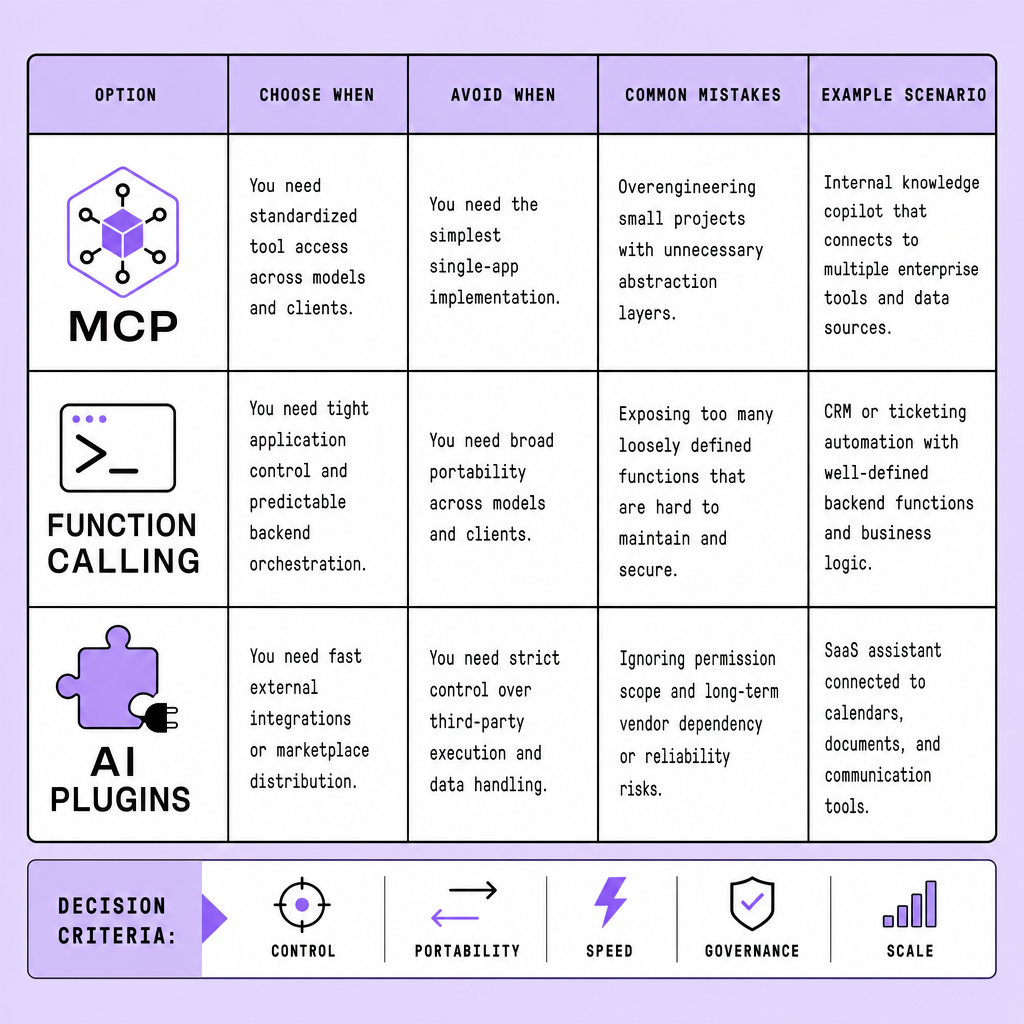
Common mistakes are usually selection mistakes, not model mistakes:
- Choosing MCP vs function calling before you have enough integration complexity to justify it
- Forcing plugins into internal microservice or back-office workflows that need tighter control
- Using function calling for integrations that will soon need portability, shared governance, or reuse across teams
- Ignoring environment consistency, auth boundaries, and testing needs until the integration surface expands
If you are unsure, optimize first for the fewest moving parts, then add abstraction only when the operational pain is real.
Frequently Asked Questions
What is the main difference in MCP vs function calling for enterprise systems?
MCP defines a reusable protocol layer between models and tools, while function calling defines a direct contract between a model and your application runtime. In enterprise systems, MCP is better when multiple assistants or models must share the same tool layer, while function calling is better when one application owns execution, policy, and auditing.
How does MCP vs function calling affect vendor lock-in?
Function calling can create lock-in around your application logic because tool definitions, execution rules, and schemas often live inside one app stack. MCP can reduce lock-in by separating tool exposure from any single model host, which makes it easier to switch model providers or support multiple clients without rebuilding every integration.
When should I use AI plugins instead of building MCP or function calling flows?
AI plugins are the best choice when your priority is fast access to supported third-party services and the host platform already offers a mature plugin ecosystem. They are less suitable when you need custom approval logic, strict internal governance, or deep control over retries, logging, and permission boundaries.
Why do MCP vs function calling projects fail after a successful prototype?
Most failures happen because teams validate the demo path but ignore production concerns such as schema evolution, service limits, secret rotation, approval workflows, and rollback plans. A prototype proves that a tool can be called; it does not prove that the integration can survive policy changes, scaling pressure, or multi-environment deployment.
How should I evaluate security in MCP, function calling, and AI plugins?
Evaluate security by tracing who authenticates, who authorizes, who executes the action, and who records the audit trail. The safest option is usually the one with the fewest trust boundaries and the clearest ownership. In practice, that often means function calling for internal actions, MCP for governed shared services, and plugins only with strict scope review.
Make Imversion a preferred source on Google
Like this kind of AI and software analysis? Add Imversion as a preferred source so Google can highlight our articles for you in Search, AI Overviews, and AI Mode.