AI Agent Access Control: Practical Strategies for 2026
Learn how RBAC/ABAC, scoped tokens, and more can enhance AI agent access control, reducing risk while maintaining efficiency.

AI agent access control starts with limiting what the agent can read, write, and execute
Teams usually discover the access problem after the agent starts doing real work. One broad service account feels efficient at first. Then the agent reads too much, writes in the wrong place, or triggers actions no one meant to expose. The agent becomes useful fast -- and dangerous faster.
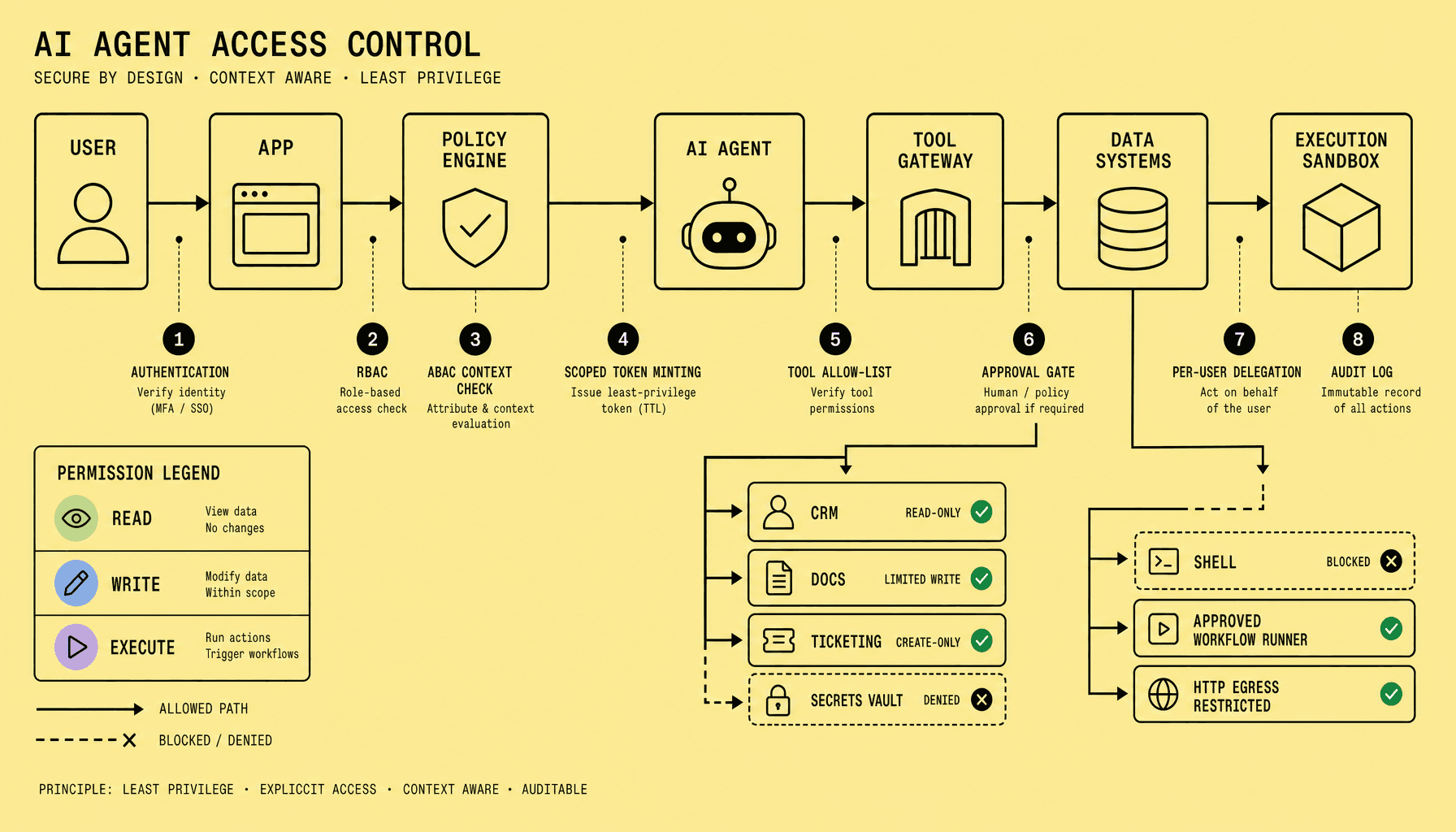
AI agent access control works only when access is bounded at the action level. Practical AI agent security combines least privilege, RBAC/ABAC, scoped short-lived tokens, tool allow-lists, approval gates, and per-user delegation so the agent can act, but only inside tightly defined boundaries.
A safer design treats the agent like an untrusted operator: RBAC defines coarse roles, ABAC narrows by customer account, folder path, project ID, environment, or document label.
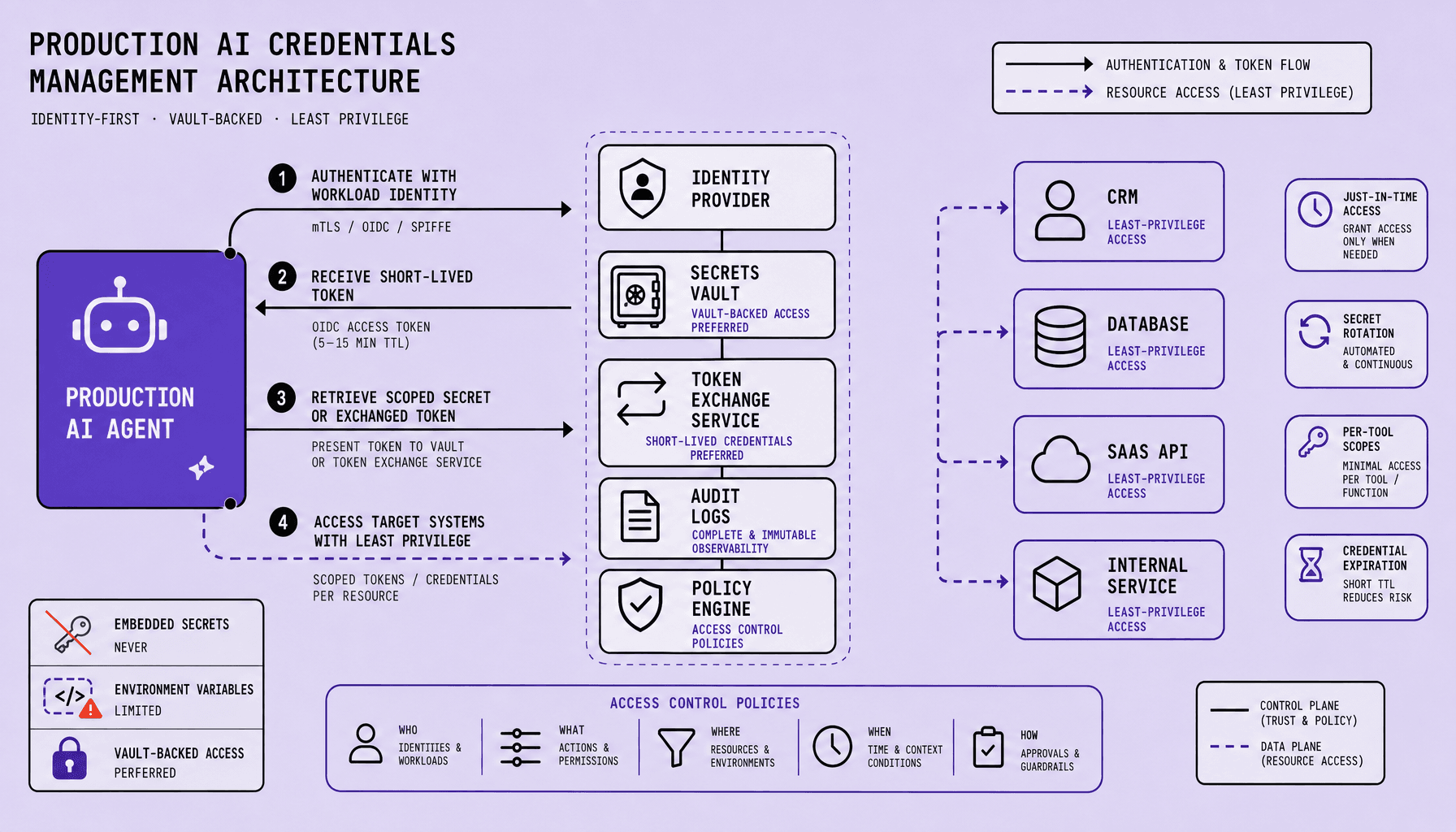
Then lock down credentials. Use scoped tokens for AI agents with short TTLs, audience limits, and claims such as read:docs, write:drafts, or execute:query, tied to specific repositories, vector DB namespaces, or Google Drive folders. No standing admin keys.
Tool access matters just as much as data access. Allow-list connectors like Slack, Jira, or GitHub per workflow, and put approval gates in front of destructive or external actions -- deletes, merges, payouts, bulk messages. At Imversion Technologies Pvt Ltd, reliable systems matter most, and agent permission management should reflect that: useful autonomy, narrow blast radius.
Key Takeaways for AI agent access control
-
Start with identity, not prompts. Strong AI agent access control begins with RBAC for coarse roles and ABAC for context -- customer account, folder path, project ID, environment, or time window. Teams that skip identity policy usually end up debugging overreach after deployment.
-
Use scoped tokens for AI agents instead of broad API keys. Short TTLs, audience limits, and narrow scopes like
read:docs,write:drafts, orexecute:querycontain damage if a token leaks. Reliable systems matter most, so every credential should expire, log cleanly, and map to a specific action boundary. -
Restrict tools separately from data access. An agent may be allowed to read from Google Drive yet still have no permission to call Slack, open a GitHub pull request, or run a shell command. Good agent permission management treats connectors and executors as distinct risk surfaces.
-
Stack controls; do not substitute them. Identity rules, scoped tokens, tool allow-lists, approval gates, and per-user delegation work together. One missing layer can reopen the blast radius.
-
Keep human approval for destructive or high-impact writes -- production changes, external messages, deletes, payments, or cross-system actions. That is practical AI agent security, not unnecessary friction.
Why over-permissioned agents fail: a read, write, and execute risk model
Most failures do not start in the prompt. They start in the permissions behind it.
Over-permissioned agents fail because teams secure prompts but leave connectors and tools too broad. A simpler way to limit blast radius is to separate permissions into read, write, and execute so each capability gets different boundaries and controls.
Once permissions are split this way, the blast radius becomes easier to reason about. The model maps cleanly to Google Drive folders, Slack channels, GitHub repositories, Jira projects, SQL roles, and deployment tooling. Different capability, different failure mode, different containment plan.
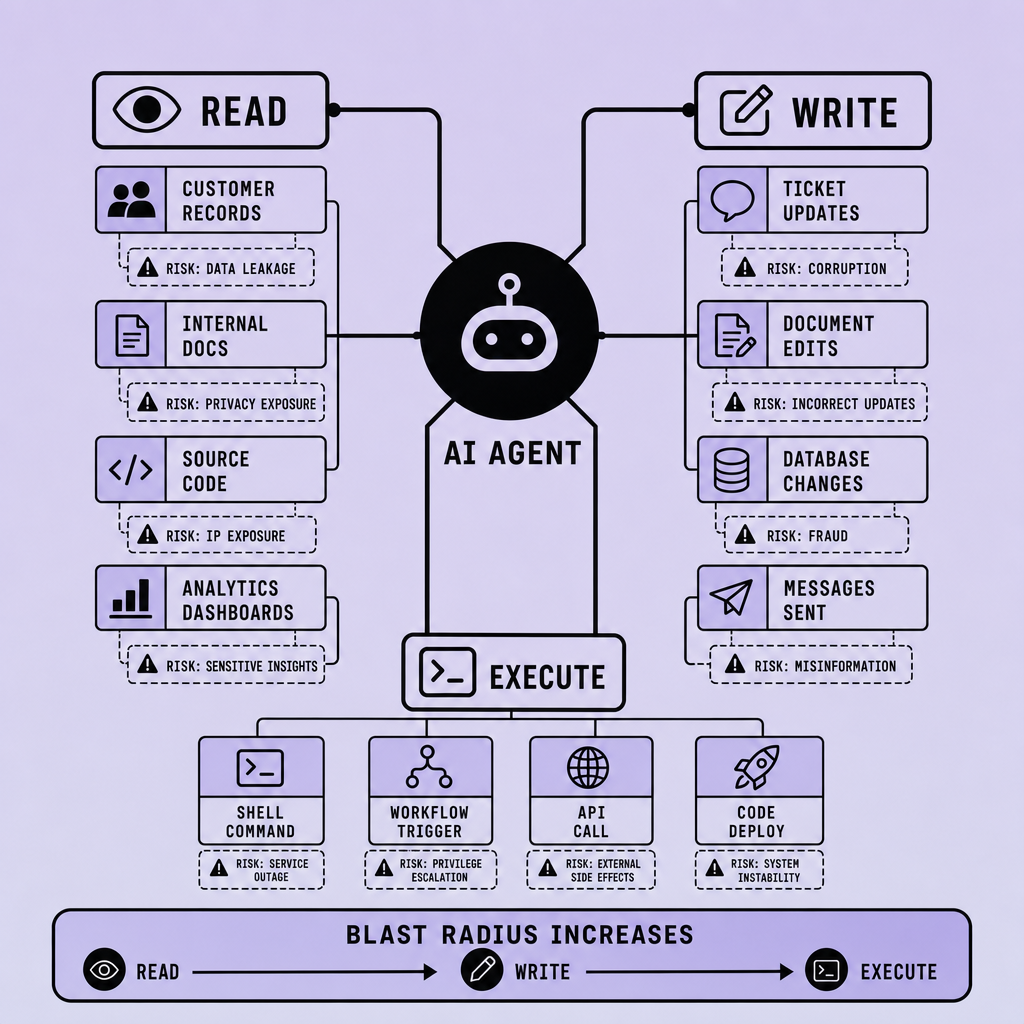
Read risk: quiet leaks with wide impact
Read access is often treated like the safe case. It is not.
Broad read access creates the easiest path to data leakage. If an agent can search internal docs, CRM records, support tickets, and vector indexes without tight scope boundaries, one prompt can pull sensitive material into logs, summaries, downstream tools, or a reply to the wrong user.
This is where connector security matters most. A “read-only” Google Drive or Snowflake connector still carries serious risk if the token can traverse every folder, customer account, or table. Read access feels safe because it has no obvious side effects, but leakage is still a side effect.
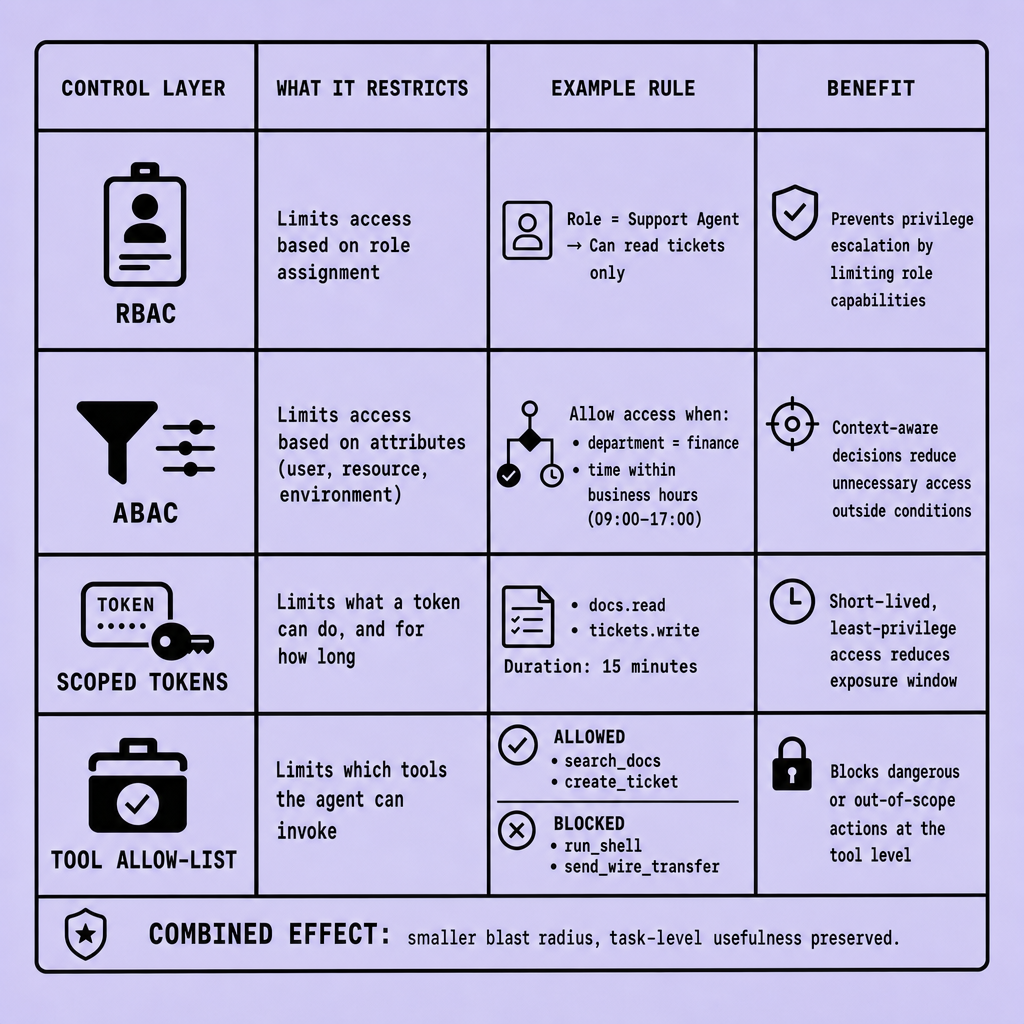
Use RBAC for coarse roles, then ABAC for limits like folder path, project ID, customer account, and document classification. Add scoped tokens with short TTLs, audience restriction, claims such as read:docs, and resource bounds such as /policies/benefits/*.
Write risk: integrity loss, not just convenience
Write permissions change the problem because the agent can alter state.
That may mean posting to Slack, editing a wiki, updating a ticket, committing to GitHub, or publishing content. A bad summary is annoying; a bad write to the wrong repository or customer record causes operational damage.
The practical boundary is to separate drafting from publishing: allow write:drafts in a bounded workspace, but require approval for publish:*, merge:*, or changes outside a tagged project.
Execute risk: side effects compound fast
Execute is the highest-risk class because tool invocation can trigger irreversible or expensive side effects: run SQL, call a payment API, restart a service, open a firewall rule, or kick off a CI/CD job.
If read leaks data and write corrupts state, execute can multiply both at machine speed.
Treat execution as a distinct control plane: allow-list tools, bind them to environment boundaries, delegate per user where possible, and put approval gates in front of high-impact actions. Teams do not need one master policy. They need layered limits that answer a simple question: what exactly may this agent read, write, and execute right now?
Design AI agent RBAC ABAC around tasks, resources, and context
Access policies get messy when the agent's job is vague. That is usually where authorization starts to drift.
Start simple: define what the agent is allowed to do by task, then narrow it by resource and runtime context. That is the practical shape of AI agent RBAC ABAC.
Teams often make the same mistake. They jump straight to highly expressive policy logic before they have a clean role model. Agent permission management becomes unmaintainable fast if nobody can answer a basic question: what job is this agent actually performing? Clarity is better than complexity -- especially in authorization.
Start with a small task role catalog
Use RBAC to create understandable boundaries tied to real business actions, not departments or vague labels. Good examples:
support-agent-read-crmfinance-agent-draft-invoicedev-agent-read-logslegal-agent-summarize-contracts
Those roles should map to concrete permissions across connectors, APIs, and data stores: read:crm, read:docs, write:drafts, execute:query. For scoped tokens for AI agents, issue short-lived OAuth 2.0 or OIDC-backed JWTs with narrow scopes, audience restrictions, and resource constraints such as folder path, repository, project ID, or customer account ID.
Not admin. Not wildcard access. Task-shaped access.
Add ABAC where RBAC gets too coarse
RBAC gives auditability. ABAC gives precision.
A support-agent-read-crm role might still be too broad if the agent can read every customer record. So add attributes:
- customer account assignment
- document labels like
public-internalorrestricted-finance - environment attributes such as
prodvsstaging - time window like business hours only
- trusted network or managed device requirement
In practice, the policy should read like a guardrail, not a research paper: allow read:crm if role is support-agent-read-crm and account_id matches the assigned queue and request comes from a trusted environment.
Use a policy engine people can operate
This is the point where policy either stays maintainable or disappears into scattered code and prompt logic.
OPA or Cedar earns its place by keeping role rules, resource tags, and context checks in a policy engine instead of burying them in prompts or app code. Understanding why an access decision was allowed matters during reviews, incidents, and policy changes.
Build for auditability first, expressiveness second.
The tradeoff is straightforward: RBAC alone is easy to reason about but too blunt; ABAC alone is flexible but harder to govern. Good AI agent security combines both so policies stay readable, testable, and strict enough to reduce blast radius without making the agent useless.
Use scoped tokens for AI agents and an AI tool allow-list to contain action paths
Broad credentials are often the quiet failure behind an otherwise well-designed agent.
The safer pattern is simple: issue scoped tokens for AI agents for a narrow job, for a short time, and only against the intended service. Then limit the agent’s tool surface so it cannot route around those limits through some other connector, shell command, or admin API. Teams often get the first half right and forget the second. That is where AI agent security breaks.
With OAuth 2.0 or OIDC, the agent should receive a short-lived JWT with claims that answer four questions: what action, on which resource, for which audience, and until when. Practical scopes look like read:docs, write:drafts, or execute:query, tied to a repository, folder path, vector index, or project ID. The audience claim should bind the token to one API -- say the document service, not every internal backend. The TTL should be short enough that a leaked token expires before it becomes an incident. Because reliable systems matter most, long-lived API keys should be treated as a failure mode, not a convenience.
But token scope alone is not enough.
An agent with a safe token can still do unsafe things if it can invoke Slack, Google Drive, GitHub, Jira, a shell runner, and a broad “HTTP request” tool in the same workflow. That is why an AI tool allow-list belongs beside credential controls. It narrows connector permissions and execution paths per workflow: a draft-writing agent may call the document store and policy retriever, but not kubectl, billing APIs, or arbitrary webhooks.
| Approach | Best fit | Main risk | Human handoff |
|---|---|---|---|
| Broad API key + broad tools | Quick prototype | High blast radius | Frequent cleanup after mistakes |
| Scoped token + broad tools | Data access control only | Unsafe execution pathways remain | Needed for risky tool calls |
| Scoped token + workflow-specific AI tool allow-list | Production agent permission management | Lower, bounded by token and tools | Approval only for high-impact actions |
A grounded recommendation: enforce both layers in policy, not prompt text. Use OPA or Cedar to evaluate token claims and workflow rules before tool execution. So the agent stays useful -- but contained.
Add approval gates and per-user delegation for high-risk AI agent actions
The hardest part is deciding where autonomy stops.
An agent should pause for approval whenever the action can create irreversible damage, external impact, or legal and financial exposure. Not when the model feels uncertain. When the action is risky.
That distinction matters. A confident agent can still be wrong -- or working from stale context, partial retrieval, or an outdated policy snapshot. So human-in-the-loop enforcement should be tied to action class, resource sensitivity, and environment, not just confidence scores.
Put approval gates on impact, not model confidence
A practical approval workflow usually triggers on actions such as:
- sending external email, Slack Connect, or customer-facing messages
- deleting records, revoking access, or changing retention settings
- modifying production configs, CI/CD secrets, firewall rules, or feature flags
- executing refunds, payouts, invoice approvals, or other financial transactions
The pattern is simple. Let the agent draft, prepare, and validate. Require approval before commit.
For example, an agent can assemble a Jira change request, generate a GitHub pull request, or prepare a payment batch with scoped tokens for AI agents. But promotion to production, final send, or money movement should require step-up authorization from a named approver. Teams often encode this in OPA or Cedar policies with conditions like environment=prod, amount threshold, external_recipient=true, or action=delete.
Because speed is not the only goal. Reliable systems matter most.
Use per-user delegation instead of one shared agent identity
Shared service identities make audit and containment worse. Every action looks the same. Every connector becomes a lateral path. Agent permission management collapses into “the bot can do everything.”
Per-user delegation is safer. The agent receives an on-behalf-of token for a specific user, with that user’s RBAC and ABAC boundaries, short TTL, audience restriction, and explicit scopes such as read:docs, write:drafts, or a project-limited Jira permission. The token should carry user and session claims in the JWT or OIDC context, and every tool call should log who approved, who delegated, what resource was touched, and whether the action was autonomous or gated.
If a user cannot delete a customer record or change a production setting, the agent acting for that user should not be able to either.
That is stronger AI agent security: user-bounded authority, clear delegation boundaries, and an audit trail that supports incident review without giving the agent a permanent master key.
A reference architecture for AI agent access control with implementation examples
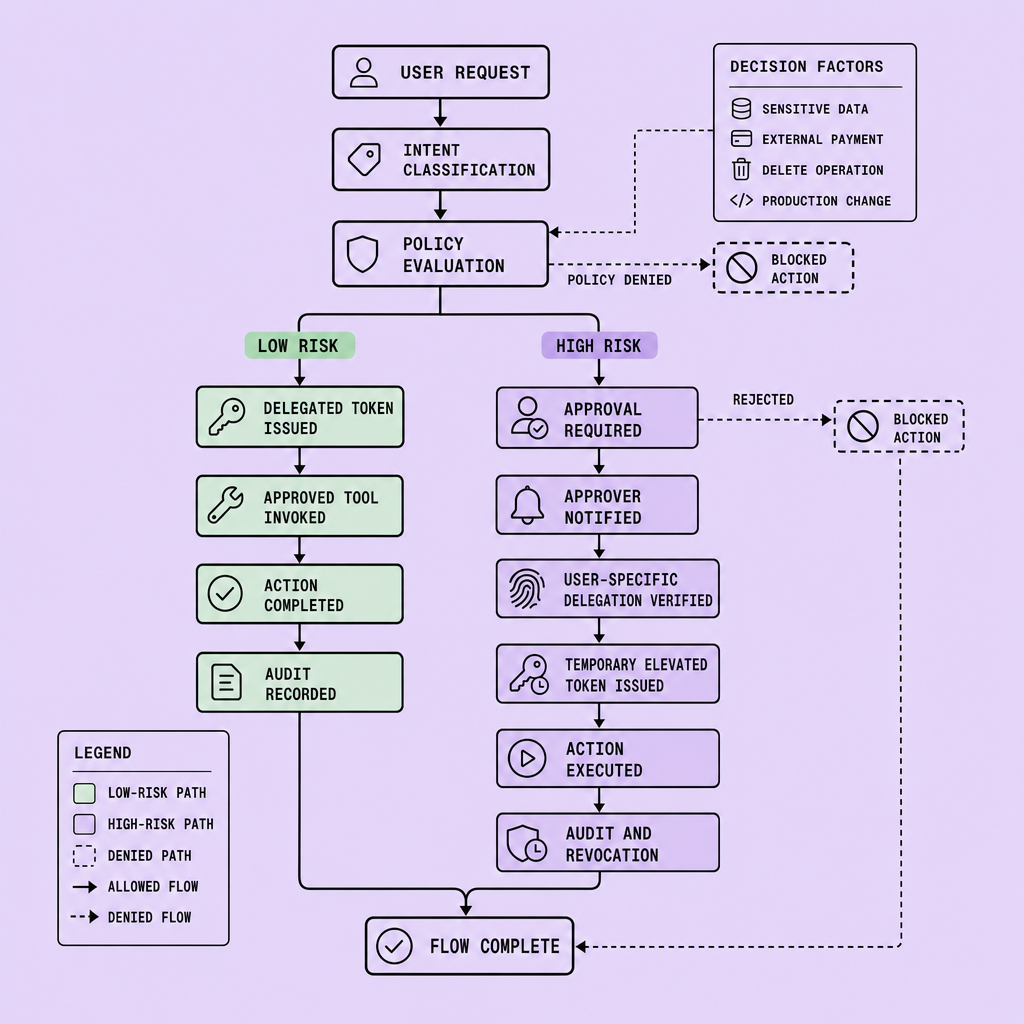
A good production design is layered, not clever. The agent should not hold broad standing access. It gets bounded access per request, per tool, and, for risky operations, per action.
Request flow: from prompt to controlled execution
A practical flow starts with user identity over OIDC or OAuth 2.0. The application sends the prompt, user ID, tenant, and requested task to a policy decision point built with rules in OPA or Cedar. RBAC answers the coarse question: can this type of agent do this class of work? ABAC narrows it by user, customer account, folder path, project, or environment.
A policy enforcement point then calls a token broker. It mints short-lived JWTs with narrow claims such as read:docs, write:drafts, or execute:query, plus resource constraints like folder paths, repository names, or CRM account IDs. Scoped tokens should expire quickly and target one audience.
Next, the agent plans. But planning is not permission. Every tool call should pass through a tool gateway with an allow-list for approved connectors such as Salesforce, Google Drive, Jira, or internal APIs. The gateway validates the token, strips unsafe parameters, and routes code, shell, SQL, or file operations into a sandbox. deny by default should apply throughout.
If an action crosses a risk threshold, such as external email, production deployment, delete, money movement, or policy publication, the flow pauses for approval. Audit logs should capture prompt, identity, policy result, minted scopes, tool calls, outputs, denials, and approvals.
Worked examples
A support agent can read CRM notes for accounts assigned to the requesting rep, draft an update, and write only to status=draft. It cannot close cases or message customers without approval.
An HR document agent can read /policies/benefits/* and write only to /drafts/hr/. It is blocked from payroll folders, employee records, and delete actions.
A dev agent may read logs and open pull requests in a staging repo. Production changes, secret access, and cluster exec remain denied.
Implementation order
Start with identity, a policy decision point, a policy enforcement point, and scoped tokens. Then add the tool gateway, sandboxing, and audit logs. Approval gates and richer permission rules come next. Ship the smallest secure path first, then widen access only where traces show a clear need.
Frequently Asked Questions
What is the difference between AI agent access control and ordinary API authorization?
AI agent access control must evaluate intent, tool choice, and execution context together, not just whether a credential is valid. A normal API client usually performs a predictable call pattern, while an agent can chain tools, transform data, and trigger side effects, so its authorization model must constrain action paths as well as endpoints.
How does AI agent access control work when one workflow touches multiple systems?
AI agent access control should issue separate, narrowly scoped permissions for each system and force every tool call through a central enforcement layer. That design prevents one approved task from becoming broad cross-system access, and it preserves a consistent audit trail even when the workflow spans documents, tickets, messaging, databases, and internal services.
Why should approval gates be based on business impact instead of model confidence?
Business-impact rules are stable, auditable, and easy to enforce consistently across models and versions. Confidence scores are unreliable as a security boundary because a model can be highly confident and still act on incomplete context, stale retrieval, or ambiguous policy. Approval logic should reflect the consequence of the action, not the tone of the prediction.
What should teams log to make agent actions reviewable after an incident?
Teams should log the requesting user, delegated identity, policy inputs, decision result, token scopes, selected tools, target resources, approvals, denials, and execution outputs. This record makes it possible to reconstruct not only what happened, but also why the system allowed it, which is essential for incident response, compliance review, and policy tuning.
How can per-user delegation stay usable without creating constant re-authentication friction?
Per-user delegation stays usable when the platform mints short-lived on-behalf-of tokens automatically within an authenticated session and re-prompts only for step-up actions. Users should not approve routine low-risk reads repeatedly, but they should be asked again for sensitive writes, external communications, or privileged execution that exceeds their normal working context.
Make Imversion a preferred source on Google
Like this kind of AI and software analysis? Add Imversion as a preferred source so Google can highlight our articles for you in Search, AI Overviews, and AI Mode.