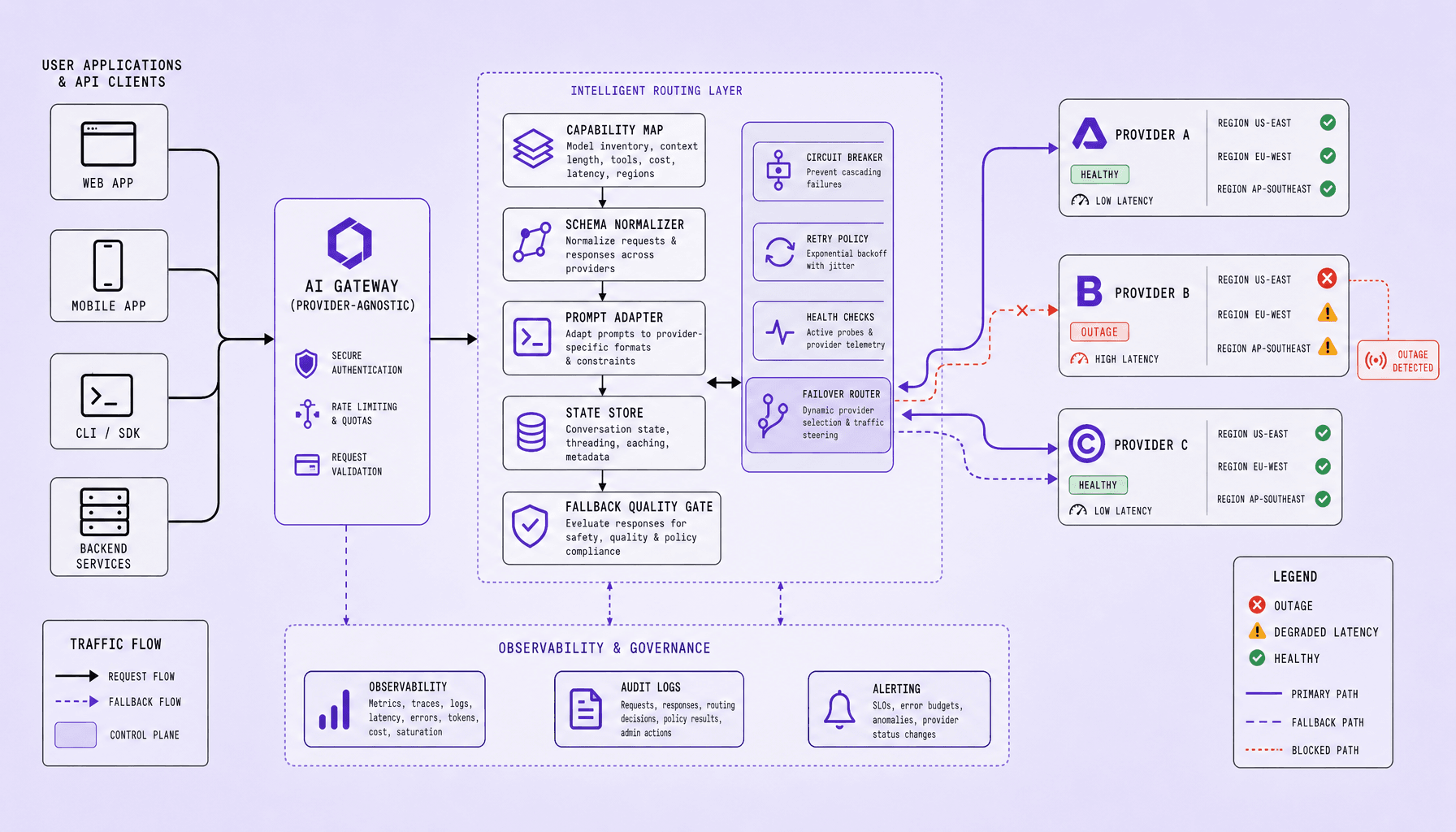
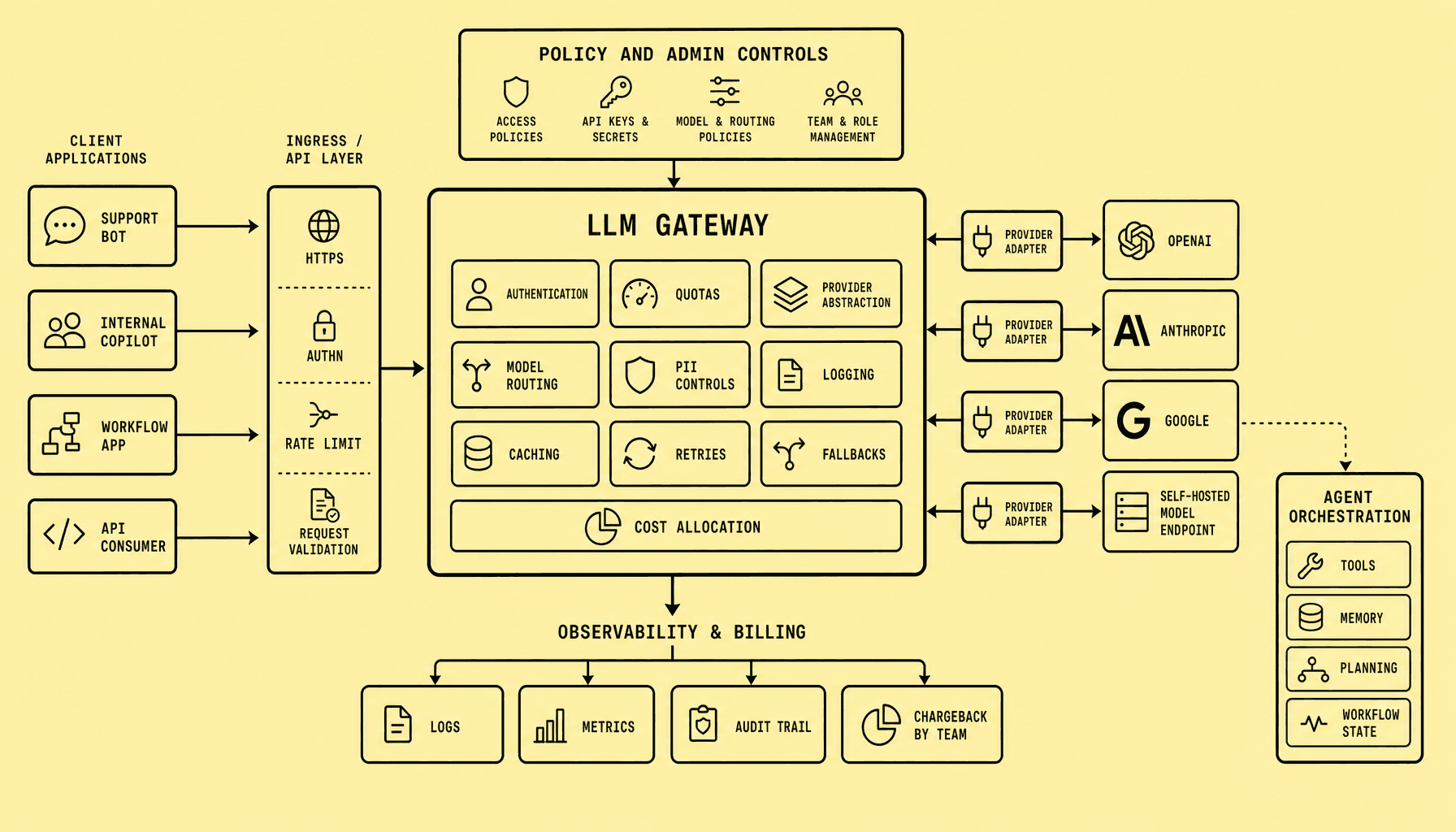
AI Agent Throughput: Estimating Real-World Load Effectively
Explore how to plan for AI agent throughput with real-world load estimation, bottleneck analysis, and scaling best practices.

On this page
AI Agent Throughput Depends on the Smallest Capacity Limit
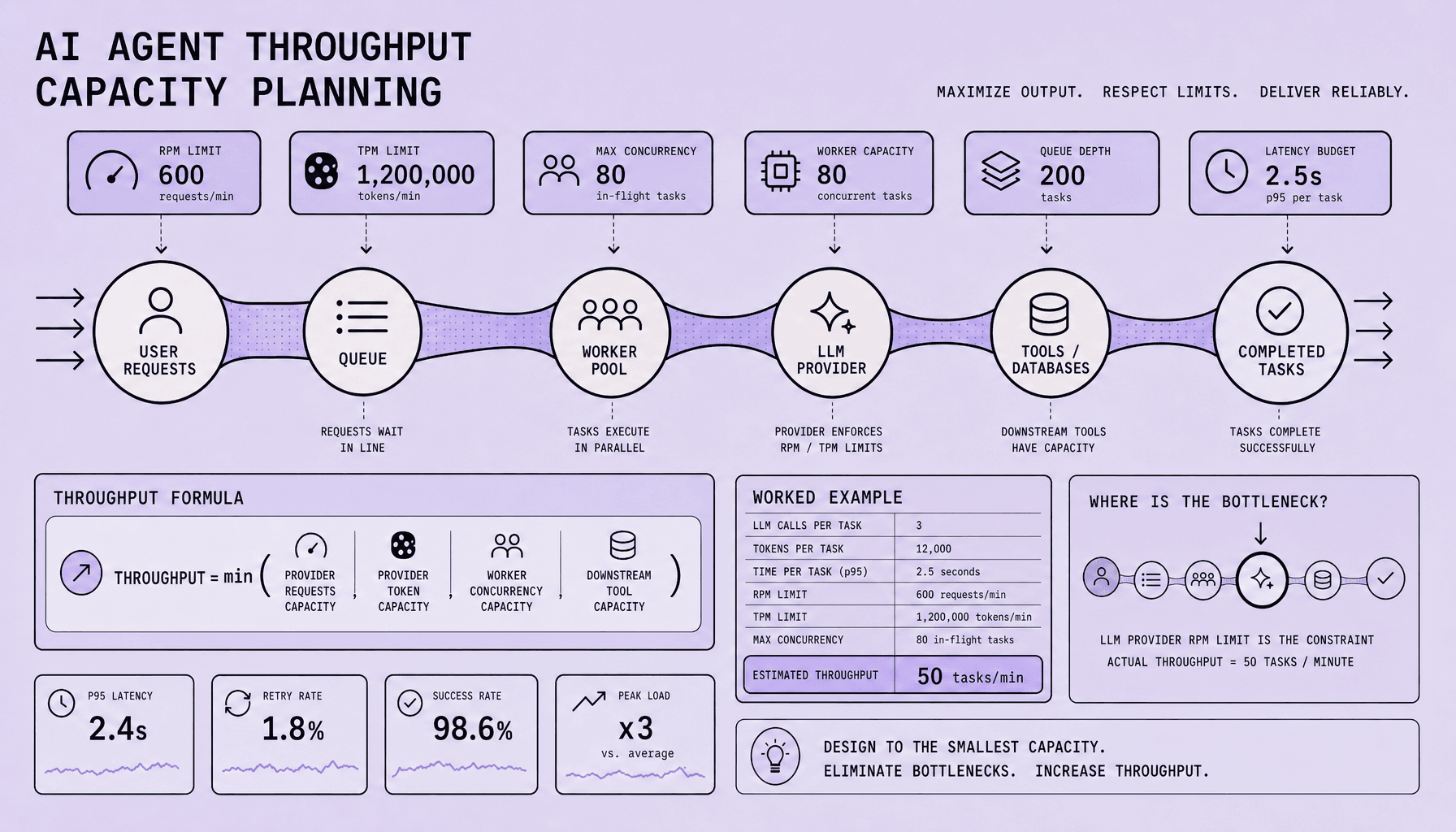
Your agent can look fast in testing and still choke the moment real traffic shows up. The usual reason is simple: teams plan around the best-looking metric, then get blindsided by the narrowest constraint in the workflow. For AI agents, throughput is set by your smallest effective capacity limit, not your fastest benchmark. In practice, sustainable throughput is the minimum of provider limits, worker capacity, and downstream tool capacity, then reduced by latency, queueing, and retries.
AI Agent Throughput Key Takeaways
-
Start with task economics, not raw model speed. Estimate LLM calls, tool calls, and total tokens per task, then compute AI agent throughput with:
tasks/min ≈ min(RPM ÷ calls per task, TPM ÷ tokens per task). If one task uses 4 model calls and 8,000 tokens, a 600 RPM / 1.2M TPM limit caps you at 150 tasks/min before retries. -
Convert traffic and latency into LLM concurrency. Use Little’s Law:
concurrency = arrival rate × average task latency. At 120 tasks/min and 20-second end-to-end latency, you need 40 concurrent in-flight tasks. Then verify workers, not just providers, can sustain that load. -
Include retry amplification early. A 10% retry rate changes effective calls per task from
4to4.4and pushes token demand up too. Small failure rates distort capacity faster than teams expect. -
Check all ceilings together -- RPM and TPM limits, worker slots, tool latency, and queue depth. Monitoring is as important as deployment, because p95 latency and backlog growth usually reveal the bottleneck before outright failure.
-
Plan for bursts, not averages. Test peak-load headroom with backoff, rate limiting, and queue thresholds so your agent scalability model survives real spikes instead of only clean staging traffic.
Map Each Task to Calls, Tokens, and Time Before Estimating AI Agent Throughput
If you model the wrong unit, every number after that is suspect. Start at the task level, not the request level. Skip that step and the estimate may look tidy in a spreadsheet, then collapse under real load.
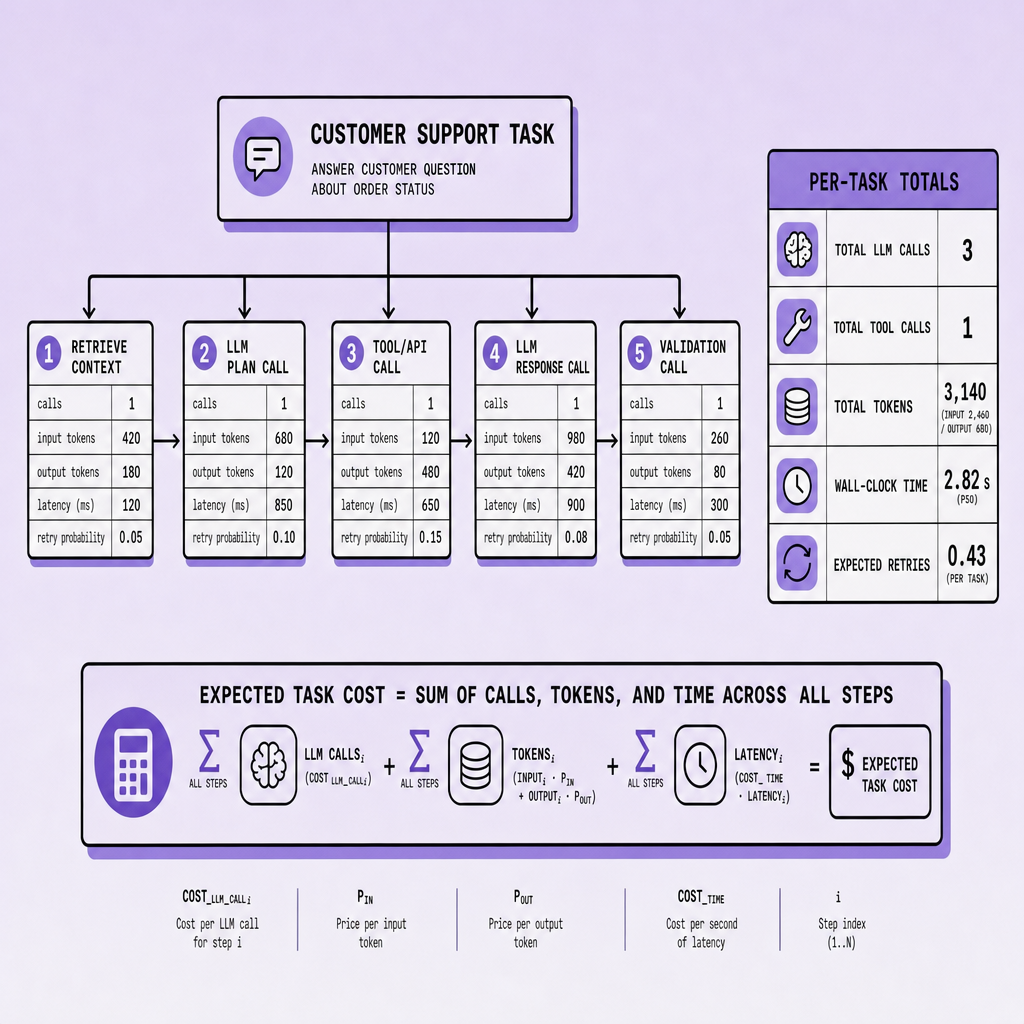
A single user action rarely maps to one model call. Multi-step agents fan out -- planner call, retrieval pass, tool execution, synthesis call, maybe a validation call, then retries if something fails. That is why naive per-request math usually underestimates AI agent throughput constraints and overestimates agent scalability.
Decompose one task into measurable inputs
For AI workload capacity planning, collect these inputs per task:
- calls per task: total LLM inference calls across the full workflow
- tokens per task: sum of prompt + completion tokens across all model calls
- tool or retrieval calls per task
- end-to-end latency: p50 and p95, not just average
- retry rate and branch frequency for alternate paths
Track both the mean path and the expensive path. Agent flows branch unpredictably, so sizing only for the happy path is how queues explode during spikes.
Use the core throughput formula first
For provider-constrained systems, the first-pass formula is:
tasks/min ≈ min(RPM ÷ calls per task, TPM ÷ tokens per task)
Worked example:
- Provider limit: 600 RPM, 1.2M TPM
- Average task: 4 LLM calls, 8,000 total tokens per task
So:
RPM ceiling = 600 ÷ 4 = 150 tasks/minTPM ceiling = 1,200,000 ÷ 8,000 = 150 tasks/min
Your starting task throughput is 150 tasks/min before queueing, retries, or worker limits.
If one task triggers four model calls, your real unit is not “request per minute.” It is “multi-call workflow per minute.”
Add time and concurrency before trusting the estimate
That first-pass estimate is useful, but it is still incomplete. Now layer in latency and LLM concurrency:
required concurrency = arrival rate × average task latency
If arrival rate is 120 tasks/min and average latency is 20 seconds:
120 × (20/60) = 40 concurrent tasks
So even if RPM and TPM limits say 150 tasks/min is possible, you still need enough workers, queue capacity, and downstream tool headroom to sustain it. Monitoring is as important as deployment -- because the gap between modeled and actual task cost usually shows up first in p95 latency, queue depth, and retry amplification, not in a static limit sheet.
That task-level map is the foundation for trustworthy AI workload capacity planning.
Use LLM Concurrency and Provider Limits to Find the True Throughput Ceiling for AI Agent Throughput
This is where many plans get overly optimistic. Your app server may look healthy while the real ceiling sits upstream. You can have idle CPU, free workers, and a healthy queue consumer pool -- and still miss your target because a model rate limit, provider quota, or in-flight cap stops new work from starting.
The first check is simple:
Tasks/min ≈ min(RPM ÷ calls per task, TPM ÷ tokens per task)
Say your workflow averages 4 LLM calls and 8,000 total tokens per task, with provider limits of 600 RPM and 1.2M TPM.
RPM ceiling: 600 ÷ 4 = 150 tasks/min
TPM ceiling: 1,200,000 ÷ 8,000 = 150 tasks/min
Clean on paper. But incomplete.
Throughput also depends on LLM concurrency. Little’s Law gives the practical requirement:
Concurrency needed = arrival rate × average task latency
Use consistent units. For 120 tasks/min and 20-second average latency:
120 × (20 ÷ 60) = 40 concurrent tasks
If your provider allows only 25 in-flight requests, or your workflow fans out into multiple overlapping model calls, your AI agent throughput drops below the RPM and TPM limits even before workers saturate. At Imversion Technologies Pvt Ltd, this is where planning usually shifts from “how many servers?” to “what actually blocks the pipeline?”
Latency budgets turn quota into real capacity
Quota numbers look generous until latency stretches. A latency budget should use more than p50. Plan with p95 latency for peak-load safety, especially for multi-step agents. If p95 rises from 20 seconds to 35 seconds, the same 120 tasks/min now needs:
120 × (35 ÷ 60) = 70 concurrent tasks
That extra concurrency may collide with a provider-side cap long before CPU or memory becomes a problem. If retries fire on 429s, the request count climbs again. Monitoring is as important as deployment -- because latency shifts can silently cut usable capacity.
Choose safe operating headroom
Running at the theoretical maximum is how systems become fragile. Keep headroom below your computed limit -- often 20% to 30% is a sensible starting guardrail -- because bursts, token variance, and retry amplification make RPM and TPM limits feel smaller in production. If calls are short but numerous, RPM is the bottleneck. If prompts or outputs are large, TPM is the bottleneck. The job is to identify which one fails first, then size concurrency, queue depth, and worker count around that constraint.
Size Workers and Queue Depth for Stable AI Agent Throughput and Agent Scalability
A throughput target is meaningless until it turns into worker math. If your plan says you need 40 concurrent tasks to hit target throughput, but each worker safely handles only 5, you need 8 workers, not 4 with hope and autoscaling.
Size workers from concurrency, not CPU alone
Use Little’s Law for the application side:
required concurrency = arrival rate × average task latency
If you need 120 tasks/min and end-to-end task latency is 20s, then:
120 × (20/60) = 40 concurrent tasks
Now convert concurrency into worker count:
workers needed = required concurrency ÷ safe concurrency per worker
If one worker can safely run 5 concurrent tasks, then:
40 ÷ 5 = 8 workers
That is your baseline.
Do not set safe concurrency from config alone. Measure it under realistic payloads. Memory pressure, connection pooling, and blocking tool calls often reduce usable concurrency well below the configured maximum. An async worker may handle several model calls well when most time is spent in I/O, then stall once tasks add CPU-heavy parsing or synchronous SDK calls.
A practical split:
- Model-bound: workers mostly wait on LLM responses; async concurrency helps.
- Tool-bound: database, retrieval, or HTTP dependencies dominate; downstream pools become the cap.
- Worker-bound: CPU, memory, or event-loop saturation limits throughput before provider limits do.
Monitoring matters because worker saturation often appears first as longer queue wait, not crashed processes.
Set queue-depth alarms from latency budgets
Queue depth is backlog translated into user delay.
A simple rule:
acceptable queue depth ≈ arrival rate × allowed queue wait time
If your SLO allows only 10s of queue wait at 120 tasks/min, acceptable backlog is:
120 × (10/60) = 20 queued tasks
Beyond that, your latency budget is already burning down. Queue growth means arrivals exceed completions. In practice, that usually points to one of three problems: workers are saturated, a tool dependency is slow, or provider limits are throttling completions.
Rising queue depth with flat worker CPU often means an external bottleneck, not a worker shortage.
For agent scalability, alarm on queue age, queue depth trend, worker utilization, and retry rate together. A deep queue with aggressive retries gets worse fast.
Account for Bottlenecks, Retry Amplification, and Peak-Load Planning
This is the part that punishes clean spreadsheets. Capacity math usually breaks under instability first, not steady state. Your staging estimate may say 150 tasks/min, but production traffic adds rate limits, slow tools, and burst traffic -- and suddenly your effective AI agent throughput is much lower than the spreadsheet promised.
A useful adjustment is to model retry amplification directly:
effective calls per task = base calls per task × (1 + retry rate × avg retry attempts)
If a task normally uses 4 LLM calls and 10% of calls are retried once after 429s or timeouts, then:
effective calls per task = 4 × (1 + 0.10 × 1) = 4.4
With a 600 RPM provider limit, your throughput ceiling drops from:
600 ÷ 4 = 150 tasks/min
to:
600 ÷ 4.4 ≈ 136 tasks/min
And that is before extra TPM consumption from repeated prompts. Retry amplification eats both RPM and TPM limits. Fast.
Use exponential backoff. Add jitter. Cap retries. Monitoring is as important as deployment here, because uncontrolled retries can turn a brief provider throttle into a queue-wide timeout cascade.
Bottleneck analysis
Do not treat the LLM as the only constraint. Compare three ceilings side by side:
- Provider ceiling:
min(RPM ÷ effective calls/task, TPM ÷ effective tokens/task) - Worker ceiling:
workers × safe concurrency per worker ÷ avg task time - Tool ceiling: external API, vector DB, or database QPS/latency under load
The lowest one wins.
If your provider supports 136 tasks/min after retries, workers support 140, but a downstream dependency only sustains 90 tool calls/min and each task needs 1 tool call, your agent scalability is actually capped at 90 tasks/min. Add circuit breaker behavior so a failing tool does not stall every in-flight task.
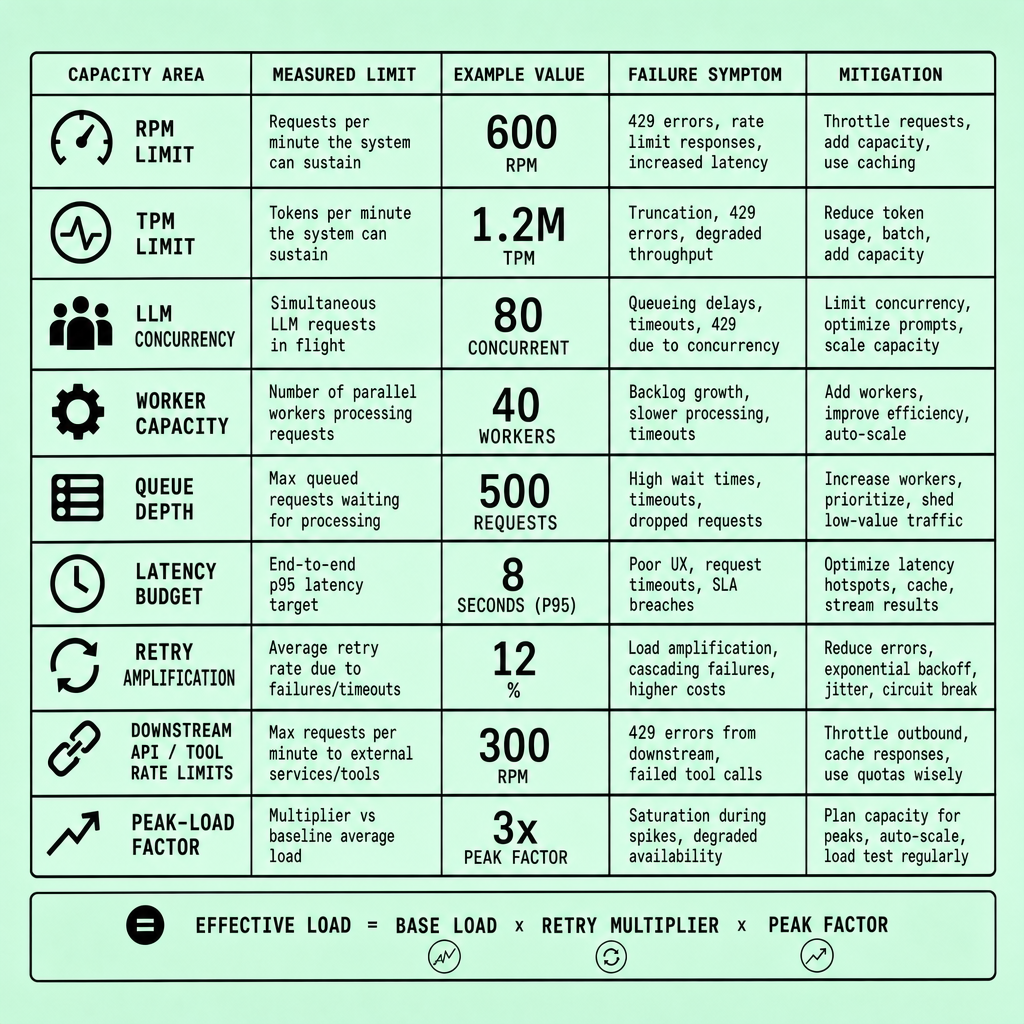
Peak-load planning
Average load is the comforting number. Peak load is the one that breaks systems. If baseline demand is 100 tasks/min and burst traffic reaches 180 for 5 minutes, queue depth and latency budgets decide whether you recover or drown. Little’s Law still applies, but the safer assumption is headroom -- keep planned steady-state utilization below saturation so bursts have somewhere to go.
Predefine graceful degradation:
- smaller prompts
- fewer tool calls
- capped LLM concurrency
- fallback models for non-critical paths
- temporary feature shedding
Peak events are easier to survive when the tradeoffs are explicit instead of improvised under pressure.
Frequently Asked Questions
What is a good way to measure AI agent throughput in production?
A good production measure of AI agent throughput is completed tasks per minute paired with task success rate, p95 latency, and queue wait time. This is more reliable than raw request counts because one user task can include several model calls, tool invocations, and retries that change the true cost of serving traffic.
How does token variance affect AI agent throughput?
Token variance reduces predictability because long prompts or completions can make TPM the limiting factor even when RPM looks safe. A system sized only on average tokens can fail during peak complexity, so capacity plans should include p95 or worst-case token ranges per task, not just the mean.
Why should I separate provider concurrency from worker concurrency?
Provider concurrency and worker concurrency are different limits that fail in different ways. Provider concurrency controls how many requests a model vendor will accept at once, while worker concurrency controls how many tasks your application can safely run. Separating them helps pinpoint whether bottlenecks come from quotas, code execution, or downstream dependencies.
How can I improve AI agent throughput without switching models?
You can improve AI agent throughput by reducing calls per task, shrinking prompt size, caching repeated context, parallelizing independent tool steps, and cutting unnecessary validation loops. These changes lower RPM and TPM pressure at the same time, which often creates more usable capacity than simply adding more workers.
What queue metrics matter most for agent scalability?
The most important queue metrics for agent scalability are queue depth, queue age, enqueue rate, completion rate, and time spent waiting before work begins. Together, these metrics show whether backlog is temporary or structural and help teams react before users experience widespread latency or timeout failures.
Make Imversion a preferred source on Google
Like this kind of AI and software analysis? Add Imversion as a preferred source so Google can highlight our articles for you in Search, AI Overviews, and AI Mode.