Internal AI Tools: Build Custom Dashboards for Better ROI
Understand why internal AI tools and custom dashboards often surpass multiple SaaS subscriptions, improving workflow and ROI.

When internal AI tools beat another SaaS subscription
Buying an AI tool is easy. Living with five of them is not.
The pain usually shows up after the quick win: one tool for support, another for reporting, another for document search, each with its own permissions, costs, and handoff gaps. Work still happens in Salesforce, SAP, Slack, or Snowflake, but the AI sits off to the side. People copy context between tabs. Oversight gets weaker. Ownership gets blurry.
Internal AI tools beat another SaaS subscription when the workflow, data model, governance rules, and integrations are too specific for standard AI dashboard software. If AI must work inside systems like Salesforce, SAP, Slack, or Snowflake -- with role-based access, audit logs, and approval steps -- a custom AI dashboard usually wins.
Most teams start with buying because it is faster. Fair. But the build vs buy AI decision changes once separate tools create duplicate costs, weak oversight, and broken handoffs between teams. In practice, enterprise AI works better when one internal layer connects prompts, business rules, and outputs to the systems employees already use.
A practical test helps. Build when the tool must use proprietary data, trigger AI business automation, enforce SSO and permissions, or serve multiple teams through one interface. Buy when the use case is narrow, standalone, and easy to replace.
At Imversion Technologies Pvt Ltd, the bias is simple: clarity is better than complexity. One controlled dashboard is often easier to govern than five disconnected subscriptions.
Key Takeaways
-
Build, don’t buy, when AI has to live inside real workflows -- not beside them. A custom AI dashboard makes sense when teams need shared access, proprietary data, approvals, and tight links to systems like Salesforce, SAP, Slack, or Snowflake. If the job is narrow and standalone, SaaS is usually faster.
-
Internal AI tools create value when they replace fragmented point solutions with one governed workspace. This shows up most clearly in enterprise AI setups where support, finance, ops, or sales need the same data, prompts, and audit trail without jumping across vendors.
-
The biggest cost mistake is comparing only subscription price versus build cost. Teams should measure integration effort, admin overhead, adoption, and cost per workflow. Decisions should be backed by data -- hours saved, cycle-time reduction, and duplicate-tool cleanup are better ROI signals than feature lists.
-
Security is often the deal-breaker. A custom AI dashboard gives more control over role-based access control, SSO, audit logs, model routing, and where sensitive data moves. But it also creates ownership: the team must maintain reliability, permissions, and API limits over time.
Build vs buy AI: the clearest signals that custom is the better choice
A lot of teams frame this as a technology decision. It is usually a workflow decision first.
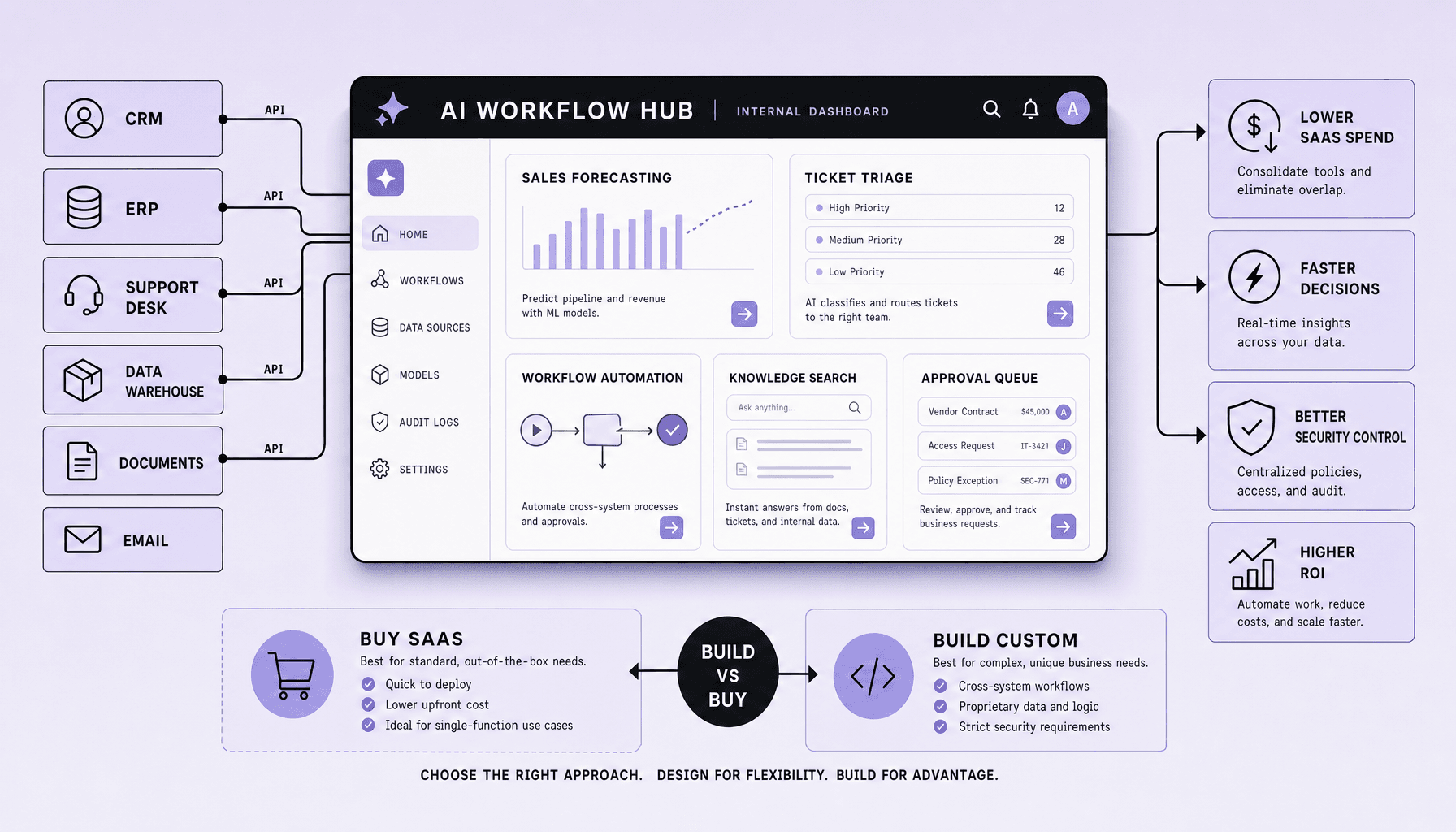
Buy first if the job is narrow, standard, and mostly isolated. Build when AI has to cross teams, touch proprietary data, and drive real workflow orchestration inside the business.
That is the practical build vs buy AI line.
A SaaS tool fits well when one team needs one outcome fast: drafting content, summarizing calls, classifying tickets, or answering basic knowledge-base questions. Setup is lighter. Time to first use is shorter. If the tool only needs a simple API connection or none at all, buying usually wins.
But speed to first use is not the same as speed to sustained value.
A custom AI dashboard becomes the better choice when teams start stitching together separate AI subscriptions for support, finance, ops, and sales -- then discover the work still happens in Salesforce, SAP, NetSuite, Zendesk, Slack, Microsoft Teams, or Snowflake. At that point, governance gets messy. Context gets lost. Human handoff breaks.
Build vs buy AI comparison
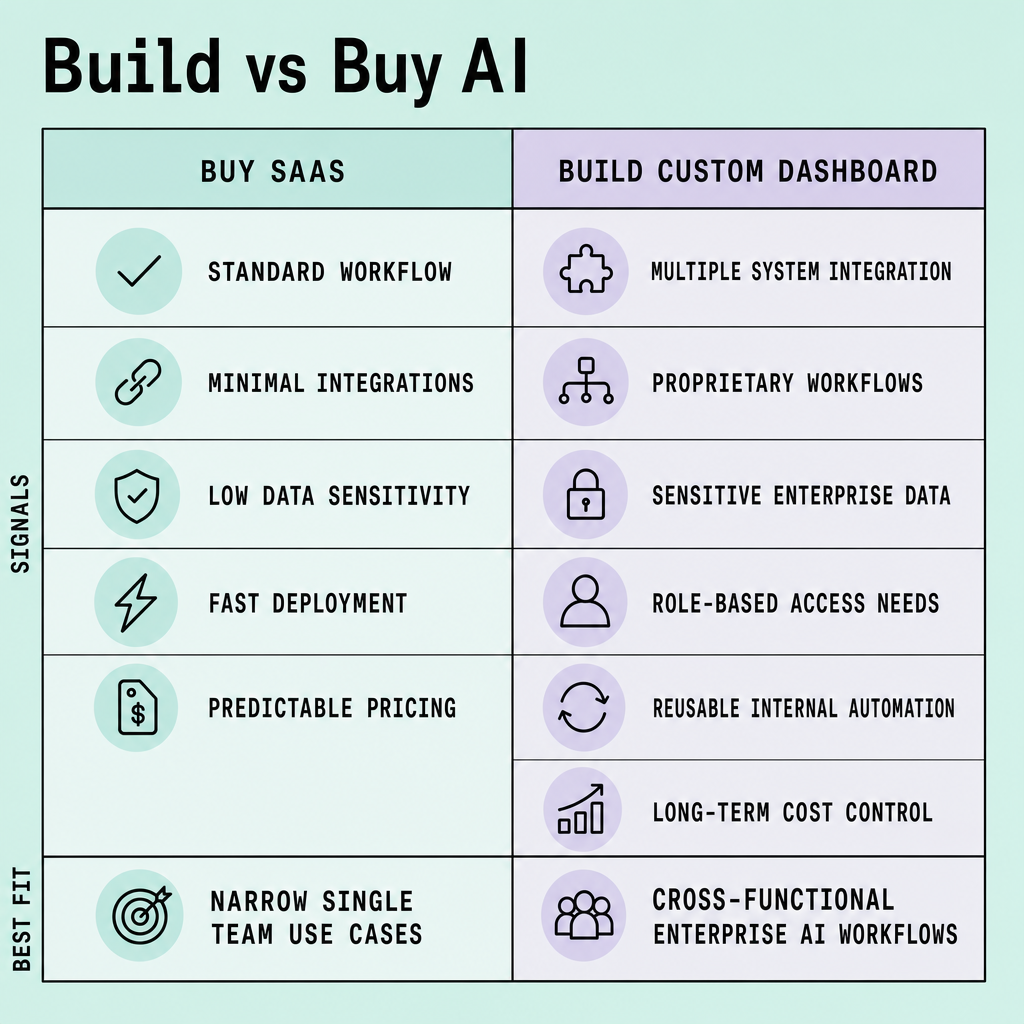
| Criteria | Buy SaaS | Build custom AI dashboard |
|---|---|---|
| Speed to launch | Fast for a single use case | Slower upfront |
| Flexibility | Limited to vendor workflow | Built around internal process |
| Integration depth | Basic API connectors | Deep integration with API, events, and workflow orchestration |
| Governance | Vendor-defined controls | Custom SSO, RBAC, audit logs, approval paths |
| Total cost of ownership | Lower at first, can rise with seats and add-ons | Higher initially, often better if it replaces multiple tools |
The clearest signals for custom internal AI tools are concrete:
- Multiple teams need one governed interface, not separate logins
- AI outputs must pull from private documents, ERP records, CRM data, or warehouse tables
- The process needs approvals, exception handling, and human review
- Security requires SSO, RBAC, audit logs, and tighter control over prompts and outputs
- Existing AI dashboard software adds another tab, but not a usable workflow
Teams should not build just to “own AI.” They should build when a shared enterprise AI layer can reduce tool sprawl, improve control, and lower cost per workflow over time.
A grounded recommendation: buy for isolated productivity gains; build for AI business automation that has to live inside core systems.
Why a custom AI dashboard works better for internal AI tools
The problem with most standalone AI tools is not that they are weak. It is that they sit outside the real job.
A custom build works better when AI needs to sit inside the work itself, not beside it. For internal use, that usually matters more than having a standalone tool with lots of surface-level features.
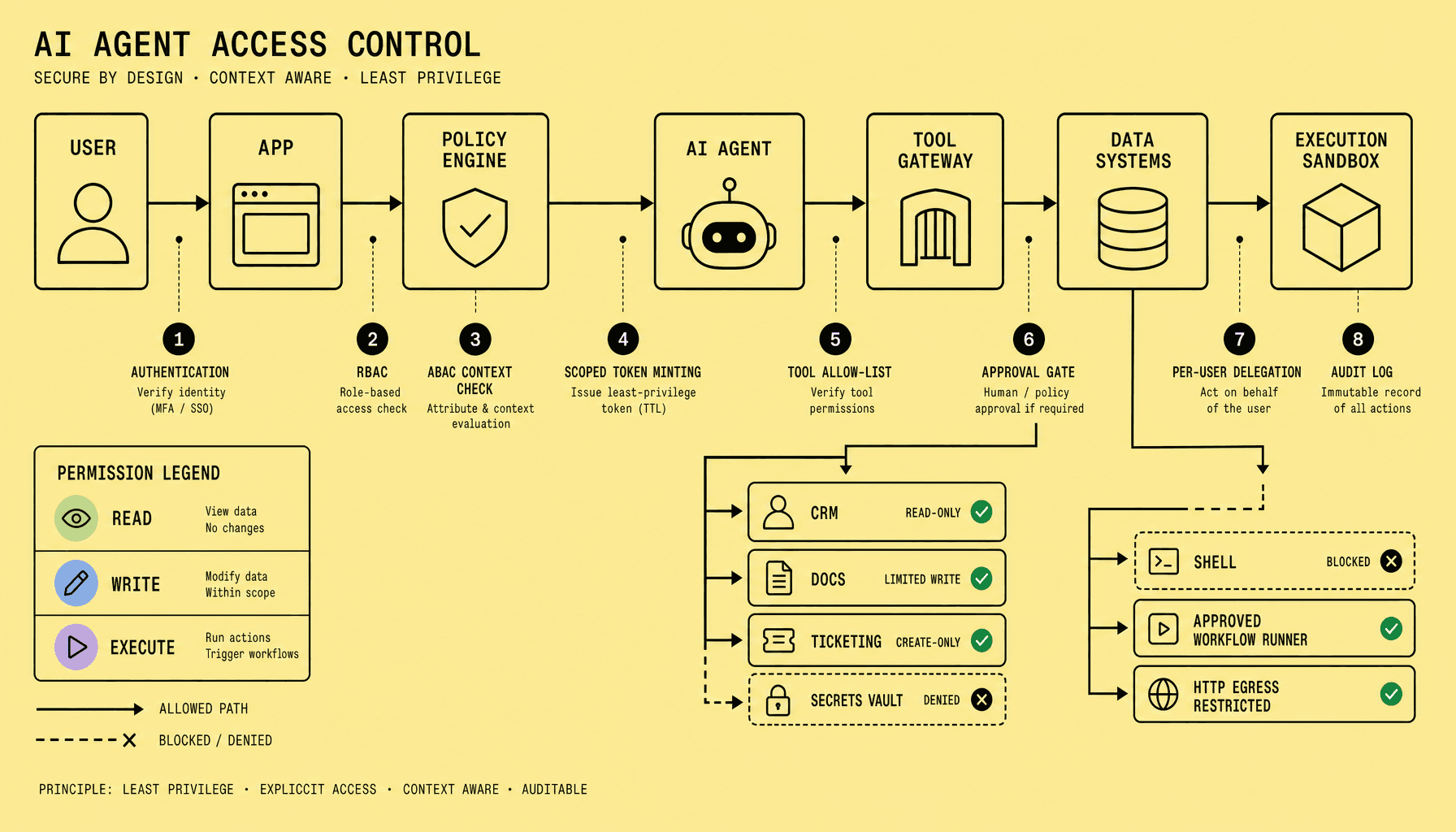
Most teams start with separate AI subscriptions for separate problems: one for support, another for reporting, another for document search. That pattern creates friction fast -- disconnected outputs, duplicate permissions, weak governance, and one more place employees have to remember to check. A custom AI dashboard solves that by bringing internal AI tools into a single interface tied to the systems people already use.
The practical win is better workflow alignment. If the dashboard pulls from Salesforce, SAP, Zendesk, a knowledge base, Slack, or Microsoft Teams, employees do not need to copy data between tabs or re-enter context. AI business automation usually pays off here, by cutting steps out of existing processes instead of layering on new ones.
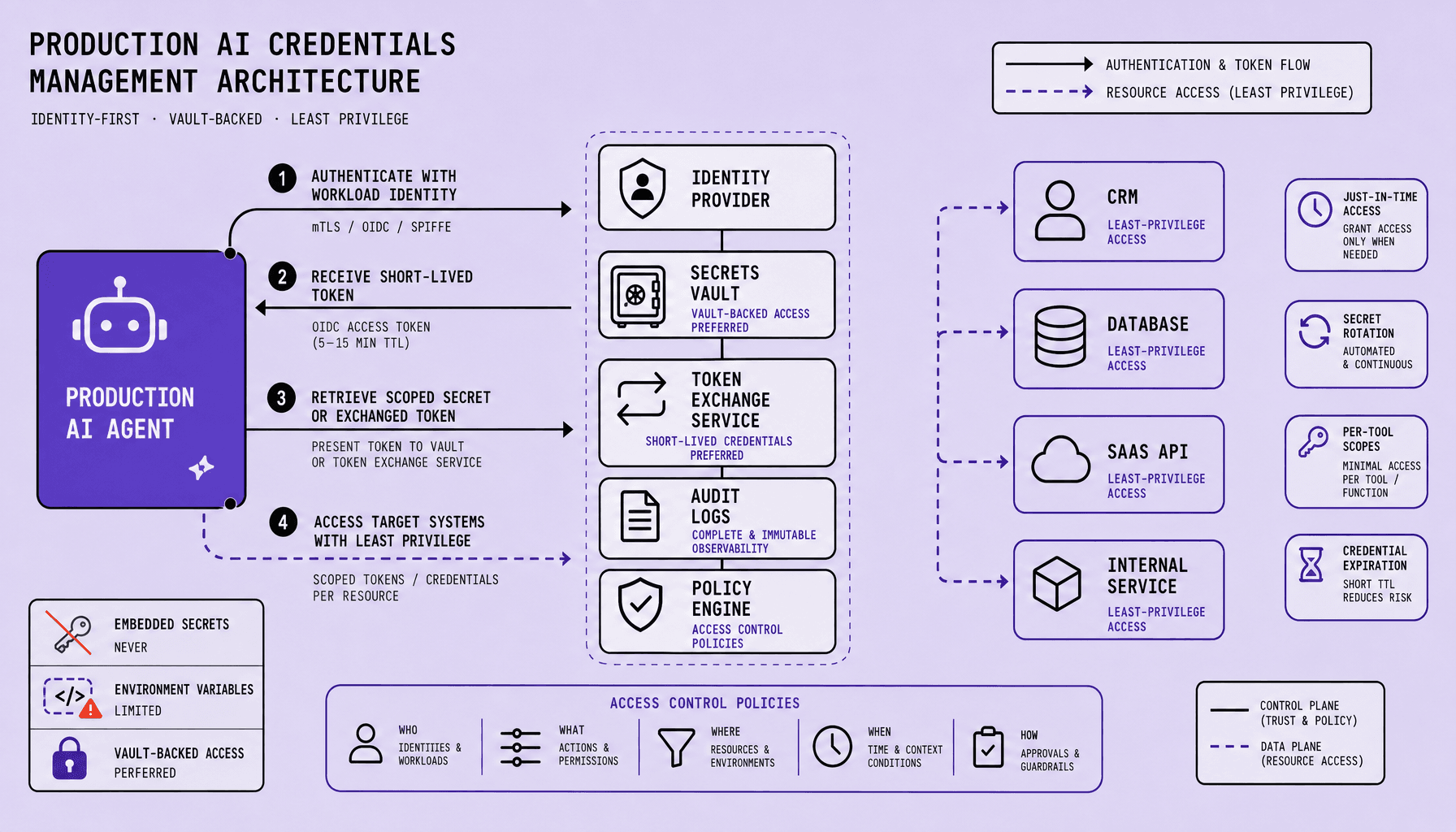
There is also a control advantage. One dashboard can enforce SSO, role-based access control, audit logs, approval flows, and usage analytics across teams. In enterprise AI, security and accountability are rarely optional.
Support and customer operations
Support teams feel the cost of context switching quickly. An agent cannot do much with a clever summary if it lives in a separate tab and ignores ticket history.
Support teams benefit when AI sits next to the ticketing system and knowledge base. A custom AI dashboard can summarize cases, draft responses, suggest internal articles, and route escalations without forcing agents into a separate tool.
Operations and process execution
Operations work tends to break when systems disagree or exceptions pile up. That is exactly where shallow AI tooling starts to struggle.
Operations teams often need AI tied to ERP records, order status, internal forms, and exception handling. A shared dashboard can surface bottlenecks, generate follow-up actions, and standardize approval flows across functions.
Finance and compliance review
Finance teams do not need novelty. They need traceability.
Finance teams can use internal AI tools for invoice review, policy checks, variance explanations, and document extraction. Centralized reporting helps managers see what was automated, what still needs approval, and where errors cluster.
Sales and knowledge management
Sales and knowledge work look simple from the outside, but both depend heavily on context staying intact.
Sales teams can connect a custom AI dashboard to CRM data from HubSpot or Salesforce for account summaries, call prep, and follow-up drafting. Knowledge teams can unify document search, policy Q&A, and internal guidance in one governed layer.
Most ROI comes from removing workflow friction, not asking staff to learn a separate AI destination.
There is a tradeoff. Custom dashboards add maintenance responsibility -- integrations, API limits, model changes, and access rules need active ownership. But if several teams need shared AI inside core systems, the reduction in tool sprawl and the gain in unified reporting can justify it.
How internal AI tools integrate with CRM, ERP, support, and data systems
This is where the decision usually gets real.
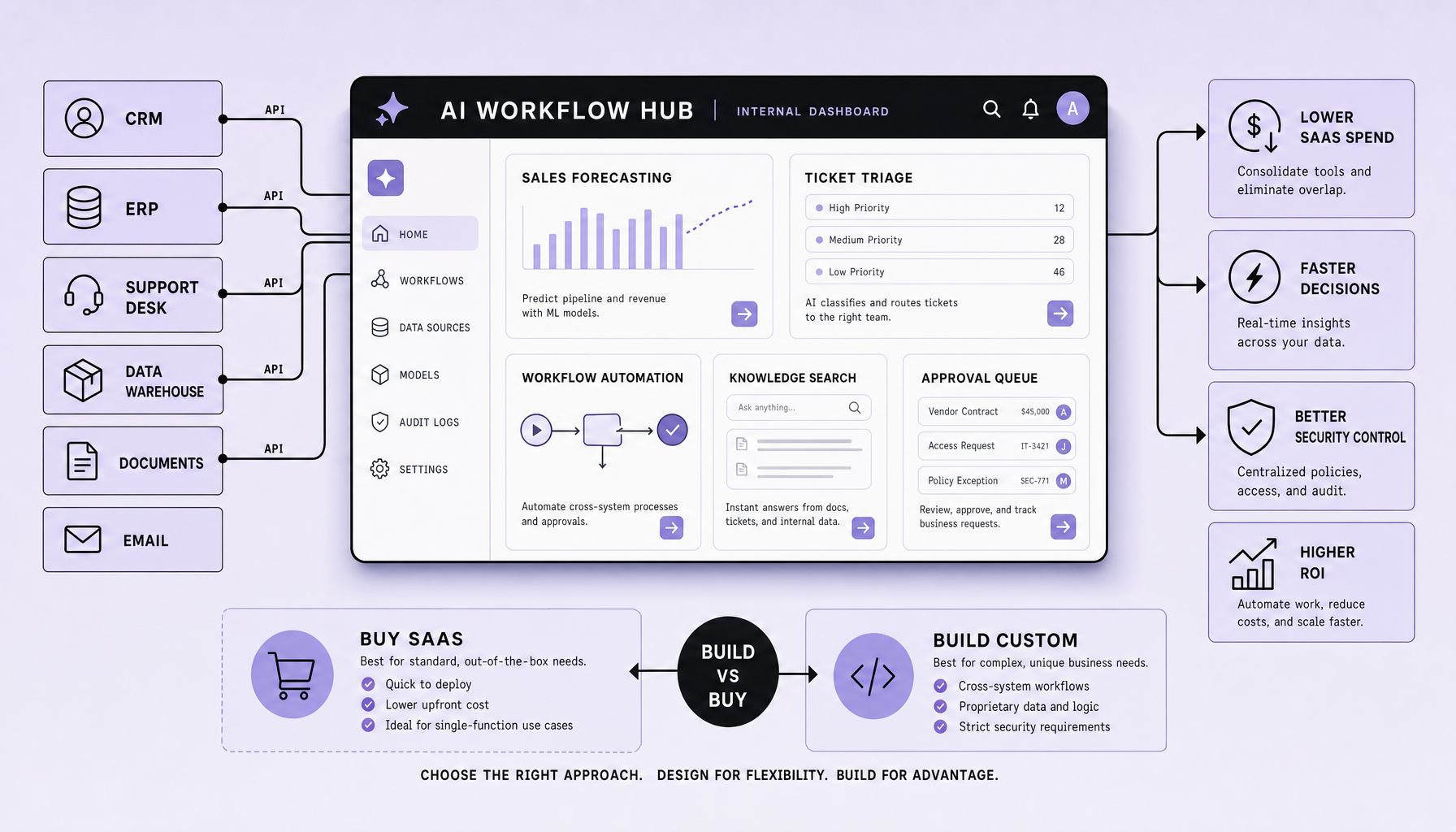
Generic AI subscriptions can summarize text or answer prompts. Fine. But enterprise AI becomes useful when it can read from Salesforce, pull order or billing context from SAP or NetSuite, check ticket history in Zendesk, query a warehouse like Snowflake, and push the result back into the workflow people already use in Slack or Teams. That is why internal AI tools often outperform off-the-shelf products: they connect action to context.
What a workable integration stack looks like
A practical custom AI dashboard usually sits between source systems and users. It does not replace CRM, ERP, or support tools. It orchestrates them.
In practice, the stack often includes:
- APIs to systems like Salesforce, SAP, NetSuite, and Zendesk
- a warehouse or analytics layer such as Snowflake for reporting and historical context
- chat delivery in Slack
- identity and access through Microsoft Entra ID for SSO and role-based access
- webhooks for event-driven triggers, approvals, and status updates
So the dashboard becomes the control layer. One place for prompts, outputs, permissions, audit logs, and workflow actions.
Where integration gets hard
The hard part is not the model. It is permissions, data shape, and reliability.
Sales data may use one customer ID. ERP may use another. Support tickets may be messy, incomplete, or locked behind narrow API scopes. Some APIs have rate limits. Some objects are poorly documented. Some systems expose read access cleanly but make write-back risky without approval rules.
Because of that, teams should start small. One high-friction workflow. One or two trusted systems. For example: pull account context from Salesforce, combine it with open issues from Zendesk, then send a draft renewal-risk summary into Slack for human review.
Start with a workflow that already hurts, not a company-wide AI layer.
What to choose early
Early architecture choices can save a lot of rework later.
Use direct APIs first if the workflow is narrow and time-sensitive. Add a warehouse-first pattern when the use case needs historical joins, analytics, or cross-system reporting. Keep write actions gated behind approval flows. Design for failure too -- retries, fallback states, and auditability.
Understanding why a workflow breaks before automating it matters more than adding more connectors. That is how a custom AI dashboard turns AI business automation into something usable, governed, and reliable.
Costs, ROI, and security: the numbers behind enterprise AI decisions for internal AI tools
This is where weak business cases usually fall apart.
A custom build should win on total cost of ownership and control, not novelty. In enterprise AI, the real comparison is rarely monthly sticker price versus build cost alone. SaaS can look cheaper upfront, then expand through per-seat pricing, feature tiers, API caps, and added contracts for admin or security controls. Internal AI tools usually have the opposite shape: more upfront effort, but less long-term fragmentation when they replace multiple point solutions.
What to include in the real cost
Estimate five buckets:
- Build cost: product design, backend and frontend work, integrations with Salesforce, SAP, NetSuite, Zendesk, Slack, Microsoft Teams, or Snowflake, plus testing and rollout
- Maintenance: bug fixes, prompt updates, model changes, access reviews, monitoring, and support
- Model usage: OpenAI or Azure OpenAI token costs, embedding costs, retrieval pipelines, and retry overhead
- Vendor fees: SaaS subscriptions, per-seat charges, premium security add-ons, and usage-based overages
- Opportunity cost: delays, manual work that stays in place, and the cost of keeping teams in disconnected tools
A simple ROI formula
Use a baseline before building. Then calculate:
ROI = ((hours saved x loaded hourly rate) + error-cost reduction + cycle-time value - annual TCO) / annual TCO
A practical benchmark for internal AI tools is not “best model.” It is measurable process gain: fewer support touches, faster approvals, lower rework, better adoption, or lower cost per workflow.
If the strongest benefit is vague productivity sentiment, the business case is weak.
Security requirements that can justify a custom AI dashboard
Security often tips the decision because it changes what “usable” even means.
A custom AI dashboard can centralize RBAC, SSO, audit logs, and data retention rules instead of scattering prompts and outputs across vendors. For regulated workflows, teams may also need document-level permissions, redaction, clear access logging, and governance that fits internal policies.
But custom does not mean automatically secure. It still needs least-privilege access, retention limits, encrypted transport and storage, and reviewable audit logs from day one.
Common mistakes with internal AI tools and a simple decision framework
Most internal AI tools fail for boring reasons, not model quality. Teams build before they map the workflow, define success metrics, or assign one accountable owner. The result is often a custom AI dashboard that looks impressive in demos but never becomes part of daily work.
The common mistakes are predictable: building before validating the job, skipping governance, over-customizing too early, and treating adoption as an afterthought. Governance gaps are especially costly in internal tools. If there is no role-based access control, no audit trail, and no approval logic, teams may block the rollout even if the model performs well. Over-customization creates a different risk: the team spends time polishing edge cases before proving that one narrow use case actually matters.
A better starting point is smaller and stricter: one workflow, one owner, one measurable outcome. That outcome might be hours saved, cycle-time reduction, error reduction, or active usage by the people who must rely on the tool.
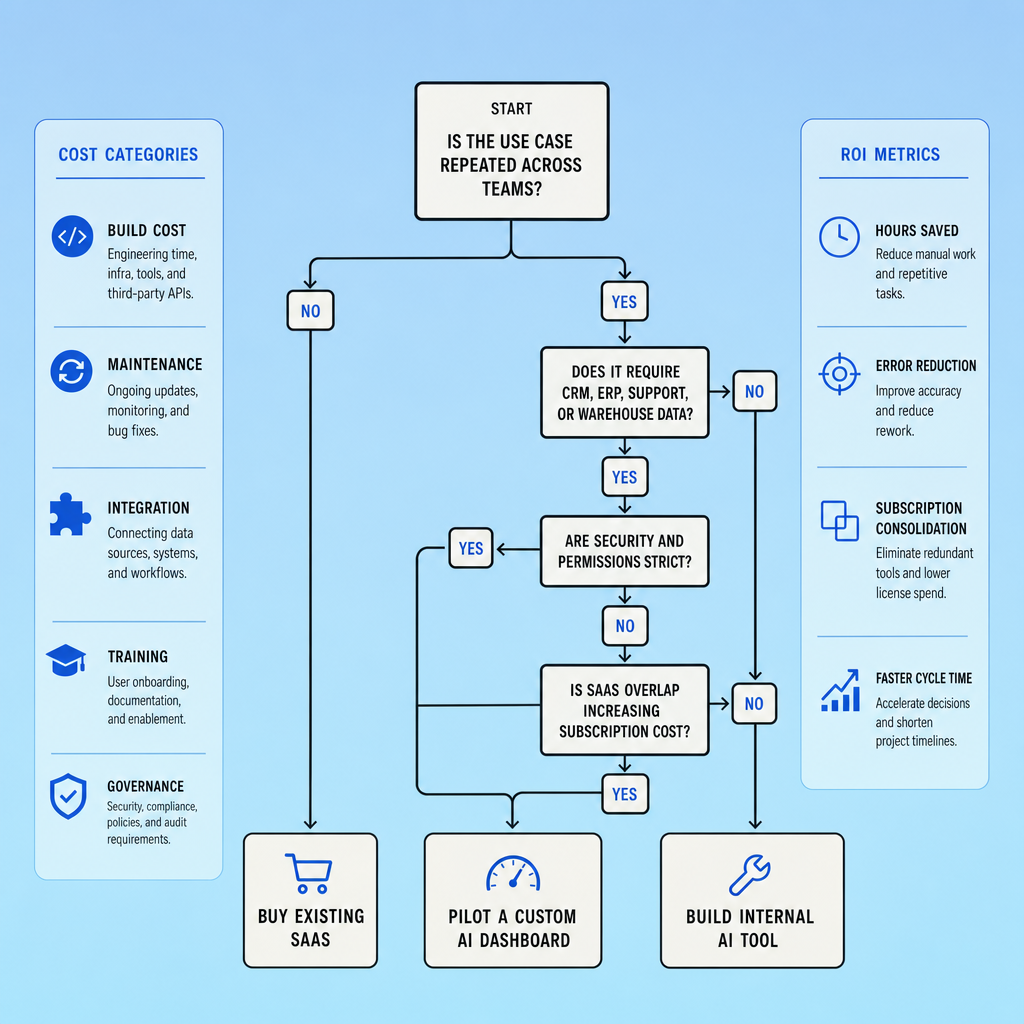
A simple build vs buy AI checklist
- Buy if the workflow is standard, low-risk, and mostly standalone.
- Pilot if value seems real but integration depth, API limits, governance needs, or user demand are still uncertain.
- Build if the workflow is unique, the data is sensitive, and the AI must connect deeply with systems like Salesforce, SAP, Snowflake, Slack, or Microsoft Teams.
- Expand only after workflow mapping, governance, and success metrics are in place.
The tradeoff is speed versus fit. Buying usually gets a team moving faster, but building can be the safer long-term choice when the workflow is specific, cross-functional, or tightly regulated.
Frequently Asked Questions
What are internal AI tools in an enterprise context?
Internal AI tools are company-specific applications that apply AI inside internal workflows, data environments, and permission models. Unlike public AI apps, they are designed around business systems such as CRM, ERP, support platforms, and data warehouses, so employees can use AI with approved context, traceable outputs, and operational controls.
How do internal AI tools differ from a standard SaaS AI product?
Internal AI tools are optimized for a company’s exact processes, security rules, and system integrations, while standard SaaS AI products are built for broad, repeatable use cases. The difference matters when teams need shared context, cross-system actions, custom approval logic, or tighter control over where sensitive data is accessed, stored, and routed.
When should a company start with a pilot instead of fully building a custom AI dashboard?
A pilot is the right move when the use case looks promising but the operational facts are still unclear, especially around API limits, user adoption, data quality, and compliance requirements. A focused pilot reduces risk by proving whether a workflow creates measurable business value before the organization commits to full architecture and maintenance.
Why should enterprise AI projects measure workflow-level ROI instead of general productivity?
Workflow-level ROI is more reliable because it ties AI performance to business outcomes that finance and operations teams can verify. Measures such as cycle-time reduction, error reduction, escalations avoided, and throughput gains are harder to dispute than subjective claims that staff feel more productive after using a new AI interface.
What is the biggest governance risk with a custom AI dashboard?
The biggest governance risk is allowing the tool to act across systems without clear access boundaries, logging, and review controls. If permissions, approvals, and audit records are weak, a custom AI dashboard can spread errors faster than manual work, which turns an efficiency project into a compliance and accountability problem.
Make Imversion a preferred source on Google
Like this kind of AI and software analysis? Add Imversion as a preferred source so Google can highlight our articles for you in Search, AI Overviews, and AI Mode.