Next.js AI Integration: Streamlined Architecture
Unlock the power of Next.js AI integration with this guide on effective architecture, API integration, and common pitfalls to avoid.

What Next.js AI Integration Looks Like in a Production App
A chat box talking to a model can look finished in a demo and still fall apart the moment real users hit it. The failures are predictable: secrets end up in the wrong place, streams hang halfway through, logs are too thin to debug anything, and the frontend starts carrying backend responsibilities it should never have owned.
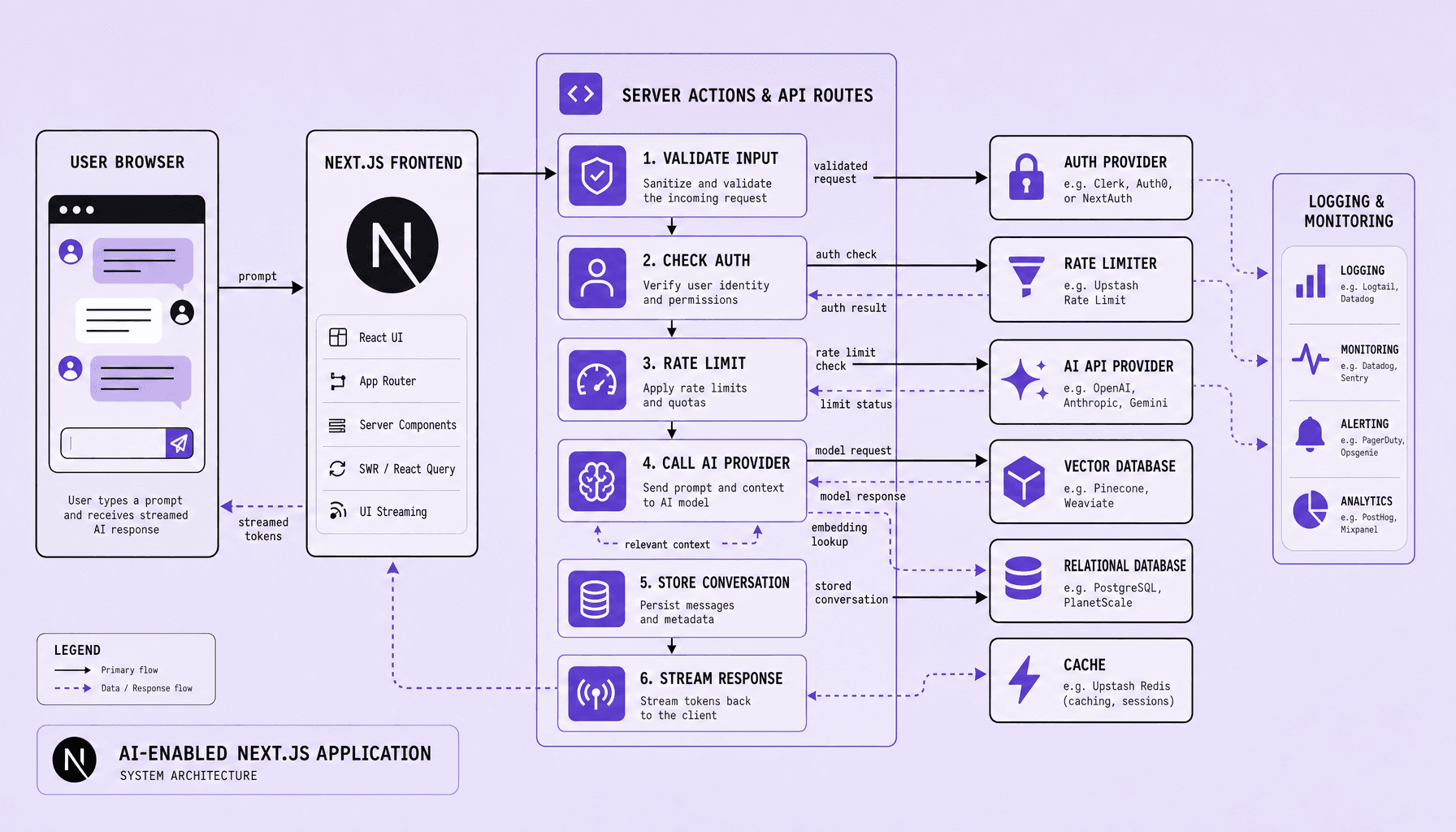
Production-grade Next.js AI integration is not a frontend widget wired to a model. It is a server-first system: Next.js architecture handles AI APIs behind Route Handlers or Server Actions, the client talks to a controlled backend boundary, and data flows through auth, validation, storage, and streaming layers.
In practice, the path is simple but strict: the UI sends a prompt to /api/chat, the server checks identity, loads context from PostgreSQL or a vector store, calls the model, and streams tokens back with SSE or WebSockets. This is where demos usually crack. Keys leak. Streams stall. Logs disappear. At Imversion Technologies Pvt Ltd, the better approach is clarity over complexity -- one internal AI service, one response shape, and explicit controls for retries, rate limits, and moderation. Reliable systems matter most.
Key Takeaways for Next.js AI Integration
- Draw hard boundaries early: keep prompts, provider logic, auth, and secret keys inside Route Handlers or Server Actions. Good Next.js architecture prevents a quick demo from turning into a fragile proxy layer.
- Treat AI APIs as backend infrastructure, not frontend utilities. Use server-side validation, retries, moderation, and response shaping before anything reaches the client.
- Stream responses on purpose. SSE works well for chat-style UX, but the UI, cancellation flow, and partial-state handling must match the transport -- otherwise streaming feels broken even when the model responds.
- Keep data flow predictable: client to API, API to model, model back to UI, then persist useful state in PostgreSQL, Redis, or a vector store only where needed. Clarity is better than complexity.
- Deploy for reliability first. Prioritize auth, rate limits, logging, timeout handling, and environment-safe secrets before chasing advanced AI app development features.
Next.js AI Integration Architecture: Frontend, API Layer, and Data Services
If the architecture is blurry, AI features get expensive to maintain very quickly. The practical setup is a three-layer system: thin UI, server-controlled AI boundary, and durable data services. That structure keeps Next.js AI integration secure, easier to scale, and easier to debug as traffic and feature scope grow.
Developers often start by wiring a chat box straight to AI APIs. Fast demo, weak production pattern. Secret exposure, weak auth, messy retries, and brittle frontend-backend communication show up quickly.
Frontend responsibilities
The frontend should collect prompts, render streamed tokens, manage local UI state, and display errors clearly. Use Client Components for interactive chat input and optimistic updates. Use React Server Components where preloaded history or retrieval context improves first render.
Keep the client thin. It should send user input, conversation IDs, and lightweight metadata to a server endpoint such as /api/chat or a Server Action. It should not hold provider keys, moderation rules, or model routing logic.
Server responsibilities
This is the control plane for AI app development. Route Handlers or Server Actions should validate payloads, enforce authentication, apply rate limits, fetch retrieval context, call providers, and stream output back with SSE or a readable stream.
The server should also normalize provider responses into one internal format. That makes retries, logging, model fallback, and provider swaps less painful later.
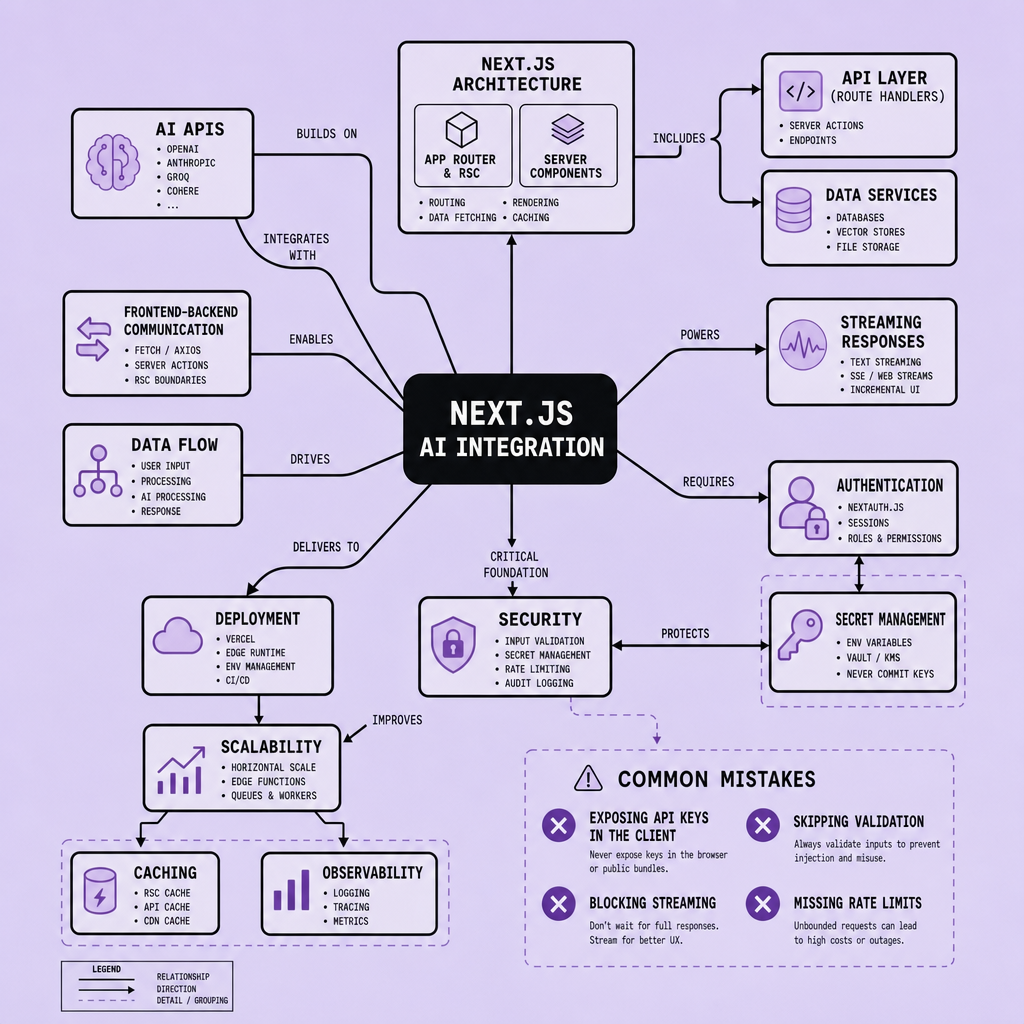
Recommendation: use a thin UI and a server-owned AI layer from day one. It reduces security risk and avoids rebuilding the request path once the app needs auth, logging, and quotas.
| Approach | Best fit | Main risk | Operational note |
|---|---|---|---|
| Route Handlers | Chat, streaming, provider orchestration | Extra API surface | Best default for AI requests |
| Server Actions | Form-like mutations, simple workflows | Less flexible streaming patterns | Good for tightly scoped actions |
| Direct browser calls | Public, non-sensitive APIs only | Exposed keys and weak control | Avoid for provider-backed AI |
Data storage responsibilities
Once requests start crossing multiple systems, storage decisions stop being incidental. Use PostgreSQL for users, conversations, message state, and audit logs. Use Redis for rate limiting, caching, session state, or queued jobs. Use a vector database for embeddings and retrieval.
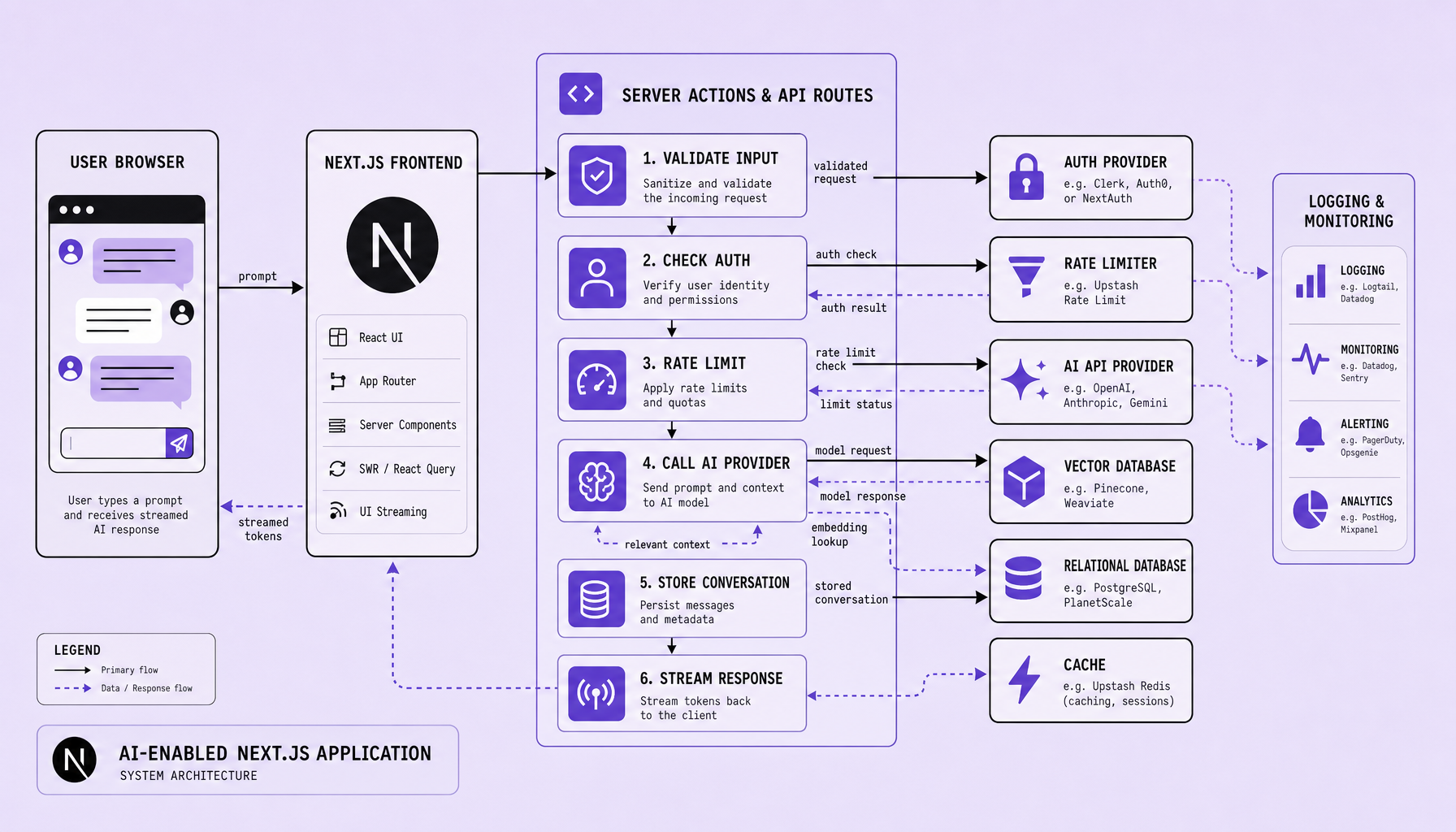
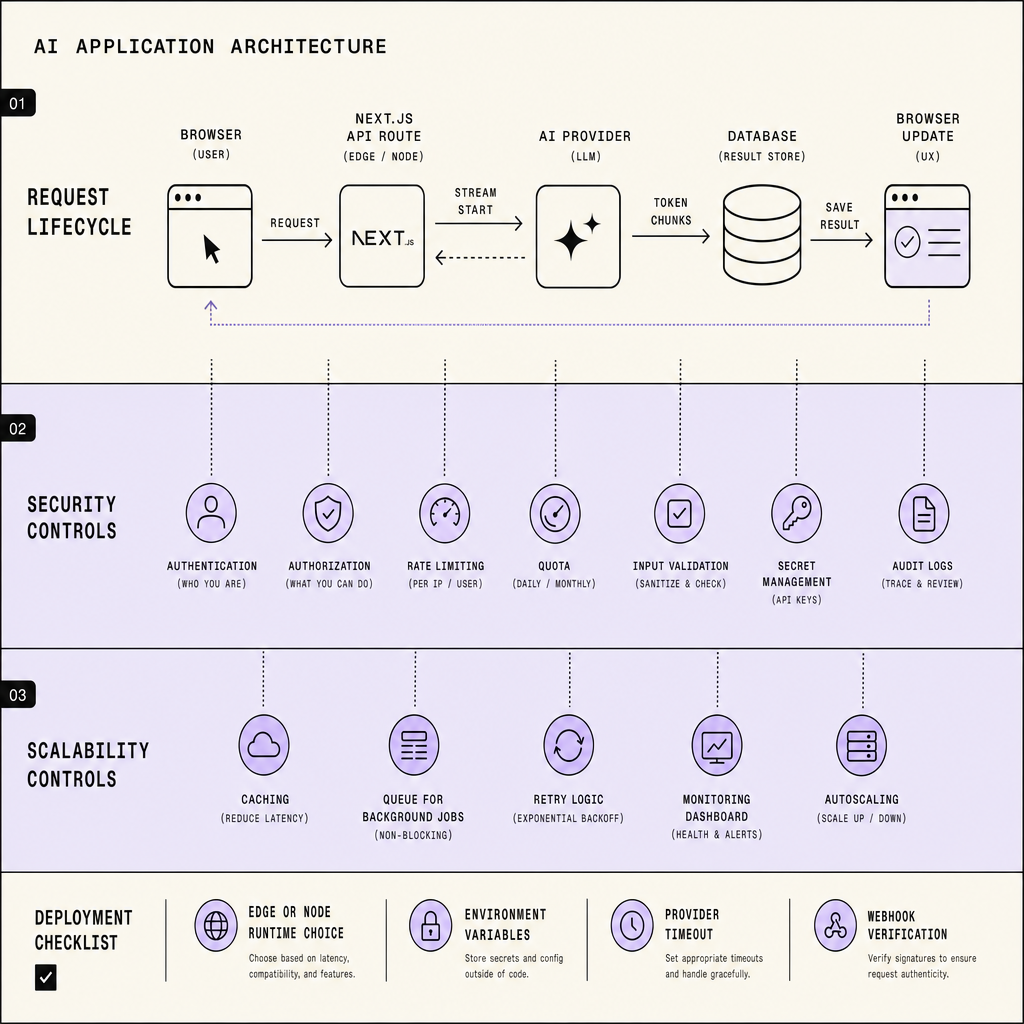
A common request lifecycle in this Next.js architecture looks like this: prompt submitted from the client, auth checked on the server, context loaded from PostgreSQL or a vector database, AI provider called, tokens streamed to the UI, final output persisted, logs written, and cache updated if needed.
Design for persistence, replay, and failure handling before adding more complex prompt chains.
How to Connect AI APIs in Next.js Without Exposing Secrets
The temptation is obvious: call the model directly from the browser and save time. That shortcut usually becomes the first production liability. Developers should connect AI APIs through server-side boundaries in Next.js -- Route Handlers or Server Actions -- never from the browser. Browser-side keys get exposed. Once secrets leak, the app becomes a public proxy for someone else’s usage.
A safer pattern is simple: the client sends input to /api/chat, /api/embed, or /api/tools; the server validates, authenticates, shapes the prompt, calls the model, and returns a streamed or standard response. That fits cleanly into solid Next.js architecture and keeps Next.js AI integration maintainable as features expand.
Provider setup
Store provider keys in environment variables and access them only on the server. OpenAI, Anthropic, and Google AI all support server-side calls, but their request formats, response shapes, and rate-limit behavior differ. So teams should wrap each provider in one internal service.
That abstraction adds a little upfront work. But it pays off fast when pricing changes, models get swapped, or one provider handles embeddings better while another is stronger at function calling.
Example endpoints:
/api/chatfor text generation/api/embedfor embeddings/api/agentfor function calling against internal tools
Request normalization
Most AI integration bugs are easier to prevent than to debug. Normalize requests before they hit the model. Use Zod to validate message arrays, max token settings, tool names, and user IDs. Reject malformed payloads early. It saves cost and avoids messy downstream failures.
Prompt shaping belongs on the server too. Add system instructions, trim conversation history, attach retrieval context, and strip client-only fields. Because understanding why a request failed is essential, structured inputs beat ad hoc prompt strings every time.

A practical flow:
- text generation: validate prompt, add system role, stream tokens back with SSE
- embeddings: sanitize text, chunk if needed, store vectors in PostgreSQL or a vector database
- function calling: whitelist callable tools, validate tool arguments, execute only approved server functions
Moderation should sit before output reaches users -- and sometimes before the model call if the input is risky.
Failure handling
AI app development breaks down when every provider error leaks straight to the UI. Map upstream errors into internal error types: validation, auth, rate limit, moderation block, provider timeout, retry exhausted.
Use retry logic only for transient failures like timeouts or temporary provider errors. Not for bad input. Not for blocked content.
Good server boundaries favor clarity over complexity: one request shape in, one response contract out, provider quirks hidden inside.
Frontend-Backend Communication and Streaming AI Responses in Next.js AI Integration
Most UX complaints around AI features are not really model problems. They are request-path problems. The cleanest pattern is simple: the UI sends intent, the server owns execution, the provider streams output, and the database saves the final state. That is how frontend backend communication stays predictable in real Next.js AI integration.
A practical request lifecycle looks like this: the client submits a prompt to a Route Handler such as /api/chat, includes the active conversation ID, and starts a local pending message in React state. The server validates auth, checks rate limits, loads prior messages from a conversation store, calls the selected AI APIs, and returns either one complete response or a stream. After completion, the server writes the assistant message, usage metadata, and any tool results to PostgreSQL or another durable store.
Streaming improves perceived speed. But only if the app also handles cancellation, partial failure, and a final persistence step after generation finishes.
Synchronous vs streaming flows
Use a standard request-response flow for short transforms -- classification, summaries, structured extraction. The client waits, then renders one payload.
Use streaming AI responses for chat, long-form generation, and tool-heavy outputs. In that flow, the server returns chunks through Server-Sent Events or a ReadableStream, and the client appends tokens as they arrive. Partial rendering keeps the interface alive. Users trust progress they can see.
A useful rule: stream text, persist at the end. Saving every token to the database creates noisy writes and harder recovery paths.
Transport options
Transport choice shapes UX more than people expect. For most chat interfaces, Server-Sent Events are the easiest choice. They fit one-way token delivery well and work cleanly with Route Handlers. If the app needs bi-directional real-time events -- like collaborative editing or live tool status -- WebSockets may be worth the extra complexity.
Cancellation should be first-class. Wire an AbortController from the client to the server call so users can stop generation without leaving orphaned loading states.
If cancellation is missing, streaming feels fast right until it feels broken.
State management in the client
Keep client state boring. That is a strength.
Use React state or a small client store to track messages, loading states, stream buffers, and error states. Optimistic UI updates should add the user message immediately, mark the assistant message as “streaming,” then reconcile once the server confirms completion. If the stream fails, preserve the user message and show retry from the last confirmed turn. Clarity beats a clever state machine nobody can debug.
Authentication, Scalability, and Security Controls for AI App Development
AI routes need stricter controls than normal CRUD endpoints. Fast. With AI APIs, abuse, latency, and cost tend to rise together. A weak /api/chat route is not just noisy -- it can leak data, burn credits, and collapse under load.
Authentication and authorization
Start with server-side auth on every AI entry point. In a solid Next.js architecture, Route Handlers or Server Actions should verify identity before they touch provider logic. NextAuth works well for session-based apps. JWT fits better for API clients, mobile apps, or service-to-service calls.
Then separate identity from permission. Use RBAC so not every authenticated user gets the same model access, token budget, or tool-calling rights. For example, a free user might get basic completions, while an internal analyst can run retrieval workflows or higher-cost models.
Add quota control early. Per-user and per-workspace limits matter in AI app development because model usage maps directly to spend. Pair auth with rate limiting -- often backed by Redis -- to cap burst traffic, block automated abuse, and keep one tenant from starving everyone else.
If a route can trigger expensive model calls, it should require auth, enforce limits, and log usage before launch -- not after the first spike.
Scaling patterns for AI workloads
What works for CRUD endpoints does not automatically work for AI workloads. AI endpoints hold open connections, stream tokens, and depend on external providers. So design for backpressure.
Use streaming with SSE for chat-style responses, and push long-running jobs into a queue when the request does not need an immediate answer. That tradeoff keeps the UI responsive and prevents server timeouts. Cache what is safe to cache -- embeddings, repeated system prompts, stable retrieval results, or deterministic responses -- but avoid caching user-specific output without clear cache keys and expiration rules.
Observability is non-negotiable. Track latency, provider errors, token usage, queue depth, and retry rates. Without that, teams guess. Decisions should be backed by data.
Security safeguards
Security problems around AI apps rarely stay isolated to the model layer. Keep secret management server-side with environment variables or a managed secret store. Never expose provider keys in the browser. Validate input size, file type, and tool arguments before sending anything downstream.
Then defend the model boundary itself. Log prompts and outputs with redaction, filter unsafe output where needed, and treat prompt injection as an application-layer threat, not just a model problem. If the model can call tools, lock those tools down with explicit allowlists and permission checks.
Frequently Asked Questions
What is the best deployment model for Next.js AI integration on Vercel or similar platforms?
The best deployment model keeps latency-sensitive chat routes close to users, runs provider calls on the server, and offloads long jobs to background workers. Use edge only when dependencies and streaming behavior support it cleanly. For most AI features, standard serverless or Node runtimes are safer because they simplify SDK use, observability, and secret handling.
How does Next.js AI integration change when you support multiple AI providers?
Multi-provider support works best when your app uses one internal interface for prompts, model settings, tool calls, and error handling. That abstraction prevents provider-specific response formats from leaking into the UI or business logic. It also lets teams route traffic by cost, capability, region, or uptime without rewriting frontend flows.
Why should AI app development separate conversational state from model context?
Conversational state and model context should not be treated as the same thing because they serve different purposes. Stored conversation history supports product features, analytics, and replay, while model context should be trimmed to the minimum needed for one request. Separating them reduces token cost, improves relevance, and avoids passing unnecessary or sensitive data to the model.
What common mistakes slow down streaming responses in a Next.js app?
The most common causes are buffering responses unintentionally, writing too much per token, skipping cancellation support, and mixing UI rendering with persistence logic. Streaming also suffers when middleware, proxies, or hosting settings interrupt chunked delivery. A fast model can still feel slow if the request path is not built to flush partial output consistently.
How should monitoring work for AI APIs in production?
Monitoring for AI APIs should track provider latency, token usage, error classes, retries, moderation outcomes, and per-route cost over time. Good monitoring also links each request to a user, workspace, and conversation ID so incidents can be traced quickly. Without usage and failure visibility, teams cannot tune prompts, control spend, or debug degraded output quality reliably.
Make Imversion a preferred source on Google
Like this kind of AI and software analysis? Add Imversion as a preferred source so Google can highlight our articles for you in Search, AI Overviews, and AI Mode.