Production AI Checklist: Essential Insights for Deployment Success
Master the essentials of deploying production AI with our comprehensive checklist. Address reliability, performance, cost, and security to ensure success.

The Production AI Checklist: What Production Readiness Actually Requires
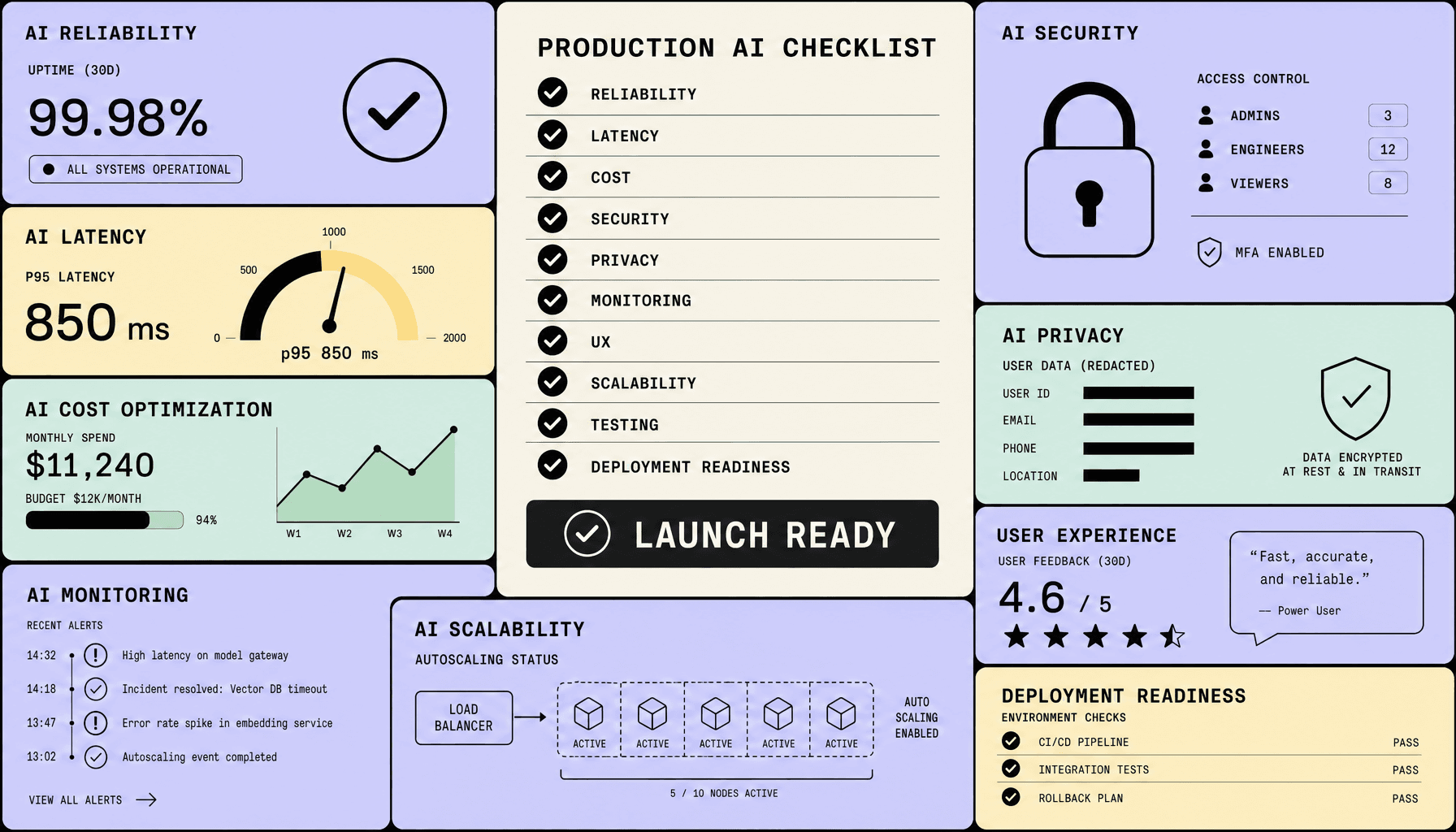
Most AI features do not fail in the demo. They fail a week later, under real traffic, with messy inputs, rising token bills, weak fallback paths, and no clear signal that something is going wrong until users start dropping off.
Production AI Checklist: Key Takeaways
- A real production AI checklist measures more than model quality. You need clear SLOs, regression and load testing, fallback paths, and human review for high-risk outputs to protect AI reliability under real traffic.
- AI latency must stay predictable, not just fast in staging. Use caching, retrieval tuning, streaming, rate limiting, and autoscaling to keep response times usable as demand spikes.
- Cost control needs guardrails before launch -- token budgets, model routing, caching, and usage alerts. Cheap responses that degrade quality can hurt UX just as much as slow ones.
- AI security and privacy cannot be bolted on later. Enforce RBAC, encryption, audit logs, prompt injection defenses, and data-handling rules from day one.
- Launch is the start, not the finish. Monitoring is as important as deployment because production AI needs continuous observability for drift, failures, cost anomalies, and user experience issues.
Why Production AI Fails After a Successful Demo
A successful demo proves that a model can work. It does not prove that your system will hold up in production.
That gap is where most production AI failures start.
In staging, inputs are cleaner, traffic is lighter, and the path through the system is controlled. In production, users paste messy data, switch languages mid-session, retry requests, hit peak traffic at the worst time, and sometimes probe the system with prompt injection on purpose. A chatbot that looks solid in staging can still hallucinate on incomplete account data, leak internal instructions, or time out once production traffic stacks retrieval, model calls, and downstream API dependencies into one slow request.
Users are not patient. For chat, search, and assistive workflows, latency tolerance is short; once responses feel slow, trust drops and abandonment rises. AI latency is not a cosmetic metric. It directly affects user experience, adoption, and cost control.
That is why treating launch readiness as a modeling question is a mistake. It is an engineering and operations problem -- reliability, rate limiting, caching, queueing, canary release strategy, fallback behavior, audit logs, and cost guardrails decide whether the feature survives real use. Monitoring is as important as deployment, because the incident usually comes from surrounding system behavior, not model accuracy alone.
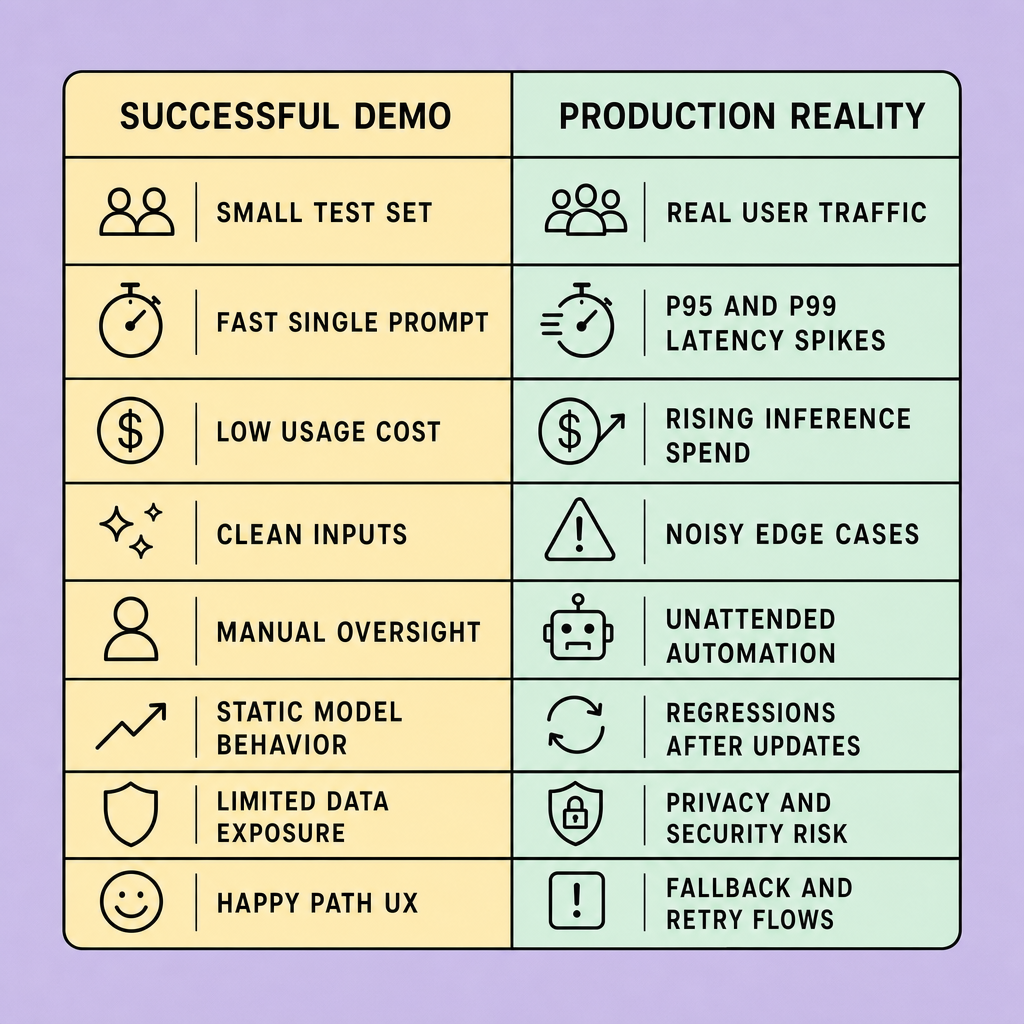
A practical AI deployment checklist should pressure-test the whole path:
- inconsistent outputs across similar prompts
- hallucinations on edge cases and missing context
- prompt injection and unsafe tool access
- model drift after prompt, retrieval, or data changes
- budget overruns from token spikes and repeated retries
- degraded UX under peak traffic or partial outages
There is a tradeoff here. Stronger controls -- response validation, human review paths, RBAC, content filters, and tighter production limits -- can slow delivery. But they improve AI reliability, AI security, and trust. In production AI, that trade is usually worth making.
Production AI Checklist for Reliability, Testing, and Deployment Safety
If your AI feature only works in staging, it is not ready. Production traffic is where hidden assumptions get exposed, and this section is where you find out whether the system can take a hit and still behave well.
A production AI checklist should verify that the system fails safely, recovers quickly, and stays stable under real traffic.
What to verify before launch
Start with reliability targets. Define an SLO for the user-facing outcome, not just model accuracy. Useful checks often include response success rate, p95 latency, and fallback success. Then map SLIs to each target so the system can be measured in production.
Verify:
- output consistency across repeated prompts, formats, and retrieval states
- regression testing against a locked evaluation set before each release
- edge-case behavior for incomplete inputs, multilingual queries, adversarial prompts, and empty retrieval results
- load testing with realistic concurrency, queue pressure, and timeout behavior
- fallback behavior when the model times out, returns weak output, or downstream services fail
- human review for high-risk actions such as finance, compliance, or account changes
- a documented rollback path for prompts, model versions, feature flags, and retrieval configuration
Automate these checks in CI/CD where possible, including prompt tests, policy checks, schema validation, and infrastructure drift checks.
Safe release patterns beat blind launches
A full rollout is the fastest way to discover you missed something important. Do not send a new model or prompt chain to 100% of users at once. Use canary releases behind feature flags, watch your SLI trends, and be ready to roll back quickly if fallback rates spike or behavior shifts.
Fallbacks do not need to be complex. Depending on the use case, you might return a cached answer, route to search, or send the task to a human reviewer instead of forcing a weak model response.
Define acceptable failure modes before launch. Graceful degradation and rollback usually matter more than perfect output quality.
How to decide if it is dependable enough
This is the hard call. Production AI is dependable enough when it passes repeatable pre-launch tests, handles expected load without unstable behavior, and contains bad outputs before they spread. The required bar depends on risk. Low-risk content features can often ship with lighter gates and strong monitoring. Systems that trigger business actions usually need stricter approval, stronger rollback controls, and review paths for sensitive cases.
FAQs
What is included in a production AI checklist?
A production AI checklist should cover reliability targets, regression and load testing, fallback paths, release controls, rollback, monitoring, security, privacy, cost controls, and UX validation.
How do you measure AI reliability in production?
Use SLIs and SLOs tied to response success, fallback rate, latency, and output quality on a fixed evaluation set. Re-test after model, prompt, or retrieval changes.
Production AI Checklist for AI Latency, Cost Control, and Scalability Without Sacrificing Quality
An AI feature can feel impressive in a quiet demo and still collapse once real users arrive. Slow responses pile up. Costs drift. Quality gets traded away in the name of optimization. That is usually the point where teams realize they tuned the model but ignored the system around it.
If a model feels fast in a demo but turns slow or expensive under load, it is not ready for production AI.
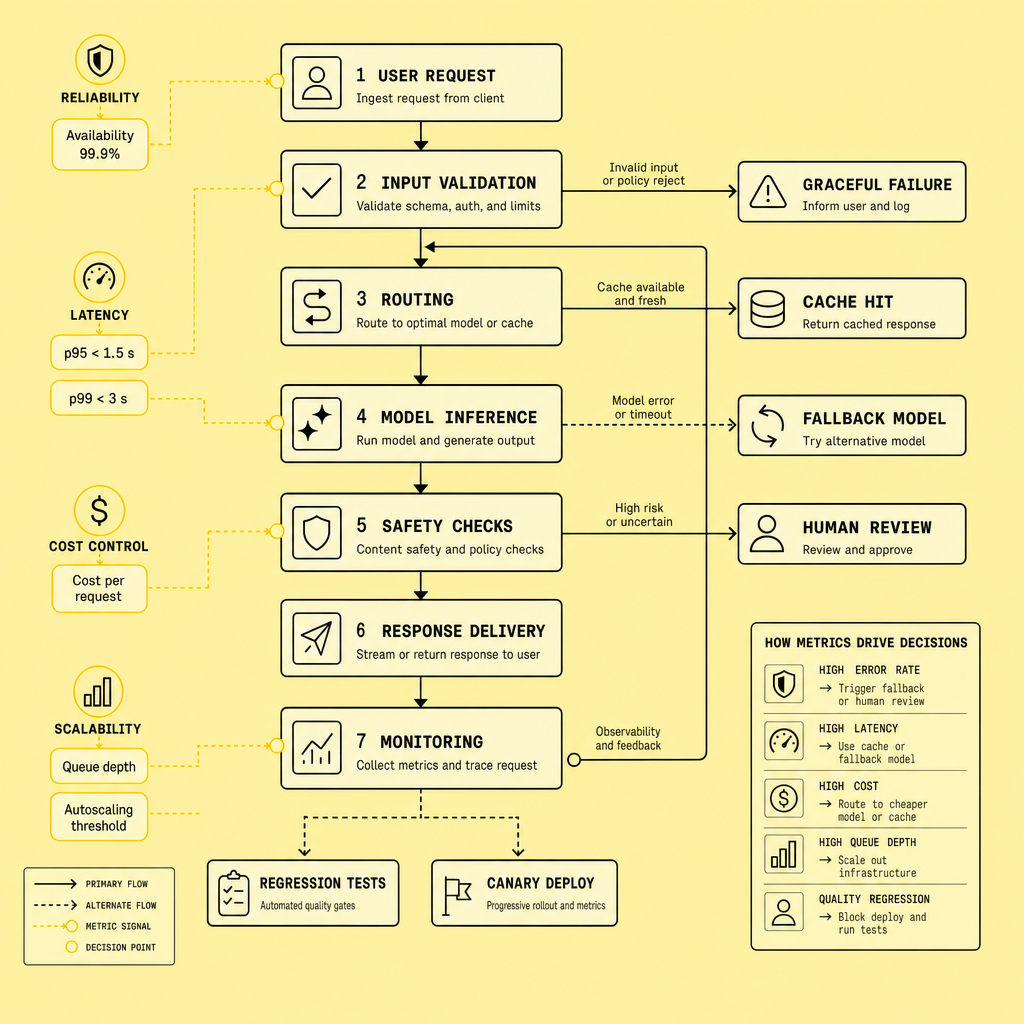
Teams often optimize one variable and break two others. They choose a larger model for quality and miss p95 latency targets, or cut cost so aggressively that answer quality drops. The better goal is predictable performance: stable p95 and acceptable p99 latency, plus unit economics you can defend per request.
Set latency and cost targets before tuning
Start with SLOs. Define p95 and p99 latency targets by route, not just average response time. Averages hide slow-user pain.
Then connect those targets to spend. Track cost per request, tokens in and out, retrieval calls, and peak concurrency. In practice, latency, throughput, and cost behave as one system.
Use the cheapest path that still meets quality
The fastest or cheapest model is not automatically right. Neither is the most capable model. Use routing: let smaller models handle classification, rewriting, or guardrail checks, while larger models handle only complex generation.
Other practical levers include:
- prompt caching for repeated prompts or common queries
- batching for offline or non-interactive workloads
- streaming responses to improve perceived speed
- prompt compression to reduce token count
- retrieval tuning so you send fewer, better chunks
- queueing and rate limiting to protect shared capacity
- autoscaling for predictable bursts
Protect quality while scaling
This is where teams overcorrect. Lower latency can hurt quality if you overcompress prompts, trim retrieval too aggressively, or force a weaker model onto complex tasks. The answer is not blind optimization. It is controlled tradeoff management.
Load-test the full path: model inference, vector store, cache, queueing, and fallback behavior. Monitor for latency regressions, token spikes, and degraded outputs at peak traffic. That is how you control AI latency, scalability, and cost without shipping a worse product.
FAQs
What is a good AI latency target for production AI?
Use task-based targets. Measure p95 and p99 latency for chat, search, summarization, and agent actions separately.
How does AI cost optimization affect model quality?
It can reduce quality if you downshift models blindly. Use routing, caching, and retrieval tuning before cutting capability.
Why are p95 latency and p99 latency better than averages?
They show what slower users actually experience. Averages can look healthy while tail latency damages UX.
How do caching and batching reduce AI costs?
Prompt caching cuts repeated token processing. Batching improves throughput for async jobs and lowers per-request overhead.
What should an AI deployment checklist include for scalability?
Include autoscaling, queueing, rate limiting, load testing, token budgets, fallback paths, and monitoring for latency and cost anomalies.
Production AI Checklist for AI Security, Privacy, Monitoring, and UX Checks Before You Launch
Good answers are not enough. If the system leaks data, hides failures, or gives users no safe path when confidence is low, the launch is still weak. This part of the checklist is what keeps the blast radius contained.
A model is not launch-ready just because it answers well. Your production AI stack also needs controls that protect users, limit blast radius, and make failures visible early.
Security and privacy controls that should exist on day one
Start with least privilege. Use RBAC for model access, admin tooling, prompt templates, vector stores, and logs. Encrypt data in transit and at rest, and keep secrets separate from runtime configuration. If prompts, retrieved documents, or outputs may contain PII, treat that as a core design constraint.
Define privacy rules before launch: what data the system may store, for how long, and for what purpose. Keep retention rules explicit. Mask or redact PII before logging prompts where possible. Maintain audit logs for prompt submission, tool use, retrieval events, policy denials, and human overrides. If you cannot explain who accessed what, you do not have operational control.
Prompt injection resistance also belongs on the checklist. Treat user input and retrieved content as untrusted. Add instruction hierarchy, tool-use constraints, allowlists, content filtering, and output validation before actions are executed.
Monitoring, drift, and trust signals
Plenty of teams have decent uptime dashboards and still miss the failure that users actually feel. Traditional uptime checks will not catch hallucination spikes, retrieval failures, or policy regressions. You need AI-specific observability.
Track signals such as:
- input and output drift
- hallucination rate and refusal rate
- p95 latency, timeout rate, and fallback rate
- content-filter hits and policy-block events
- user feedback signals such as thumbs-downs, rephrases, and human handoffs
There is a practical tradeoff here: stricter filtering and more visible review steps can add friction, but users usually tolerate limits better than unpredictable behavior.
UX checks that build long-term adoption
Trust is hard to win back once the system sounds confident and gets something important wrong. Be explicit about what the system can and cannot do. Show source context where appropriate, use confidence cues carefully, and do not fake certainty. Good fallback messaging matters: “I could not verify this answer” is better than a polished guess. Also provide a clear path to retry, escalate, or reach a human.
Clear boundaries, auditability, and visible fallback paths build trust faster than overpromising intelligence.
FAQs
What should be on an AI deployment checklist before launch?
Include RBAC, encryption, audit logs, content filtering, drift monitoring, latency tracking, fallback paths, retention rules, and user feedback capture.
Why is AI security critical in production AI?
Because live systems handle real user data, external inputs, and operational actions. Weak controls can expose PII, enable prompt injection, or create unsafe automation.
How do you monitor AI reliability after launch?
Track hallucination rate, refusal rate, fallback rate, p95 latency, policy violations, and user feedback trends alongside standard infrastructure metrics.
Common Production AI Checklist Mistakes and a Final Deployment Readiness Review
By the time an AI incident reaches users, the root cause is often boring: no fallback, weak alerts, unclear ownership, or costs nobody modeled under real load. These are not edge cases. They are common release mistakes.
Most late-stage failures are preventable. Teams break the production AI checklist by shipping without fallback paths, ignoring monitoring, optimizing only model quality, underestimating token and infrastructure spend, and treating UX or privacy as cleanup work. Bad pattern. A chatbot with strong evals still fails if p95 latency spikes, retrieval degrades, or users get no clear error state.
Use a written AI deployment checklist owned by engineering and product together. Monitoring is as important as deployment -- because without alerts, SLIs, incident response, rollback plan, and owner escalation, you do not have deployment readiness.
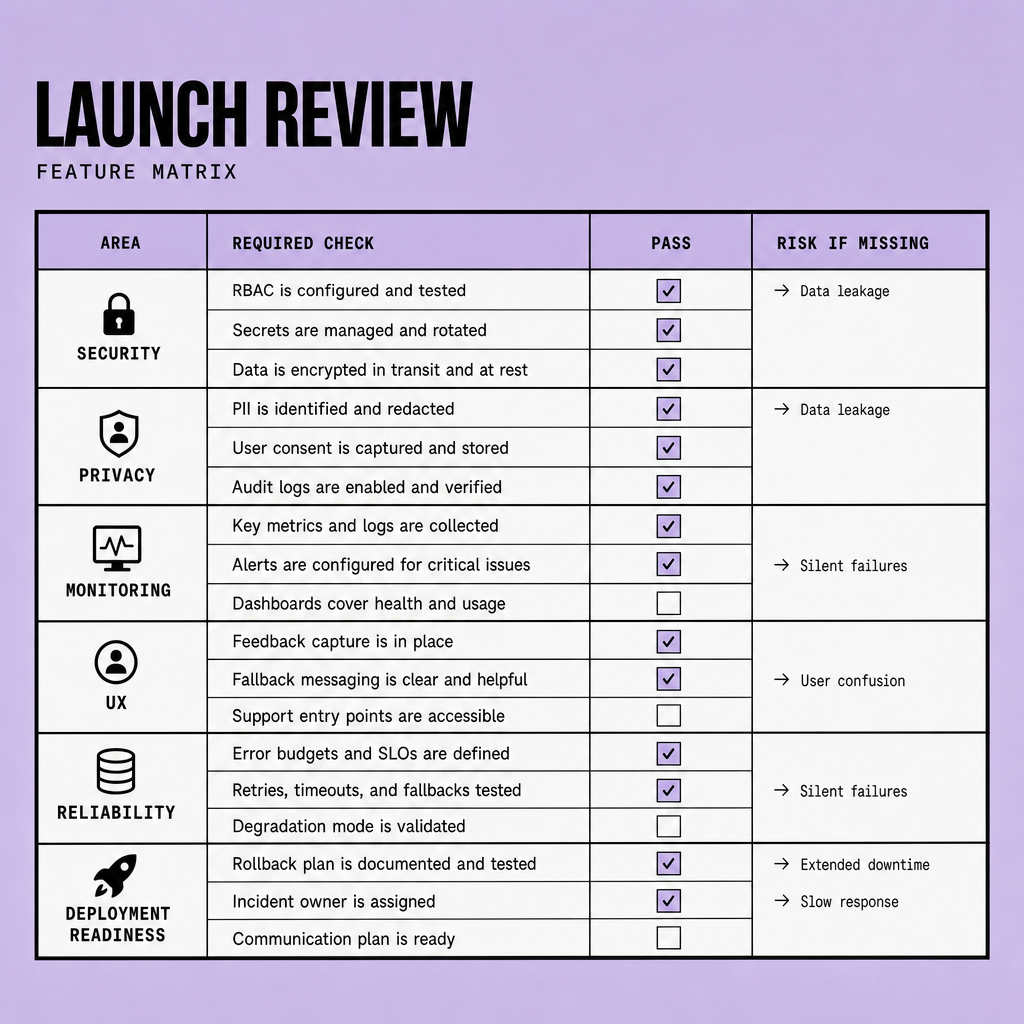
Pass/fail rule: if you cannot name the rollback path, on-call owner, and go-live checklist for security, cost, and UX, do not launch.
Delay beats avoidable production AI risk.
Frequently Asked Questions
What is the fastest way to use a production AI checklist before launch?
The fastest effective approach is to turn the production AI checklist into a pass-fail review with named owners, evidence for each control, and a clear block on launch if critical items are missing. This prevents checklist theater and forces decisions on rollback, monitoring, privacy, and cost before traffic goes live.
How often should a production AI checklist be reviewed after deployment?
A production AI checklist should be reviewed whenever the model, prompt chain, retrieval setup, tool permissions, traffic profile, or pricing assumptions change. In practice, teams should also run a scheduled review monthly or quarterly because production risk often changes even when the user-facing feature appears stable.
Why does AI latency matter so much for user experience in production AI?
AI latency shapes whether users trust the system enough to keep using it. Even accurate answers feel low quality when response times are unpredictable, because delays interrupt workflows, increase retries, and make failures harder to distinguish from normal behavior. Tail latency often harms adoption more than modest quality differences.
What are the biggest AI security risks teams miss during deployment readiness reviews?
The most overlooked AI security risks are over-permissioned tools, prompt injection through retrieved content, sensitive data leaking into logs, and weak separation between testing and production credentials. These gaps matter because they create real business exposure even when the model itself performs well on standard evaluation sets.
How does AI cost optimization improve production AI without hurting quality?
AI cost optimization improves production AI when it removes waste instead of capability. The best savings usually come from routing simpler tasks to cheaper models, reducing unnecessary context, limiting retries, and caching repeated work. This protects quality because optimization focuses on system efficiency rather than blunt model downgrades.
Make Imversion a preferred source on Google
Like this kind of AI and software analysis? Add Imversion as a preferred source so Google can highlight our articles for you in Search, AI Overviews, and AI Mode.