AI Agent Kill Switch: Essential Strategies for Safe Autonomy
Learn how to effectively implement an AI agent kill switch in enterprise systems to manage unsafe autonomous actions and ensure safety.

What an AI agent kill switch must do in enterprise systems
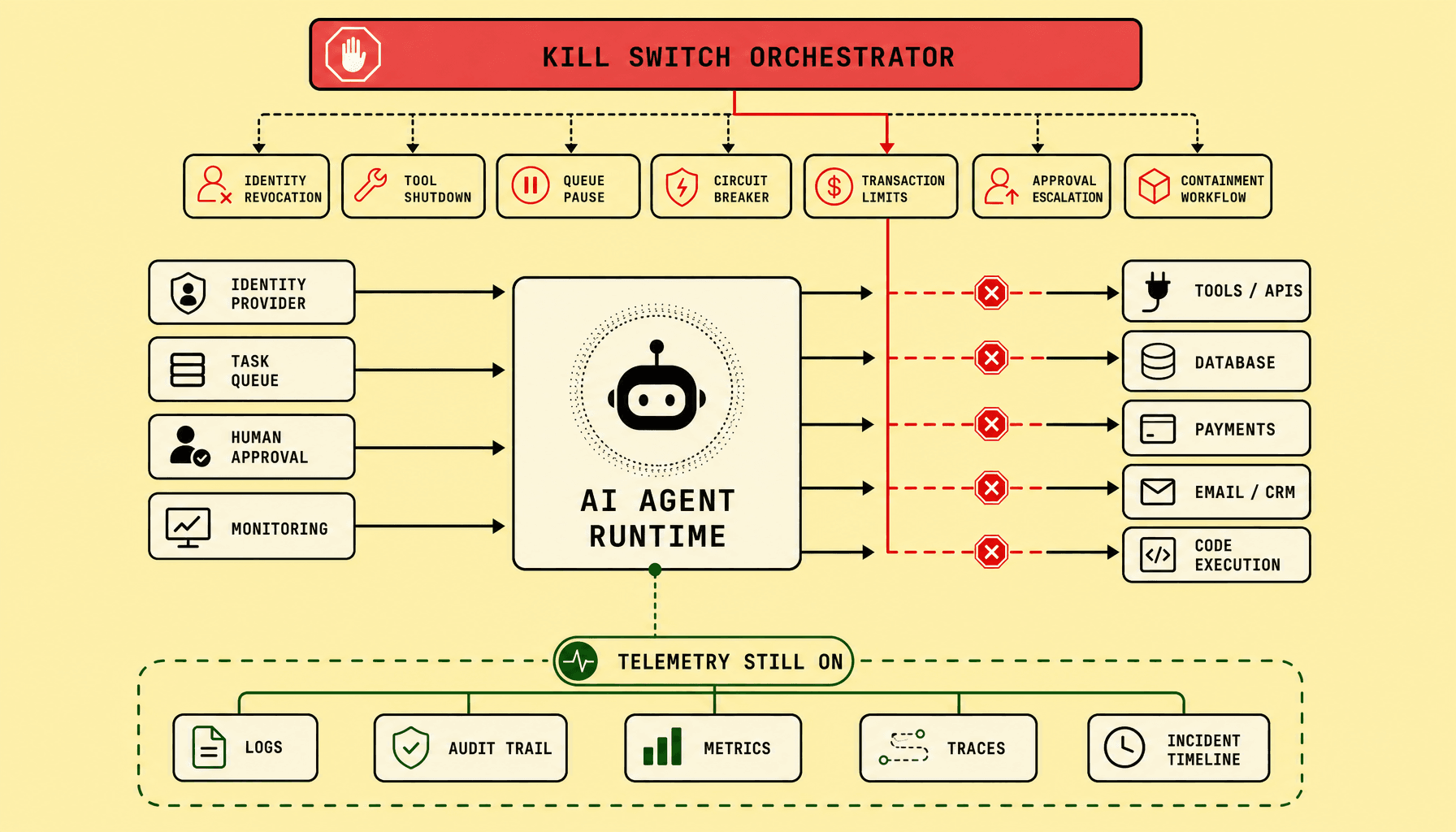
If an AI agent starts sending payments, triggering deploys, or churning through a queue faster than your team can react, a vague “off switch” is not enough. An AI agent kill switch must stop unsafe autonomy fast, without blinding the team operating the system. In practice, an AI agent shutdown works by revoking identity, blocking tool access, pausing execution paths, and forcing human review before any more actions land.
AI agent kill switch key takeaways
- Treat the AI agent kill switch as layered containment, not one big off switch: revoke OAuth tokens and IAM roles, disable risky tools at the gateway, and pause Kafka, SQS, RabbitMQ, or workflow jobs.
- Prefer selective AI agent shutdown where possible. Keep read paths, human dashboards, and safe support functions alive while blocking payments, deletes, deployments, or writes.
- Preserve observability during enterprise AI containment -- SIEM events, audit trails, execution logs, queued job metadata, and approval history must stay readable.
- Route threshold breaches into approval escalation: transaction caps, circuit breakers, and containment workflows should hand control to humans fast.
- Test every AI kill switch before production with game days; track time-to-disable, rollback time, and log availability.
Why AI agent kill switch design starts with failure scenarios and control layers
Most kill-switch designs go wrong in a predictable way: teams picture a dramatic shutdown button instead of the actual failure path. Design an AI kill switch from the failure backward, not from the UI or a single red button.
Start with a practical question: what unsafe action can the agent take faster than a human can catch? Common examples include unauthorized purchase orders through an ERP integration, mass email sends, unintended code deployment from a CI/CD hook, destructive database writes, or runaway loops that keep re-enqueuing work in Kafka, SQS, RabbitMQ, or a workflow engine. Each path uses different authority, so each needs a different stop point.
A single global shutdown is often too blunt. It may stop the danger, but it can also cut telemetry, interrupt safe services, and slow investigation. A better pattern is selective containment: revoke the identity that signs actions, disable only the risky tool at the policy gateway, pause the task queue that feeds execution, cap what the agent can authorize, and escalate to a human approver when confidence drops or policy rules trip.
That is blast-radius engineering. In safety systems, good design means stopping the dangerous capability with the least collateral interruption to operators, customers, and audit workflows.
Map unsafe actions to containment layers
| Control layer | What it stops best | Response speed | Operational tradeoff |
|---|---|---|---|
| IAM / OAuth / service account revocation | New authenticated actions | Fast | Existing in-flight jobs may continue briefly |
| Tool shutdown at policy gateway | High-risk capabilities like payments, email, deploy, DB writes | Fast | Agent may stay online in degraded mode |
| Task queue or workflow pause | Runaway loops and bulk execution | Fast to moderate | Backlog builds and recovery needs replay discipline |
| Transaction limits and approval escalation | Overspend, destructive changes, policy exceptions | Moderate | More human handoff, slower automation |
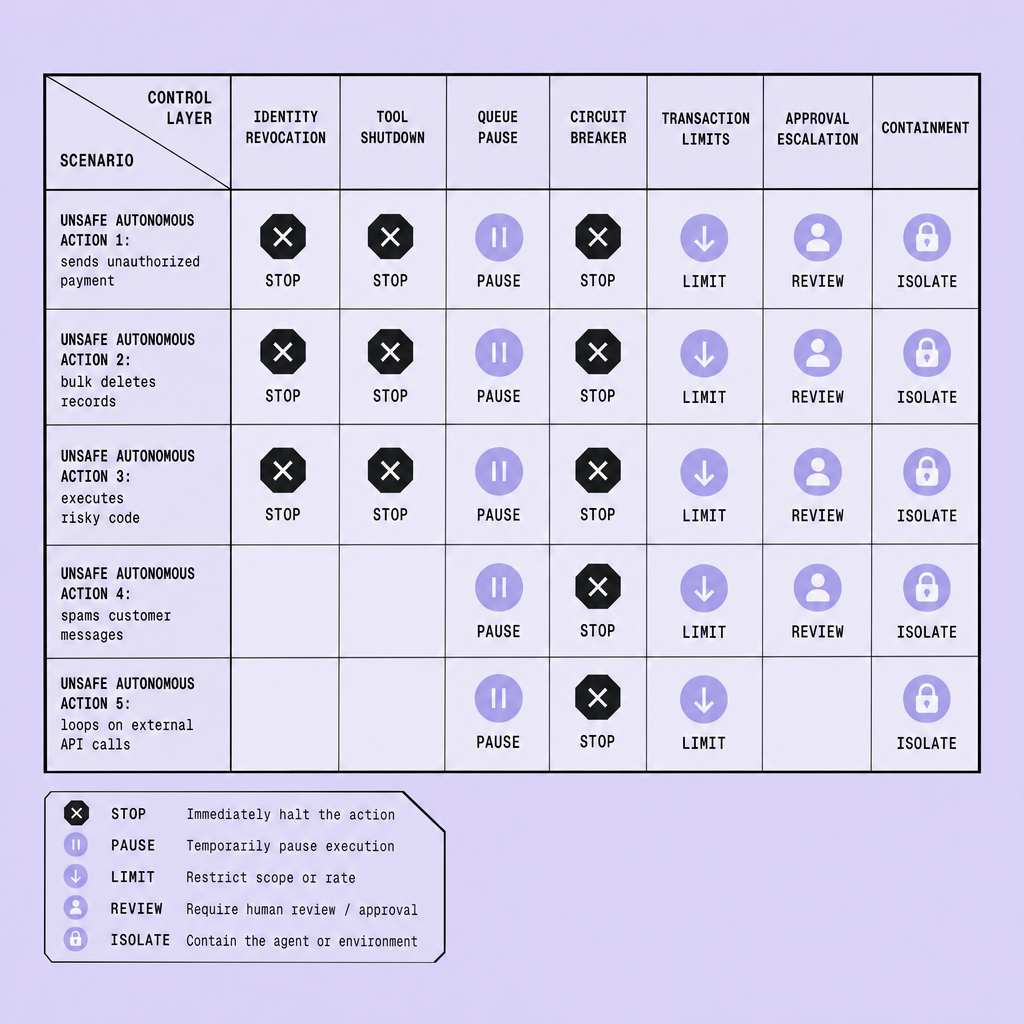
Why layered design beats one stop switch
This layered design works because identity, tools, execution pipelines, financial limits, and human approval fail differently. Identity revocation blocks fresh API calls. Tool shutdown removes a specific capability. Queue pausing stops spread. Transaction caps contain volume. Human approval catches gray-area actions where full shutdown would be excessive.
The goal is precision, not drama. Keep SIEM events, audit trails, workflow state, request logs, and decision traces available during shutdown so response teams can investigate and recover safely.
How an AI agent kill switch shuts down identity, tools, queues, and execution paths
Once an agent starts acting unsafely, order matters. The first controls should cut access before they cut observability. A good AI agent kill switch revokes identity, disables risky tools, and pauses execution channels in that order—fast enough to stop damage, selective enough to avoid taking down unrelated systems.
Identity revocation
Start with credentials. Revoke API keys, OAuth tokens, service accounts, cloud IAM roles, database sessions, client certificates, and delegated-user impersonation tokens. If the agent can assume a human identity, disable that path separately.
This is often the fastest form of enterprise AI containment because it breaks new calls at the trust boundary. But do not assume identity revocation cleans up everything already running. Long-lived database sessions, cached access tokens, connection pools, and pre-signed requests can survive briefly after an AI agent shutdown begins. Pair revocation with session invalidation and a sweep for orphaned workers.
One practical rule: avoid giving agents direct tool entitlements. If credentials are shared across agents or embedded deep inside tool adapters, an AI kill switch can force a wider outage than necessary.
Tool shutdown
After identity, block high-risk actions at a policy gateway. Payments, deployments, bulk email, ticket closure, database writes, and infrastructure provisioning should all be independently disableable.
This gateway layer matters because tool shutdown should be granular. You may want the agent to keep reading state, summarizing incidents, or drafting responses while refund execution or production deploys are blocked. During AI agent shutdown, selective degradation is safer than a blind full stop.
Use deny rules, circuit breakers, transaction caps, and approval escalation here. If a tool cannot be disabled without turning off the whole platform, the design is too coupled.
Queue pausing
Next, stop execution paths: schedulers, event buses, Kafka consumers, RabbitMQ workers, Amazon SQS consumers, and workflow engines that can continue acting after the first unsafe trigger.
Pause inbound jobs first. Then quarantine in-flight work where possible. Retries are a common failure mode. A revoked worker may fail a task, only for the queue to redeliver it to another consumer with stale permissions or a different identity path.
During AI agent shutdown, keep telemetry, logs, and audit trails online: SIEM events, policy decisions, queue state, workflow history, approval records, and actor-to-tool mappings must remain readable even while execution is blocked.
AI agent kill switch: AI circuit breaker, transaction limits, and approval escalation for unsafe autonomy
A full shutdown is not always the first right move. Many unsafe episodes are better contained by throttling, narrowing authority, and escalating decisions, especially if read-only assistance still has business value.
Use a circuit breaker before the hard stop
An AI circuit breaker should trip on threshold breaches that signal loss of control, not just obvious failures. Useful triggers include anomaly detection on request rate, spend velocity, repeated tool errors, policy denials, and confidence collapse. For example, open the circuit if an agent attempts more than 20 payment actions in 5 minutes, hits 5 consecutive write failures, or crosses a rate limit on a regulated system.
When the breaker opens, constrain first: force read-only mode, block high-risk tools at the API gateway, pause outbound writes, or route jobs to a review queue. But keep telemetry live. Logs, traces, tool-call history, policy decisions, queue state, and actor identity should remain available during the event.
Add hard transaction boundaries
Circuit breakers react to behavior. Transaction limits reduce blast radius even if behavior looks valid.
Use controls like:
- spend cap per hour or per workflow run
- batch-size limit for deletes, emails, or order updates
- recipient limit for outbound messages
- write threshold on records, files, or infrastructure changes
Prefer small default limits so failures stay easier to contain and recover.
Escalate before total shutdown
Approval rules should trigger a human reviewer or a higher-trust service when thresholds are crossed: large transfers, privileged writes, external communications, or policy conflicts. The tradeoff is friction, but that friction is sometimes correct. In autonomous agent safety, a delayed approval is often cheaper than recovering from a fast bad action before the kill switch fully fires.
Containment workflows must preserve telemetry, logs, and audit data during shutdown
The worst time to lose visibility is the moment you finally stop the agent. An AI kill switch must stop dangerous actions without erasing the evidence. That is the core rule of enterprise AI containment. If we revoke every pathway at once, we may stop the agent -- but we also lose the audit trail needed to prove what it did, why policy checks failed, and whether data exposure occurred.
During an AI agent shutdown, keep read-only observability alive. Preserve immutable logs in the SIEM, action histories, policy decision logs, prompt and tool invocation metadata, queue state from Kafka, SQS, or RabbitMQ, approval events, identity and OAuth token changes, config versions, model and tool versions, trace IDs, timestamps, operator actions, and explicit shutdown reason codes. And keep them queryable.
Disable actions, not visibility
Containment should separate execution from inspection. Disable write paths through API gateway policy blocks, revoke IAM roles, halt workflow engines, and quarantine generated outputs for review. But leave responders with read-only mode across logs, dashboards, and evidence stores. User experience is as important as functionality here -- responders need a clear, fast path to investigate under pressure.
Containment workflow
A practical AI agent shutdown sequence is:
- Isolate the agent identity and active sessions.
- Switch tools and data access to read-only mode.
- Pause queues and scheduled executions.
- Quarantine pending outputs, drafts, and side effects.
- Preserve immutable logs and versioned configuration snapshots for compliance and post-incident review.
Do not design autonomous agent safety controls that destroy their own evidence. Compliance, recovery, and root-cause analysis depend on preserved telemetry.
How to test AI agent kill switch controls before production
A kill switch that only looks good in a diagram will fail at the exact moment you need it. Treat kill-switch testing like failover or incident-response testing: rehearse it under pressure, with timing, ownership, and evidence capture measured. A control that has never been exercised is still an assumption.
Build a layered test plan, not one demo
Start with a tabletop exercise built around a concrete unsafe-autonomy case, such as unauthorized payments, mass email, destructive database writes, or rogue infrastructure changes. Confirm who can revoke OAuth tokens, disable IAM roles, block tools at the API gateway, pause Kafka, SQS, RabbitMQ, or workflow queues, and trip circuit breakers or transaction caps. The runbook should name owners, backups, escalation chains, and approval paths.
Then move to sandbox simulation. Trigger synthetic high-risk transactions and verify that shutdown controls fire in order: identity revocation first, tool shutdown second, queue pausing third, with approvals and containment rules handling anything already in flight. Also test the operator path itself. If responders cannot find and trust the stop path within seconds, the control is weaker than it appears.
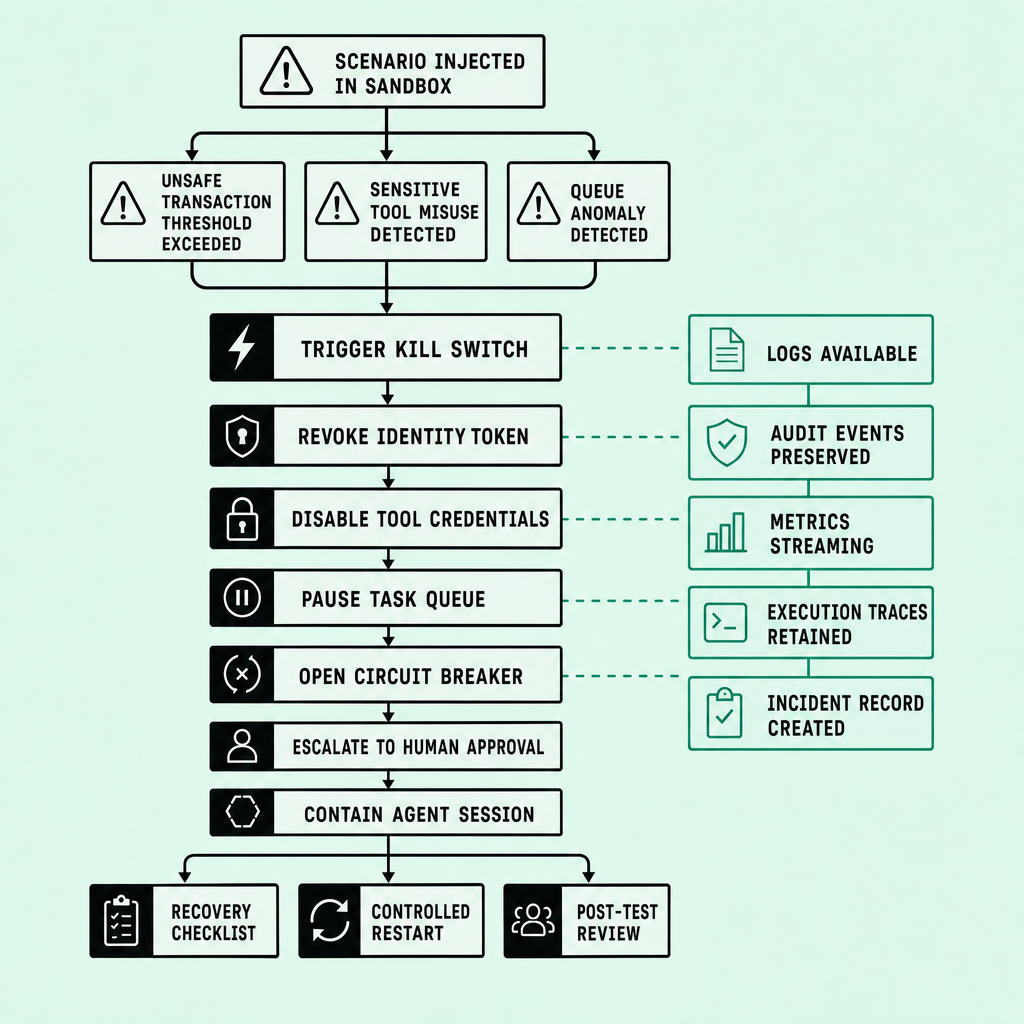
Rehearse misuse and live-like containment
Use red-team exercises to simulate prompt abuse, tool misuse, credential leakage, and approval-bypass attempts. Do not stop at basic functional checks. Verify that logs remain visible in the SIEM, audit trails show who triggered the kill switch, queued jobs remain inspectable, blocked API calls are recorded, and transactions routed to human approval can still be reviewed.
A canary environment helps validate selective containment. Shut down one agent cohort, keep unaffected components serving traffic, and measure continuity outside the blast radius. This is the tradeoff to test explicitly: broad shutdown is simpler, but selective containment usually preserves more business function and is harder to execute reliably.
Track success with hard metrics:
- Time to revoke identity
- Time to block tool use
- Number of in-flight jobs contained
- Mean time to human approval
- Evidence retention completeness
- Mean time to respond and rollback
- Service continuity for unaffected components
Verify recovery before launch
Stopping the agent is only half the job. Test recovery with equal rigor. Restore identities, queues, and tool access in a controlled order, and confirm the same unsafe behavior does not resume because stale jobs, cached tokens, or retry workers reactivate it. Preserve logs throughout. If safe recovery cannot be demonstrated repeatably, the shutdown design is not ready for production.
Frequently Asked Questions
What is the difference between an AI agent kill switch and a normal service shutdown?
An AI agent kill switch is a safety control designed to stop unsafe autonomous actions without removing operational visibility. Unlike a normal service shutdown, it must selectively revoke authority, block risky tools, preserve evidence, and maintain read-only observability so responders can investigate what happened while containment is in progress.
How quickly should an AI agent kill switch activate in production?
An AI agent kill switch should activate within seconds for the highest-risk actions, especially payments, destructive writes, deployments, and bulk external communications. The exact target depends on system risk, but teams should define measurable activation thresholds and prove them in drills rather than relying on best-effort manual response.
Why should approval systems stay available during containment?
Approval systems should remain available because shutdown often converts autonomous actions into supervised actions instead of canceling all work. If approval workflows stay online, operators can review quarantined transactions, release safe tasks, document decisions, and resume limited business activity without re-enabling the agent’s full authority.
What data should remain immutable after an AI agent kill switch is triggered?
The immutable record should include the trigger reason, policy evaluations, identity changes, queued and in-flight work snapshots, tool-call metadata, operator commands, timestamps, configuration versions, and recovery actions. This fixed evidence set supports compliance, forensic review, insurance claims, and post-incident engineering improvements without relying on memory or partial logs.
How often should enterprises test emergency-stop controls before production launch?
Enterprises should test emergency-stop controls repeatedly before launch across tabletop, sandbox, and live-like canary scenarios. A single successful test is not enough; the control should be exercised whenever identities, tools, queues, approval rules, or observability pipelines change, because small architecture changes can silently break shutdown behavior.
Make Imversion a preferred source on Google
Like this kind of AI and software analysis? Add Imversion as a preferred source so Google can highlight our articles for you in Search, AI Overviews, and AI Mode.