AI evals: Building Reliability Before Agent Development
Discover why AI evals should precede agent development. Define success criteria, build test datasets, and automate evaluations for reliable performance.

Why AI evals Should Come Before You Write the Agent
Most teams find out too late that their agent only works in demos. It sounds polished in chat, then falls apart on messy inputs, wrong tool calls, edge cases, and real workflow pressure.
AI evals Key Takeaways
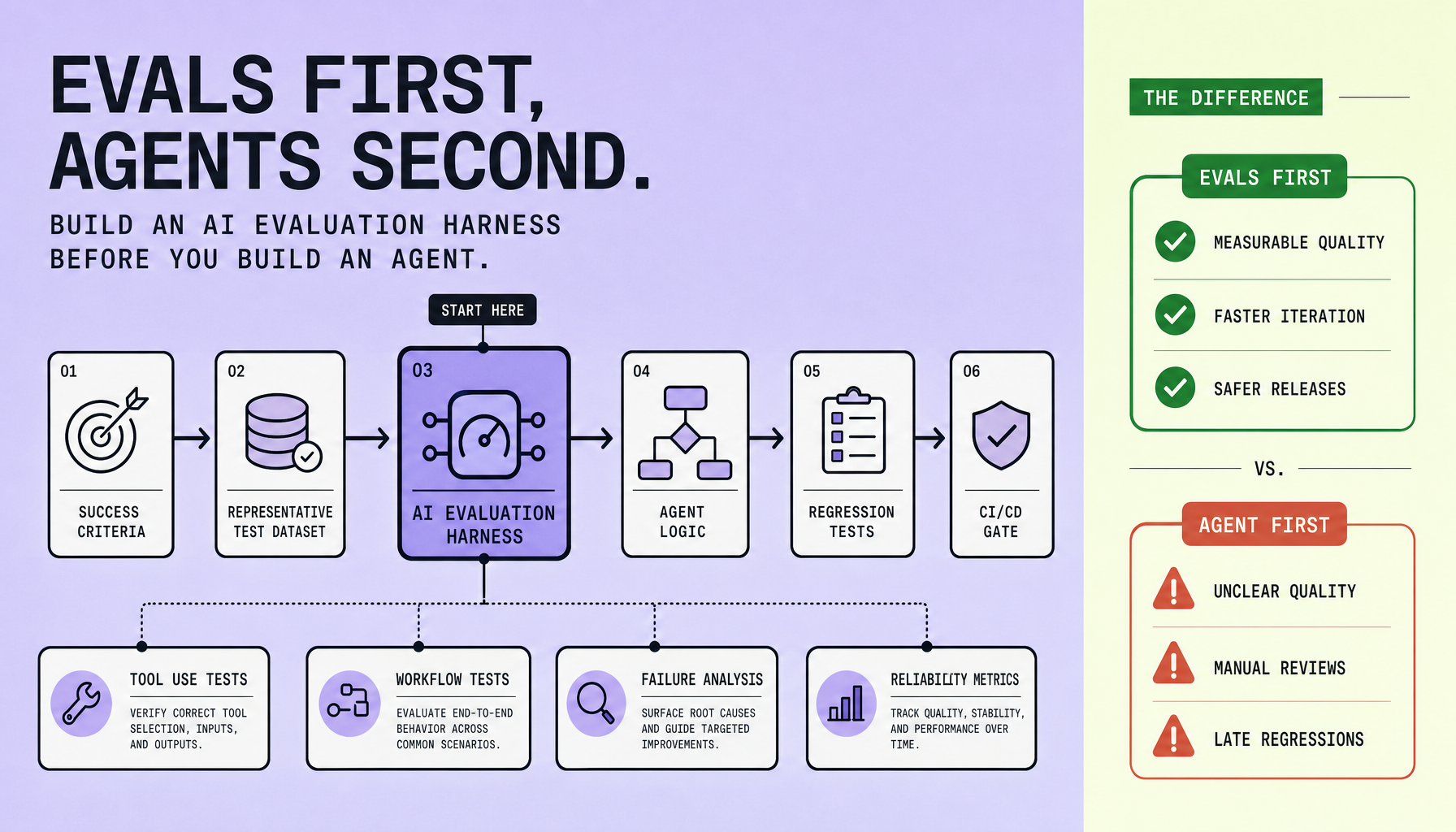
- Write the AI evaluation harness first. If you cannot define pass/fail criteria, you are not ready to build the agent. Start with task completion, factual accuracy, tool-call correctness, latency, cost, and policy compliance.
- Good AI evals use representative datasets -- happy paths, edge cases, ambiguous requests, and failure scenarios. Demo prompts are not enough for real AI agent testing.
- Automate LLM evaluation early with golden datasets, regression suites, and workflow checks for retrieval, tool use, and multi-step actions. Automation reduces human error.
- Put AI agent testing in CI/CD with Docker-based runners and GitHub Actions so prompt changes, model swaps, and tool updates do not silently break production reliability.
- Treat failure analysis as ongoing work. Measure what failed, why it failed, and what regressed before you ship.
Define Success Criteria Before Building Any Agent Logic
If you cannot write pass/fail criteria before implementation, you are not ready to build the agent.
That sounds strict, but it saves time. “Helpful” and “smart” are demo words. They fail in production because they do not tell you what to measure, what to reject, or what to fix. Good AI agent testing starts by turning business intent into observable outcomes your AI evaluation harness can score the same way every run.
Start with 5-10 high-value tasks. Then write a one-line success definition for each before discussing prompts, frameworks, or orchestration. This keeps LLM evaluation grounded in outcomes instead of opinions, and it prevents scope drift early.
What to define up front
For each workflow, define measurable criteria across the system dimensions that actually affect agent reliability:
- task completion rate
- factual accuracy
- tool selection correctness
- latency SLO
- cost per run
- policy compliance
- recovery behavior after tool, retrieval, or validation failure
Subjective demo quality is not enough. A human can forgive a clever reply. Your production workflow cannot forgive a wrong CRM update, a fabricated refund policy, or a tool call to the wrong system.
What a good success definition looks like
For a support agent:
Resolve the request or route correctly, cite only approved knowledge, avoid policy violations, and recover safely if retrieval fails.
Make that testable: “Agent answers using retrieved support content, does not invent account status, escalates billing disputes, finishes within the defined latency SLO, and asks for clarification if required fields are missing.”
For a sales ops workflow: “Create or update the CRM record with the correct account ID, choose the right tool selection path, reject ambiguous lead ownership, and stay within the cost per run ceiling.”
One practical rule
Define thresholds before you see results. Otherwise teams move the goalposts.
At Imversion Technologies Pvt Ltd, this is the kind of discipline that makes automated evaluations useful instead of cosmetic. Consistency in environments is critical -- if your dataset, tool mocks, and runner differ between local and CI, your AI evaluation harness will produce noise, not signal.
Human judgment still matters. First, make success measurable.
Build an AI evals Evaluation Harness With Representative Test Datasets
Bad datasets create fake confidence fast. If your tests only reflect ideal demos, your agent will look capable right up to the moment a real user asks something messy.
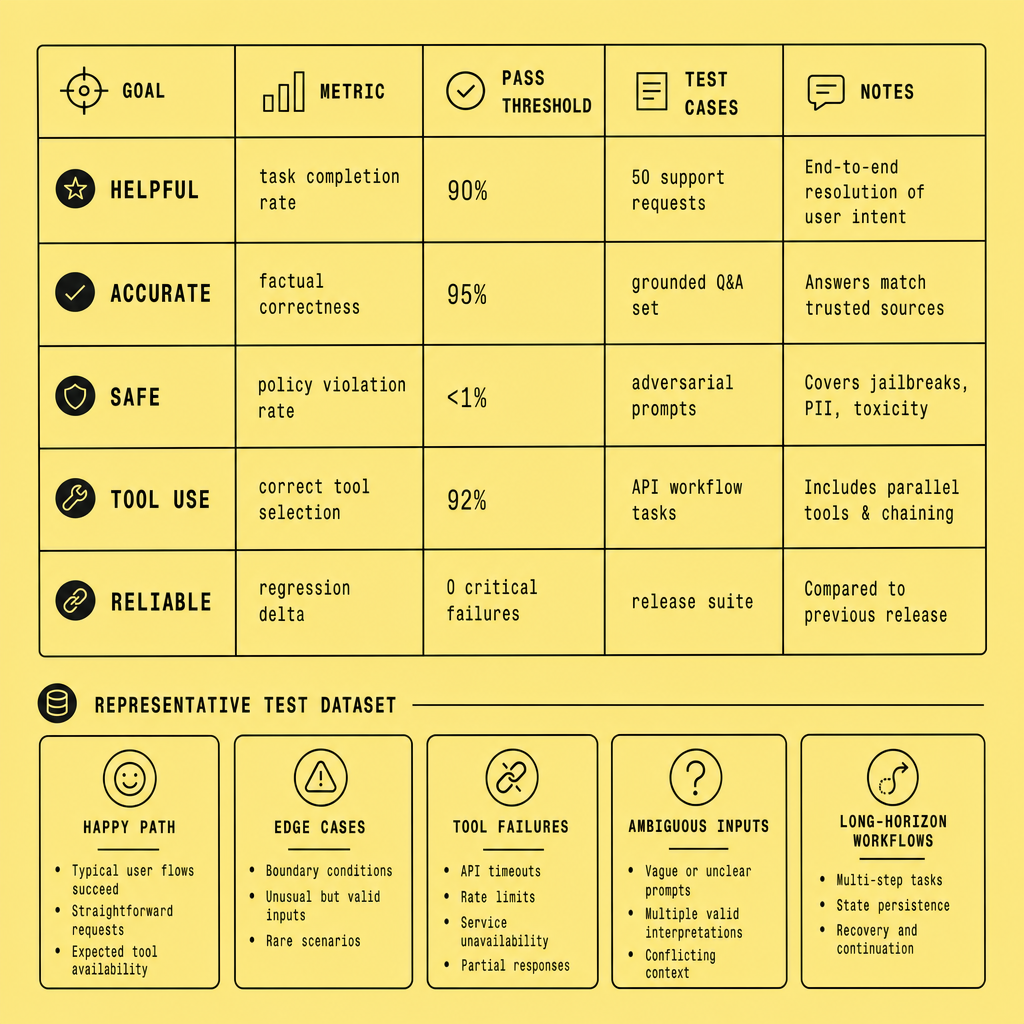
Start with the dataset, not the prompt set. An effective AI evaluation harness is built around a reusable golden dataset -- not a folder of ad hoc prompts someone tried in chat last week. Ad hoc testing helps you explore behavior. It does not support reliable LLM evaluation, regression testing, or team-wide comparison over time.
Structure the dataset around real behavior
Your dataset should mirror how users actually behave, including the parts teams prefer to ignore:
- Happy path: standard requests with enough context and a clear expected result
- Edge cases: unusual phrasing, partial context, conflicting instructions
- Adversarial inputs: prompt injection attempts, policy bypass requests, manipulative wording
- Missing data: required fields omitted, broken assumptions, empty retrieval results
- Ambiguous requests: tasks that require clarification instead of guessing
- Tool failure scenarios: timeouts, invalid API responses, permission errors, malformed payloads
Keep your test fixtures stable. Freeze tool mocks, retrieval snapshots, and expected schemas so failures point to agent behavior, not infrastructure drift.
Label expected outcomes and grading rules
Some cases need exact-match assertions. Others need rubric scoring. Use both.
For example, a CRM update test might expect:
- correct tool selected
- required fields validated
- missing account ID requested before write
- no fabricated values
- response completed within your latency ceiling
That can be graded as pass/fail on tool-call structure, plus a rubric for response quality and recovery behavior. This is what makes automated AI testing practical: explicit labels, clear scoring, repeatable inputs.
Start with a small, high-signal dataset you can maintain, then expand it as production logs reveal new failure modes.
Version the eval set like code
Treat the dataset as a product artifact. Store it in version control, assign IDs to cases, track rubric changes, and note why examples were added. Small curated AI evals beat broad noisy datasets early on because they stay reviewable. They will still miss distribution shift if you never refresh them. Expand deliberately, based on observed failures.
That is how an AI evaluation harness starts reflecting real user behavior instead of staged success.
Automate AI evals to Catch Regressions Before Release
A one-time test run tells you very little. The trouble starts after a prompt edit, a model swap, a retrieval tweak, or a tool schema change quietly knocks something else loose.
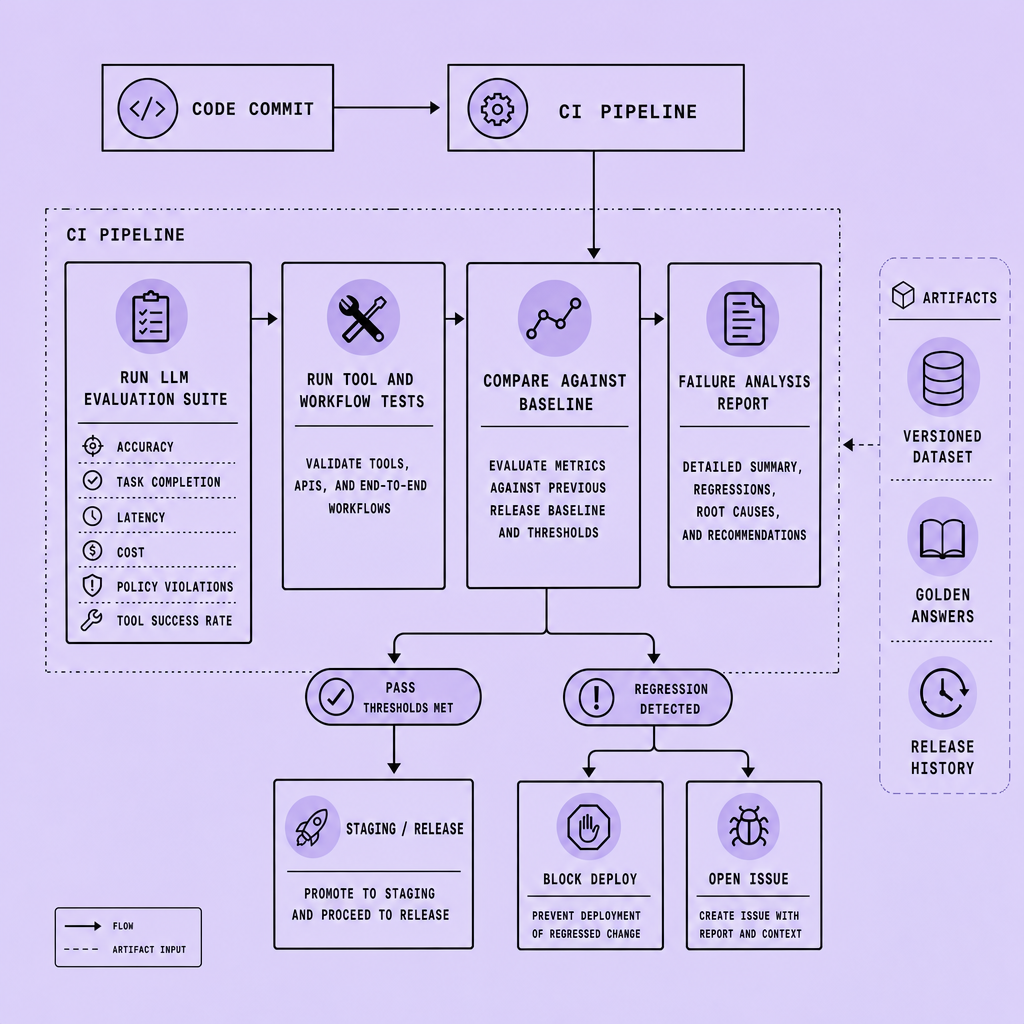
If you want agent reliability, your AI evaluation harness must run automatically on every meaningful change -- prompt edits, model swaps, retrieval updates, tool schema changes, and orchestration rewrites.
Turn benchmark runs into release gates
The practical goal is simple: compare the new version against the last known-good version on the same dataset, then block release only when high-risk metrics regress past defined thresholds. Start small. Gate on correctness, policy compliance, and workflow completion first. Leave softer signals like style or verbosity as non-blocking reports, or you will build a brittle process.
Use deterministic assertions where the answer must be exact: JSON schema validity, required fields present, correct tool selected, workflow state updated, no forbidden action executed, latency under a ceiling, cost within budget. These checks are fast, repeatable, and ideal for automated AI testing.
Open-ended outputs need a different approach.
For summarization, grounding, or response quality, use rubric scoring or model-as-judge evaluation. Give the evaluator a strict rubric, fixed examples, and pairwise comparisons against a baseline. Then add safeguards: sample human review, disagreement flags, and stable prompts for the judge model. Model-graded evaluation is useful. It is not self-authenticating.
Not every metric should block deployment. High-risk failures should.
Catch regressions across prompts, models, and workflows
This is where teams get fooled. A prompt update makes responses sound better in chat, but task completion drops because the agent stops asking for missing fields before writing to a CRM. The same pattern shows up with retrieval changes that increase recall but lower answer grounding, or model swaps that cut cost while harming tool-call accuracy.
Run the full benchmark suite in CI/CD -- GitHub Actions, a Docker-based test runner, or your existing pipeline -- and publish pass/fail diffs per case. Monitoring is as important as deployment because release-time checks catch known failures, while production telemetry catches drift you did not predict.
Common mistakes: changing the dataset every run, gating on too many subjective metrics, skipping tool and workflow assertions, and not saving failure traces for analysis. Keep the dataset versioned. Keep thresholds explicit. Keep failure review human.
Test Tool Use, Analyze Failures, and Add the Harness to CI/CD
Prompt spot-checks are easy. They are also weak. Reliability shows up when you test full workflows under stress and keep those checks enforced in CI/CD.
Test tool use and workflow paths, not just final answers
A strong AI evaluation harness should verify each step in the chain: did the agent choose the right tool, send valid parameters, respect the schema, handle timeouts, retry safely, and avoid duplicate side effects?
Take a simple CRM workflow. If the agent should look up an account before creating a contact, testing should fail when it skips the lookup, passes the wrong account ID, or retries a timed-out write without idempotency protection. That matters more than polished wording.
Workflow tests should also cover partial failure. If retrieval succeeds but the billing API times out, the agent should surface a clear recovery path instead of fabricating completion. Security checks belong here too, especially when tools can write, send, or delete.
Analyze failures like incident reports
Pass/fail is only the start. Review failed cases for pattern clusters: bad tool selection, missing fields, prompt drift, retrieval noise, latency spikes, or weak fallback logic.
Add every meaningful production miss back into the eval set as a regression test. Static datasets age fast.
Capture tool traces, inputs, outputs, retries, elapsed time, and termination reason so failure analysis is actionable.
Add the harness to CI/CD in layers
Run lightweight checks on every pull request: golden prompts, schema validation, tool-call correctness, and latency guards. Then run deeper suites before release in GitHub Actions or your existing CI/CD pipeline: broader workflow tests, edge cases, cost thresholds, and longer timeout scenarios.
Common mistakes are predictable: relying on vibe checks, using unrealistic datasets, skipping failure analysis, or treating the evaluation harness as one-time setup instead of a living system. Keep the harness close to code, run it often, and evolve it from real failures.
Start With AI evals if You Want a Reliable Agent
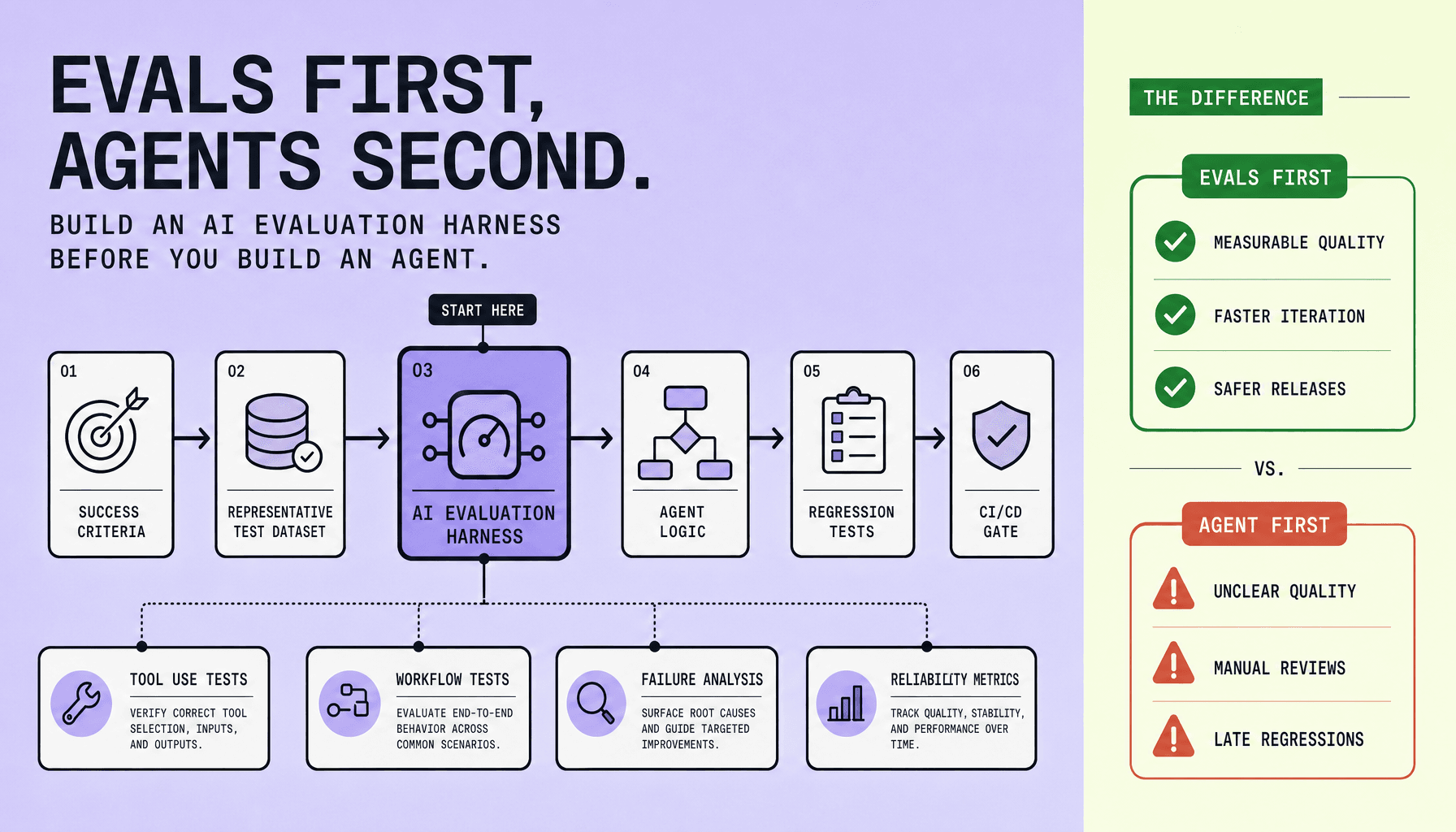
If you want agent reliability, write the AI evaluation harness first. Not after the prototype. Before it.
The sequence is simple: define success criteria, assemble a realistic dataset, automate AI evals, test tool calls and multi-step workflows, study failures, then wire the system into CI/CD. That order keeps AI agent testing tied to measurable outcomes instead of demo appeal.
A practical harness can start small: a golden dataset, pass/fail checks for accuracy and tool selection, latency and cost thresholds, and a regression suite in GitHub Actions or another CI runner. Expand it as the agent grows.
There is one tradeoff you cannot ignore: a narrow eval set creates false confidence. Your LLM evaluation should include edge cases, tool failures, ambiguous inputs, and workflow interruptions.
Monitoring matters after deployment too, so your AI evaluation harness should continue running after release.
Before you ship your next agent prototype, build the smallest possible eval harness and make every prompt, tool, and workflow change prove itself against it.
FAQs
What are AI evals for agents?
They are repeatable tests that measure task success, accuracy, tool use, safety, latency, and cost.
What is an AI evaluation harness?
It is the framework that runs datasets, scores outputs, validates workflows, and tracks regressions over time.
Why should evals come before agent development?
Because you need pass/fail criteria before you can judge whether the agent is improving or just sounding better.
Frequently Asked Questions
What is the difference between AI evals and manual prompt review?
AI evals produce repeatable, comparable results against fixed datasets and scoring rules, while manual prompt review is subjective and inconsistent across reviewers. Manual review is useful for exploration, but it cannot serve as a reliable release gate because it does not create stable baselines for regression detection.
How often should I run an AI evaluation harness?
An AI evaluation harness should run on every meaningful change to prompts, models, retrieval logic, tool schemas, and orchestration code. It should also run on a schedule after deployment to catch drift, upstream API changes, and environment issues that may not appear during pre-release testing.
Why do AI evals fail even when the agent looks good in demos?
AI evals often fail polished agents because demos overrepresent clean prompts and underrepresent ambiguity, missing data, latency pressure, and tool failures. A system that sounds competent in a narrow chat scenario can still be unreliable when asked to make decisions, call tools, or recover from workflow disruptions.
What should an AI agent testing dataset include beyond happy paths?
A strong AI agent testing dataset should include contradictory instructions, incomplete inputs, policy-sensitive requests, malformed tool responses, retrieval misses, and cases where the correct behavior is to refuse, escalate, or ask clarifying questions. These examples reveal reliability gaps that standard success cases tend to hide.
How do I choose thresholds for LLM evaluation without making them arbitrary?
Choose thresholds by tying them to business risk and operational cost, not model preference. For example, tool-call correctness and policy compliance should have stricter pass rates than tone or style metrics. Thresholds should be defined before test runs and reviewed only when requirements change, not when results are inconvenient.
Make Imversion a preferred source on Google
Like this kind of AI and software analysis? Add Imversion as a preferred source so Google can highlight our articles for you in Search, AI Overviews, and AI Mode.