AI Process Automation: Essential Tasks to Automate in 2026
Learn what AI process automation is, ideal processes to automate first, implementation strategies, and how to maximize ROI.
On this page
AI Process Automation: What It Is and Why It Matters
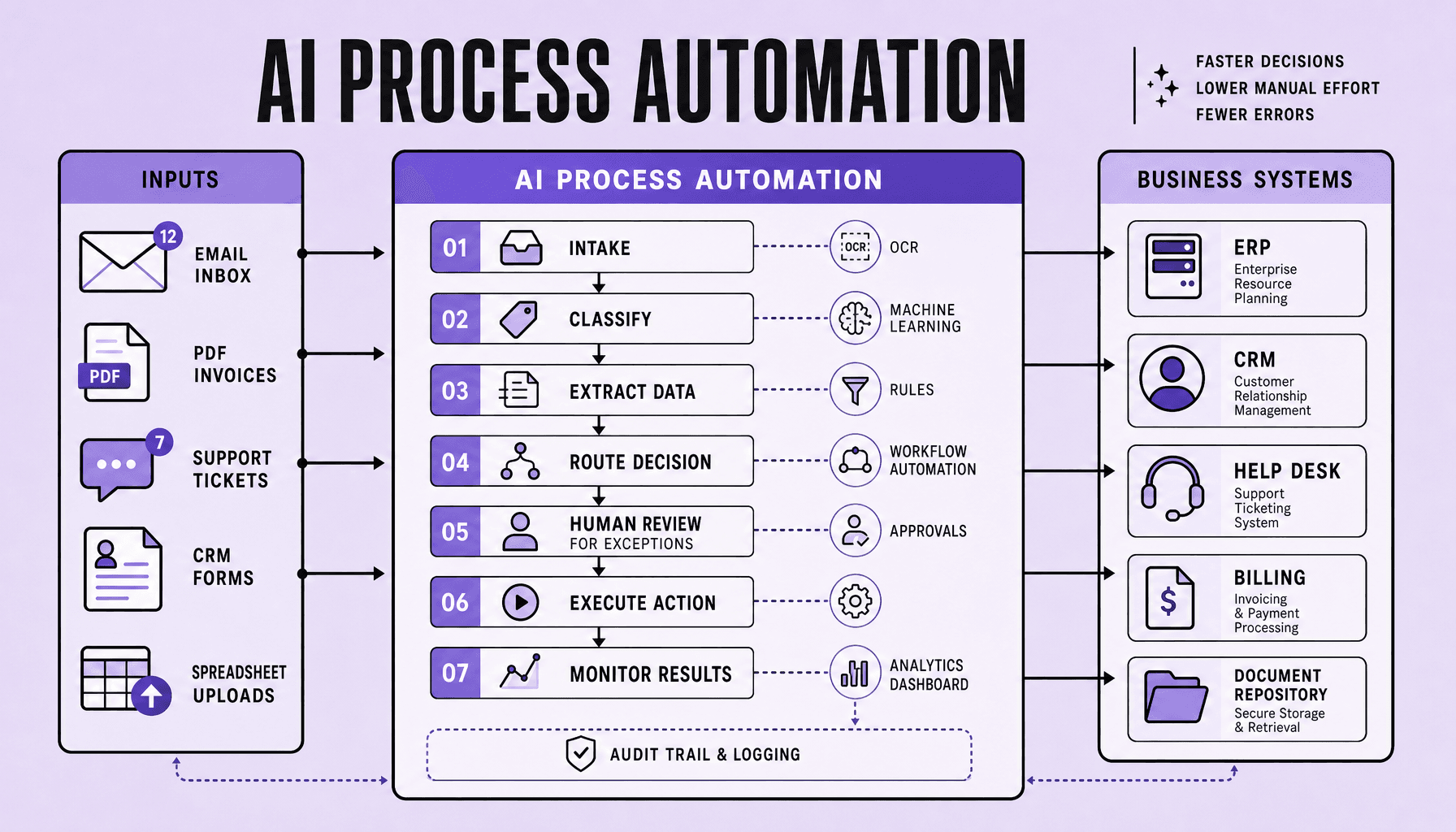
Most workflows do not break on the easy stuff. They break when an invoice shows up as a messy PDF, a support request lands as a vague email, or a ticket contains just enough ambiguity to confuse a rigid rules engine. AI process automation addresses that gap by applying AI to workflows so systems can interpret documents, text, and other messy inputs instead of relying only on fixed if/then rules.123 That makes it useful for processes involving emails, PDFs, tickets, and other unstructured data.
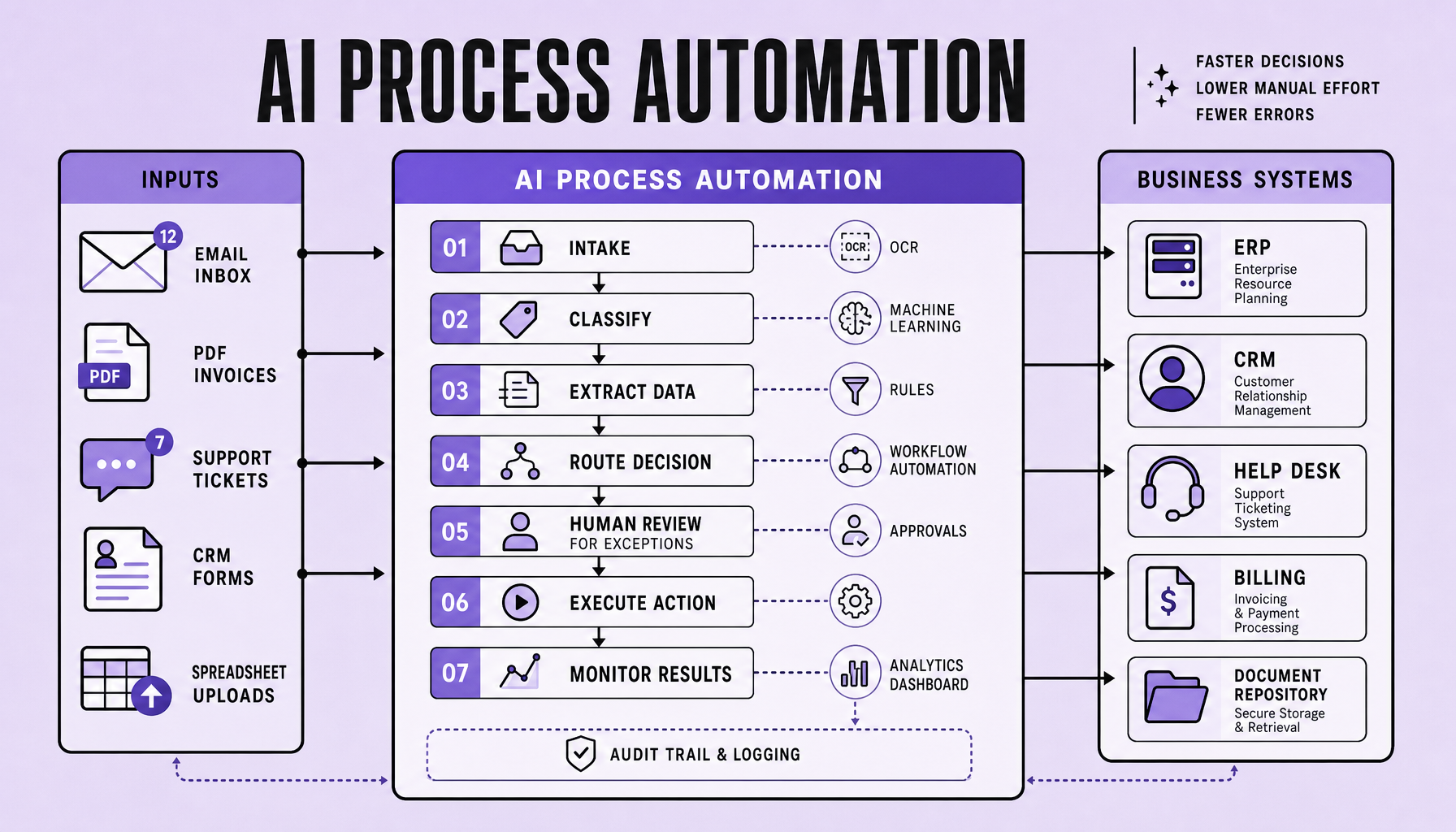
In practice, it extends standard workflow automation with capabilities like document extraction, natural-language understanding, prediction, and exception routing.45 Common starting points include repetitive, high-volume workflows with clear outcomes, such as invoice handling, ticket triage, and onboarding.67 Human review still matters for edge cases and approvals.
SEO FAQs
What is AI process automation?
The use of AI in workflows to automate tasks involving unstructured data, variable inputs, or judgment-based routing.15
How is AI workflow automation different from rule-based automation?
Rule-based automation follows predefined logic; AI workflow automation can interpret language, documents, and patterns before triggering workflow steps.24
What are the best processes to automate first?
Start with repetitive, high-volume workflows with clear outcomes, such as invoices, support tickets, and onboarding.67
Why do businesses invest in intelligent automation?
To reduce manual effort, improve speed and consistency, and extend automation into work that rules alone cannot handle.38
Key Takeaways
- Start with AI process automation where work is high-volume, repetitive, measurable, and constrained by a manageable number of exceptions -- invoices, ticket triage, onboarding, and document-heavy intake are stronger first bets than complex edge-case workflows.125
- Good AI workflow automation priorities balance effort against impact: pick processes with clear inputs, existing system integrations, and human review paths, not the messiest workflow in the business.63
- AI automation costs depend on process volume, tool choice, integration depth, model usage, and exception handling. UiPath, Power Automate, Zapier, Make, and document AI tools fit different cost and control needs.145
- Measure process automation ROI with labor hours saved, cycle-time reduction, error-rate changes, and faster throughput. Monitor production performance too, because monitoring is as important as deployment.63
AI Process Automation vs RPA vs Business Process Automation
A lot of teams reach for AI too early. If your workflow is deterministic, structured, and stable, use rules first. Bring in AI process automation only when the work depends on messy inputs, judgment, or probabilistic classification.163
Where each approach fits
Business process automation, or BPA, coordinates repeatable workflows across people and systems -- approvals, routing, notifications, status changes, SLA tracking. RPA works at the task level. It mimics user actions in existing interfaces, which makes it useful for legacy systems with no clean API. Intelligent automation combines workflow orchestration with AI services such as OCR, NLP, document understanding, and prediction so the process can handle unstructured inputs and ambiguous decisions.2435
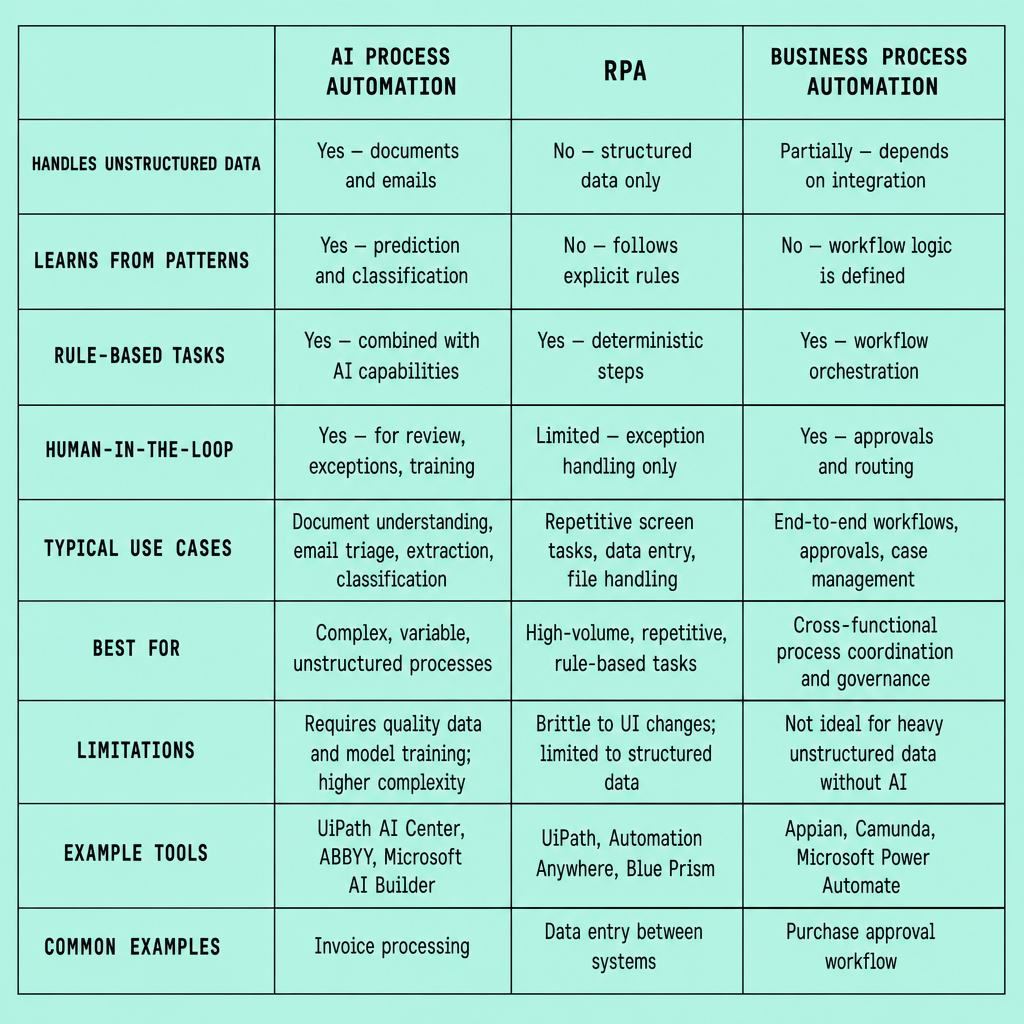
| Approach | Scope | Inputs | Decision logic | Exception handling | Ideal use case |
|---|---|---|---|---|---|
| BPA | End-to-end workflow orchestration | Structured forms, system records | Fixed business rules | Route to approver or queue | Onboarding, approvals, standard service workflows |
| RPA | Task and UI automation | Screen fields, repetitive clicks | Scripted steps | Bot stops or hands off | Legacy data entry, cross-system copy/paste |
| AI process automation | Workflow + AI-assisted decisions | Emails, PDFs, tickets, chat, mixed data | Probabilistic models + rules | Confidence thresholds and human review | Invoice processing, ticket triage, document intake |
When AI is necessary -- and when it is not
This is where teams usually overcomplicate things. Bad move.
If invoices arrive in a standard EDI format and the approval logic is fixed, BPA or RPA is enough. AI workflow automation adds cost, testing overhead, and drift risk without improving outcomes. But if invoices arrive as varied PDFs, or support requests arrive as free-form email, AI can classify, extract, and route the work before rules take over.1278
A practical example: use UiPath or Microsoft Power Automate for repetitive ERP updates. Use AWS Textract or Azure AI Document Intelligence plus workflow orchestration for invoice capture, exception routing, and approval queues. OpenAI-based workflows can help with ticket summarization or intent classification -- but only with guardrails.
Start with high-volume workflows where exceptions are bounded and humans can review low-confidence cases.
At Imversion Technologies Pvt Ltd, I’d make one recommendation consistently: avoid adding AI to deterministic workflows that already run well on structured data. Automation reduces human error, yes -- but only if you choose the lightest mechanism that solves the actual bottleneck.
What to Automate First With AI Workflow Automation
Most automation roadmaps fail at the first decision. Teams pick the most strategic-looking process instead of the one they can actually improve. Start with workflows that are painful, frequent, and easy to measure. Not the most complex process in the company.
The best first targets for AI workflow automation sit in a sweet spot: high volume, repetitive handling, clear business rules, some variability in inputs, and a bounded exception path. If a process arrives through emails, PDFs, forms, or free-text tickets, AI process automation can add value by classifying, extracting, and routing work that standard business process automation struggles to handle cleanly.123
Use a simple filter:
- Volume: enough transactions per week to matter
- Manual delay: queues, handoffs, or inbox waiting time
- Variability: unstructured inputs such as invoices, claims forms, emails, or attachments
- Exception rate: not zero -- but low enough that humans can review the edge cases
- Measurability: cycle time, touch time, error rate, SLA misses, rework
Strong early candidates include invoice automation, ticket triage, employee onboarding, lead routing with CRM enrichment, document classification, IT service desk routing, and claims intake.275 Two stand out fast: invoices and support triage. Both are repetitive, delay-prone, and full of semi-structured inputs. Tools like AWS Textract or Azure AI Document Intelligence can extract invoice fields, while OpenAI-based workflows, UiPath, or Microsoft Power Automate can classify emails, summarize intent, and route work with human approval where needed.248
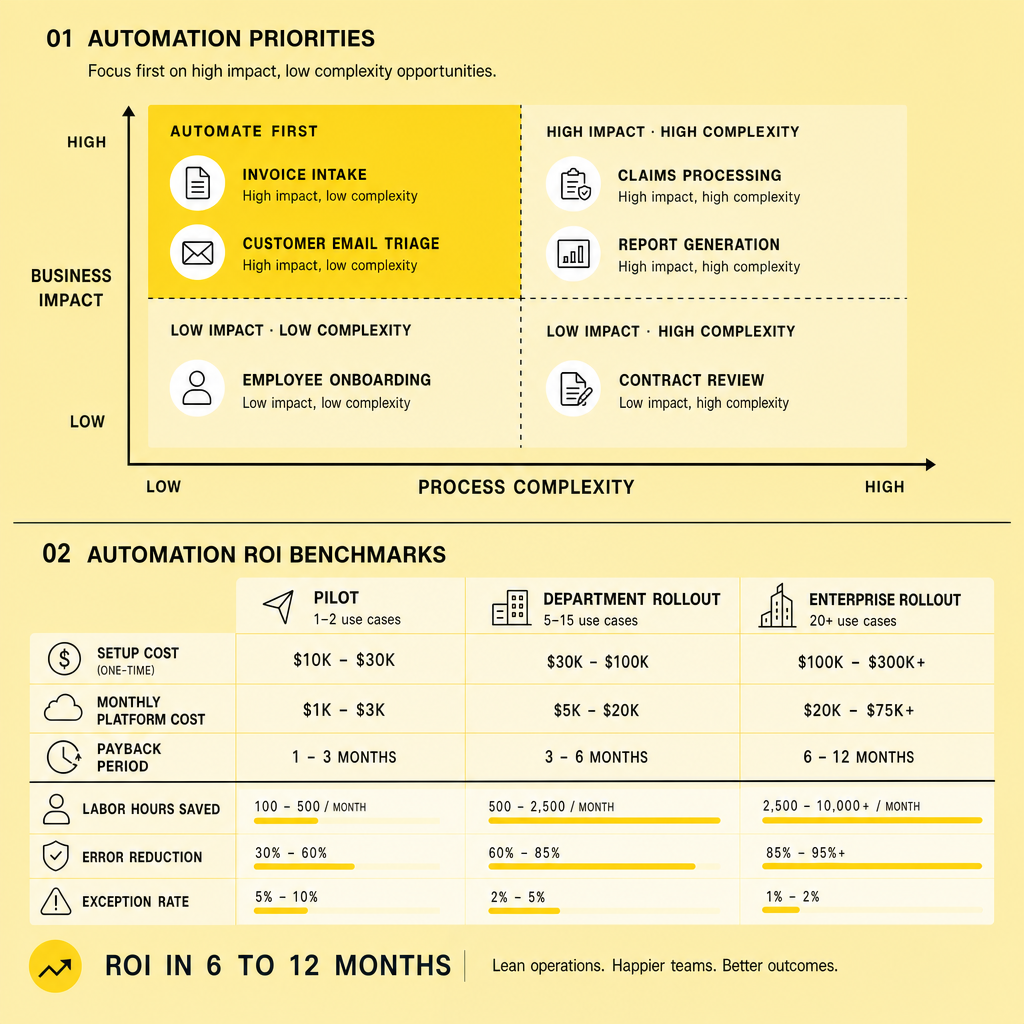
Pick one process that is narrow enough to instrument end to end in a pilot, but painful enough that the business will notice the improvement.
That sounds simple, but many teams still miss it. They start with a cross-functional, low-volume, high-ambiguity workflow like enterprise contract negotiation or complex exception-heavy approvals. Those projects look strategic. They also stall.
The better pattern is narrower and less glamorous. Intelligent automation works best early on where you can compare before-and-after metrics in weeks, not quarters. Monitoring is as important as deployment -- because once AI starts making routing or extraction decisions, you need visibility into confidence scores, fallback rates, and exception patterns. That is how you estimate AI automation costs, prove ROI, and decide whether to expand the workflow or redesign it first.135
How to Prioritize and Implement AI Process Automation
A rushed rollout is how automation projects become expensive experiments. The safer path is narrower: start small, measure aggressively, and automate decisions only where confidence thresholds and escalation paths are explicit. Teams get into trouble when they chase the hardest workflow first.
Score processes before you automate them
Before you build anything, rank the candidates. Use a simple priority model for AI workflow automation: volume, manual touch time, error rate, SLA pressure, data quality, exception rate, and system complexity. High-volume work with repeatable steps and bounded exceptions usually beats strategic-but-chaotic workflows as a first deployment.125
A practical shortlist:
- Invoice processing with OCR plus validation
- Ticket triage from email or forms
- Employee onboarding across HR, IT, and access systems
- Document classification and intake
Then pressure-test the shortlist. If a process has legal exposure, poor source data, or frequent edge cases, lower its initial priority unless you keep human review in place.
Implement in phases, not all at once
Do not start with tooling. Start with a baseline. Measure throughput, touch time, accuracy, exception rate, SLA compliance, and cost per case before any change. Without baseline metrics, your process automation ROI model is guesswork.63
Then map the workflow in detail:
- Define each step, handoff, and system dependency.
- Mark decisions, exceptions, and failure states.
- Set automation boundaries -- what AI can classify, extract, or recommend, and what a human-in-the-loop must approve.
- Run a pilot on a limited queue or business unit.
- Instrument KPI tracking and audit logs.
- Scale only after reliability holds under real volume.278
This phase matters more than most teams expect. KPI instrumentation should be part of the design, not an afterthought. If exception queues grow or model confidence drops, your workflow orchestration layer should route work back to people immediately.
Choose tools that fit the process
Once the process is clear, the tool choices usually become clearer too. For document-heavy business process automation, tools like AWS Textract or Azure AI Document Intelligence can handle extraction, while UiPath or Microsoft Power Automate can manage orchestration. Zapier and Make fit lighter cross-app flows. OpenAI-based workflows help with summarization, classification, and routing where rules alone break down.
Strong implementations automate the obvious path first and make uncertainty visible, reviewable, and auditable.43
AI Process Automation Tools, AI Automation Costs, and ROI Benchmarks
Tool sprawl is a real risk here. Your stack should match the process, not the hype. Most teams do better with a layered setup: workflow orchestration, RPA for legacy steps, document AI for unstructured inputs, LLM/NLP for language tasks, integration middleware, and monitoring from day one.123
Tool categories that actually matter
For AI process automation, the common stack looks like this:
| Layer | Example tools | Best fit | Main watchout |
|---|---|---|---|
| Workflow automation | Microsoft Power Automate, Zapier, Make | Routing, approvals, cross-app triggers | Can become brittle with complex logic |
| RPA | UiPath, Power Automate Desktop | Legacy UI actions, systems without APIs | High maintenance if screens change |
| Document AI + LLM | AWS Textract, Azure AI Document Intelligence, OpenAI API | Invoices, emails, forms, ticket classification | Needs confidence thresholds and human review |
| Integration + monitoring | API/iPaaS tools, observability dashboards | Data sync, logs, retries, audit trails | Weak monitoring hides failure modes |
Each layer has a job. Use workflow tools to orchestrate and RPA only where APIs do not exist. Use OCR or document AI where PDFs, scans, and forms block straight-through processing. Add LLM-driven classification, summarization, or extraction only for bounded tasks with clear handoff rules.278 The tradeoff is straightforward: more AI flexibility usually means more testing, exception design, and oversight.
What drives AI automation costs
Costs rarely come from one place. AI automation costs usually come from six buckets:
- software licenses for workflow, RPA, or document tools
- usage-based AI calls -- token, page, or document volume
- integration work across ERP, CRM, help desk, and identity systems
- implementation labor for process mapping, prompts, rules, testing, and security controls
- change management and training
- ongoing evaluation, monitoring, and exception tuning145
The cheapest subscription is rarely the lowest total cost. A low-cost tool that adds manual exception handling or custom integration work can raise operating cost fast.
A simple ROI model
Use a plain process automation ROI formula:
ROI = (annual labor savings + error/rework reduction + cycle-time value + avoided outsourcing cost - annualized AI automation costs) / annualized AI automation costs
Keep the first model grounded. For a realistic payback view, model one workflow first -- such as invoice processing, onboarding, or ticket triage -- and test conservative, expected, and aggressive cases. A grounded recommendation: start with a workflow that has high volume, measurable baselines, and limited exception paths. Intelligent automation tends to pay back faster when a human reviewer handles low-confidence cases instead of forcing full autonomy, which can increase rework and governance risk.63
Common Risks, Mistakes, and Best Practices in Intelligent Automation
Most failures here are not caused by the model. They come from weak operations. Common mistakes include choosing a bad first process, using poor or inconsistent data, automating too many edge cases too early, skipping exception handling, and launching without a clear owner, control point, or success metric.635 That is why the safest implementations start with narrow scope, explicit business rules, and measurable outcomes.
The operating baseline is simple. Assign an accountable process owner, define service levels and accuracy targets, keep an audit trail, and send low-confidence outputs to human review rather than forcing full autonomy.243 For document- and language-heavy workflows, this tradeoff matters. More automation can reduce manual effort, but aggressive straight-through processing can also increase hidden rework if confidence thresholds are too loose. Partial automation with clear escalation paths is often better than full automation that fails unpredictably.123
And do not treat AI workflow automation as a one-time deployment. Models, prompts, upstream systems, and business policies change; performance can drift even when the workflow looks stable.243 Best practice is ongoing monitoring for accuracy, exception volume, latency, and downstream errors, plus fallback paths when systems fail or outputs fall below threshold. Review the process periodically, retrain or adjust where needed, and expand only after controls, compliance, and ROI continue to hold up in production.235
References
- AI Process Automation: Complete Guide to Smarter Workflows - Kissflow
- AI Workflow Automation: See How It Works - Appian
- AI-Powered Business Process Automation: When to Automate vs ...
- What is AI Automation? | Complete Guide - Infor
- AI Business Process Automation 101: All You Need to Know - Activepieces
- Intelligent automation: What you need to know - Box Blog
- AI Workflow Automation: A Complete Guide (2026) - Kognitos
- What is AI process automation? A guide for operations teams - Plane
Footnotes
-
AI Process Automation: Complete Guide to Smarter Workflows - Kissflow - https://kissflow.com/workflow/bpm/ai-process-automation-complete-guide/ ↩ ↩2 ↩3 ↩4 ↩5 ↩6 ↩7 ↩8 ↩9 ↩10 ↩11 ↩12
-
AI Workflow Automation: See How It Works - Appian - https://appian.com/blog/acp/process-automation/ai-workflow-automation ↩ ↩2 ↩3 ↩4 ↩5 ↩6 ↩7 ↩8 ↩9 ↩10 ↩11 ↩12 ↩13 ↩14 ↩15 ↩16
-
Intelligent automation: What you need to know - Box Blog - https://blog.box.com/intelligent-automation ↩ ↩2 ↩3 ↩4 ↩5 ↩6 ↩7 ↩8 ↩9 ↩10 ↩11 ↩12 ↩13 ↩14 ↩15 ↩16 ↩17
-
What is AI Automation? | Complete Guide - Infor - https://www.infor.com/platform/what-is-ai-automation ↩ ↩2 ↩3 ↩4 ↩5 ↩6 ↩7 ↩8 ↩9
-
What is AI process automation? A guide for operations teams - Plane - https://plane.so/blog/what-is-ai-process-automation-a-guide-for-operations-teams ↩ ↩2 ↩3 ↩4 ↩5 ↩6 ↩7 ↩8 ↩9 ↩10 ↩11
-
AI-Powered Business Process Automation: When to Automate vs ... - https://online.hbs.edu/blog/post/business-process-automation ↩ ↩2 ↩3 ↩4 ↩5 ↩6 ↩7 ↩8
-
AI Business Process Automation 101: All You Need to Know - Activepieces - https://www.activepieces.com/blog/ai-business-process-automation ↩ ↩2 ↩3 ↩4 ↩5 ↩6
-
AI Workflow Automation: A Complete Guide (2026) - Kognitos - https://www.kognitos.com/blog/ai-workflow-automation/ ↩ ↩2 ↩3 ↩4 ↩5
Frequently Asked Questions
How long does AI process automation usually take to implement?
A focused pilot for AI process automation can often be deployed in 4 to 8 weeks if the process is narrow, the source systems are accessible, and success metrics are defined upfront. Enterprise-scale rollouts take longer because integrations, approvals, security reviews, and exception handling usually add more time than model configuration itself.
What is the difference between AI process automation and intelligent automation?
AI process automation usually refers to applying AI inside workflows for tasks like document extraction, classification, and routing. Intelligent automation is broader: it combines workflow orchestration, RPA, AI, and governance controls to automate larger business operations across systems and teams.[^4][^6]
How accurate does AI process automation need to be before going live?
AI process automation does not need perfect accuracy to create value, but it does need reliable thresholds, human review paths, and auditability. In practice, the go-live standard should be based on business risk: low-risk routing can tolerate lower confidence than payments, compliance decisions, or customer-facing approvals.[^2][^8]
Why do AI automation costs vary so much between companies?
AI automation costs vary because pricing depends on workflow volume, document complexity, model usage, integration depth, security requirements, and the amount of human exception handling required. Two companies automating the same process can see very different total costs if one has clean APIs and structured data while the other relies on legacy systems and manual review.[^1][^4]
Should small businesses use AI workflow automation or start with basic business process automation?
Small businesses should usually start with basic business process automation when workflows are structured and repetitive, then add AI workflow automation only where unstructured inputs create delays or manual review. This approach limits tooling costs, reduces operational risk, and makes ROI easier to prove before expanding into more advanced automation.
Make Imversion a preferred source on Google
Like this kind of AI and software analysis? Add Imversion as a preferred source so Google can highlight our articles for you in Search, AI Overviews, and AI Mode.