AI SaaS MVP: Essential Features & Pitfalls for 2026
Uncover essential elements for a successful AI SaaS MVP. Avoid common pitfalls and learn best practices for validation and scaling post-launch.

AI SaaS MVP: What Version One Should Actually Include
Most AI MVPs fail for a boring reason: they try to look complete before they prove they are useful.
AI SaaS MVP Key Takeaways
- Start narrow. A strong AI SaaS MVP should solve one workflow well -- support ticket summarization, invoice extraction, or CRM email drafting -- instead of chasing broad automation on day one.
- In AI MVP development, version one needs a few non-negotiables: simple onboarding, output review or approval, basic usage analytics, and one core integration only if the workflow depends on it.
- Avoid feature bloat. Multi-step agents, complex dashboards, and too many integrations slow an AI startup MVP before users have proven they trust the outputs or will pay for them.
- Validate with real users fast. Track acceptance rates, onboarding completion, corrections, and repeat usage. Decisions should be backed by data, not launch excitement.
- Scale after proof. An AI product launch should expand features, automations, and infrastructure only after the AI startup MVP shows reliable usage, trust, and a clear path to retention.
What Defines an AI SaaS MVP in SaaS Product Development
If users still have to double-check every output, version one is not working yet.
An AI SaaS MVP should prove one narrow workflow that users trust enough to keep using — and eventually pay for. That is the bar. In standard SaaS product development, an MVP often tests feature demand, usability, and onboarding. In AI MVP development, the product also has to prove output quality, reviewability, and operational fit inside a real job-to-be-done.
So the goal is not “add an LLM to the app.” It is to validate one meaningful AI-assisted task such as support ticket summarization, invoice extraction, or CRM email drafting. The best first version usually handles a single input, produces a single useful output, and gives the user an easy way to review, edit, or reject the result.
Here is the split teams miss: demo-worthy AI can impress in a live call, but workflow-worthy AI survives repeated use inside an actual process. Users do not buy AI capability in the abstract. They adopt workflow automation when it removes friction from a recurring task with acceptable accuracy and a clear human-in-the-loop step.
Because reliability matters most, an AI startup MVP should test more than feature clicks. It should track output acceptance rate, task completion rate, correction patterns, failure cases, and whether users trust the result enough to act on it. A grounded recommendation: ship narrower than feels comfortable. One use case, one user persona, and only the integration required to complete the workflow.
That is the real tradeoff. A model can look impressive early while still creating too much review work to be valuable. That is what separates an AI startup MVP from a proof-of-concept.
Must-Have Features in Version One of an AI SaaS MVP
The pressure in V1 is always the same: make it look substantial, or make it work. Pick the second one.
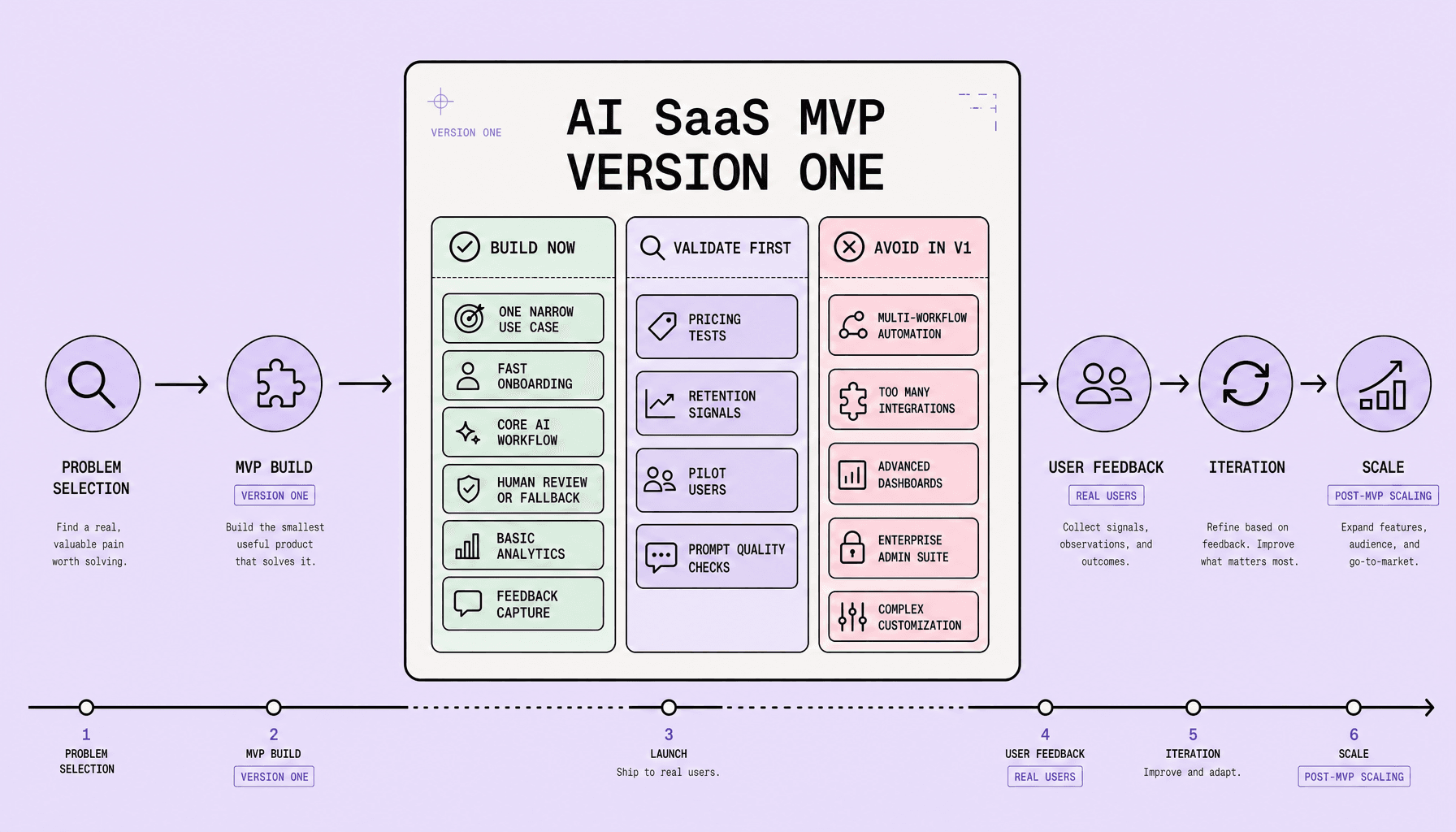
Version one should prove one trustworthy workflow, not simulate a complete product. Teams often overbuild. An effective AI SaaS MVP includes only the features that validate value, trust, or retention.
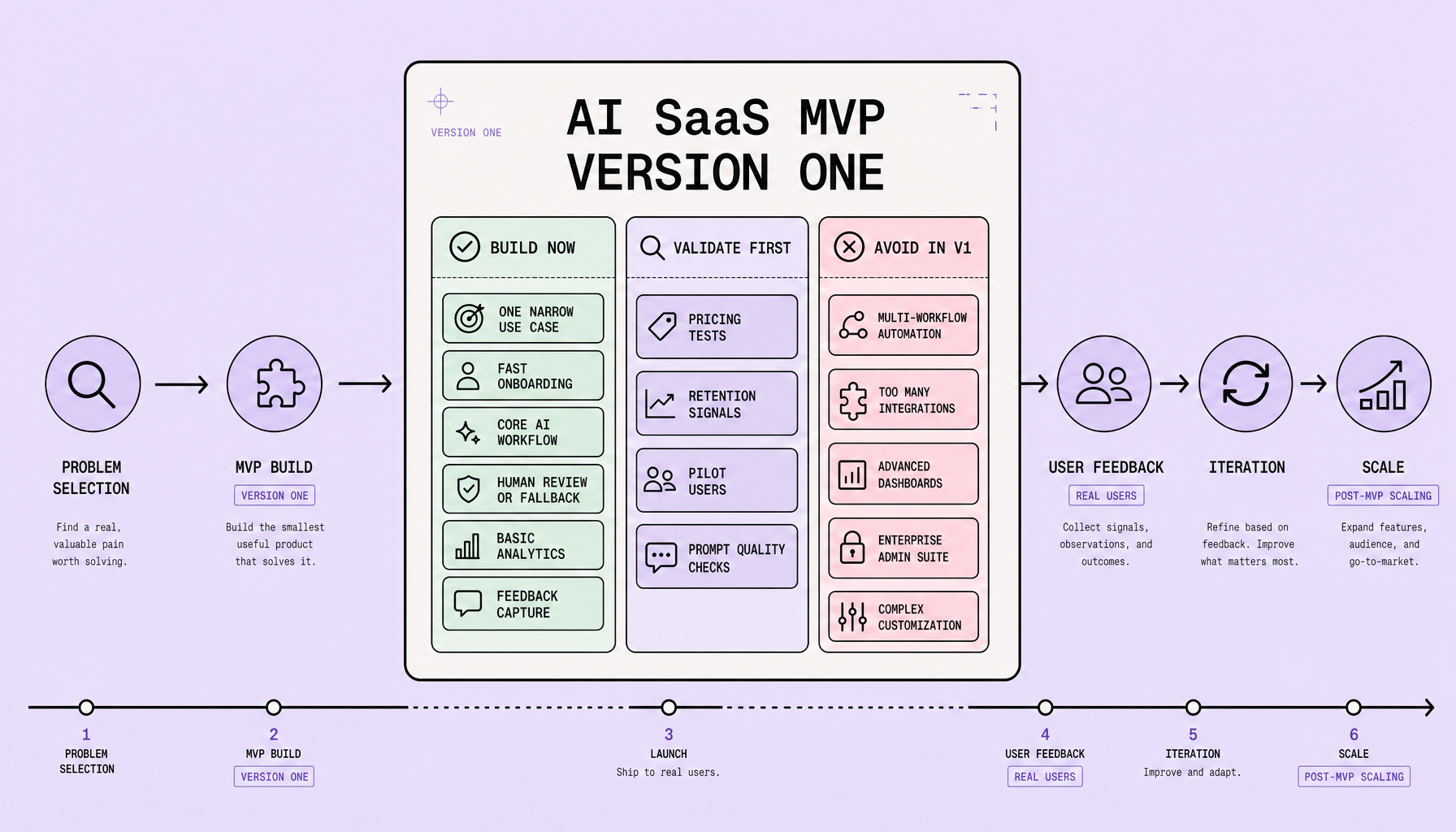
One narrowly defined use case
Pick one job and do it well: support ticket summarization, invoice extraction from PDF files, or CRM email drafting from HubSpot records.
That focus gives a minimum viable product for AI a fair test. If users cannot complete one clear task faster or better, adding more features will not fix the core problem. In practice, AI MVP development works best when the scope is tight enough to measure task completion and output acceptance rate.
Fast onboarding
Users should reach first value in minutes, not after a setup project. Keep onboarding short: connect one data source, show one example, trigger one result.
Onboarding should also explain what the model does, what it does not do, and when review is required. That reduces false expectations early. A useful test is simple: can a new user complete the first workflow without a call, a manual, or a long configuration screen?
Human review or approval
Do not let version one auto-act on high-impact outputs unless the workflow is low risk. Add review, edit, and approve steps before sending an email, updating a CRM field, or processing extracted data.
For an AI startup MVP, human-in-the-loop design is not a temporary patch. It is how teams validate trust. Track acceptance rate, edit frequency, and rejection reasons.
Basic analytics and one essential integration
You need enough visibility to know whether the product is helping or creating cleanup work. Start with lightweight analytics: usage, task completion, time-to-value, and acceptance rate. In SaaS product development, opinion can hide weak adoption for a long time if the instrumentation is missing.
If an integration is necessary, add one: Slack, HubSpot, or Google Drive, whichever unlocks the workflow.
Simple feedback capture
Do not wait for a full reporting layer before you learn what is broken. Include thumbs up/down, a short correction field, or a “what went wrong?” prompt. Small feedback loops beat complex dashboards in early AI MVP development.
What to Avoid in an AI Startup MVP Before Real Validation
A bloated V1 does not just take longer to ship. It also makes it harder to understand why users stay, leave, trust, or hesitate.
Avoid anything that slows learning without improving trust, usage, or willingness to pay. That is where many first-time founders miss the mark. They confuse roadmap ambition with launch readiness.
In an AI startup MVP, broad multi-workflow automation should stay out of V1. If the product drafts CRM emails, do not also add lead scoring, follow-up sequencing, and meeting summaries. Too much surface area hides whether one workflow actually works. In AI MVP development, understanding why users accept or reject outputs matters more than covering every use case.
Skip integration sprawl, too. One core connection like Slack or HubSpot may be enough; five integrations create setup friction, support burden, and edge-case failures. The same applies to advanced admin controls, multi-tenancy complexity, polished dashboarding, custom models before demand, and enterprise features built for one prospect.
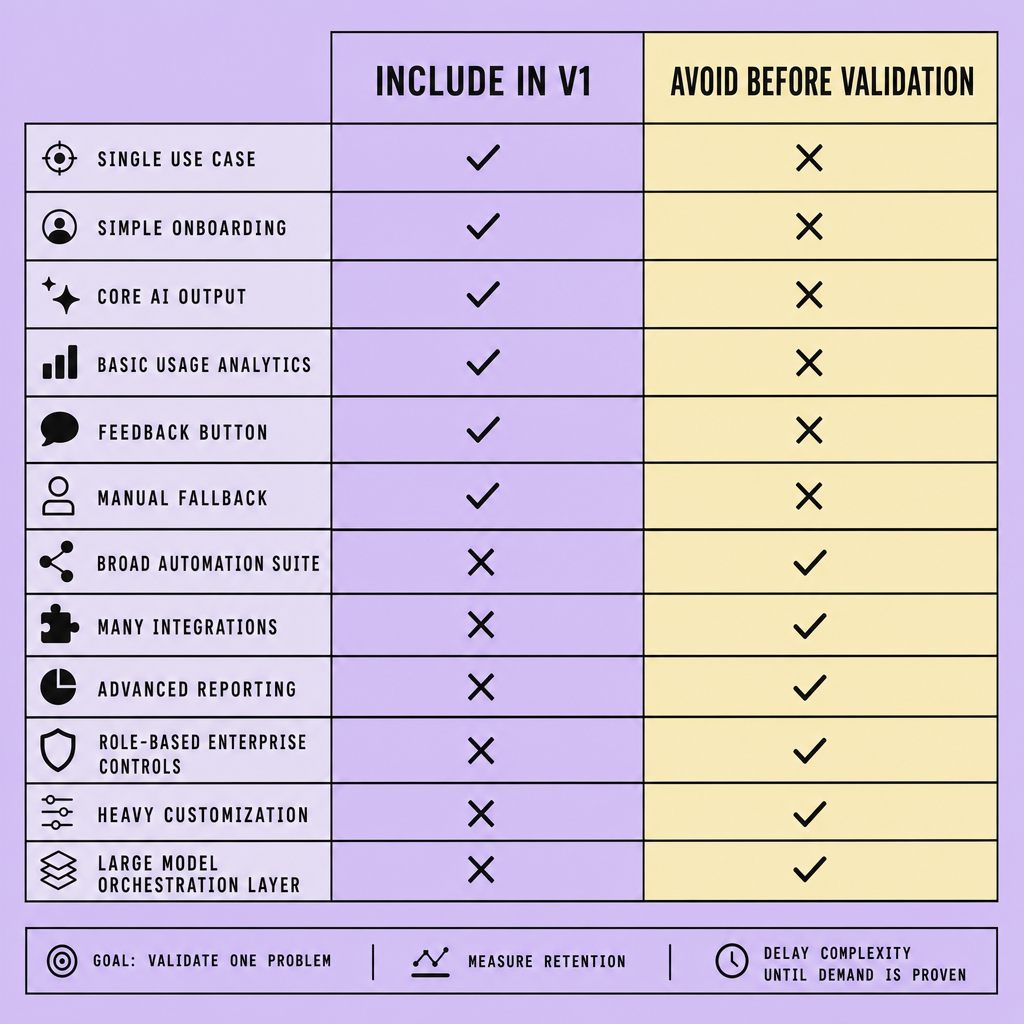
| Build now | Build later | Main risk if added early |
|---|---|---|
| One proven workflow | Broad multi-workflow automation | Scope creep, slower validation |
| One essential integration | Many integrations | Support and maintenance overhead |
| Basic review + feedback flow | Advanced admin controls, multi-tenancy | Longer build time, lower learning speed |
| Hosted model APIs | Custom models and infra | Higher cost before demand |
| Simple usage metrics | Executive dashboards | Polish without proof |
Build the narrowest trustworthy workflow first. Then expand based on user feedback and operational evidence, not assumptions.
How to Validate an AI SaaS MVP With Real Users and Feedback Loops
Good demos are noisy. Real usage is much harder to misread.
Validate with behavior, not compliments.
Teams often rush an AI product launch after a few good demos. That breaks fast. An AI SaaS MVP should be tested inside a narrow, repeatable workflow first -- support ticket summarization, invoice extraction, or CRM email drafting are good examples -- so founders can see whether users trust the output enough to use it in real work.
Start small. Run a concierge MVP before full automation: deliver the result manually or with partial tooling, then watch where users accept, edit, or reject outputs. In AI MVP development, those signals reveal value better than signups alone.
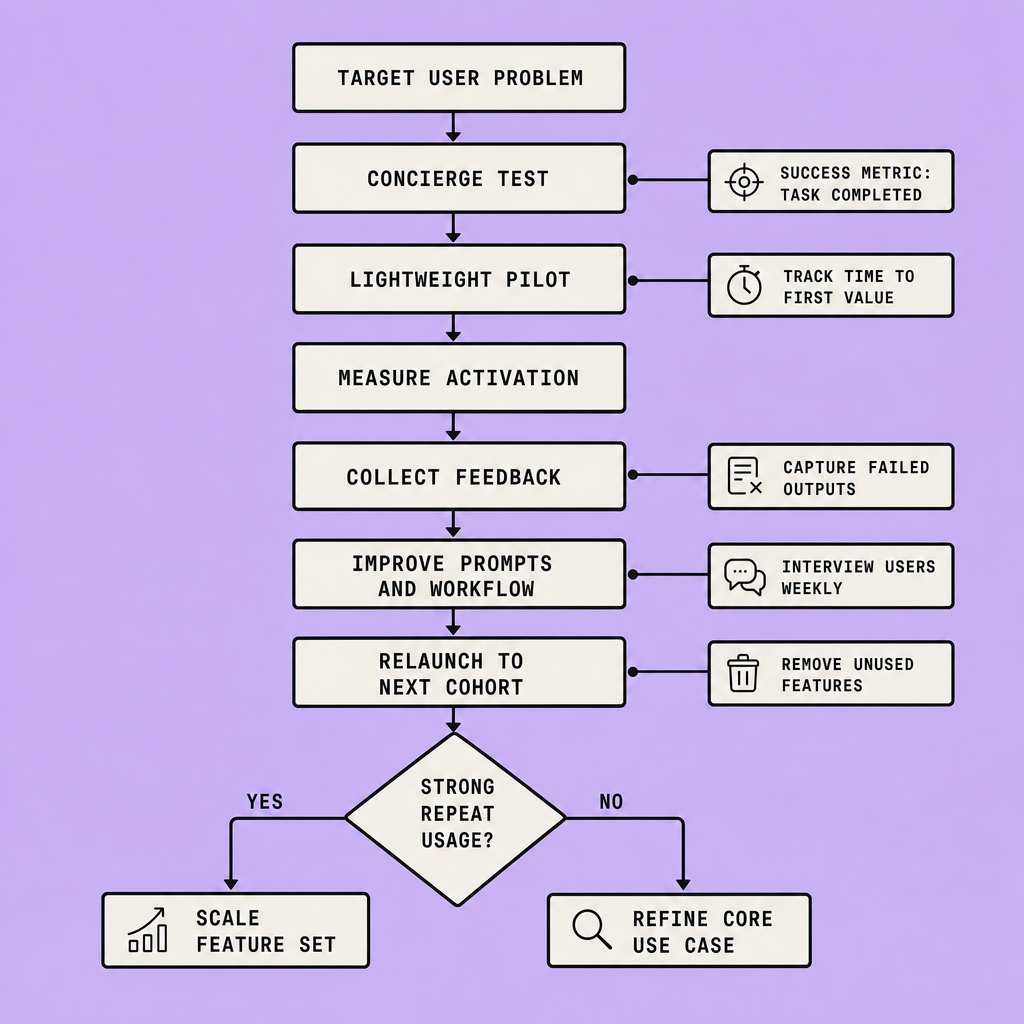
Use a beta cohort with a clear job to be done. Track:
- activation
- onboarding completion
- retention
- output acceptance rate
- edit rate
- rejection rate
- time to completed task
And keep feedback lightweight. Add thumbs up/down, a correction field, and a one-question survey after key actions. Then schedule short user interviews with people who used the feature repeatedly -- and with people who dropped off early. Both groups matter.
Decisions should be backed by data, but raw usage is not enough for an AI startup MVP; founders need output-level signals tied to real outcomes.
Prioritize iterations by pattern, not volume. If users edit every draft, improve quality. If they never reach first value, fix onboarding before adding features.
AI Product Launch Best Practices, Common Mistakes, and Scaling After MVP
A weak launch does not always look weak at first. Sometimes it looks like traffic, signups, and a support queue that grows faster than trust.
Launch narrow, not loud. A strong AI product launch usually starts with a limited release to a small user group, clear onboarding, and explicit accuracy expectations. If the product summarizes support tickets or drafts CRM emails, say where it performs well, where human review is required, and what users should verify before approving output. Clear limits build more trust than vague “smart automation” claims.
Support and monitoring should be ready on day one. Track onboarding completion, activation, repeat usage, acceptance or edit rates, latency, failed generations, and support volume. Keep a rollback plan too: feature flags, manual review, queueing, or a simpler non-AI fallback flow if quality drops. Extra safeguards can slow the experience, but removing them too early can damage trust before the workflow is proven.
Common mistakes are predictable: launching too broadly, adding Slack or HubSpot integrations before the core workflow sticks, treating traffic like proof of product-market fit, and ignoring cases where the model fails quietly instead of obviously. Another mistake is scaling support burden along with usage; if every output needs rescue from the team, the product is not ready to expand.
When to scale after MVP
More features do not fix weak retention. They usually hide it for a while.
Scale only after retention, repeat usage, and workflow fit are visible in behavior. Expansion makes sense when users return, trust the output enough to use it in real work, and can complete the job without heavy hand-holding. Until then, improve reliability, tighten scope, and fix the failure modes that appear most often.
Frequently Asked Questions
What is the fastest way to scope an AI SaaS MVP without overbuilding?
The fastest way to scope an AI SaaS MVP is to define one user, one repeated task, one input source, and one measurable output. If the workflow cannot be explained in a single sentence and judged by a single success metric, the scope is still too wide for version one.
How long should AI MVP development take before launch?
AI MVP development should usually take weeks, not many months, if the team is truly building an MVP. A practical target is enough time to deliver one reliable workflow, instrument core metrics, and run a small pilot. Long timelines usually signal unnecessary platform work or premature feature expansion.
Why should an AI startup MVP include pricing tests so early?
An AI startup MVP should test willingness to pay early because usage alone can be misleading. Some users will try AI features out of curiosity, but only pricing conversations reveal whether the workflow solves an urgent enough problem to justify budget, replacement behavior, or internal adoption pressure.
What metrics matter most after launching an AI SaaS MVP?
The most important post-launch metrics for an AI SaaS MVP are repeat usage, output acceptance, time saved, and support burden per active user. These metrics show whether the product creates dependable value. Revenue matters too, but weak trust signals usually appear before churn or conversion problems become obvious.
When should SaaS product development move from hosted models to custom AI infrastructure?
SaaS product development should move from hosted models to custom AI infrastructure only after the product has proven stable demand, predictable usage patterns, and clear economic pressure from model costs or latency. Before that point, custom infrastructure usually adds engineering overhead without improving customer validation.
Make Imversion a preferred source on Google
Like this kind of AI and software analysis? Add Imversion as a preferred source so Google can highlight our articles for you in Search, AI Overviews, and AI Mode.