CI/CD Pipeline Best Practices for Fast-Moving Teams
Unlock the secrets to fast CI/CD pipeline best practices. Improve your team's efficiency and avoid common pitfalls in automated deployments.

Introduction to CI/CD Pipeline Best Practices
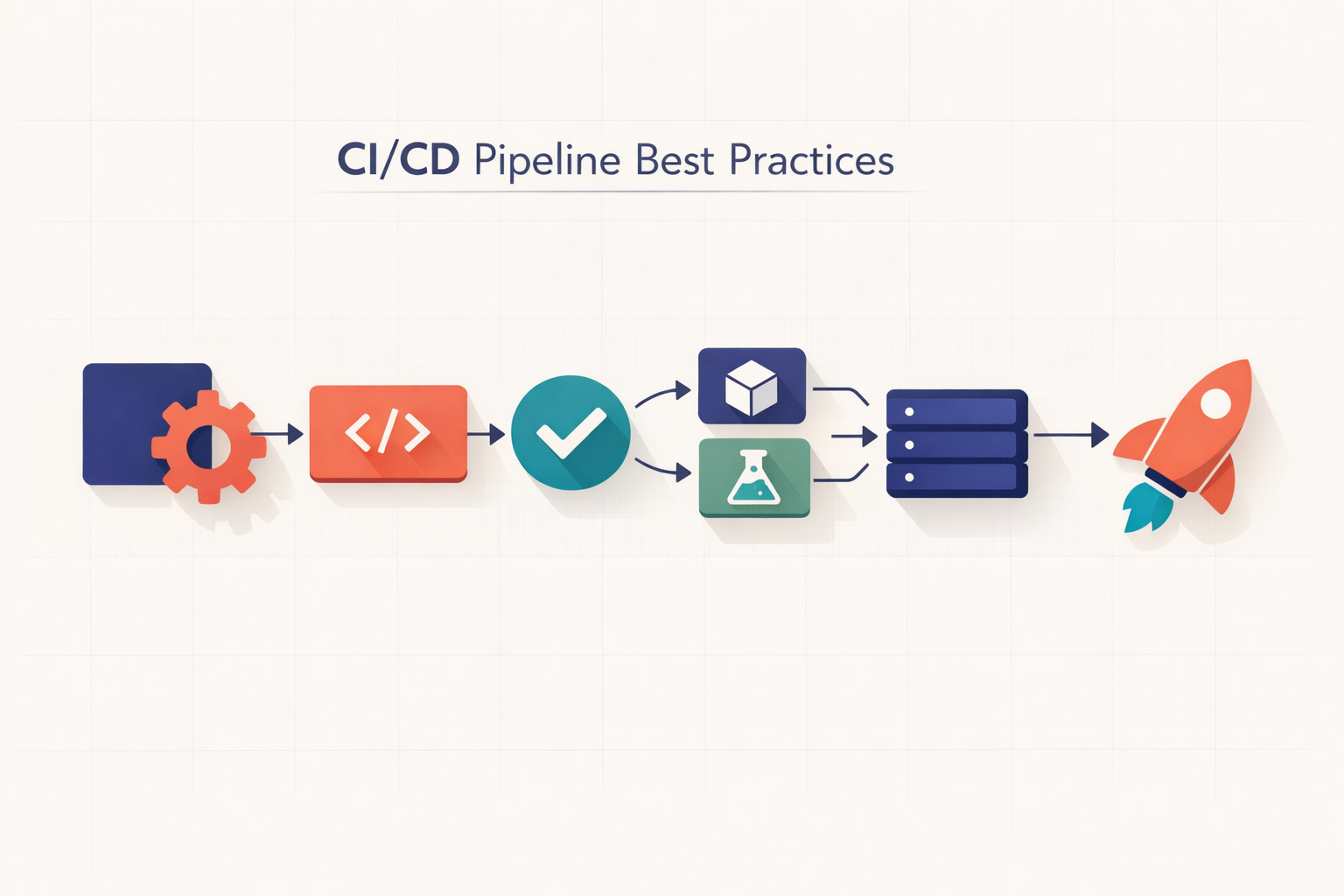
In the fast-paced realm of software development, CI/CD pipeline best practices have swiftly become vital for enhancing speed and efficiency in team workflows. This advantageous approach is rooted in the seamless integration of Continuous Integration (CI) and Continuous Deployment (CD) practices, enabling teams to maintain a competitive advantage in an ever-evolving technological landscape.
At the core of a CI/CD setup is the systematic merging and deployment of code, which minimizes the risk of integration issues in the back end. As integral components of the broader DevOps pipeline, CI and CD serve distinct purposes. CI promotes frequent integration into a shared codebase, which reduces the likelihood of late-stage errors. Conversely, CD ensures that software remains in a deployable state through automated processes and infrastructure-as-code implementations.
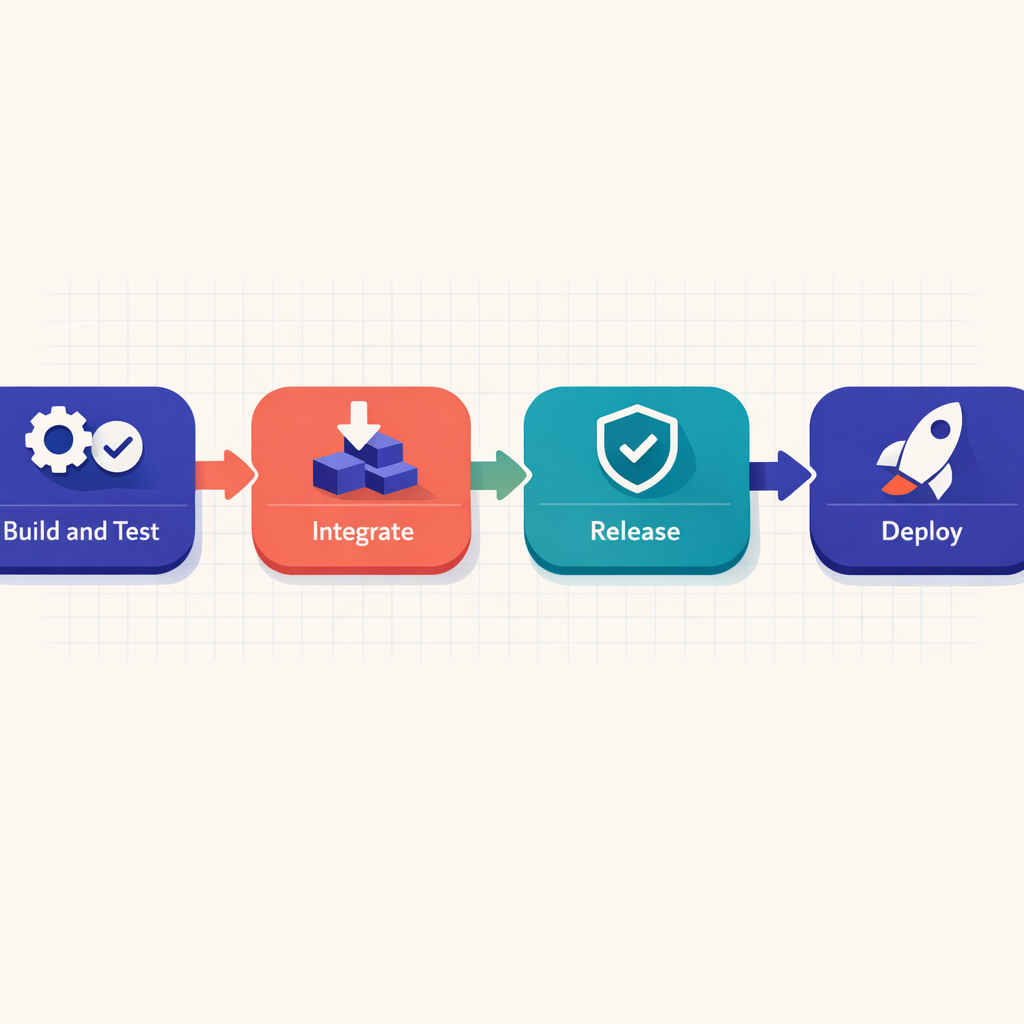
A standard CI/CD pipeline encompasses various stages, including Build, Test, and Deploy. Establishing effective CI/CD pipeline practices involves strategic branching. We recommend adopting Trunk-based development, a strategy that mitigates integration issues while facilitating continuous deployment. This approach requires developers to consistently merge their work back into the main branch.
As we explore the nuances of CI/CD pipelines, a critical element emerges: automated testing. By incorporating this essential feature into the pipeline, your team can significantly enhance its efficiency, thereby optimizing software development productivity.
To build a robust, future-proof software development pipeline, it is essential to recognize how CI/CD practices, branching strategies, automated tests, infrastructure-as-code, and team scalability interrelate. Understanding each of these components will equip you with valuable insights to avoid common pitfalls and leverage the benefits of an automated deployment process.
In the sections that follow, we will dive deeper into best practices, share tips for team scalability, and address frequently asked questions.
Tip: For more information on integrating these methodologies into your framework, explore our custom software development offerings. If you seek to enhance your team with skilled professionals, visit our staff augmentation services page. Take the leap towards accelerated, error-free, and streamlined software development today.
Overview of CI/CD
Understanding the intricacies of Continuous Integration and Continuous Deployment (CI/CD) is crucial for creating a smooth-running DevOps pipeline and effectively implementing continuous integration practices.
CI refers to a development practice in which developers integrate code into a shared repository multiple times daily. Each integration is then validated through automated builds, allowing teams to detect and address issues early. It is noteworthy that CI lays the foundation for CI/CD setups, as frequent integrations can reveal problems earlier in the project lifecycle, avoiding the complications associated with large late-stage integrations.
Conversely, CD ensures that every change made to the software—be it broad-spectrum modifications, new features, bug fixes, or experiments—can be safely, swiftly, and reliably released to customers at any time. This can lead to multiple automated deployments in a single day, keeping the software in a constant state of readiness for release.
Together, CI and CD form the fundamental segments of the DevOps pipeline, each with specific features and processes. Notably:
| Stage | Description |
|---|---|
| Build | Code integrations are automatically validated by creating a build, followed by initial testing. |
| Test | Essential for confirming the system's logic and conducting more in-depth assessments of integrations. |
| Deploy | Involves the application being delivered to the production environment. |
Moving forward, we will discuss key topics such as branching strategies, testing automation, security considerations, Infrastructure as Code, continuous monitoring, and scaling your teams to optimize your CI/CD pipeline.
Next, let’s address some common pitfalls and frequently asked questions regarding CI/CD implementation.
Benefits of CI/CD for Fast-Moving Teams
Rapid innovation demands agile and efficient processes. When strategically implemented, a CI/CD setup provides numerous benefits specifically tailored for fast-moving teams and the DevOps pipeline. Here's how:
-
Efficiency Boost: Continuous integration practices minimize the time teams spend on debugging, enabling them to focus on developing new features. Every code change, regardless of size, triggers an automated process for building, testing, and deploying, liberating countless hours of development time.
-
Process Streamlining: CI/CD facilitates near-instantaneous feedback on changes, allowing developers to detect and rectify errors promptly. It segments the development process into smaller components, each continuously monitored and tested for quality assurance.
-
Reduction of Errors: Automated tests integrated within the CI/CD pipeline can identify errors early in the build process, thus reducing the likelihood of unexpected issues during deployment.
Strong CI/CD practices significantly enhance collaboration among team members, fostering a shared responsibility for the product's success.
Capitalizing on the benefits of CI/CD requires not only the right tools and integration best practices but also a culture of collaboration and adaptability.
Are you ready to boost your team's efficiency? Learn more about our custom software development service. If you need to address any technical gaps in your team, consider our staff augmentation services.
CI vs CD: Understanding the Differences
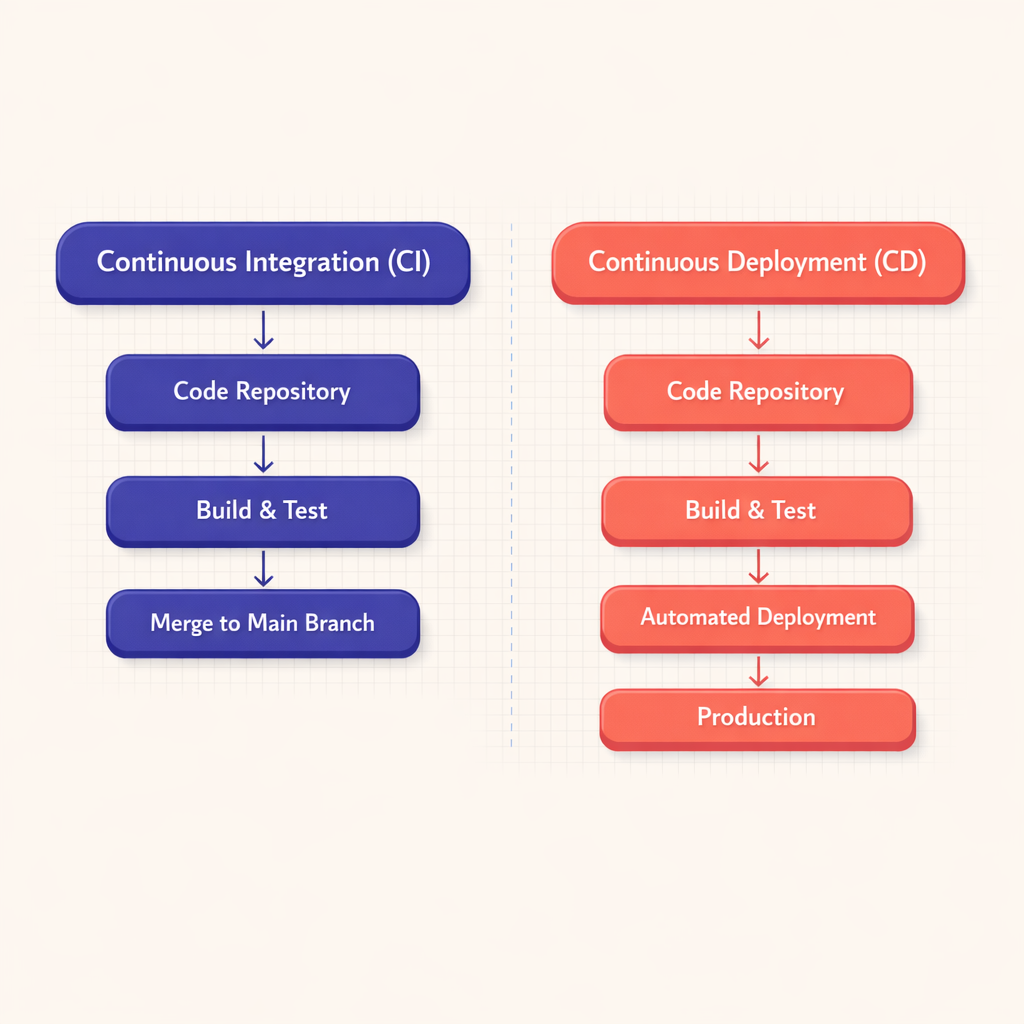
In the DevOps pipeline, Continuous Integration (CI) and Continuous Deployment (CD) play integral yet distinct roles. While both methodologies are essential for an efficient software delivery lifecycle, they serve different purposes and contribute uniquely to the CI/CD framework. Understanding these differences is crucial for implementing optimal Continuous Integration practices and maximizing the effectiveness of your DevOps pipeline.
Continuous Integration: The Bedrock of Efficiency
Continuous Integration (CI) is a foundational practice that ensures all code changes within a project are integrated into a shared repository for regular, automated testing. Developers are encouraged to commit code multiple times a day to this shared repository, allowing for automated tests to quickly identify any issues at an early stage.
Tip: The primary objective is to avoid the "integration hell" that arises from deferring the merging of changes until the project's conclusion.
By facilitating regular testing and feedback, CI enables developers to address bugs and errors in real-time, thereby reducing potential bottlenecks that could impede the overall development process.
Continuous Deployment: Rapid and Reliable Deliveries
Conversely, Continuous Deployment (CD) ensures that any change passing the automated tests is automatically deployed to production, allowing for software releases to customers at any time. This process enables seamless integration of new features, bug fixes, and updates without manual intervention.
| Aspect | Continuous Integration (CI) | Continuous Deployment (CD) |
|---|---|---|
| Focus | Maintaining code quality via integration and testing | Automating deployment to production |
| Main Goal | Identifying and fixing issues early | Keeping software in a release-ready state |
| Testing | Performing automated testing after each commit | Executing automated deployment after tests pass |
| Manual Process | May involve manual interventions | Aims for elimination of manual deployment steps |
It’s important to recognize that while Continuous Deployment is an aspirational goal, it may not suit every organization. Some teams may prefer a final review or manual testing before changes are deployed to production. In such cases, they might consider Continuous Delivery, which incorporates CI practices but entails manual deployment of updates.
Ultimately, CI and CD, through their distinct methodologies, aim to enhance operational efficiency and promote a more productive, cohesive, and agile software development process. Effectively leveraging CI/CD can accelerate the development lifecycle, improve code quality, and drive successful outcomes for fast-moving teams. Learn more about these methodologies in custom software development.
Additionally, explore our staff augmentation services to optimize your team’s efficiency and productivity.
Mastering Your CI/CD Pipeline Stages
To maximize the benefits of your DevOps pipeline, a comprehensive understanding of the individual stages within the CI/CD setup is essential. Each stage serves a distinct purpose and collectively enhances the overall effectiveness of the pipeline, adhering to CI/CD best practices.
Build
The first stage in the CI/CD pipeline is the Build phase. In this phase, developers write code, which is subsequently compiled into a functional application. This stage may also involve tasks such as code linting and auto-formatting to maintain consistency across the development team.
Test
Following the completion of the build phase, the Test stage commences. In line with continuous integration principles, automated testing procedures are employed to validate code quality. This may encompass:
- Unit tests
- Integration tests
- Functional tests
- And more.
This approach aids in identifying issues early, thereby reducing the time required for debugging in subsequent stages.
Deployment
Next is the Deployment stage, where the application is made accessible to end-users. Depending on the continuous delivery (CD) aspect of your CI/CD pipeline, deployments may occur automatically (in line with Continuous Deployment practices) or manually (following Continuous Delivery practices).
Note: Best practices advocate for promoting changes through multiple environments—such as staging and pre-production—before they reach the target environment. This strategy helps prevent the deployment of incomplete or untested features to users.
Monitoring
After deployment, it is vital to monitor your application for potential issues, runtime errors, or performance degradations. Implementing effective monitoring tools can significantly reduce system downtime and assist in capturing essential data for debugging.
By applying CI/CD pipeline best practices across these stages, you can significantly enhance your team's efficiency and minimize time spent on debugging or resolving deployment errors. Understanding the nuances of each stage is crucial for optimizing your DevOps pipeline and aligning it more closely with your team's specific needs.
In our next segment, we will explore various branching strategies your team can adopt to further refine your CI/CD setup, while also focusing on best security practices, infrastructure as code, and more.
Furthermore, learn how custom software development services can enhance your pipeline strategy.
Effective Branching Strategies within CI/CD
When implementing a successful CI/CD setup, one critical aspect that cannot be overlooked is your branching strategy. Branching strategies play a pivotal role in your continuous integration practices—they serve as the foundational structure that supports all other components of your DevOps pipeline.
Trunk-Based Development
Trunk-based development is a widely adopted strategy that encourages developers to merge their changes back into the main branch as soon as they are ready. This approach can significantly enhance the efficiency of your CI/CD pipeline by minimizing integration issues and facilitating continuous deployment.
Advantages of trunk-based development include reducing:
- Integration issues
- Code conflicts
- Delays in delivering new features
Feature Branches
Feature branches involve creating separate branches for each feature, bug fix, or improvement being developed. These branches are typically short-lived and are merged back into the main branch once the feature is deemed ready for deployment. This strategy allows for parallel development efforts without impacting the main, deployable code.
Benefits of feature branches include:
- Separation of work, allowing different features to be developed simultaneously
- Smooth integration of new features into the mainline
- Facilitation of code reviews and pull requests
Release Branches
Another effective approach is the use of release branches. Release branches are created from the mainline in preparation for a production release. Once established, only essential changes—such as bug fixes or final adjustments—are made. After the release is complete, the branch is merged back into the main branch.
Advantages of release branches include:
- Isolation of production-ready code from ongoing developmental changes
- Facilitation of rigorous testing prior to deployment
- Streamlining the release process
Tip: Selecting the appropriate branching strategy can greatly enhance the efficiency and effectiveness of your continuous integration and deployment practices. There is no one-size-fits-all solution; it's essential to assess your team’s needs, workflows, and capabilities. Experimentation and adaptation can help identify what works best for your organization.
It is important to note that branching strategies are just one piece of the puzzle. Equally crucial is the automation of testing procedures, the implementation of robust security measures, the adoption of infrastructure as code practices, effective application monitoring, and avoiding common pitfalls such as poor communication or ineffective collaboration.
For fast-moving teams looking to scale and optimize their DevOps pipelines, our staff augmentation services provide the necessary expertise and support.
Security Best Practices in CI/CD Pipelines
Achieving security in Continuous Integration/Continuous Deployment (CI/CD) systems requires a balanced approach that incorporates multiple techniques. By implementing a robust security framework, your team will be better equipped to protect codebases and enhance the DevOps pipeline. Below are some essential best practices that underscore the importance of security measures within CI/CD pipelines.
1. Detect Vulnerabilities Through Automated Testing
Utilize automated testing practices and tools to identify vulnerabilities in the codebase at an early stage. Unlike manual testing, an automated test suite can swiftly detect a broad range of issues without human intervention. Incorporate security-related testing suites into your initial CI/CD setup to ensure that security is not an afterthought but rather a continuous process.
2. Regular Updates and Patch Deployments
To protect the pipeline from potential threats, ensure that your team members are consistently updating and deploying security patches. This practice not only preserves the integrity of the code but also enhances the efficiency of continuous integration.
Tip: Always remember: Building a secure CI/CD pipeline requires continuous, proactive efforts from the team.
3. Access Control and Secured Credentials
Restrict access to sensitive components of the CI/CD pipeline. Implementing robust access control systems elevates security, significantly reducing the risk of unauthorized access. Additionally, secure all credentials by storing them in an encrypted format and utilizing service accounts for machine-to-machine authentication.
4. Infrastructure-as-Code Security
Adopt 'Infrastructure-as-Code' (IaC) to establish CI/CD pipelines. This approach fosters the creation of consistent and reproducible environments, thereby minimizing potential security risks associated with manual configurations. Changes made to the code can be tracked, reverted, or updated, contributing to a more secure environment.
5. Frequent Security Training
Regularly train your team to keep them informed about the latest threats and protective measures. Raising security awareness among team members bolsters your DevOps pipeline and reduces the likelihood of security breaches.
6. Monitoring and Reporting
Continuous monitoring of the CI/CD pipeline is essential for detecting and mitigating potential security breaches. Implement monitoring tools that provide real-time insights and event alarms, enabling the team to quickly identify and resolve issues.
While these practices offer significant benefits, it's critical for teams to recognize that while achieving a perfectly secure system is an ideal goal, vulnerabilities and breaches may still occur. Therefore, it is essential to maintain a robust incident response strategy alongside these CI/CD pipeline best practices.
For more insights and advice tailored specifically to your team, consider our staff augmentation services.
Harnessing Infrastructure as Code for Better CI/CD
As we delve deeper into CI/CD setups and practices, it is crucial to recognize the significant role of Infrastructure as Code (IaC) in creating a robust and efficient DevOps pipeline. IaC is the practice of managing and provisioning data center resources through machine-readable definition files, as opposed to relying on physical hardware configurations or interactive configuration tools. In essence, IaC automates the deployment and management of infrastructure, serving as a foundational element in achieving the continuous deployment aspect of the CI/CD pipeline.
The Role of IaC in CI/CD
Within the context of continuous integration and automated deployment, IaC is indispensable. It enables teams to manage infrastructure in a consistent and repeatable manner, significantly reducing the likelihood of human error during setup and maintenance. By automating infrastructure deployment, IaC minimizes manual workloads and accelerates delivery times. Consequently, ensuring that your infrastructure aligns seamlessly with your codebase becomes a streamlined, trackable, and manageable component of the development lifecycle.
The adoption of IaC offers several key benefits:
| Benefit | Description |
|---|---|
| Speed | Automated processes inherently outperform manual ones, empowering your team to deploy infrastructure rapidly. |
| Consistency | Automation minimizes human errors, ensuring uniform configurations across diverse environments. |
| Scalability | IaC allows your infrastructure to scale dynamically according to your needs, providing a flexible and scalable solution. |
IaC: The Automated Deployment Catalyst
Tip: By treating infrastructure as code, you lay the groundwork for efficient automated deployments.
A code-based approach to infrastructure permits version control and testing akin to application software. This automation ensures that every new release aligns with the requisite infrastructure, thereby preventing compatibility issues and making deployments more predictable and reliable.
In summary, IaC serves as the backbone of an effective continuous integration and automated deployment process. It introduces predictability, speed, and consistency to the CI/CD setup, significantly enhancing the overall efficiency of the DevOps pipeline.
As discussed, IaC is an essential component of the modern CI/CD pipeline and is critical for teams operating at a fast pace. If you wish to leverage the advantages of IaC in your team’s CI/CD setup, we encourage you to explore our staff augmentation services, where our expert professionals can guide you through the process.
Make Imversion a preferred source on Google
Like this kind of AI and software analysis? Add Imversion as a preferred source so Google can highlight our articles for you in Search, AI Overviews, and AI Mode.