GTM Automation Stack: Streamlined Sales Workflow Guide
Learn how a GTM automation stack connects CRM, website, email, and AI for seamless lead management and improved sales performance.

What a GTM automation stack does for modern revenue teams
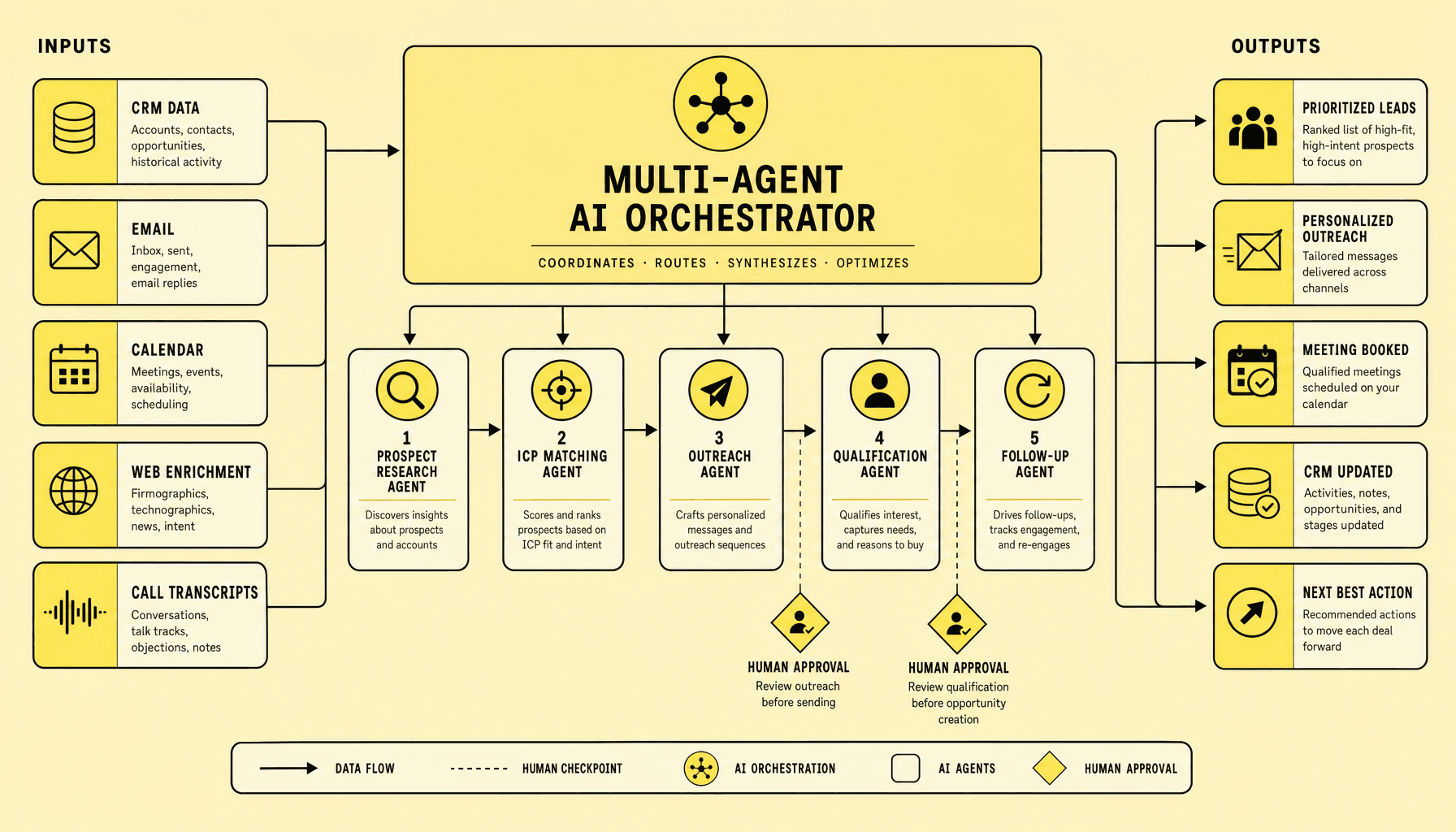
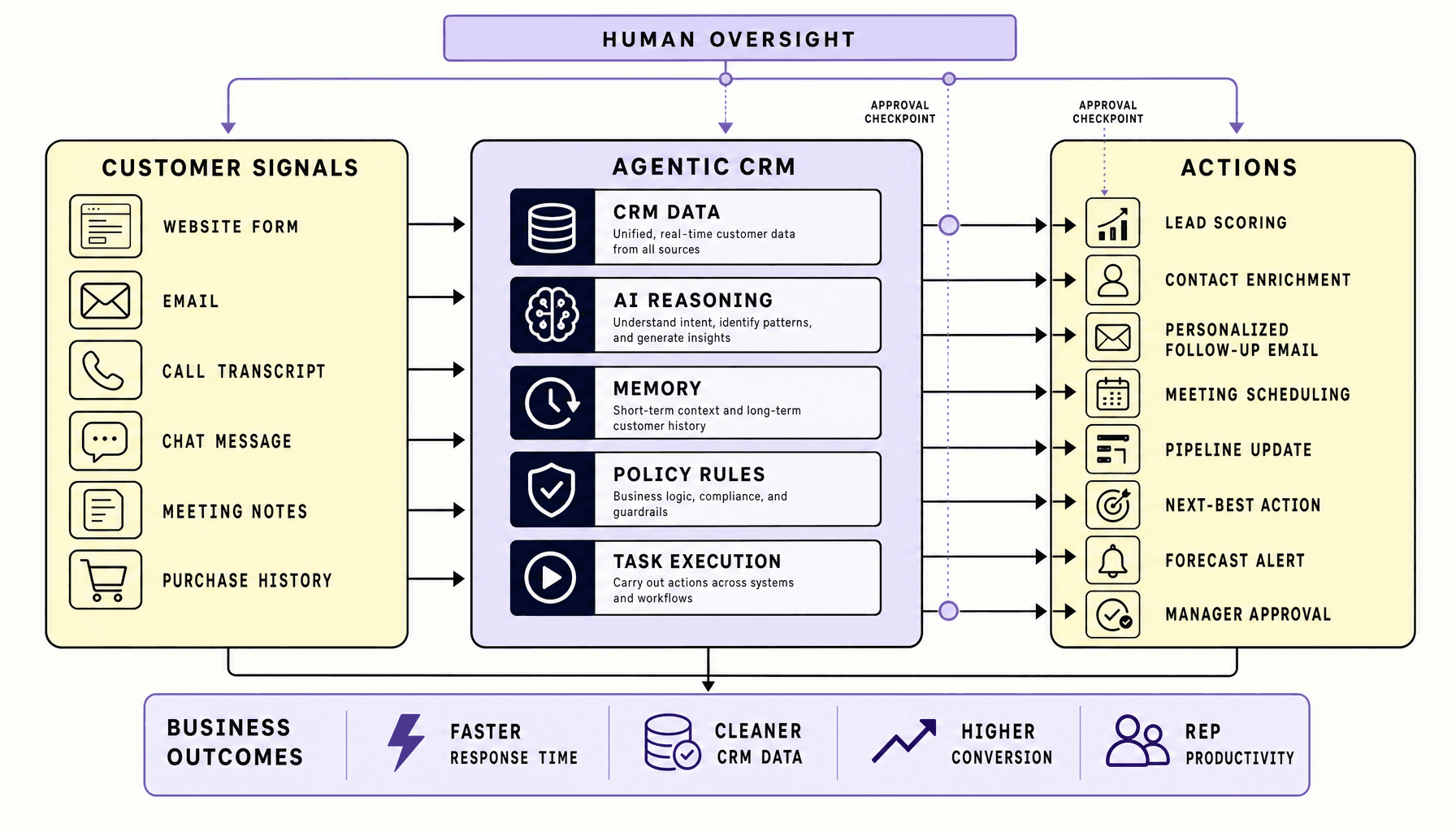
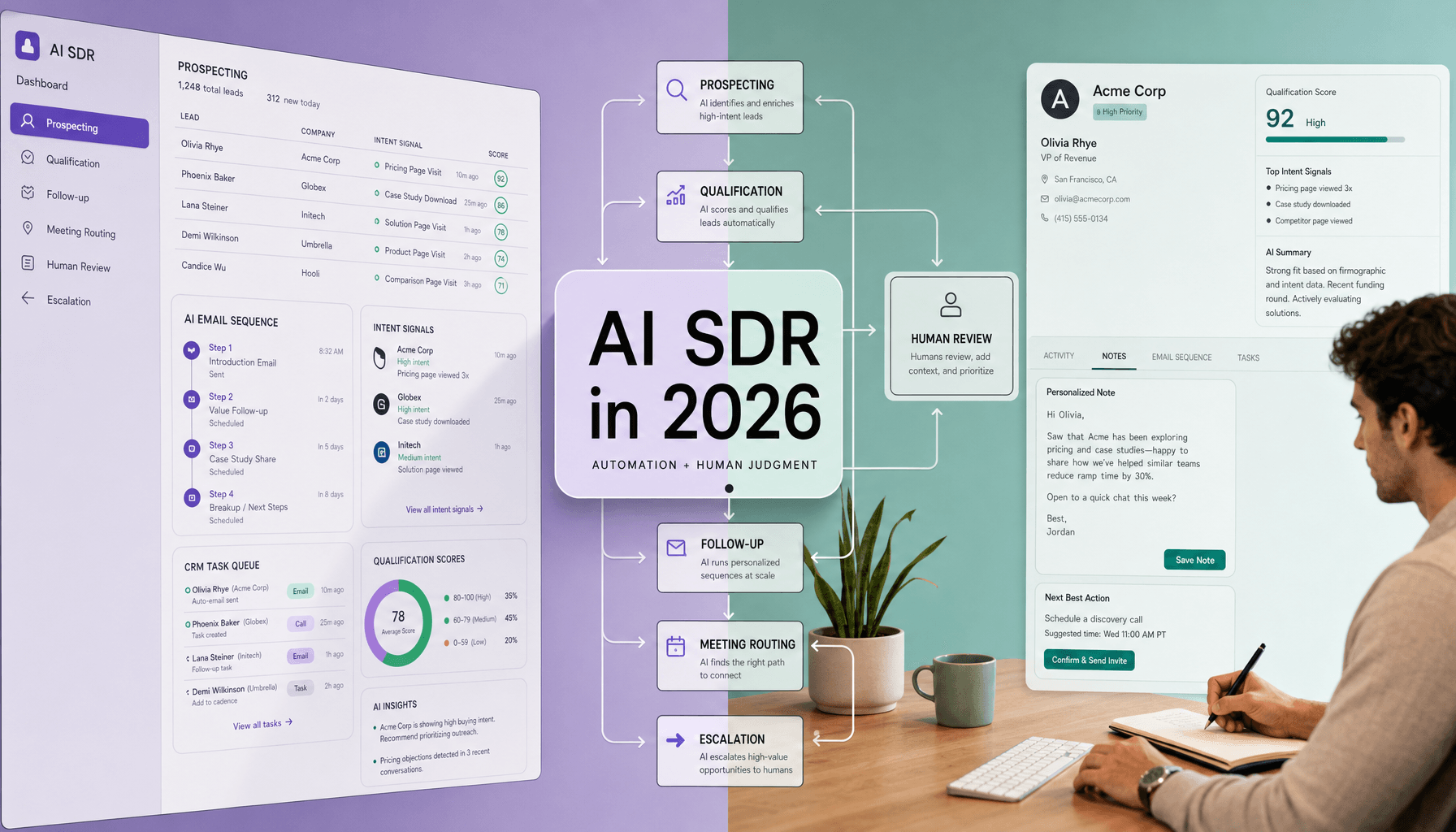
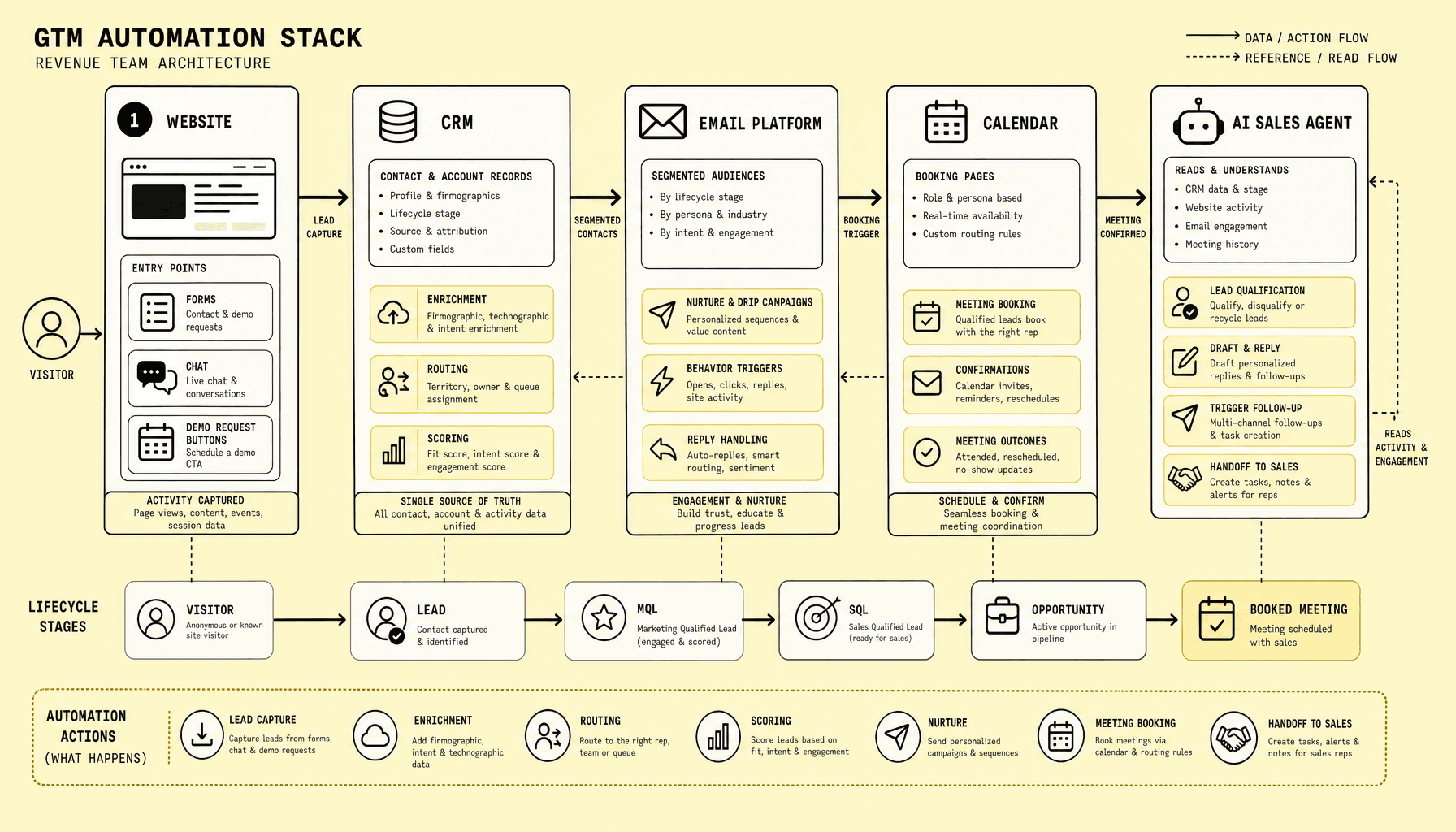
Leads rarely disappear because demand is weak. They disappear in the gaps between tools. A form gets submitted, the CRM updates late, follow-up lands from the wrong sequence, or a qualified buyer hits scheduling friction and drops. A GTM automation stack is meant to close those gaps by connecting the website, CRM, email, calendar, and AI agent into one working revenue system. It moves leads from capture to qualification to booking with less manual work, faster follow-up, and clearer ownership across the funnel.
For modern revenue teams, that means fewer dropped handoffs and better use of sales automation tools. The website captures intent, CRM automation stores and routes it, email drives follow-up, the calendar removes booking friction, and AI GTM automation helps qualify and respond in real time. But the stack works only if the systems share clean fields, routing rules, and sync logic -- otherwise teams create duplicate records, delayed outreach, and noisy reporting. In practice, we recommend defining lifecycle stages and field ownership before connecting tools like HubSpot or Salesforce, Calendly, and an AI sales agent.
Key Takeaways for building a GTM automation stack
- A GTM automation stack works only when website, CRM, email, calendar, and AI sales agent behave like one pipeline -- not five separate tools with partial syncs and unclear ownership.
- Strong CRM automation should control routing, lifecycle stages, lead scoring, and field hygiene first; then layer in AI GTM automation for qualification, follow-up, and booking acceleration.
- The winning workflow is simple: capture intent on the website, sync to CRM, enrich and score, trigger email, route to the right owner, then send qualified leads straight to calendar booking.
- Most failures come from bad data flow -- duplicate records, two-way syncs without rules, broken field mapping, and automation that fires before enrichment or consent checks complete.
- Our recommendation at Imversion Technologies Pvt Ltd: start with one high-intent path such as demo requests, define SLAs and sync direction early, and expand only after the core flow is clean.
The role of each system in a GTM automation stack
A GTM automation stack falls apart when every tool tries to do a little of everything. That sounds flexible, but it creates conflicts fast. Two systems own the same field, three automations respond to one event, and nobody trusts the report at the end.
The stack works better when each layer has a clear job. If two systems try to own the same record, data gets messy fast. If one layer is missing, leads stall, routing breaks, or sales loses context before the first meeting.
Website: capture intent at the source
Everything starts here. If the website captures weak data or drops context, every downstream step gets worse.
The website is the entry point for lead capture automation. Its job is to collect high-intent actions -- demo requests, contact forms, chat conversations, pricing-page visits, and content downloads -- plus the context around them. That usually includes UTM source, page path, company name, product interest, and form answers.
Without the website layer, the stack loses intent signals. Sales sees a name, not a buying journey.
CRM: own the record and drive workflow
This is where teams either gain control or lose it.
The CRM should be the source of truth for contact, company, owner, lifecycle stage, lead scoring, and activity history. This is where automation matters most: deduplication, routing, enrichment triggers, task creation, SLA tracking, and stage changes.
A grounded rule: keep lifecycle stage and ownership in the CRM, while the website, email tool, and calendar send events into it. The tradeoff is that centralizing control in the CRM can make setup slower at first, but it usually reduces sync conflicts and reporting confusion later.
If the CRM is not authoritative, every downstream automation becomes harder to trust.
Without it, teams fall back to inboxes, spreadsheets, and partial syncs, which weakens attribution, handoffs, and reporting.
Email platform: execute timely follow-up
Fast follow-up helps, but only if it fits the lead state.
The email layer handles automated responses, nurture tracks, reminders, and re-engagement. It should react to CRM status and website behavior, not invent its own lead state. Common uses include sending a demo confirmation, a no-response sequence, or a reminder before scheduling.
If email automation is disconnected from the CRM, follow-up may be fast but poorly timed or irrelevant.
Calendar: convert interest into meetings
A qualified lead should not get stuck in scheduling back-and-forth.
Calendar scheduling removes back-and-forth. Its role is narrow but critical: present the right booking link, respect rep availability, and write booking outcomes back to the CRM. If scheduling is disconnected, qualified leads may wait too long or book with the wrong rep.
AI sales agent: qualify and route in real time
This layer is useful when speed matters and human coverage is uneven, but it still needs boundaries.
The AI sales agent adds always-on response, basic qualification, FAQ handling, and routing support. In AI GTM automation, this layer can ask budget or timeline questions, suggest the right meeting type, and pass clean data into the CRM before handoff.
The caveat: use it for first-pass qualification and speed, not as a replacement for human judgment on complex deals or sensitive accounts.
How CRM, website, email, calendar, and AI GTM automation connect
The main problem is not tool count. It is broken sequence. Teams lose momentum when forms, chat, CRM records, email sequences, and calendars run on separate logic. The result is slower follow-up, messy ownership, and delays for qualified buyers.
A GTM automation stack should move one lead through one connected path, not five disconnected handoffs.
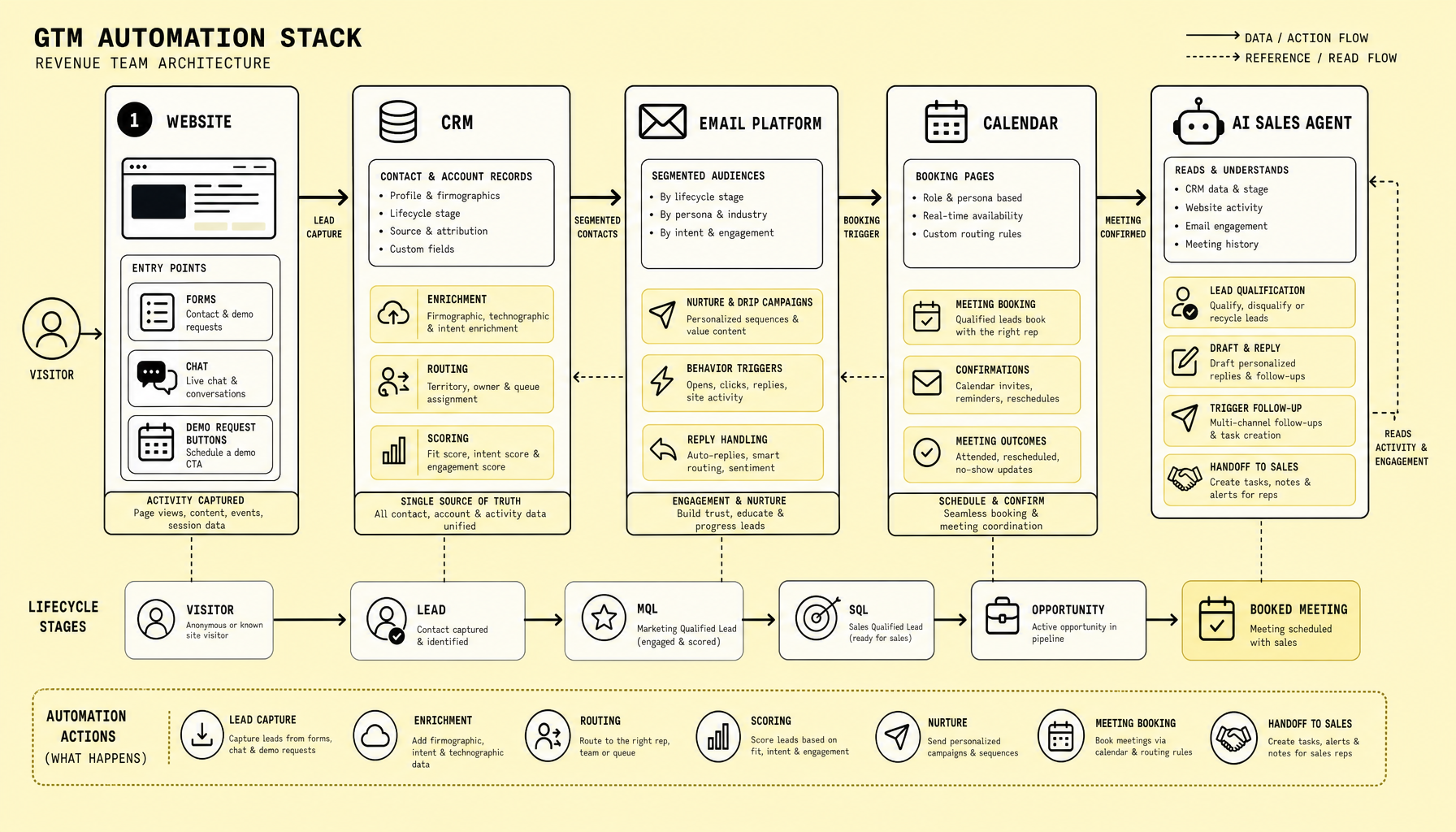
Here is the practical flow.
A visitor lands on the website and triggers lead capture through a form, chat widget, or AI sales agent. The website should pass source, page URL, campaign data, product interest, and declared fields into the CRM through native sync or webhooks. CRM automation then creates or updates the contact, checks for duplicates, links the company record, and starts enrichment if needed.
From there, qualification decides the next move. Logic can use firmographic fields, territory, lifecycle stage, and behavioral signals such as pricing-page visits or repeat sessions. Not every lead should go straight to a rep calendar. Routing should depend on fit, intent, territory, and meeting readiness.
For a high-intent inbound demo request, the path is straightforward: create the CRM record, enrich, score, assign an owner, send a confirmation email, and present meeting booking options through a scheduler. Once booked, the calendar event should write back to the CRM with meeting type, time, owner, and status so reporting stays usable.
Lower-intent leads need a different path. The AI automation layer can ask follow-up questions in chat or email, collect missing qualification fields, and unlock booking only after basic thresholds are met.
Use immediate sync for form submits and booking events. Delay enrichment and other non-critical activity updates so the user experience stays fast.
Common mistakes are predictable: unclear field ownership in two-way syncs, missing duplicate rules, giving unqualified leads instant calendar access, and failing to sync no-shows, reschedules, or cancellations.
That is why rollout order matters. A practical rollout is phased: website capture first, then CRM rules, enrichment, routing, email triggers, and finally meeting booking. That sequence keeps ownership clear and reduces breakpoints across the stack.
FAQs
What is the main job of a GTM automation stack?
It connects lead capture, qualification, follow-up, and meeting booking into one workflow across the website, CRM, email, calendar, and AI sales agent.
How does CRM automation improve lead handling?
CRM automation creates records, prevents duplicates, enriches data, assigns owners, scores leads, and triggers the right next action without manual triage.
Where does an AI sales agent fit in?
An AI sales agent helps qualify inbound leads, answer common questions, collect missing data, and route meeting-ready prospects into the right calendar flow.
Should every website lead get a booking link?
No. High-intent, qualified leads can book fast. Lower-intent or poor-fit leads should enter nurture or qualification first.
What data should sync back after meeting booking?
Meeting time, rep owner, meeting type, booking status, reschedules, cancellations, and attendance outcome should all flow back into the CRM.
Recommended automation rules and data flow for a GTM automation stack
This is usually where teams overcomplicate things. They add rules for every edge case before the core path is reliable, and then they spend weeks debugging avoidable issues.
Start with fewer rules than you think you need. In a GTM automation stack, reliability beats complexity because hidden routing errors, bad field mapping, and duplicate records can quietly break follow-up and reporting.
Implement these rules first
The highest-value rules are the ones that protect speed-to-lead and ownership:
- Lead capture automation: send every website form and AI chat submission into the CRM with mapped fields for name, work email, company, country, employee range, product interest, consent, and UTM parameters.
- Deduplication: match on email first, then company domain plus name. If a record exists, update the contact and append activity instead of creating a net-new lead.
- Lead scoring: assign points for high-intent actions such as demo requests, pricing-page visits, or qualified chat answers. Use a threshold to trigger handoff.
- Routing: assign by geography, company size, or account owner. Example: EMEA goes to one queue; enterprise accounts route to an AE instead of SDR.
- SLA alert: if no first-touch activity is logged within the target response window, alert the owner and manager in Slack or email.
- Instant follow-up: send a confirmation email immediately after submission, then switch message logic based on score or form type.
- Calendar logic: show a direct booking link only for qualified leads. Lower-intent leads should enter nurture or AI-assisted qualification first.
- Lifecycle updates: move records through subscriber, lead, MQL, SQL, opportunity, and customer stages based on explicit triggers.
- Closed-loop reporting: push meeting booked, opportunity created, and closed-won data back to campaign reporting.
Design the data flow carefully
Data flow is where good intentions usually become operational problems.
Use the CRM as the system of record. Website forms, chat widgets, and sales automation tools should write into the CRM. Calendar systems should send booking status, meeting time, and no-show outcomes back to the CRM. Email engagement can sync bi-directionally if ownership is clear.
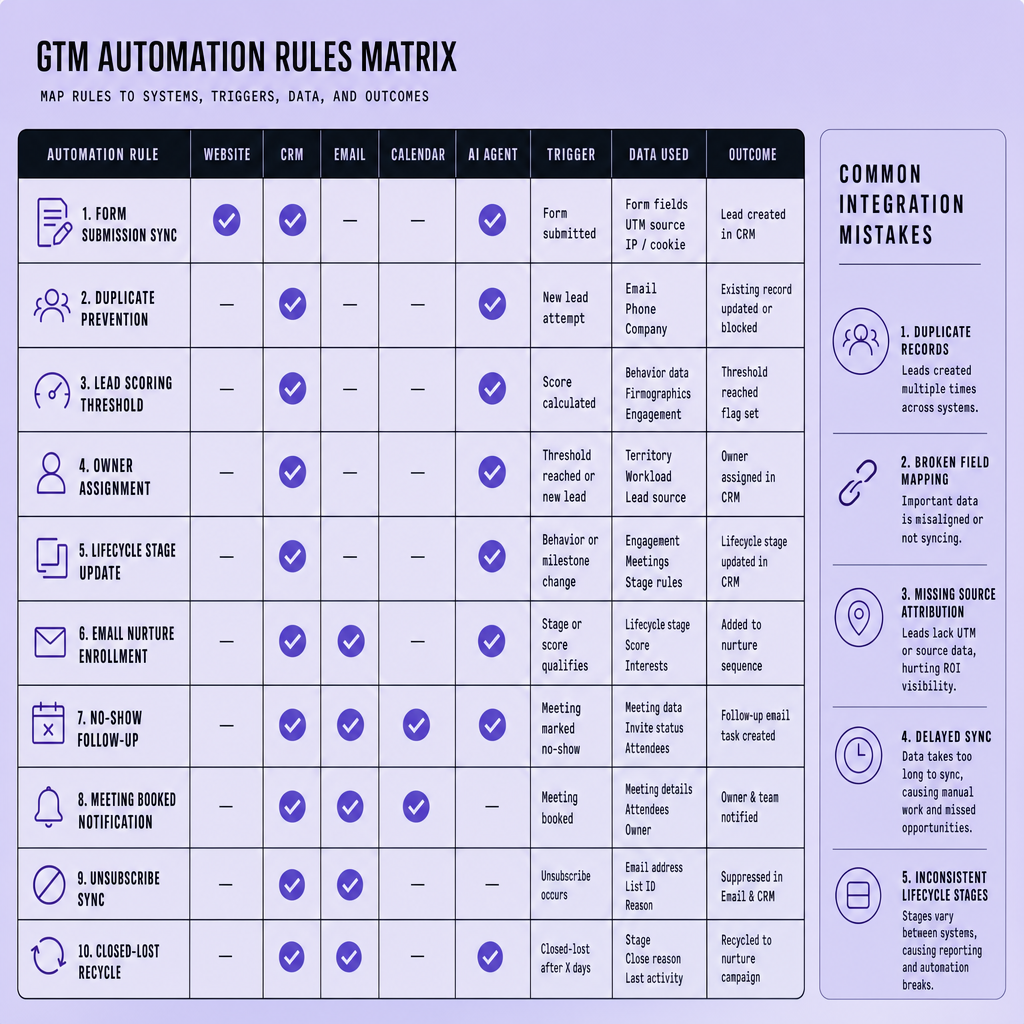
But not everything should be bi-directional.
Keep one-way sync for UTM parameters, original source, first conversion data, and raw form submissions to preserve attribution. Use bi-directional sync only for fields that truly need updates in both systems, such as lifecycle stage, owner, or meeting status. We prefer this because clean automation logic is easier to audit, fix, and trust over time.
Track duplicate rate, speed-to-lead, and MQL-to-meeting rate first. Those KPIs reveal whether your CRM automation is helping or quietly leaking demand.
Common integration mistakes and implementation steps to avoid them
Most stack failures do not come from missing features. They come from preventable integration mistakes that pile up quietly until routing, reporting, and follow-up all start slipping at once.
Most GTM automation stack failures are not caused by missing features. They usually come from poor integration hygiene: partial syncs, weak deduplication, unclear field ownership, and too many automations launched at once.
The mistakes that break the GTM automation stack
A common failure mode is duplicate creation. A website form, chat widget, and AI sales agent can each create contact records if deduplication rules are weak. CRM automation then splits history across records, routing can fire twice, and reporting gets noisy.
Field ownership breaks stacks just as often. If HubSpot or Salesforce owns lifecycle stage, but an email platform or AI GTM automation flow can overwrite it, teams lose control. One field should have one owner.
Broken attribution is another frequent issue. UTM fields may be captured on the website but never persist to the CRM contact, company, or deal record. Then source reporting turns into guesswork.
Many teams also overbuild too early: too many tools, too many triggers, and too many sync directions. Complexity can feel powerful, but it creates more failure points.
Other costly misses include:
- no fallback workflow when territory routing fails or a rep is unavailable
- weak permission controls that let users edit critical routing fields
- AI workflows without guardrails, where the AI sales agent qualifies, scores, or books meetings without clear limits or review paths
Test exceptions before launch: repeat form submissions, existing contacts, territory conflicts, and meeting assignment errors. Most failures happen there.
A phased rollout that prevents avoidable failures
The safest implementation is usually the one that feels a bit slower.
A phased implementation is usually safer than an all-at-once launch because it makes errors easier to spot and fix.
- Audit current tools and syncs: list forms, chat, CRM fields, calendar rules, email triggers, and AI actions.
- Define lifecycle stages: set explicit entry and exit rules for inquiry, MQL, SQL, meeting booked, no-show, and recycled.
- Map data and ownership: decide sync direction, required fields, attribution handling, and field owners.
- Build core automations first: lead capture, dedupe, scoring, routing, confirmation email, calendar booking, and fallback workflow.
- Run QA on edge cases: test existing records, missing firmographic data, routing gaps, reassignment, and unsubscribed contacts.
- Train teams: sales, marketing, and ops should work from the same rules.
- Monitor and refine: review speed-to-lead, meeting-booked rate, no-show patterns, and routing errors.
Phased rollout may feel slower at first, but it reduces disruption, protects attribution, and gives AI GTM automation a more stable system to act on.
ROI of a GTM automation stack and when businesses actually need one
The wrong time to think about ROI is after you have already bought more tools than your process can support.
Measure ROI in operating terms before you reduce it to software cost. The clearest signals are faster lead response, higher meeting-booked rate, fewer dropped or misrouted leads, less manual CRM cleanup, and better visibility into where pipeline stalls. If those metrics improve, the stack is creating more value even before finance models full revenue impact.
Most businesses actually need a GTM automation stack when volume, handoffs, and tool count start to outgrow memory and manual process. Common triggers are rising inbound lead flow, multiple channels feeding the same CRM, inconsistent routing between sales reps, delayed follow-up, and reporting that depends on spreadsheet patchwork. At that point, automation is not just a convenience; it becomes a way to preserve speed and accountability.
The tradeoff is that automation adds setup, governance, and maintenance work. Small teams with low lead volume usually do not need a complex stack yet. They often get more value from tightening stage definitions, form logic, ownership rules, and basic follow-up discipline first. If the process is unclear, automation scales confusion.
A grounded recommendation: add a fuller stack only after the team can name one source of truth, one owner for each key field, and one standard path from lead capture to booked meeting. Build when the manual system is proving too slow or too fragile, not just because more tools seem more advanced.
Frequently Asked Questions
What is included in a GTM automation stack besides a CRM?
A GTM automation stack usually includes a website or landing page system, CRM, email platform, calendar scheduler, enrichment tools, routing logic, and an AI sales agent or chatbot. The value comes from how these systems share data and trigger actions together, not from buying the largest number of tools.
How long does it take to implement a GTM automation stack properly?
A well-scoped GTM automation stack can often be implemented in two to six weeks for one inbound workflow, depending on field cleanup, routing complexity, and existing integrations. Most delays come from unclear ownership, inconsistent lifecycle definitions, and fixing old sync issues rather than from the automation build itself.
Why should companies start AI GTM automation with one use case first?
Companies should start AI GTM automation with one high-intent use case, such as demo requests, because it limits risk and makes results easier to measure. A focused rollout helps teams validate qualification logic, handoff timing, and booking accuracy before extending AI into lower-intent nurture or more sensitive sales conversations.
How does an AI sales agent differ from traditional sales automation tools?
An AI sales agent does more than send scheduled messages or update fields. It can interpret buyer intent, ask follow-up questions, summarize responses, and decide whether a prospect is ready for booking based on live inputs. Traditional sales automation tools mostly execute predefined rules after a trigger has already occurred.
When does a business actually need a GTM automation stack?
A business typically needs a GTM automation stack when leads are arriving from multiple channels, response times are inconsistent, and team members are manually stitching together CRM updates, follow-up emails, and scheduling steps. That is usually the point where process gaps begin affecting pipeline quality, conversion rates, and reporting accuracy.
Make Imversion a preferred source on Google
Like this kind of AI and software analysis? Add Imversion as a preferred source so Google can highlight our articles for you in Search, AI Overviews, and AI Mode.