RPA vs AI automation: Choosing Tools for Efficient Workflows
Explore when RPA wins and where AI excels in automation. Learn about the hybrid model and find the best approach for your processes.

On this page
RPA vs AI automation: which one should you use?
Most teams do not get stuck on RPA vs AI automation because the concepts are confusing. They get stuck because the workflow looks simple from a distance, then turns messy the moment real inputs show up. A process that seems repetitive can fall apart under inconsistent PDFs, OCR errors, long email threads, or screens that keep changing.
The practical answer is usually clear once you look at the inputs. Use RPA for predictable, rules-based work with structured data. Use AI automation for variable inputs, classification, extraction, and exception handling. And in plenty of cases, the best result comes from combining both.
If the process depends on stable screens, fixed fields, and deterministic rules, RPA usually wins on speed, auditability, and lower entry cost. If emails, PDFs, OCR output, or free text drive the workflow, AI process automation is a better fit. In practice, intelligent automation vs RPA is rarely either-or -- we often recommend RPA for orchestration and system actions, then layer AI for document extraction, routing, confidence thresholds, and human-in-the-loop review. At Imversion Technologies Pvt Ltd, we see the same pattern: user experience is as important as functionality, so brittle bots for messy inputs usually cost more to maintain than teams expect.
Key Takeaways
- Choose by variability first. In RPA vs AI automation, RPA fits structured inputs, stable screens, and low exception rates; AI fits OCR, IDP, LLM-driven classification, and messy documents.
- RPA vs AI is not just a capability question -- it is a maintenance and governance question. RPA is easier to audit; AI needs confidence thresholds, logging, and human-in-the-loop review.
- The strongest pattern is RPA and AI integration: use bots for deterministic steps, and AI for extraction, routing, and exception triage.
- Use the decision table to avoid overbuilding. For predictable work, intelligent automation vs RPA usually favors simple bots first; for variable inputs, plan migration sequencing and replacement costs before scaling.
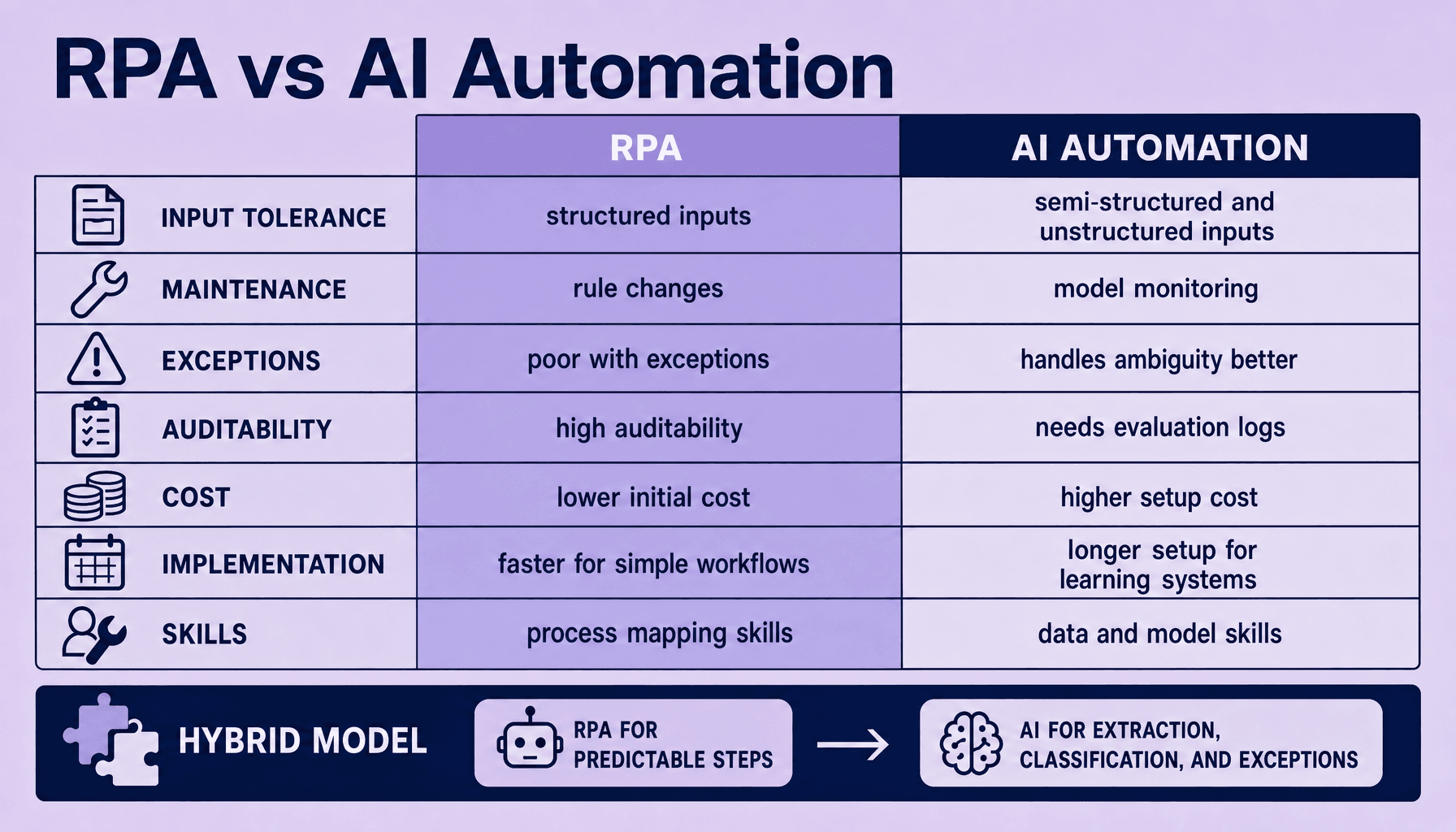
RPA vs AI automation: core differences in input tolerance, maintenance, auditability, cost, and skills
Choose by variability first.
In day-to-day operations, RPA vs AI automation is really a choice between deterministic automation and probabilistic automation. RPA follows explicit rules: open the app, click the field, copy the value, submit the form. Tools like UiPath, Automation Anywhere, and Blue Prism are strong here. AI automation works differently -- it interprets inputs, scores confidence, and handles ambiguity using OCR, IDP, or large language models.
That difference changes everything.
Teams usually run into trouble in one of two ways: they put UI-based bots on unstable inputs, or they expect AI to deliver compliance-grade workflows without guardrails. The process problem should decide the tool, not the hype. If inputs are structured and exceptions are rare, RPA usually wins on speed, auditability, and entry cost. If inputs are messy, semi-structured, or language-heavy, AI wins on tolerance and exception handling.
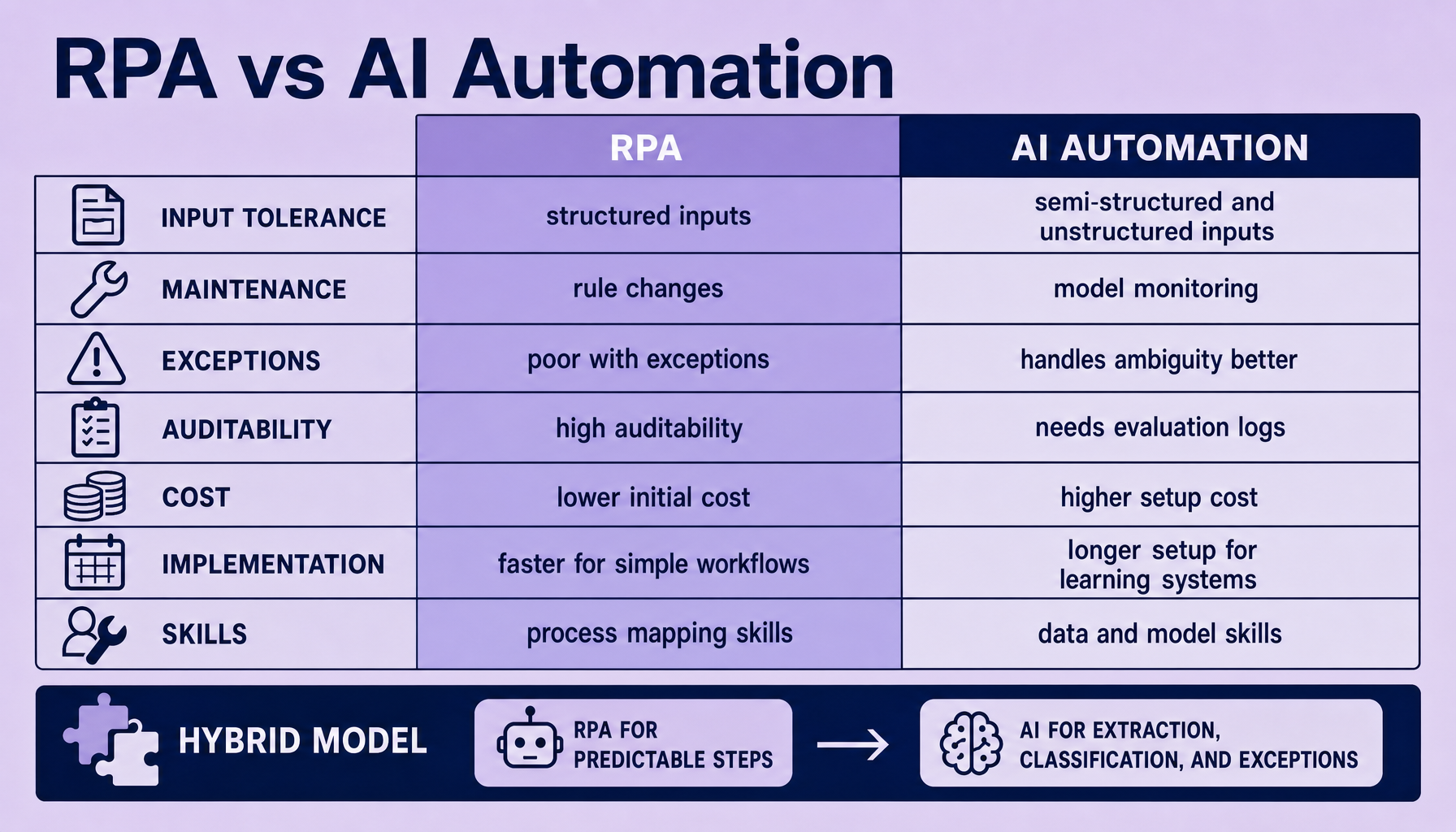
| Dimension | RPA | AI automation |
|---|---|---|
| Input tolerance | Best with structured data, stable screens, fixed rules | Handles semi-structured or unstructured inputs like emails, PDFs, and chats |
| Maintenance | Brittle when UI selectors, layouts, or business rules change | Less UI-dependent, but needs model monitoring, prompt control, and validation |
| Exceptions and handoff | Weak on novel cases; often requires hardcoded branches or human handoff | Better at classification, extraction, and routing with human-in-the-loop review |
| Auditability | High -- every step is deterministic and traceable | Lower by default; needs logging, confidence thresholds, and review workflows |
| Cost, speed, and skills | Lower entry cost, faster for simple flows; needs process mapping and bot development | Higher setup effort, slower validation cycle; needs data, model, and governance skills |
So in the RPA vs AI debate, RPA is best for predictable execution, while AI is best for variable interpretation. That is why intelligent automation vs RPA is often a false choice. The practical model is hybrid: RPA for system actions, AI for extraction, classification, and exception triage.
One caveat matters here. Clean code improves long-term productivity. In automation, that means modular workflows, versioned prompts, reusable validators, and explicit fallback paths. Without that discipline, both RPA and AI become expensive to maintain.
For a broader framework, see our AI Process Automation pillar.
How input structure and exception rates decide whether RPA vs AI automation fits
Start with the inputs. Then measure the exceptions.
That is the most practical way to answer when to use RPA vs AI. Teams often look at volume first and miss the real constraint: variability. A process can look repetitive at a high level, but if the inputs arrive as inconsistent PDFs, long email threads, scanned forms, or mixed attachments, pure RPA becomes brittle fast.
RPA works best when the work is deterministic: structured data, fixed fields, stable screens, and a low exception rate. Think UiPath, Automation Anywhere, or Blue Prism moving invoice values from a standard template into an ERP through an API or a stable UI. The bot follows a known path. Auditability stays high. Implementation stays lean.
But exception-heavy flows change the economics.
Every branch you add to handle missing fields, alternate layouts, different subject lines, or unusual business rules makes a bot harder to test and maintain. Past a point, the workflow becomes an exception tree instead of an automation. In practice, that is where teams burn time. Clean code improves long-term productivity -- and in automation, that means not forcing rigid bots to interpret messy inputs they were never built to understand.
AI automation fits where inputs are variable: semi-structured documents, unstructured text, email classification, document extraction, and language-driven routing. OCR, IDP, and LLM-based services can read content, assign a confidence score, and send low-confidence cases to an exception queue for human-in-the-loop review. That is where AI process automation usually outperforms traditional RPA vs AI assumptions.
Decision table: input structure vs exception rate
| Input type | Low exception rate | Medium exception rate | High exception rate |
|---|---|---|---|
| Structured data | RPA | RPA with rules and exception queue | Hybrid: RPA + human review |
| Semi-structured documents | Hybrid: extraction + RPA | AI-first with RPA handoff | AI + human-in-the-loop |
| Unstructured text | Limited fit | AI automation | AI automation |
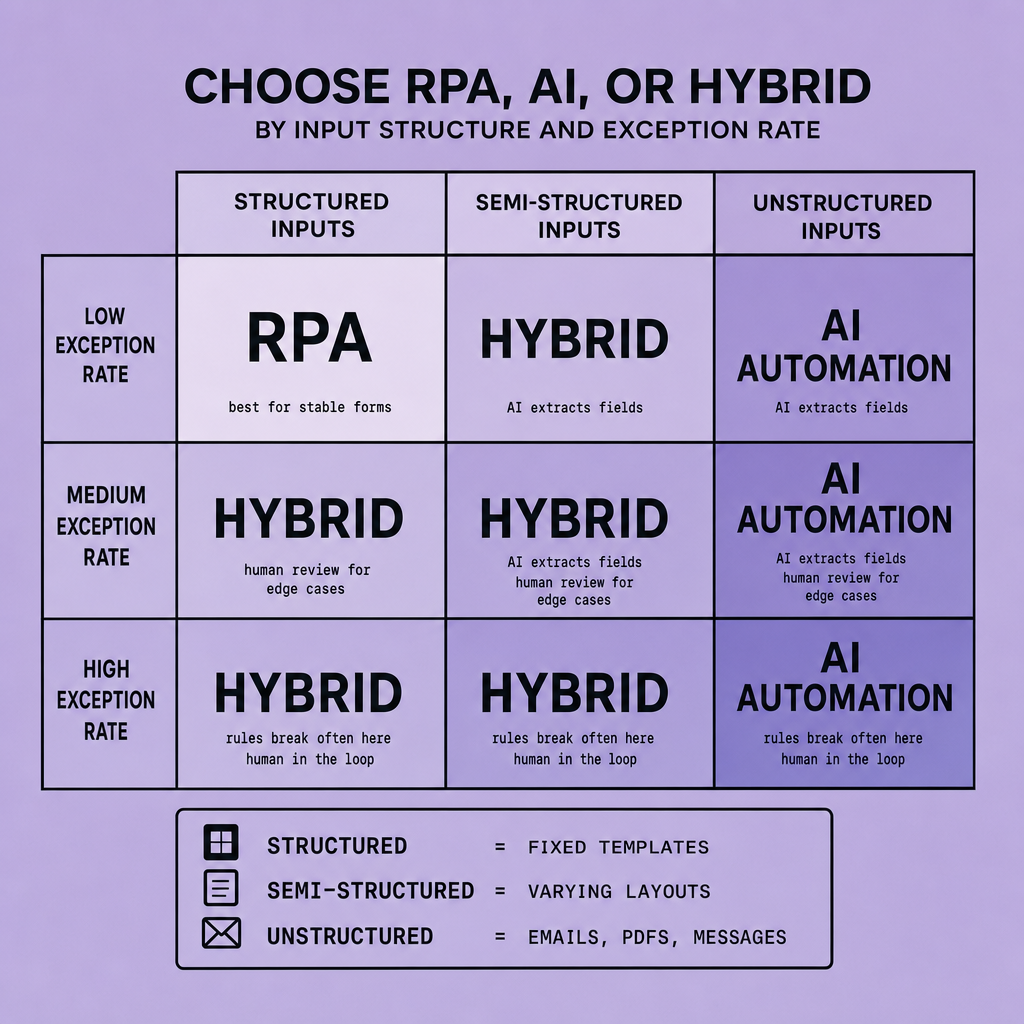
A strong RPA fit: standardized web forms pushed into a CRM.
A strong AI fit: supplier emails with attachments in different formats, where the system must extract fields, classify intent, and route exceptions.
Before automating, quantify exception rates. If edge cases are frequent, intelligent automation vs RPA is not a tooling preference; it is a cost and maintainability decision.
For most teams, the best design is hybrid: RPA for predictable execution, AI for interpretation and exceptions. For a broader operating model, connect this choice back to the AI Process Automation pillar.
RPA vs AI automation: maintenance, auditability, implementation effort, and replacement costs
A workflow that ships quickly can still become expensive six months later. That is the real tension in this part of the RPA vs AI automation decision.
If the process is simple and stable, RPA usually gets into production faster. For straightforward workflows in UiPath, Automation Anywhere, or Blue Prism, implementation is often mostly process mapping, selectors, credentials, and exception branches. That makes RPA attractive in the RPA vs AI decision for structured inputs and low-change systems. The problem starts when the workflow depends on screen scraping, brittle selectors, changing forms, or business rules that shift every quarter. Then maintenance becomes change management by firefighting -- bot fixes, regression testing, and rework across every dependent step.
AI automation has a different cost curve. Up front, it asks for more: data preparation, validation sets, confidence thresholds, prompt versioning, model monitoring, fallback logic, and human-in-the-loop review. So in intelligent automation vs RPA, AI often feels heavier to start. And it is. But if the inputs are variable -- invoices from many vendors, free-form emails, PDFs with layout drift -- AI can reduce the endless patching that a pure bot approach creates.
Auditability is the sharp tradeoff. RPA is naturally strong here because the workflow is deterministic: click, read, write, submit. Every step can sit in an audit log, which helps with compliance reviews and root-cause analysis. AI needs governance designed in, not assumed. Log the prompt or model version, capture inputs and outputs, store confidence scores, route low-confidence cases for review, and preserve approval actions. Without that, auditability degrades fast.
Replacement cost is where teams under-budget.
- RPA replacement costs: bot rebuilds, selector updates, workflow redesign, API-based automation migration, and retesting after UI or rule changes
- AI replacement costs: retraining or prompt redesign, validation reruns, model swap testing, policy reviews, and reviewer time for edge cases
- Hybrid costs: orchestration changes across RPA and AI integration, handoff logic, and exception queue redesign
Low initial automation cost can be misleading if the process lives on fragile UIs or rapidly changing rules; total cost of ownership matters more than pilot speed.
Our recommendation is practical: use RPA for stable, auditable steps, use AI for extraction and classification, and design governance from day one. That is usually the most durable answer in intelligent automation vs RPA -- and it aligns with the broader AI Process Automation pillar.
When RPA wins, where it fails, and why hybrid RPA and AI integration works best
The easiest automation wins come from work that already behaves predictably. That is where RPA still earns its place.
In the RPA vs AI decision, use RPA when the path is fixed: stable, high-volume, rules-based work with structured inputs and low exception rates. Common fits include data transfer between ERP and CRM, daily reconciliations, and workflow orchestration across systems without clean APIs. In those cases, every step is deterministic, traceable, and easier to audit. If the job is “log in, pull fields, validate against rules, post result, send status,” RPA is often the faster, simpler answer.
Pure RPA starts to fail when variability enters the process.
Invoice processing is a common failure point. If invoices arrive in different layouts, with missing fields, poor scans, or embedded notes, screen-driven bots become brittle quickly. The same pattern shows up in claims intake and email triage, where language, attachments, and exceptions vary case by case. Teams often respond by adding more branching logic. That can work for a while, but maintenance grows and reliability drops.
This is where RPA and AI integration usually works best: AI handles judgment-heavy intake, and RPA handles deterministic execution.
A practical hybrid flow looks like this: AI uses OCR, IDP, or LLMs to extract fields, classify document type, summarize anomalies, and assign a confidence score. Low-confidence cases go to a human review step. High-confidence cases pass to RPA, which enters data into the target system, runs validations, updates records, and completes downstream actions through UI or API integrations.
If inputs are messy but actions are deterministic, use AI to decide and RPA to do.
That is often the clearest answer to when to use RPA vs AI. It also explains why intelligent automation vs RPA can be the wrong framing: in many real workflows, the better design is both.
Migration sequencing, replacement planning, and the link to the AI Process Automation pillar
The fastest way to create risk is to replace working automation before you understand why it is failing. Most teams are better off sequencing carefully.
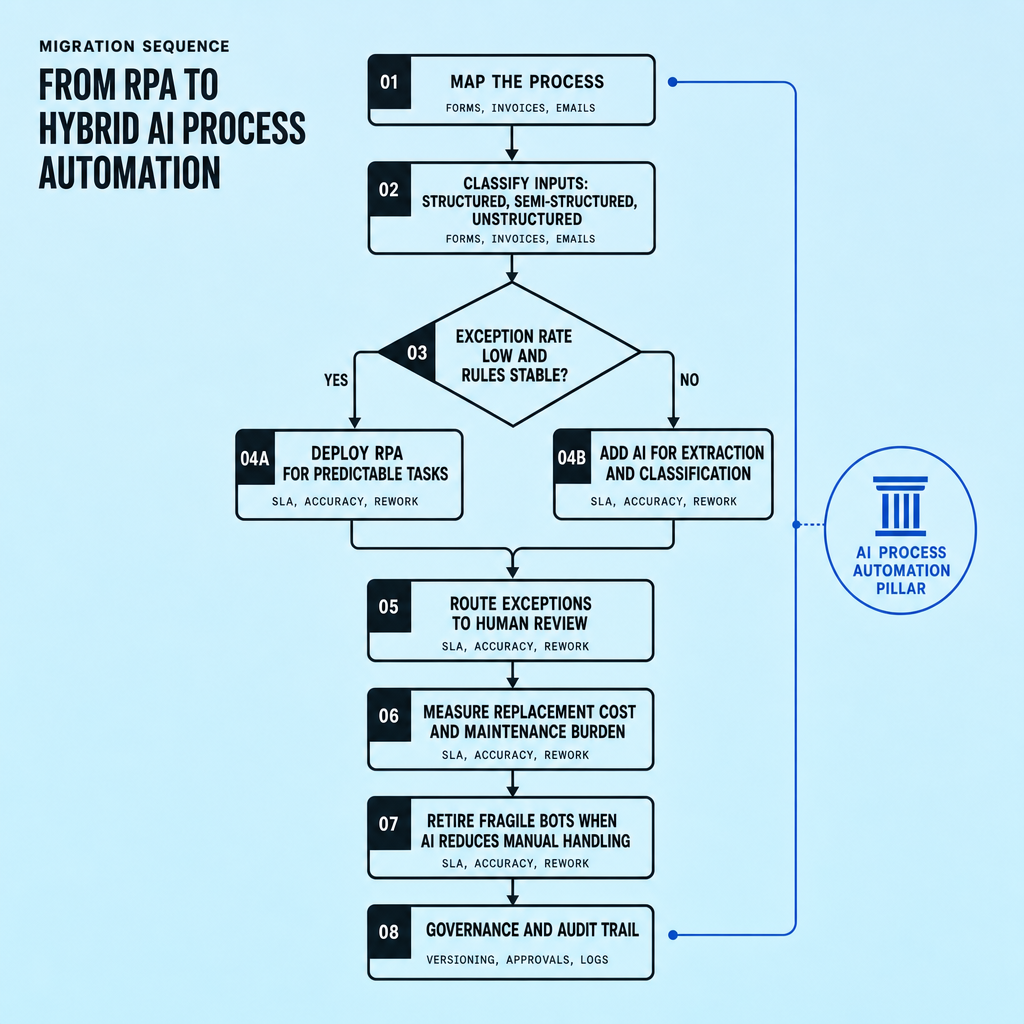
Do not rip out working bots first. In RPA vs AI automation, the safer sequence is to understand the process, measure where it fails, and replace only the parts creating real cost or risk. That usually means process discovery, input classification, and an exception baseline before any rebuild, rather than starting with a full-platform migration.
Map each step, separate structured from unstructured inputs, and identify where the current bot depends on fragile UI interactions. Then automate the stable path first with UiPath, Automation Anywhere, or Blue Prism, and add AI only where variability justifies it: OCR or IDP for document extraction, LLMs for classification, and human-in-the-loop review behind confidence thresholds and exception routing. This sequencing reduces the chance of turning a simple rules workflow into an overengineered hybrid.
A grounded rule of thumb: repair before replace when the business logic is still deterministic and the failure mode is mostly technical, such as screen changes or brittle selectors. In those cases, API integrations, better orchestration, or targeted AI extraction may extend the life of the workflow at lower risk than a full rebuild. Replace when maintenance is dominated by UI fragility, branching logic, unclear ownership, and repeated manual rework.
The tradeoff is speed versus future flexibility. Keeping an old bot can preserve short-term output, but it may also lock in weak process design. Full replacement creates a cleaner architecture, but usually requires more redesign, testing, and change management. For teams comparing RPA vs AI, intelligent automation vs RPA, or broader AI process automation strategy, the next step is our AI Process Automation pillar, which connects tool choice to end-to-end operating design.
Frequently Asked Questions
What is the biggest practical difference in RPA vs AI automation?
The biggest practical difference is that RPA follows fixed rules on predictable inputs, while AI automation interprets variable inputs and makes probabilistic decisions. That means RPA is stronger for stable workflows and audit trails, while AI is stronger for documents, language, and exception-heavy intake.
How does RPA vs AI automation affect compliance and risk?
RPA generally creates lower operational risk in regulated workflows because every action is deterministic and easier to trace. AI automation can still meet compliance needs, but only when teams add controls such as confidence thresholds, review queues, model version logs, and approval records.
Why should a company choose a hybrid model instead of only RPA or only AI?
A hybrid model works best when the front of the process is variable but the back of the process is predictable. AI can read, classify, and prioritize messy inputs, while RPA can complete the exact downstream actions consistently, giving teams better resilience without sacrificing control.
When should you avoid replacing an existing bot with AI?
You should avoid replacing an existing bot with AI when the process is still structured, the business rules are clear, and the main issues are technical maintenance problems such as selector breaks or UI changes. In those cases, repair, API migration, or limited AI augmentation is usually cheaper than full replacement.
What skills are usually missing in RPA vs AI automation projects?
RPA projects often fail from weak process mapping and poor exception design, while AI automation projects often fail from weak validation, governance, and monitoring. Teams usually need stronger cross-functional ownership that combines operations knowledge, technical implementation, and review policy design.
Make Imversion a preferred source on Google
Like this kind of AI and software analysis? Add Imversion as a preferred source so Google can highlight our articles for you in Search, AI Overviews, and AI Mode.