RPA vs AI Automation: Why Agencies Are Shifting in 2023
The shift from RPA to AI Automation is redefining agency partnerships. Learn why companies are making the switch and the benefits of AI-driven solutions.

On this page
RPA vs AI Automation: Why Companies Are Switching Agencies
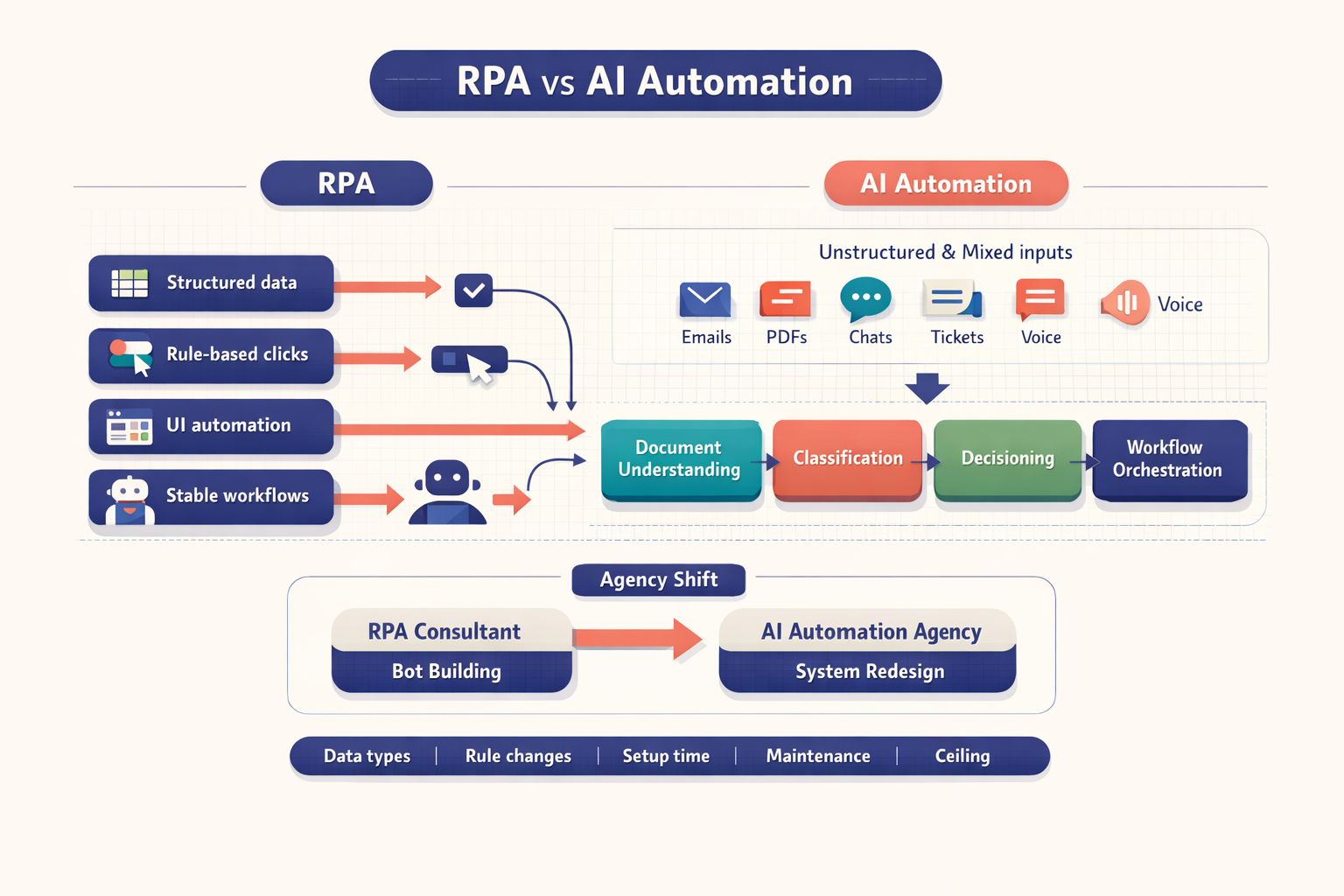
The short answer in the rpa vs ai automation debate is simple: companies are switching because RPA solved repetitive clicks, while AI automation solves interpretation, variation, and decision-heavy work. The shift from an rpa vs ai automation agency choice happens when leaders realize bots alone cannot handle unstructured data, changing rules, and constant maintenance.
RPA was the first wave of automation. It mattered. It still matters in the right conditions. But business processes did not stay clean, structured, and stable. Inputs started arriving as emails, PDFs, chats, screenshots, and mixed-format documents. Policies changed. Interfaces changed. Exceptions multiplied.
That is where the old automation model starts to strain.
Ankit Kumar Baral, Full-Stack Developer at Imversion Technologies Pvt Ltd, approaches this topic from a systems perspective: automation should not be judged by whether it works once, but by whether it stays reliable under change. That distinction is driving agency switching. At Imversion Technologies Pvt Ltd, a common pattern teams encounter is that companies first buy bot capacity, then later discover they actually need workflow intelligence, data pipelines, API integrations, and governance around AI outputs. Different problem. Different partner.
Key Takeaways
- RPA still works well for predictable workflows. In the rpa vs ai automation comparison, RPA remains strong for structured inputs, stable interfaces, fixed rules, and compliance-friendly execution such as report generation, CRM sync, or fixed-format invoice entry.
- Its ceiling appears when variability rises. The biggest pressure behind rpa migration to ai automation is not hype. It is maintenance load, exception handling, brittle UI bots, and the inability to interpret emails, contracts, claims documents, or free-text requests.
- AI automation adds understanding, not just speed. It can classify requests, extract meaning from documents, summarize content, support routing decisions, and work with LLMs, OCR, IDP, and APIs to orchestrate broader workflows.
- Agency capability now matters as much as tooling. Buyers comparing partners should ask whether they need a bot builder or an automation architect. The gap between delivery models is real, especially in the ai automation agency vs rpa consultant decision.
- The best path is usually phased. Keep RPA where workflows are deterministic. Layer AI into exception-heavy steps first. Then redesign around reliability, observability, and business outcomes.
RPA vs AI Automation: RPA Was the First Wave of Business Automation
RPA earned adoption because it solved a painful business problem with relatively low disruption. Instead of replacing legacy systems or waiting for major ERP upgrades, companies could deploy software bots to mimic user actions across existing applications. Click here. Copy that. Paste there. Log the result. Move to the next case.
That was powerful.
For finance teams, this meant automating reconciliations, invoice entry from standard templates, and report distribution. In HR, it meant onboarding workflows, payroll data updates, and system synchronization. In operations and support, it often meant order status checks, ticket creation, and repetitive data transfer between disconnected tools.
The attraction was practical, not theoretical. RPA often delivered time-to-value faster than large transformation programs because it sat on top of existing interfaces. No major backend rebuild. No long replacement cycle. Just process mapping, bot scripting, testing, and rollout.
This is one reason the rpa vs ai automation conversation should be framed historically, not emotionally. RPA was not a mistake. It was the right first answer for a large class of repetitive work.
In our experience at Imversion Technologies Pvt Ltd, teams that adopt automation usually begin with the most visible manual burden, not the most strategically complex process. That is exactly where RPA performs well. It gives organizations a way to reduce repetitive effort before they are ready for deeper systems redesign.
But the method had a built-in assumption: the process should remain predictable enough for scripts to hold.
As enterprises pushed automation into more realistic workflows -- vendor emails, claim documents, customer messages, contract reviews, multi-system approvals -- they hit the boundary. The issue was no longer task execution alone. It was interpretation. Context. Variability. That pressure is why the buyer conversation has moved from simple bot deployment to the broader rpa vs ai automation agency decision.
What RPA Does Well and Where RPA Limitations Push Teams Toward AI
Where RPA performs best in structured, stable workflows
RPA is strongest where work is repetitive, rule-based, and built on structured data. If a process has fixed fields, known formats, a stable user interface, and clear business rules, bots can be efficient and reliable.
Examples include:
- Fixed-format invoice entry into an ERP
- CRM record synchronization between two systems
- Scheduled report generation and distribution
- Employee data transfer during onboarding
- Claims status updates from one portal to another
In these cases, the value is obvious. Setup can be relatively fast. Audit trails are clear. Compliance teams often like the determinism because the bot follows explicit steps every time. If a buyer wants a workflow with low exception rates and measurable labor reduction, RPA can still be the right tool.
And this matters. Too much commentary treats automation as if only the newest option counts. It does not. Reliable systems matter most.
A well-designed RPA bot can reduce manual handling time, standardize execution, and avoid expensive platform replacement. For a stable workflow, that is enough.
The core rpa limitations ai buyers now care about
The pressure point appears once process reality gets messy. This is where rpa limitations ai discussions become commercially relevant, not academic.
RPA struggles with:
-
Unstructured inputs
Emails, contracts, scanned PDFs, handwritten notes, support chats, and mixed-layout documents do not fit neat field mapping. OCR can help, but extraction alone is not understanding. -
Frequent interface changes
UI bots depend on selectors, layouts, and screen positions. A vendor portal update can break a script overnight. Small changes. Big maintenance. -
Exception-heavy workflows
If 20 percent of cases need judgment, escalation, or context, bots hit the edge fast. Hard-coded branches multiply. Maintenance follows. -
Limited decision-making
RPA can apply rules. It does not reason through ambiguity. It cannot read the tone of a complaint, compare clauses across contracts, or infer intent from an email thread without AI support.
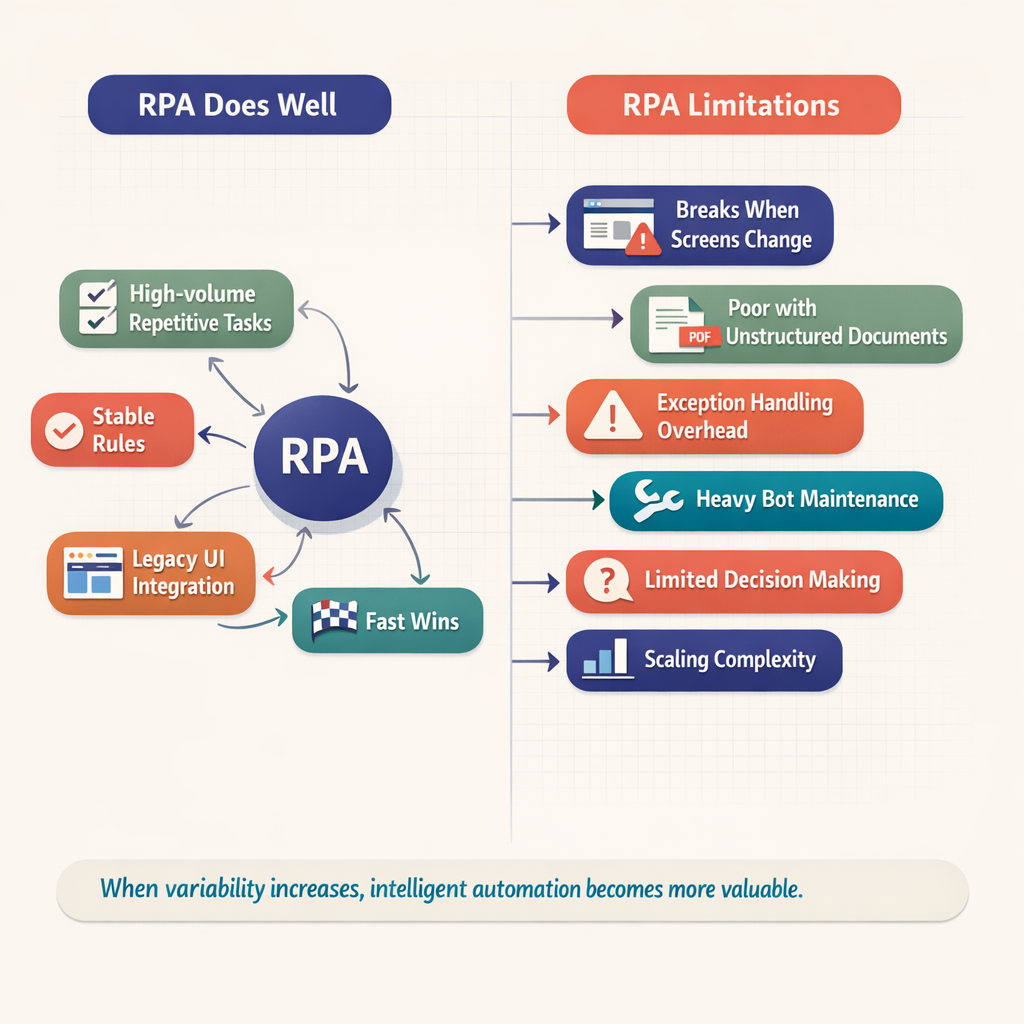
Consider the difference between two workflows. A bot entering invoice fields from a fixed supplier template is a classic RPA case. But an inbox receiving invoices, credit notes, attachments, and vendor questions in inconsistent formats is different. The second workflow needs classification, extraction, validation, and routing based on context. That is not just clicking. It is interpretation.
At Imversion Technologies Pvt Ltd, a pattern often seen is that companies blame the tool when the bigger issue is scope drift. They started with deterministic steps, then kept adding document variety, approval logic, and exception handling until the bot became fragile. Because the process changed, the automation model had to change too.
That is the real pivot in rpa vs ai automation.
What AI Automation Adds: Intelligent Automation vs RPA in Real Workflows
AI automation adds interpretation, context, and adaptive routing
AI automation goes beyond replaying steps. It can read language, classify intent, extract entities, summarize content, detect anomalies, and support decisions inside a workflow. With OCR, IDP, LLMs, retrieval systems, and backend APIs, automation becomes less dependent on static screens and more aligned with business meaning.
This is the real distinction in intelligent automation vs rpa. RPA executes predefined actions. AI helps the system understand what action should happen next.
That changes workflow design.
Instead of building dozens of hard-coded branches, teams can use AI to interpret incoming content, score confidence, route low-confidence cases for human review, and pass approved outputs into downstream systems through APIs. Cleaner architecture. Better control.
Contract review shows the difference clearly
A classic RPA bot can download a contract, rename the file, upload it into a repository, and notify a reviewer. Useful, yes. But limited.
AI automation can:
- Extract key clauses and dates
- Summarize obligations
- Flag unusual payment terms
- Compare language against policy templates
- Route high-risk agreements to legal review
The task is no longer document movement alone. It becomes document understanding.
Customer email triage is where RPA hits its ceiling
Support inboxes are rarely structured. Customers write in different tones, ask multiple questions, attach screenshots, and reference previous cases. An RPA bot can create tickets from emails based on fixed fields. But if the workflow requires intent detection, urgency scoring, response drafting, or routing by context, AI is the better fit.
A practical stack might include:
- OCR for attachments
- LLM-based classification for intent
- Confidence thresholds for human review
- API integrations to CRM and help desk tools
- Workflow rules for escalation and SLA handling
So the workflow becomes orchestrated, not scripted.
Intelligent automation combines AI and execution layers
The intelligent automation vs rpa comparison should not be framed as replacement in every case. Some of the best systems combine both. AI interprets the incoming content. Rules engines apply policy logic. APIs write data to systems of record. RPA handles the few steps where no API exists and UI interaction is still required.
This hybrid model works well in claims handling, support ticket routing, procurement intake, and onboarding review. In our experience at Imversion Technologies Pvt Ltd, the strongest automation outcomes come from reducing brittle dependencies first, then deciding where bots still make economic sense. Clarity beats complexity. Always.
RPA vs AI Automation Across Data Types, Rule Changes, Setup Time, Maintenance, and Ceiling
The most useful rpa vs ai automation comparison is operational. Buyers should evaluate how each approach behaves after deployment, not only during demos.
| Dimension | RPA | AI Automation |
|---|---|---|
| Data types handled | Best with structured fields, fixed templates, stable forms | Handles structured and unstructured data such as emails, PDFs, contracts, chats, and images |
| Response to rule changes | Requires script updates and retesting when UI or steps change | Can adapt better to variability, especially with model-driven classification and configurable workflows |
| Setup time | Fast for simple, repetitive tasks with clear rules | Often longer upfront due to model evaluation, prompt design, data preparation, and governance |
| Maintenance load | High when selectors break, exceptions rise, or workflows drift | Lower UI brittleness if built around APIs and document understanding, though models need monitoring |
| Exception handling | Weak for ambiguous or novel cases | Stronger through confidence scoring, routing, summarization, and human-in-the-loop review |
| Automation ceiling | Task automation | Task automation plus interpretation and decision support |
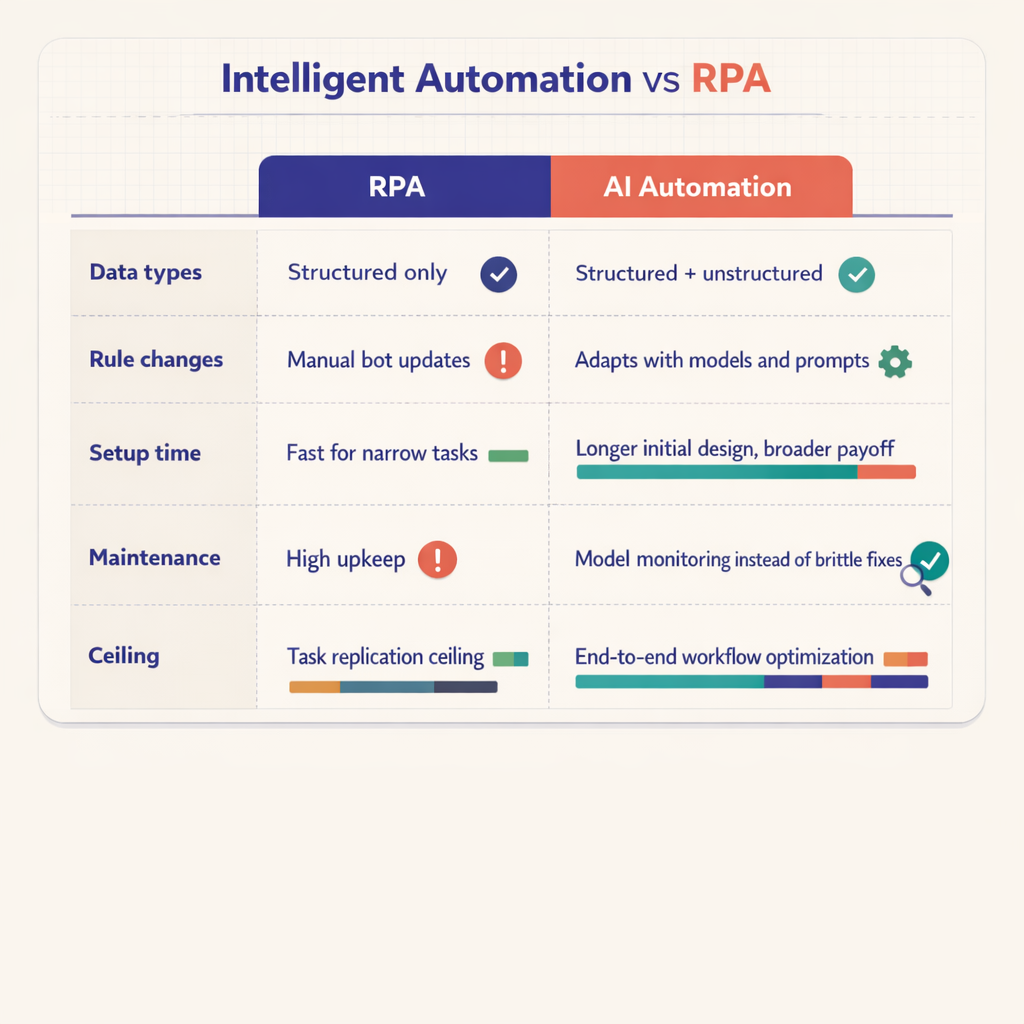
The table matters because buyers do not purchase “automation” in the abstract. They buy reduced handling time, lower maintenance hours, higher straight-through processing, and better reliability under change.
And this is where rpa limitations ai becomes a budgeting issue. If a process takes three weeks to automate but then needs constant fixes, the original win shrinks. A slightly slower AI-led implementation can produce better long-term ROI if the workflow includes document variance, language interpretation, or frequent exceptions.
Hybrid models still make sense. For example, AI can classify inbound claims documents and extract fields, while RPA handles a legacy portal with no API. That is often the most practical form of intelligent automation vs rpa -- not either-or, but architecture by fit.
RPA vs AI Automation: AI Automation Agency vs RPA Consultant
The delivery model has changed. That is why the ai automation agency vs rpa consultant comparison now matters so much.
A traditional RPA consultant is usually optimized for process discovery, task mapping, bot design, UI automation, test scripts, and bot support. Those are useful services. But AI automation requires a broader technical base and a different operating mindset.
An rpa vs ai automation agency decision often comes down to whether the partner can handle:
- Data pipelines and document ingestion
- OCR and IDP selection
- Prompt design and model evaluation
- Retrieval systems for grounded responses
- API-first workflow orchestration
- Confidence scoring and human review loops
- Output governance, auditability, and monitoring
That stack is not an extension of bot scripting. It is a different discipline.
At Imversion Technologies Pvt Ltd, a common observation is that buyers who outgrow RPA are not just looking for more developers. They are looking for better system design. They want discovery workshops that separate structured from unstructured work. They want process maps that include exception paths, not only happy paths. They want governance models for AI outputs. They want migration roadmaps, not just bot backlogs.
Because the risk profile changes.
A bot failure usually means a broken step. An AI failure can mean a wrong classification, weak extraction, or low-confidence output that still needs oversight. So the partner must know how to design guardrails, thresholds, fallback logic, and review queues.
That is why many legacy RPA agencies struggle. Their delivery engine was built for deterministic automation. AI work demands experimentation, evaluation, and backend engineering discipline. Different team shape. Different playbook. Different expectations from the client.
RPA Migration to AI Automation: A Practical Path and Decision Framework
A smart rpa migration to ai automation plan should be phased, not ideological.
Start here:
- Audit current bots and measure exception rate, maintenance hours, break frequency, and business impact.
- Identify workflows with unstructured inputs such as email intake, document review, claims handling, or support routing.
- Separate deterministic steps from interpretation-heavy steps.
- Pilot AI on one exception-heavy process with human-in-the-loop review.
- Redesign around APIs where possible, keeping UI bots only where system constraints remain.
- Establish governance -- confidence thresholds, review paths, logging, and model monitoring.
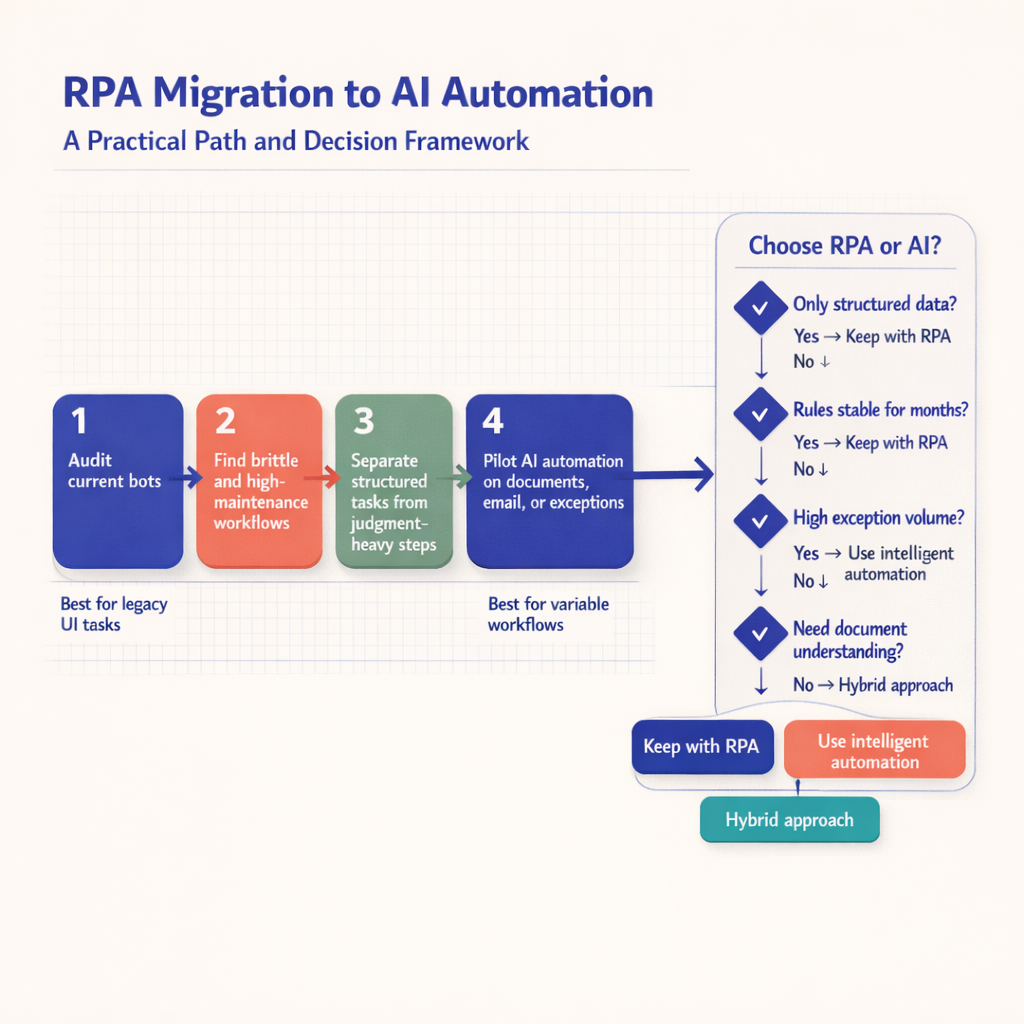
This sequence works because it respects what already functions while exposing where the next gains actually are.
A simple decision framework helps:
- Keep RPA for stable, repetitive, rules-based workflows with structured data and low change frequency.
- Combine RPA and AI where workflows mix interpretation and execution, such as document intake followed by legacy system entry.
- Replace with AI-led automation where process value depends on language, context, classification, summarization, or rapidly changing rules.
That is the practical answer to rpa vs ai automation. The right choice depends less on trend and more on workflow variability, maintenance burden, and partner capability. And for buyers comparing ai automation agency vs rpa consultant, the strongest question is simple: who can build a reliable system that still works after the process changes? At Imversion Technologies Pvt Ltd, that is the standard worth using.
Frequently Asked Questions
What is the biggest practical difference in rpa vs ai automation?
The biggest practical difference is that RPA follows predefined steps, while AI automation interprets content and helps decide the next step. RPA is ideal for repetitive actions in stable systems, but AI automation is better when workflows involve language, documents, exceptions, or changing business context.
How should I evaluate rpa vs ai automation for a single process?
You should evaluate the process by looking at input type, exception rate, rule volatility, and maintenance history. If the work uses structured data and rarely changes, RPA is usually sufficient. If it relies on emails, PDFs, customer language, or judgment-heavy routing, AI automation is the stronger fit.
Why would a company choose an ai automation agency vs rpa consultant?
A company should choose an AI automation agency when the problem involves document understanding, model evaluation, API orchestration, or governance of AI outputs. An RPA consultant is usually strongest at deterministic bot delivery, while an AI automation agency is better equipped for adaptive workflows and system-level redesign.
Is intelligent automation just another name for RPA?
No. Intelligent automation is a broader operating model that can include RPA, AI, OCR, workflow rules, APIs, and human review. RPA may be one component inside it, but intelligent automation is designed to handle interpretation, exceptions, and end-to-end process orchestration rather than scripted task execution alone.
When do rpa limitations ai concerns become expensive enough to justify migration?
RPA limitations become expensive when maintenance hours, bot failures, and exception handling consume more value than the automation creates. Migration is usually justified when teams repeatedly patch screen changes, manually review too many edge cases, or fail to scale because the process depends on documents, language, or variable inputs.
Make Imversion a preferred source on Google
Like this kind of AI and software analysis? Add Imversion as a preferred source so Google can highlight our articles for you in Search, AI Overviews, and AI Mode.